

Editor’s Note: First published October 2026. Evidence: Research review — we compared both companies’ official pricing pages and documentation on October 4, 2026. We did not run live test payments through either platform, because that would mean spending real money on processing fees — treat this as a pricing-and-features guide, not a hands-on trial. List prices are quoted; both companies run promos, so check the official pricing page before buying.
In a sentence: HoneyBook is the premium client-wrangling machine for service pros who live on proposals and bookings; Indy is the same all-in-one idea at a fraction of the price — and the only one with a genuinely useful free tier.
Plain-English Verdict: If you’re a freelancer who mostly needs to send invoices and get paid, Indy wins: its $9/month annual plan (or the free tier, if you send fewer than three invoices a month) does the core job HoneyBook does for $29/month. HoneyBook earns its premium when your business runs on the client journey — proposals, contracts, scheduling, and automated follow-ups all in one polished, branded flow. Pick Indy for the wallet; pick HoneyBook for the machinery.
What we actually did: We read HoneyBook’s and Indy’s current pricing pages and payment-fee guides line by line, cross-checked plan details against current independent reviews (via simply.coach’s and prospeo.io’s 2026 HoneyBook breakdowns and agiled.app’s freelancer invoicing roundup), and did the fee math ourselves. We sent no real invoices and moved no real money for this piece — anything that would have cost processing fees, we calculated instead of trialing. This site earns nothing if you buy — we have no affiliate links, so our only incentive is being right.
If you’re a freelancer, the real question behind this comparison isn’t “which app has more features?” It’s: “Am I buying a machine that wins me clients, or am I just overpaying for invoicing?” HoneyBook and Indy both call themselves all-in-one platforms for freelancers, but they aim at different freelancers. Let’s sort that out in plain dollars.
1. HoneyBook, the client-wrangling machine
What it does in one sentence: HoneyBook takes a client from first inquiry to final payment, proposals, contracts, scheduling, invoices, and a branded client portal, without you juggling five separate tools.
What we like
- The “smart file” idea is genuinely clever. HoneyBook lets you bundle a proposal, contract, and invoice into one interactive document the client moves through in order. A photographer can send a booking link where the client picks a package, signs the contract, and pays the retainer in one sitting. That reduces the “I’ll get to the paperwork later” drop-off that costs freelancers real bookings.
- Automation does the nagging for you. On the Essentials plan and up, workflows can send follow-up emails, questionnaires, and payment reminders automatically. If you’ve ever lost a week to chasing a signature, this is the feature that pays for itself.
- The client portal looks expensive. Clients get a clean, branded page with every file, message, and payment in one place. For photographers, coaches, and designers, people whose clients judge the experience, polish is a sales tool, not vanity.
- Unlimited clients on every plan. Even the cheapest tier covers unlimited clients and projects, so the client list can grow without forcing an upgrade.
What could be better
- The 2025 price hike still stings. In February 2025 HoneyBook raised prices sharply: Starter went from $16 to $29/month on annual billing, an 81% jump, with Essentials and Premium up roughly 53% and 65% (via prospeo.io’s 2026 pricing review). Existing members got a temporary grace discount that’s now expired. At $29/month minimum, “just invoicing” costs $348 a year.
- The Starter plan is deliberately hobbled. One user only, no scheduling, no automation, limited reporting and integrations. The features that make HoneyBook HoneyBook start at Essentials, $49/month annual. The entry price buys you the brand, not the machine.
- Watch the payment-fee fine print. Card-on-file and autopay payments are charged at 3.4% + 9¢, the same premium rate as American Express (via emakatiraee.com’s 2026 comparison). If you put recurring clients on autopay, your “2.9%” headline rate isn’t the rate you pay.
- No free plan, and it’s US-centric. There’s a free trial (no credit card required) and a 60-day money-back guarantee, but no permanent free tier. HoneyBook is also only available in the US, Canada, the UK, and Australia.
Pricing (list prices, October 2026):
| Plan | Monthly | Annual | Headline limits |
|---|---|---|---|
| Starter | $36/mo | $29/mo ($348/yr) | 1 user; no scheduling, automation, or integrations |
| Essentials | $59/mo | $49/mo ($588/yr) | Adds scheduler, automations, QuickBooks Online; up to 2 users |
| Premium | $129/mo | $109/mo ($1,308/yr) | Unlimited team members, priority support, multiple companies |
Payment processing runs through HoneyBook’s own system: 2.9% + $0.25 per Visa/Mastercard transaction, 3.4% + $0.09 for Amex, Discover, card-on-file, and autopay, and 1.5% for ACH bank transfers.
Our take: HoneyBook is a client-booking and project-management platform that also invoices. If your business is “inquiry → proposal → contract → scheduled session → paid,” it’s the most polished version of that machine we’ve seen. But if you just send invoices for work you’ve already agreed to, you’re paying $348 a year for machinery you’ll never start up.
2. Indy, the budget all-in-one
What it does in one sentence: Indy gives solo freelancers the same documents-first toolkit, proposals, contracts, invoices, time tracking, files, and a client portal, starting at free and topping out at $9/month.
What we like
- The free tier is a real free tier. Three invoices, three proposals, and three contracts a month, plus the core tools (tasks, time tracker, forms, calendar, chats) with no card required. If you’re starting out and send a couple of invoices a month, Indy costs you $0. HoneyBook has nothing like it.
- No added payment fees. Indy doesn’t take a cut of your payments, you connect your own PayPal, Stripe, or Zelle and pay only their standard rates (Stripe is 2.9% + $0.30). HoneyBook adds its own processing layer with its own rates; Indy’s approach is cheaper and more flexible.
- The documents are the point. Indy’s whole design centers on the paperwork freelancers actually drown in: proposals with templates you can reuse, contracts you can get signed, invoices that can recur. Plus a built-in chat and file sharing so the “wait, which email had the brief?” problem shrinks.
- White labeling on the cheap plan. The $9/month Pro Bundle lets you put your own branding on client-facing documents, a touch HoneyBook gates behind higher tiers.
What could be better
- The free tier caps are tight. Three documents a month and three clients total is genuinely limiting, an active freelancer outgrows it in weeks. It’s a trial wearing a free plan’s clothes; budget for the $9/month Pro.
- No real bookkeeping. Indy tracks money in and invoices out, but it won’t replace accounting software. If you need expense categorization, bank reconciliation, or tax reports, you’ll still need Wave (free) or similar alongside it.
- Thin integrations. Beyond Zapier and Google Calendar, Indy’s integration list is short. HoneyBook plugs into QuickBooks Online natively and has a deeper automation builder. Indy is a closed box by comparison.
- No scheduling muscle. HoneyBook’s scheduler is a headline feature from the Essentials plan up. Indy has a calendar, not a booking page, if clients need to book time with you, you’ll need a separate tool.
Pricing (list prices, October 2026):
| Plan | Monthly | Annual | What’s included |
|---|---|---|---|
| Free | $0 | $0 | 3 invoices, 3 proposals, 3 contracts/month; up to 3 clients; core tools (tasks, time tracker, forms, calendar, chats) |
| Pro Bundle | $12/mo | $9/mo ($108/yr) | Unlimited invoices, proposals, contracts, clients, forms, time tracking; 500GB file storage; document automations; recurring invoices; white labeling; custom branding |
Payment processing: connect your own PayPal, Stripe, Zelle, direct deposit, check, or wire. Indy adds no fees of its own — you pay the processor’s standard rate (e.g., Stripe’s 2.9% + $0.30).
Our take: Indy is the honest budget pick. It’s not as polished as HoneyBook and it won’t run your bookings or your books, but it handles the documents-and-payments core for $108 a year, less than a third of HoneyBook’s entry price, and the free tier means you can start today with no card. For freelancers whose clients come from referrals and repeat business rather than a booking funnel, that’s enough.
Why choose one over the other?
It comes down to where your clients come from.
HoneyBook wins when the client journey is the product. Photographers, wedding planners, coaches, event vendors — anyone who turns inquiries into bookings. The bundled proposal-contract-invoice flow, the scheduler, and the automations exist to convert “interested” into “paid.” If losing one booking a year to paperwork friction costs you more than $588, Essentials pays for itself.
Indy wins when the work is already won. Designers, writers, developers, consultants — anyone whose clients arrive by referral and just need clean paperwork and a pay button. You get proposals, contracts, invoicing, time tracking, and a client portal for $108 a year, and you keep your own Stripe account with its standard rates.
The real cost: one year, ten card invoices a month
Subscription prices are the appetizer; processing fees are the meal. Here’s a freelancer collecting $10,000/month through ten $1,000 card invoices (Visa/Mastercard):
| HoneyBook (Starter, annual) | Indy (Pro, annual) | Indy (Free) | |
|---|---|---|---|
| Yearly subscription | $348 | $108 | $0 |
| Processing fees on $120K | $3,510 (2.9% + $0.25 × 120) | $3,516 (2.9% + $0.30 × 120) | $3,516 |
| First-year total | $3,858 | $3,624 | $3,516 |
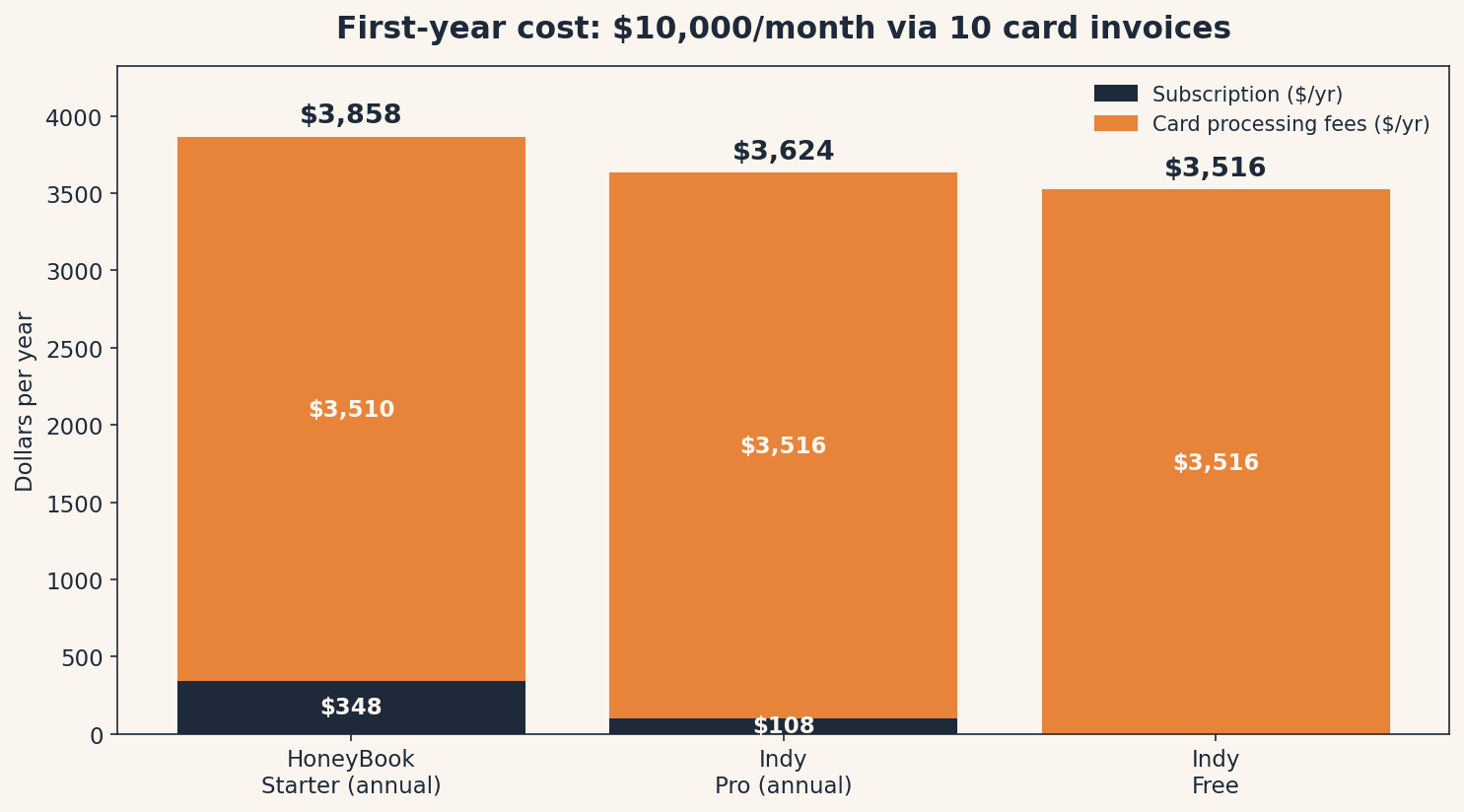
Three observations. First, the processing fees dwarf the subscriptions, the difference between the two apps’ headline prices ($240/year) is a rounding error next to ~$3,500 in card fees. Second, Indy’s no-added-fees model and HoneyBook’s in-house processing end up nearly identical on Visa/Mastercard. Third, the cheapest way to keep more of your money on either platform is the same: ask clients to pay by bank transfer instead of card.
Jargon Decoder: “Card-on-file” just means: the client saves their card once, and you charge it on a schedule — retainers, installment plans, subscriptions. Convenient for everyone, but note HoneyBook charges its premium 3.4% + 9¢ rate on these, not the headline 2.9%.
Which one should you pick?
Pick HoneyBook if: clients find you through a website or social media and you convert them through proposals and bookings; you want scheduling, contracts, and automated follow-ups in one branded place; and $49/month for Essentials (where the real features live) doesn’t make you flinch.
Pick Indy if: your clients come from referrals or repeat work; you mainly need proposals, contracts, and invoices with a pay button; and you’d rather keep $240–$480 a year in your pocket. Start on the free tier; upgrade to Pro the month you send your fourth invoice.
Who should skip both? If you need real bookkeeping, pair Indy with Wave’s free accounting, or look at our full invoicing roundup for tools built around getting paid rather than managing clients. If you’re outside the US, Canada, the UK, or Australia, HoneyBook isn’t available to you anyway. And if your “system” is one client and a spreadsheet — keep the spreadsheet. Software should earn its keep.
If you only send the occasional invoice, skip both: our free Invoice Generator makes a professional invoice in your browser, no account needed.
FAQ
Is Indy really free? The free tier is real: 3 invoices, 3 proposals, and 3 contracts per month, plus the core tools, no credit card. But an active freelancer will outgrow it quickly — the $9/month (annual) Pro Bundle is the realistic price.
Does HoneyBook have a free plan? No. There’s a free trial that doesn’t require a credit card, plus a 60-day money-back guarantee, but no permanent free tier. Starter is $29/month on annual billing.
Which is cheaper for getting paid by card? Nearly identical: HoneyBook charges 2.9% + $0.25 per Visa/Mastercard transaction; Indy charges no added fee, so you pay your processor’s rate (Stripe is 2.9% + $0.30). On a $1,000 invoice the difference is five cents. The subscription price is where the real gap is.
Can Indy replace HoneyBook’s automations? Not fully. Indy has document automations (follow-up messages after sending proposals, recurring invoices), but nothing like HoneyBook’s workflow builder or scheduler. If automations are the reason you’re shopping, you want HoneyBook Essentials, or Zapier-style automation bolted onto Indy.
Which one is better for a photographer or coach? HoneyBook, the inquiry-to-booking flow (packages, contracts, scheduling, payments in one branded file) is built for exactly that business. Indy works, but you’d be bolting on a scheduler and losing the conversion-focused flow.
Method: Research review (no hands-on testing). Cross-checked against HoneyBook’s and Indy’s official sites (plan prices, limits, payment-fee rates), independent 2026 pricing reviews (prospeo.io, simply.coach), and emakatiraee.com’s 2026 HoneyBook comparison (card-on-file/autopay fee detail). Checked October 4, 2026.
Corrections: Spotted an error? Tell us — we fix mistakes publicly and date them.
Prices: US list prices; verify before buying.
Source: official pricing and fee pages — HoneyBook via honeybook.com and plan pricing cross-checked via simply.coach and prospeo.io; Indy via weareindy.com — all checked October 2026.
Related Posts
 FreshBooks vs. Wave: Which Invoicing App Is Worth Paying For? (2026)
- Calendly vs Cal.com: Which Booking Tool Is Right for You? (2026)
- Trello vs. Asana: Which Project Tool Is Right for a Small Team? (2026)
- Google Workspace vs Microsoft 365 for a Tiny Business (2026)
- 1Password vs Bitwarden: Which Password Manager Should You Use? (2026)




1 thought on “HoneyBook vs. Indy: Which Invoicing Tool Should a Freelancer Use? (2026)”