
Editor’s Note: Updated October 2026, refreshed intro and FAQ for clarity. First published September 2026. Pricing checked September 30, 2026.
Here’s what it does in one sentence
Pick Bitwarden if you want a complete password manager for free, and pick 1Password if you want the most polished experience and are happy to pay for it. A password manager remembers all your passwords so you do not have to: you memorize one strong master password, and it handles the rest. 1Password and Bitwarden are the two names that come up in nearly every conversation like this, and both are serious, well-made tools trusted by millions of people.
In a sentence: Bitwarden gives you the complete password manager for free, while 1Password charges for the smoothest, most polished experience.
Plain-English Verdict: Start with Bitwarden, because its free tier does everything a normal person needs and costs literally nothing, forever. Choose 1Password if you’re happy paying about $4 a month for the smoothest, most polished experience in the category — especially if family members who are not good with technology need to set it up without calling you for help. Neither choice is risky: both lock your passwords with encryption that even their own companies can’t read.
Why this comparison is tricky (honestly)
Evidence level: Research review. We checked both companies’ official pricing pages and independent coverage published in September 2026, but we did not run a hands-on trial of either app for this piece.
That matters for one specific reason: a password manager is software you live inside every day, and most reviews pretend to have measured things like “how easy is setup” or “how often does autofill break” from a weekend of testing. We won’t do that. What we can tell you honestly is what each one costs, what each one includes at each price, and where their reputations genuinely differ. This site earns nothing if you pick one — there are no affiliate links anywhere on this page. Our methodology page explains how we review tools in general.
Bitwarden: the free one that doesn’t feel free
Bitwarden is the password manager the internet’s tech crowd keeps recommending, and the reason is simple: the free tier is almost suspiciously generous. Unlimited passwords, unlimited devices, automatic sync between your phone, laptop, and browser, a built-in password generator, and autofill on every platform — all free, all forever. It’s also open source, which means anyone can inspect the code to check it’s doing what it claims. There’s even an option to host your own password vault on your own server, though that’s a project for a rainy Sunday, not a Tuesday.
What we like
- The free tier covers everything that matters. There is no limit on passwords, no limit on devices, and no nagging upgrade screens blocking core features. For most people reading this sentence, the free tier is the whole product.
- Premium costs less than two coffees a year. At $19.80 a year, you get a built-in authenticator app (so your two-factor codes live next to your passwords), vault health alerts that flag reused or weak passwords, 5GB of encrypted file storage, a phishing blocker, and emergency access for a trusted person.
- It’s open source and independently audited. The code is public, and the security audits are published. You don’t have to take anyone’s word that the encryption works.
- Family plan is half the price of the competition. $47.88 a year covers up to 6 people, premium features included for everyone.
What could be better
- It’s less polished than 1Password. This is the real trade-off. The apps work fine, but the interface feels like it was designed by engineers who are very good at security and merely okay at design. Setting up a less technical family member will probably involve you doing it for them.
- The 2026 price doubling landed badly. Premium went from $10 to $19.80 a year in early 2026, the first increase in a decade, and still a bargain in absolute terms. But the communication around it rubbed the community the wrong way, and it raised eyebrows about whether more increases are coming. Existing customers got 25% off their first renewal, which softened the blow.
- Support is a smaller operation. Bitwarden’s support team is good by reputation, but it’s a fraction of the size of the big commercial players. If something goes wrong with your vault on a holiday weekend, patience is required.
Pricing
| Plan | Annual price | What you get |
|---|---|---|
| Free | $0 | Unlimited passwords, unlimited devices, sync, autofill, password generator, passkeys |
| Premium | $19.80/year ($1.65/month) | Built-in authenticator (TOTP), vault health alerts, 5GB encrypted file storage, phishing blocker, emergency access |
| Families | $47.88/year ($3.99/month) | Premium for up to 6 users, shared collections |
Check the official pricing page before buying, Bitwarden raised prices in early 2026.
Our take
Bitwarden Free is the best deal in all of personal software: the core product, free, forever, with no meaningful catches. The Premium upgrade at $19.80 a year is still one of the cheapest paid upgrades you’ll find anywhere, and it’s worth it for the built-in authenticator alone. The honest downside is the polish gap, if you share passwords with someone who struggles with technology, expect to be their IT department.
1Password: the polished one you pay for
1Password is the oldest and most established name in password managers, and it has a reputation that reads like a restaurant review: you pay more, but the experience is noticeably nicer. The apps are consistently rated the best-designed in the category — setup is guided, autofill is widely reported as reliable, and the whole thing feels finished in a way competitors don’t. There’s no free tier, though: a 14-day trial, then you pay or you leave.
What we like
- The nicest experience money can buy here. Setup, autofill, sharing, organizing — everything feels considered. This is the app to hand to your parents, your spouse, or anyone who has ever said “technology just doesn’t like me.”
- The Secret Key. 1Password adds a second, device-stored key on top of your master password, so even if someone guessed your master password (and the company’s own servers were breached), your vault stays locked. It’s a genuinely unique layer of protection.
- Travel Mode. A feature almost nobody else has: when you cross a border, you can temporarily hide vaults from your devices, so a border agent inspecting your phone finds only what you want them to find. Niche, but meaningful for frequent travelers.
- Third-party audited, despite being closed source. The code isn’t public, but 1Password undergoes regular independent security audits and bug bounty programs. Closed source here doesn’t mean unverified.
What could be better
- No free tier at all. A 14-day trial with no credit card required, then the meter starts. In a category where the best competitor is free, that is a real barrier, and 1Password knows it.
- Closed source. Audits help, but you’ll never be able to inspect the code yourself. If “trust but verify” is your personality, this will bother you.
- Price creep is real. Prices rose $12 a year in March 2026, Individual is now $47.88 a year, Families $71.88. That’s not outrageous, but two increases’ worth of momentum in a paid-only product adds up, and there’s no free tier to fall back on.
- The family plan caps at 5 members. Bitwarden’s family plan covers 6 people for half the price. For a bigger household, 1Password is the worse deal on both dimensions.
Pricing
| Plan | Annual price | What you get |
|---|---|---|
| Trial | $0 (14 days) | Full Individual features, no credit card required |
| Individual | $47.88/year ($3.99/month billed annually) | Unlimited passwords and devices, Secret Key, Travel Mode, 1GB document storage, breach watchtower |
| Families | $71.88/year ($5.99/month billed annually) | Everything in Individual for up to 5 members, shared vaults, guest accounts |
| Teams Starter | $19.95/month (up to 10 users) | Shared vaults, admin controls, breach reports |
Check the official pricing page before buying, 1Password raised prices in March 2026.
Our take
1Password is the best product in the category and the worst deal in the category, and both things are true at once. You’re paying $47.88 a year for polish, a Secret Key, and the confidence that the least technical person in your life can set it up alone. If money isn’t the deciding factor, this is the nicer life. But “the nicer life” costs $239.40 over five years against Bitwarden’s $0 — and that’s before you think about your family.
Head-to-head: what it costs over 5 years
| Plan | 5-year cost | Per month equivalent |
|---|---|---|
| Bitwarden Free | $0 | $0 |
| Bitwarden Premium | $99.00 | $1.65 |
| 1Password Individual | $239.40 | $3.99 |
| Bitwarden Families | $239.40 | $3.99 |
| 1Password Families | $359.40 | $5.99 |
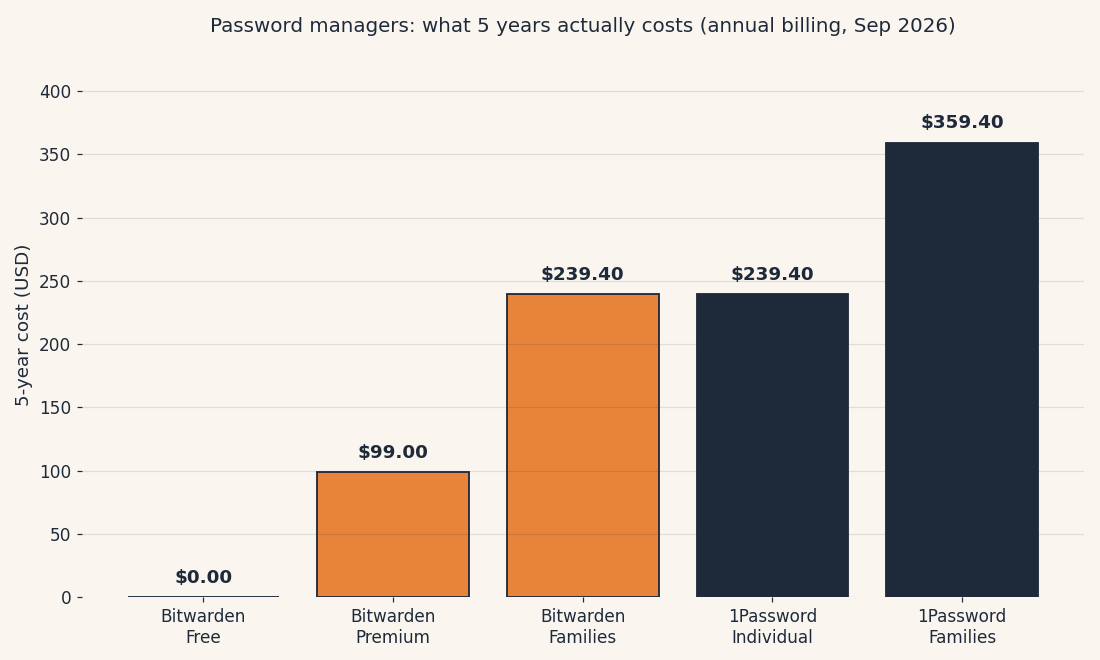
The chart makes the story plain: five years of Bitwarden Premium costs about what one year of 1Password Families does. Note the coincidence worth staring at, 1Password Individual and Bitwarden Families cost exactly the same over five years ($239.40), which is the whole decision in one number: for the price of one person on 1Password, you get six people on Bitwarden’s best tier.
| Bitwarden | 1Password | |
|---|---|---|
| Free tier | Yes, full core product | No (14-day trial only) |
| Code | Open source | Closed source, third-party audited |
| Encryption | Zero-knowledge, end-to-end | Zero-knowledge, end-to-end + Secret Key |
| Passkeys | Yes | Yes |
| Built-in authenticator | Premium ($19.80/yr) | Yes, included |
| Family plan | 6 members, $47.88/yr | 5 members, $71.88/yr |
| Document storage | 5GB (Premium) | 1GB |
| Travel Mode | No | Yes |
The 10-minute decision test
Scenario 1: The family share. You, your spouse, maybe your parents, all needing shared passwords without chaos. Bitwarden Families covers 6 people with premium features for $47.88 a year — the same five-year cost as one 1Password Individual seat. Unless your family members genuinely need hand-holding through setup (see scenario 3), Bitwarden wins this one walking away.
Scenario 2: The cheapest safe option. You want proper security and you’d rather not think about money. Bitwarden Free. Full stop. Unlimited passwords, syncs to every device, passkeys, encryption the company itself can’t read — for zero dollars, forever. There is no safer free option in this category, and no paid option that makes you meaningfully safer than it.
Scenario 3: The “just make it nice” person. You have the budget, you hate fiddling with software, and there’s a real chance the setup will fall on the least technical person in your house. That’s the 1Password customer. The Secret Key, Travel Mode, and the polished design are real advantages; the $47.88 a year is the real price of never thinking about this again. Take the 14-day trial first — if it doesn’t feel noticeably nicer within a week, cancel and go Bitwarden.
Jargon Decoder: “Zero-knowledge” encryption means the company scrambles your passwords in a way that even the company itself can’t unscramble — your master password never leaves your device. “Passkeys” are a newer, safer login method where your phone or computer proves it’s you without a typed password at all — like a digital house key instead of a secret phrase.
FAQ
Is Bitwarden really free?
Yes. The free tier isn’t a trial, unlimited passwords, unlimited devices, sync, autofill, and passkeys are free with no time limit. Premium ($19.80 a year) adds the authenticator, health reports, and file storage, but nothing in the free tier expires or gets taken away.
Is 1Password worth paying for over Bitwarden?
It depends on what “worth it” means to you. If $47.88 a year is pocket change and you want the smoothest experience — especially for a family member who struggles with technology — yes, the polish is real and people notice it. If you’re choosing on security, no: both use encryption the companies can’t read, so 1Password doesn’t make you meaningfully safer than Bitwarden.
Can I switch from 1Password to Bitwarden?
Easily. Both support standard export and import, you export your vault from one app as a file, import it into the other, and your passwords, folders, and notes come along. People do this in both directions regularly, including after 1Password’s 2026 price rise. One caution: delete the exported file afterward, because it’s your passwords in plain text while it exists.
What happens if I stop paying?
According to both companies’ documentation, your data stays accessible, the account drops back to a free or
read-only state rather than locking you out. On Bitwarden, you’d fall back to the free tier (which, as we’ve established, is the whole core product anyway). On 1Password, a lapsed subscription leaves your vault readable but freezes new additions until you renew, so export your data before the subscription ends if you’re leaving for good.
Which is better for families, 1Password or Bitwarden?
For most families, Bitwarden is the better value: its family plan covers up to 6 people for less than 1Password charges for up to 5 people. Pick 1Password instead if your family needs the easiest setup and the most polished apps, and the higher price is not a problem.
Sources
What we did: We checked the official 1Password and Bitwarden pricing pages and documentation in September 2026, plus independent coverage of the Bitwarden 2026 price increase and the 1Password March 2026 price change. We did not run a hands-on trial of either app, so this article makes no claims about real-world autofill reliability or setup difficulty, only about published features and prices. Read our methodology for how we review tools.
Pricing caveat: Prices change, both companies changed theirs during 2026. Check the official pricing pages before buying, and tell us if something here is out of date; we’ll fix it.
Affiliate links: None on this page. This site earns nothing if you choose either tool.
Source: Bitwarden’s official pricing page and 1Password’s official pricing page, for the pricing and plan details in this article.
Want one plain-English software take in your inbox every week? Subscribe to The Plain Manual newsletter, no spam, unsubscribe anytime.
Related Posts
 1Password vs Apple Passwords: Should You Just Use the Free One? (2026)
- Zapier vs. Make: What Automation Actually Costs You (2026)
- Canva vs Adobe Express: Which Is Better for Non-Designers? (2026)
- Fathom vs. Otter.ai: Which AI Meeting Notes App Should You Use? (2026)
- Calendly vs Cal.com: Which Booking Tool Is Right for You? (2026)


4 thoughts on “1Password vs Bitwarden: Which Password Manager Should You Use? (2026)”