
Editor’s Note: This guide is current as of October 2026. Pricing checked October 8, 2026.
In a sentence: If you need one booking link and you like paying nothing, Cal.com’s free plan gives you far more than Calendly’s free plan, while Calendly is still the smoother pick for non-technical teams and Salesforce shops.
Plain-English Verdict
Calendly is the famous one: easier setup, nicer booking pages, and the name your invitees already trust. Cal.com is the open-source challenger: unlimited event types and calendar connections on its free plan, with paid team seats at $12 per user per month instead of Calendly’s $16. If you’re a solo freelancer, Cal.com free does more for $0 than Calendly does for $10 a month. (And no, this site earns nothing either way. There are no affiliate links here.)
What we actually did: We read Cal.com’s official pricing page on October 8, 2026, cross-checked Calendly’s current plans against 2026 pricing guides that cite calendly.com/pricing directly, and compared the free tiers line by line. We did not sign up for either service or book test meetings, so this is a research review, not a hands-on test. We make no money if you choose either tool.
The 60-second decision tree
Skim this and you have the answer. The rest is the evidence.
- One kind of meeting, zero budget, don’t care about a logo: Calendly Free works. One event type, one calendar. Done.
- Solo freelancer with two or more meeting types (a free intro call plus a paid session, say): Cal.com Free. Unlimited event types for $0, versus $120 a year on Calendly Standard.
- Taking payment when people book: Both handle Stripe and PayPal. Cal.com includes it free; Calendly needs Standard ($120/year).
- Small team needing round-robin (bookings rotate across staff): Cal.com Teams at $12/user/month. Same feature costs $16/seat/month on Calendly Teams.
- Your company already runs Salesforce routing or needs SSO: Calendly Teams. Cal.com’s Salesforce muscle is improving but Calendly is the safe enterprise pick.
- You want to run the software on your own servers: Cal.com is the only choice. It’s open source (more on what that means below).
Calendly: what it is, in one sentence
Calendly is the scheduling link you have already clicked a dozen times this year: you share a link, people pick a time, and the meeting appears on both calendars without the email ping-pong.
It became the default because it is genuinely easy. Setup takes minutes, the booking pages look polished with no effort, and the brand recognition helps: when an invitee sees a Calendly link, they already know what to do. That smoothness is what you are really paying for.
What we like
- The setup afternoon is short. Connect your calendar, pick your hours, share the link. Calendly’s onboarding is the industry reference point for a reason.
- Booking pages look professional by default. No fiddling. Your page will not embarrass you in front of a client.
- People trust the name. A link that says calendly.com needs no explanation. A lesser-known name costs you a second of hesitation on every send.
- The integrations bench is deep. Salesforce, HubSpot, Marketo, Zapier, webhooks, Stripe, PayPal. Paid tiers cover the tools real businesses already use.
- Meeting polls are free. The free plan includes polls, which is genuinely useful for group scheduling without paying a cent.
What could be better
- The free plan is a doorway, not a home. One event type. The moment your work has two shapes (say, a 15-minute intro and a 60-minute consult), you are upgrading to Standard at $120 a year. That single limit is the whole pricing strategy.
- Per-seat pricing punishes small teams. Need round-robin routing? That’s the Teams plan at $16 per seat per month ($192 a year each). Your bill grows with every hire whether they need the features or not.
- The AI add-on is a bundle, not a menu. Notetaker and the Callie scheduling assistant come only with the Plus tiers ($18/seat Standard Plus, $24/seat Teams Plus), $8 a seat on top, and neither is available separately.
Pricing
- Free: $0. One event type, one calendar connection, meeting polls, website embed.
- Standard: $10 per seat/month billed annually ($12 monthly). Unlimited event types, up to 6 calendars, group events, reminders, Stripe/PayPal payments, HubSpot, webhooks, remove Calendly branding.
- Standard Plus: $18 per seat/month annual ($24 monthly). Standard plus the Notetaker and Callie AI assistant.
- Teams: $16 per seat/month annual ($20 monthly). Round-robin, routing forms, Salesforce, admin-managed events, SSO as an add-on.
- Teams Plus: $24 per seat/month annual ($32 monthly). Teams plus the AI bundle.
- Enterprise: custom, starting around $15,000/year, 50-seat minimum.
Our take
Calendly is the premium product that knows it is the premium product. If you want the smoothest experience and the name everyone recognizes, and you are fine paying for it, this is your tool. The honest question is whether the free tier’s single event type is a real limit for you, because crossing it costs $120 a year for what Cal.com gives away.
Cal.com: what it is, in one sentence
Cal.com is an open-source scheduling tool built to be the Calendly alternative that does not charge you for having more than one kind of meeting.
The words to unpack: open source means the code is public and anyone can inspect it, modify it, or run their own copy on their own servers. Practically, that means Cal.com can’t lock your booking data in a walled garden, and developers trust it in a way they don’t trust closed software. It has roughly 40,000+ stars on GitHub, which is the open-source equivalent of a crowded restaurant: a sign people keep choosing it.
What we like
- The free plan is genuinely generous. One user, unlimited event types, unlimited calendar connections, unlimited meetings, custom workflows (templated), webhooks, and payment collection via Stripe or PayPal. The only real limit is the single user. As free tiers go, this one is the whole meal.
- Team seats cost less than Calendly’s. Cal.com Teams is $12 per user per month (billed annually) and includes round-robin scheduling, collective events, routing forms, and removing Cal.com branding. The comparable Calendly Teams seat is $16 a month.
- You can self-host. Because it’s open source under the permissive MIT license, a technical team can run Cal.com on its own servers, keeping all booking data in-house. There is no Calendly equivalent to this.
- The feature table reads like a paid product. Multiple meeting durations per event type, private links, group events with seats, custom workflows, attribute-based routing, HIPAA compliance options, US and EU hosting. This is not a hobby project.
What could be better
- The name recognition gap is real. “cal.com” does not carry the instant trust of “calendly.com.” Clients will ask what it is. It’s a small tax, but you pay it on every link you send until they learn it.
- It’s slightly more “developer tool” in feel. The settings are powerful and plentiful, which means a non-technical user faces more choices. Calendly’s polish advantage shows here.
- Removing branding still costs money. The free plan shows Cal.com branding on your booking pages; removing it requires a paid tier. Same is true of Calendly, but the “free and fully yours” dream has this one asterisk.
Pricing
- Individual: free forever. One user, unlimited event types, unlimited calendar and video connections, unlimited meetings, Stripe/PayPal payments.
- Teams: $12 per user/month billed annually. Round-robin, routing forms, collective events, remove branding, webhooks.
- Organizations: $28 per user/month billed annually. SAML SSO, SCIM, SOC 2 / HIPAA / ISO 27001, sub-teams, dedicated compliance controls.
- Enterprise: custom pricing with dedicated database and SLA.
Pricing verified against Cal.com’s official pricing page on October 8, 2026. Check it before you buy; these pages move.
Our take
Cal.com is the value play that doesn’t feel like a compromise for solo users. The free tier covers everything one person realistically needs, and the team tier undercuts Calendly while matching its scheduling mechanics. The trade-off is polish and name recognition, not features.
The money, side by side
| Scenario | Calendly | Cal.com |
|---|---|---|
| Solo, one meeting type | Free: $0 | Free: $0 |
| Solo, two meeting types (intro + paid session) | Standard: $120/yr | Free: $0 |
| Solo, taking payments at booking | Standard: $120/yr | Free: $0 |
| 3-person team, round-robin scheduling | Teams: $576/yr | Teams: $432/yr |
| Teams, remove branding | Standard ($120/yr) or above | Teams ($144/user/yr) or above |
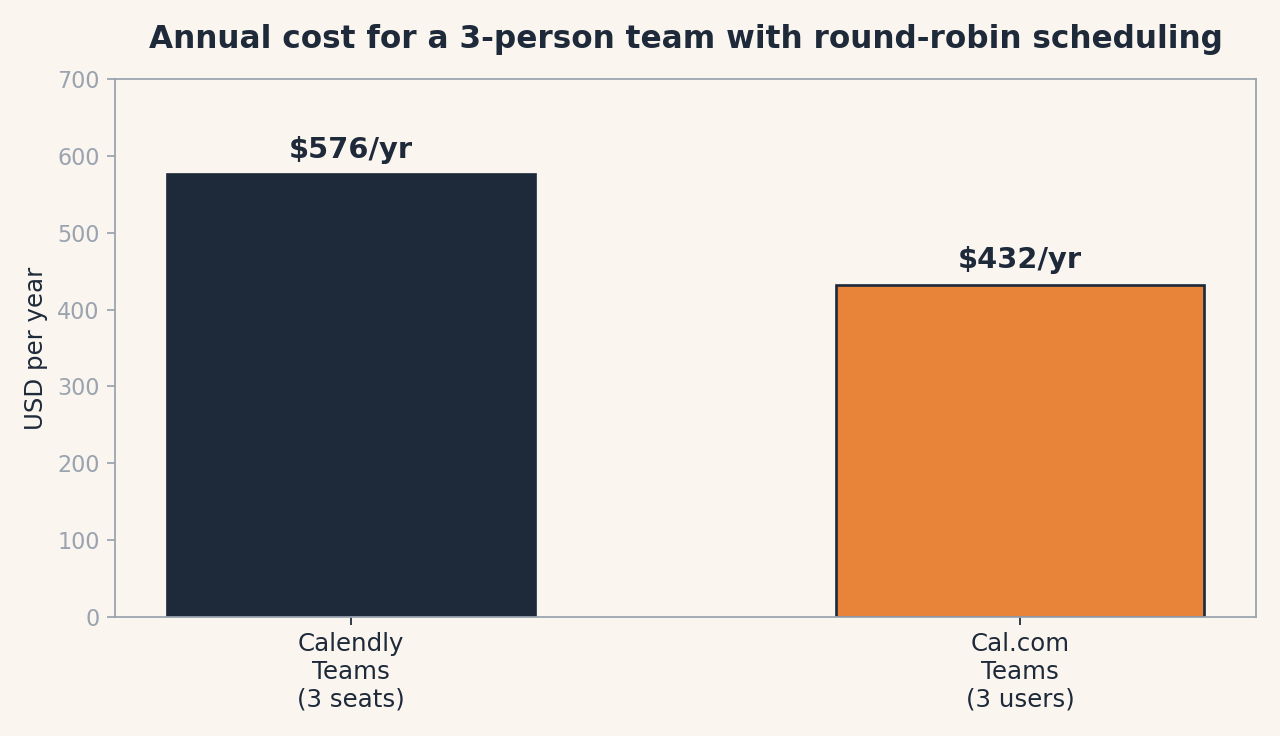
The chart above compares what a three-person team pays per year for round-robin scheduling: three Calendly Teams seats ($16 each per month) versus three Cal.com Teams seats ($12 each per month). Same feature, $144 a year apart. We built this chart for this post; the numbers match the pricing in the table above.
Why choose Cal.com over Calendly?
Pick Cal.com if you are one person who wants the full product for free, or a team that wants round-robin and routing without paying Calendly’s per-seat premium. The open-source option is the tiebreaker for privacy-minded or technical teams: self-hosting means your booking data lives wherever you say it lives. Choose Cal.com when the money and the data-control questions both point the same way.
Why choose Calendly over Cal.com?
Pick Calendly if you value the shortest path from “I need a booking page” to “it’s live,” or if your team already runs on Salesforce and Calendly’s routing is built into your sales process. The name recognition is a real business asset: every invitee already knows what to do with your link. Choose Calendly when polish and familiarity are worth the price difference.
Who should skip both?
If your booking needs are genuinely simple (a single recurring group meeting, a hobby club), the free tiers of either will do, and a dedicated tool like Doodle or your calendar’s own appointment slots may be simpler still. And if you just need to accept paid one-on-ones without any scheduling tool, our guide to automatic invoice reminders pairs fine with a plain calendar invite.
Frequently asked questions
Is Cal.com really free?
For one person, yes: unlimited event types, calendars, and meetings with no time limit. The catch is that it’s one user; adding teammates and removing Cal.com branding are paid.
Can Cal.com take payments?
Yes. Stripe and PayPal payment collection is included on the free individual plan, while Calendly requires the $10/month Standard plan for payments.
What does it mean that Cal.com is open source?
The code is public under the MIT license. You can inspect it, modify it, and run your own copy on your own servers (self-hosting). It also means the community can contribute improvements rather than waiting on one company.
Does Cal.com have a mobile app?
Yes. Cal.com lists a mobile app and browser extensions alongside its web product, and it integrates with Zoom, Google Meet, Microsoft Teams, and its own Cal Video.
Which is better for a sales team?
Calendly Teams ($16/seat/month) is the conventional pick because of Salesforce integration, routing forms, and admin-managed events. Cal.com Teams ($12/user/month) now covers round-robin and Salesforce sync too, so the gap is about enterprise polish rather than missing features.
Keep reading
- How to Set Up a Free Booking Page with Cal.com: the 15-minute walkthrough for the free tier we keep recommending here.
- What Is Zapier, Actually?: once bookings flow in, automation moves the follow-ups. Here’s the plain-English version.
- What Is a CRM?: if round-robin and routing forms sounded like your problem, you may need a contact system too.
Corrections: we fix errors when readers report them. This guide was last updated October 2026.
Source: Cal.com’s official pricing page, read October 8, 2026; Calendly pricing via Cal.com’s 2026 Calendly alternatives guide and Meetergo’s 2026 Calendly plans breakdown, both citing calendly.com/pricing. Pricing changes; check the official pages before you pay.
Like plain-English tool guides? Our newsletter rounds up the week’s posts every Saturday. Join here.
Related Posts
 HoneyBook vs. Indy: Which Invoicing Tool Should a Freelancer Use? (2026)
- FreshBooks vs. Wave: Which Invoicing App Is Worth Paying For? (2026)
- Trello vs. Asana: Which Project Tool Is Right for a Small Team? (2026)
- Fathom vs. Otter.ai: Which AI Meeting Notes App Should You Use? (2026)
- Notion vs Obsidian: Which Note App Is Right for You? (2026)