
Editor’s Note: New post, October 2026. Prices checked October 14, 2026, after Microsoft’s July 1, 2026 price rise. If a comparison elsewhere still shows Microsoft at $6 or $12.50, it is out of date.
Research review: pricing and plan contents verified October 14, 2026 against Google’s and Microsoft’s published plan pages and post-July 2026 pricing reports. No hands-on walkthrough was done for this piece.
In a sentence: Google Workspace and Microsoft 365 now cost exactly the same at every tier ($7, $14, and $22 per person per month), so pick Google if your business lives in a browser and wants AI included, and pick Microsoft if your work needs the real desktop Word, Excel, and Outlook.
Plain-English Verdict
For a tiny business starting fresh, we would start with Google Workspace Standard at $14 per person per month: it is simple, everything runs in a browser, and Google’s Gemini AI is bundled into the apps instead of sold separately. Choose Microsoft 365 Business Standard, also $14, if anyone on the team does serious work in Excel, needs desktop Outlook, or regularly swaps polished Word files with clients. The price no longer decides this one. Your habits do.
How we checked this
Checked: Google Workspace’s official pricing page (Business Starter, Standard, and Plus, annual and flexible rates); Microsoft’s published July 1, 2026 business pricing as reported by UC Today, iFeelTech, and LazyAdmin; Microsoft’s business plan comparison pages for desktop apps, storage, and mailbox limits; both vendors’ published support pages.
Date: October 14, 2026.
Method: Research review. See How We Review. We earn nothing if you buy either suite. There are no affiliate links in this post.
Here’s what these two suites do in one sentence: each one rents you business email on your own domain (you@yourshop.com instead of a free address), plus documents, spreadsheets, video meetings, and file storage, for one monthly fee per person. Google built its version inside a web browser. Microsoft built its version around the Office programs people have installed on their computers for decades, then added the browser versions later. That one difference explains almost every other difference in this guide.
The 60-second decision tree
- Does anyone need the desktop versions of Excel, Word, or Outlook? Microsoft 365, Standard tier or higher. Google has no equivalent.
- Does your team mostly work in a browser, on phones, or on Chromebooks? Google Workspace. Nothing to install, nothing to update.
- Do you want AI help inside your documents and email without a second bill? Google Workspace Standard or Plus. Gemini is included. Microsoft’s full Copilot for Business is an add-on at $21 per person per month (list price).
- Do clients send you .docx and .xlsx files that must look perfect? Microsoft 365. Its formats are the originals, not the translation.
- Are you a one-person business that just needs proper email? Either Starter or Basic at $7. Pick the one whose apps you already know.
- Still torn? Both cap their business plans at 300 users, both offer a free trial, and switching later is annoying but not catastrophic. Decide by the apps, not the logo.
Our picks, labeled by job
- Our pick for most tiny businesses starting fresh: Google Workspace Standard, $14 per person per month. The browser-first suite with AI included.
- Our pick if your work runs on Office files: Microsoft 365 Business Standard, $14 per person per month. The full desktop apps carry it.
- Our pick if security tooling matters most: Microsoft 365 Business Premium, $22. It adds device management and stronger threat protection that Google’s Plus tier does not match tool for tool.
Skip this if…
Skip Google Workspace if your bookkeeper lives in desktop Excel with macros, or your clients judge you by perfectly formatted Word documents. Google’s apps open those files, but heavy files can lose formatting.
Skip Microsoft 365 if your team works on a mix of personal laptops, Chromebooks, and phones and nobody wants to install or update anything. The browser versions alone are not the reason to buy it.
Skip both top tiers ($22) if you are under ten people with ordinary needs. For most tiny businesses, the extra money buys admin and security controls you will never open.
The scorecard
| Google Workspace | Microsoft 365 Business | |
|---|---|---|
| What it costs | 8 | 7 |
| Does the job | 8 | 9 |
| Works where you work | 8 | 9 |
| Help when stuck | 8 | 8 |
| Free version | 3 | 3 |
| Overall | 7.0 | 7.2 |
That 0.2 gap is too close to call on the facts, which matches the verdict above: the suites tie on price and trade wins elsewhere, so your work habits should decide. Google scores lower on “Does the job” because it has no desktop-app tier at any price. Microsoft scores lower on “What it costs” because the full Copilot AI is a $21 add-on while Gemini is bundled into Google’s paid plans. Neither business suite has a free tier, so both get trial credit only on “Free version”: Google offers a 14-day trial, Microsoft a 1-month trial.
Scores grade published facts only: pricing pages, feature lists, help docs. We do not score how an app feels to use.
TPM Scorecard · Rubric v1.0 — October 2026 · Checked October 14, 2026.
How we score, in full: How We Review.
1. Google Workspace
Google Workspace is Gmail, Docs, Sheets, Slides, Drive, Calendar, and Meet, all running in a browser tab, sold per person under your own business domain.
The price: Starter is $7 per person per month on an annual plan ($8.40 month to month), Standard is $14 ($16.80 flexible), and Plus is $22 ($26.40 flexible). What changes as you pay more is mostly storage and controls, not the apps: pooled storage goes from 30 GB per person on Starter, to 2 TB on Standard, to 5 TB on Plus, and Meet grows from 100 participants to 150 to 500, with recording starting at Standard. The Docs and Sheets you get on Starter are the same Docs and Sheets you get on Plus.
What we like: everything just opens. There is no install, no version mismatch, and two people editing the same document is the normal way of working, not a special mode. Gemini, Google’s AI assistant, is included in the paid plans, inside Gmail on Starter and across Docs, Sheets, and Meet on Standard and Plus, so the AI help arrives without a second subscription (via Google’s pricing page).
What could be better: the apps are web-first, and it shows at the edges. A complicated Excel workbook with macros will not run properly in Sheets, large Word documents can shift their formatting, and working offline is a setting you have to arrange ahead of time rather than a given. There is also no desktop program to fall back on when the wifi dies mid-flight.
Pricing: $7 / $14 / $22 per person per month, annual plan. Our take: for a team that writes, shares, and meets online all day, this is the lower-friction office, and Standard is the tier most tiny businesses should buy.
2. Microsoft 365 Business
Microsoft 365 Business is Outlook email, Word, Excel, PowerPoint, Teams, and OneDrive storage. Business Basic is web and mobile only. Business Standard and Premium add the full desktop programs.
The price: Microsoft raised its business prices on July 1, 2026, and a lot of the internet has not caught up. The current figures on an annual plan are Basic $7, Standard $14, and Premium $22 per person per month (via Microsoft’s pricing update, reported by UC Today). Premium did not change in July, which quietly made it better value: the gap from Standard is now $8, and that $8 buys a real security stack (device management through Intune and Microsoft Defender for Business). Every business tier includes 1 TB of OneDrive storage per person, and mailbox sizes were raised from 50 GB to 100 GB in the same 2026 update (via iFeelTech’s pricing guide).
What we like: the desktop apps are still the deepest tools in this comparison. Excel handles the heavy spreadsheets, Word handles the fussy client documents, and Outlook handles the overflowing inbox, each on up to 5 PCs or Macs, 5 tablets, and 5 phones per person on Standard and Premium. If your clients live in these formats, using the originals ends a whole category of small embarrassments.
What could be better: the AI story costs extra. Copilot Chat is included, but the full Copilot for Business, the version that works inside Word and Excel on your own files, is an add-on listing at $21 per person per month, with promotional pricing around $18 reported through the end of 2026 (via LazyAdmin’s 2026 update). The plan names and add-ons also take real effort to untangle, and the web-only Basic tier disappoints anyone who expected “Microsoft 365” to mean installed Office.
Pricing: $7 / $14 / $22 per person per month, annual plan. Our take: buy it for the desktop apps or for Premium’s security. If neither matters to you, its main advantage over Google is gone.
The head-to-head that actually matters
Who it’s for: the storage math, done honestly. Google pools storage: a 3-person team on Standard shares a 6 TB pool (2 TB per person, pooled), so one person’s video archive can borrow room from everyone else’s empty drives. Microsoft gives each person their own separate 1 TB of OneDrive at every tier, plus that 100 GB mailbox. Heavy file keepers usually prefer Google’s pool. People who think in “my drive, my files” usually prefer Microsoft’s fixed allotment. Neither is wrong. They are different shapes of the same idea.
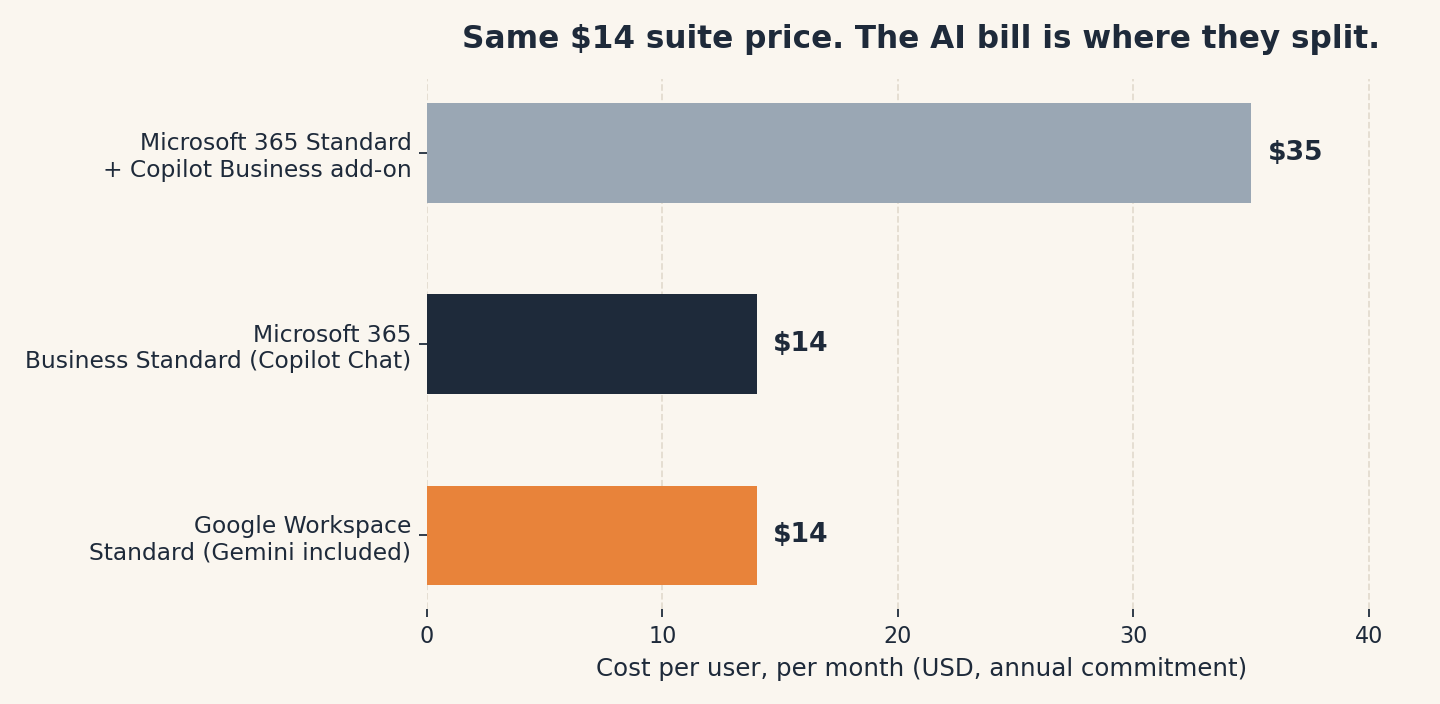
The catch: AI is the one place the identical sticker prices split apart. On Google Standard, Gemini sits inside the apps you already pay for. On Microsoft Standard, getting the equivalent in-app Copilot for every person takes the suite from $14 to $35 per person per month at list prices. For a 3-person business that is $504 a year versus $1,260 a year. If AI help inside documents is a nice extra, this changes nothing. If it is the feature you are actually shopping for, it changes the whole comparison.
| Google Workspace | Microsoft 365 Business | |
|---|---|---|
| Entry tier (annual) | Starter, $7 per person/month | Basic, $7 per person/month |
| Middle tier | Standard, $14 | Standard, $14 |
| Top business tier | Plus, $22 | Premium, $22 |
| Desktop apps | None; web and mobile at every tier | Full Word, Excel, PowerPoint, Outlook on Standard and Premium |
| Storage | Pooled: 30 GB / 2 TB / 5 TB per person | 1 TB OneDrive per person, every tier; 100 GB mailbox |
| AI in the apps | Gemini bundled into paid plans | Copilot Chat included; full Copilot for Business is a $21 add-on |
| Free version | No free business tier; 14-day trial | No free business tier; 1-month trial |
| User cap on business plans | 300 | 300 |
What about just using the free personal versions?
Fair question, and for a solo hobby project the answer is yes. A personal Gmail account with Drive, or the free web versions of Word and Excel on a personal Microsoft account, costs nothing. What the business plans add is the part that makes you look like a business: email on your own domain, an admin console to add and remove people, business-grade storage, and support that treats you as a customer. The day you hire help or a client asks why invoices come from a Gmail address is usually the day the $7 tier starts looking cheap. If that day has not come yet, our guide to the best invoicing software for freelancers covers the other half of looking established, and our plain-English CRM explainer covers when a contacts list needs to grow up.
Frequently asked questions
Is Google Workspace or Microsoft 365 cheaper in 2026?
Neither. After Microsoft’s July 1, 2026 price rise, both suites list at $7, $14, and $22 per person per month on annual plans. Older articles quoting Microsoft at $6 or $12.50 are describing prices that ended in June 2026.
Can I mix plans, or does everyone need the same tier?
Both vendors let you mix tiers on one account. A common tiny-business setup is Standard for the people who write and meet all day, and the $7 entry tier for someone who only needs email.
What happens to my files if I stop paying?
On Google, your pooled Drive storage shrinks back and files become read-only or at risk once you are over the free limits, so export before you cancel. On Microsoft, OneDrive goes read-only during a grace period after cancellation. Either way, download anything important first. Our explainer on what cloud storage actually is walks through the exit-plan thinking.
Do I need the $22 tier?
Probably not yet. On Microsoft, Premium earns its price if you need device management and stronger threat protection. On Google, Plus earns it for the 5 TB pool, Vault archiving, and bigger meetings. Under ten people with ordinary needs, the $14 middle tier is the sweet spot on both sides.
Which one is better for a one-person business?
The $7 entry tier of whichever apps you already know. At one person, the suites are close enough that familiarity beats feature lists, and you can switch before the team grows around the choice.
Method: Research review (no hands-on testing). Prices cross-checked against Google Workspace’s official pricing page and Microsoft’s July 1, 2026 business pricing as reported by UC Today, iFeelTech, and LazyAdmin; plan contents against Microsoft’s business plan comparison pages. Checked October 14, 2026.
Corrections: Spotted an error? Tell us. We fix mistakes publicly and date them.
Prices: US list prices; verify before buying.
Source: Google Workspace’s official pricing page (via Google), checked October 14, 2026.
Like plain-English tool guides? Our newsletter rounds up the week’s posts every Saturday. Join here.
Related Posts
 Zapier vs. Make: What Automation Actually Costs You (2026)
- Canva vs Adobe Express: Which Is Better for Non-Designers? (2026)
- HoneyBook vs. Indy: Which Invoicing Tool Should a Freelancer Use? (2026)
- FreshBooks vs. Wave: Which Invoicing App Is Worth Paying For? (2026)
- Notion vs Obsidian: Which Note App Is Right for You? (2026)