

Here’s what it does in one sentence
Invoicing software does one job that matters: it turns “hey, you owe me $800” into a professional-looking bill that your client can pay with one click — and it quietly keeps track of who paid, who’s late, and what you’re owed at tax time.
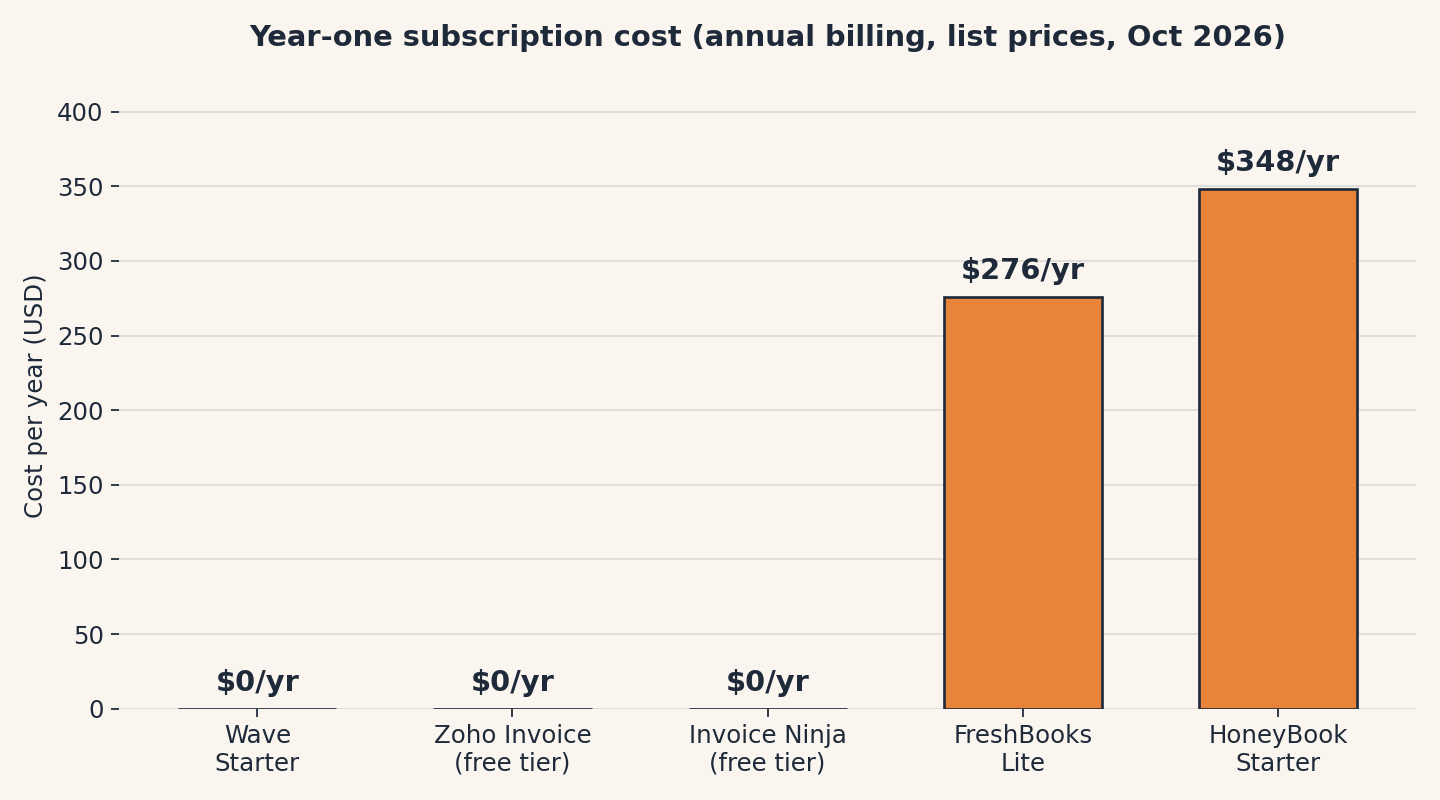
Plain-English Verdict: Most freelancers should start with Wave, because its free plan includes unlimited invoices and costs $0 a year. If you bill by the hour and want the smoothest experience, FreshBooks is worth the $276 a year — it combines invoicing and time tracking in a way nothing else does. And if proposals, contracts, and invoices all live in your client workflow, HoneyBook is worth considering once the revenue justifies $348 a year.
Why rank by cost, not features
Evidence level: Research review. We read the official pricing pages and documentation for all five tools in October 2026 and cross-checked against independent 2026 coverage, but we did not run hands-on trials, so this piece compares published prices, limits, and features, not lab-tested ease of use.
Here’s the uncomfortable truth most “best invoicing software” lists skip: the subscription price is the least important number on the page. For freelancers, the real cost is the payment-processing fee — the cut taken every time a client pays by card — and that can dwarf the subscription. A “free” tool that takes $15 every time a $500 invoice lands is more expensive than a $23-a-month tool that takes less. So we ranked by true cost: subscription plus fees, in plain dollars, on a realistic freelance scenario. This site earns nothing if you pick one, no affiliate links here. Our methodology page explains how we research tools.
1. Wave: the genuinely free one
Wave is the rare “free” plan that actually is free, unlimited invoices, unlimited clients, automatic payment reminders, and basic accounting, all at $0 a month.
What we like
- No caps on what matters. Unlike nearly every free plan in this category, Wave doesn’t limit the number of invoices or clients. If you invoice 5 clients or 50, the subscription still costs nothing.
- Accounting comes free too. Most invoicing apps make you buy a separate accounting tool (or upgrade) to track expenses and tax categories. Wave includes basic double-entry accounting, expense tracking, and tax reports in the free plan.
- The upgrade is optional, not a threat. Wave Pro (around $16–19 a month, depending on billing) adds bank-feed imports, receipt scanning, and waives the fixed per-transaction card fee on the first 10 transactions each month. If you never upgrade, nothing gets taken away.
What could be better
- The card fee is the highest here. Wave takes 2.9% + $0.60 per card payment, that $0.60 fixed fee (double most competitors’ $0.30) quietly adds up. On a $500 invoice, that’s $15.10 gone per payment.
- No time tracking, no contracts. If you bill by the hour, Wave won’t help you, no built-in timer, no proposal or contract templates. It’s invoicing and books, full stop.
Pricing
| Plan | Price | What you get |
|---|---|---|
| Starter | $0/month | Unlimited invoices, unlimited clients, reminders, basic accounting |
| Pro | ~$16–19/month | Bank-feed imports, receipt scanning, waived fixed fee on first 10 card transactions/month |
Card processing: 2.9% + $0.60 (3.4% + $0.60 for Amex); ACH bank payments: 1% ($1 minimum). Check the official pricing page before buying — plans changed recently.
Our take
Wave is the default answer for freelancers with simple billing, flat-fee projects, retainers, straightforward estimates. The $0 price isn’t a gimmick; it’s the whole product. Just check our true-cost table first if your clients mostly pay by card.
If you just need one clean invoice right now, our free Invoice Generator builds it in your browser, no signup.
2. Zoho Invoice: the free plan with time tracking
Zoho Invoice is the other genuinely free option, and it’s the better pick for freelancers who bill by the hour, because unlike Wave, it includes time tracking and a client portal on the free tier. The catch is the caps: it’s free for up to 5 customers and 500 invoices a year, which suits a freelancer with a small roster of regulars.
What we like
- Time tracking on the free tier. Start a timer, attach the hours to an invoice, and the client sees exactly what they’re paying for. For hourly consultants and designers, this alone can make Zoho the better free pick over Wave.
- Reminders and a client portal included. The free plan includes payment reminders, recurring invoices, multi-currency support, and a portal where clients can view and pay their bills, features other tools gate behind paid tiers.
What could be better
- The 5-customer cap is the wall. Bill more than five clients and the free plan is done, and Zoho’s answer isn’t a paid Invoice tier but a nudge toward the wider Zoho suite (Zoho Books, Zoho Billing), which starts the paid journey.
- Some coverage cites a revenue ceiling for the free plan. Reports vary (some sources cite eligibility limits around $20,000 in annual revenue). Verify current limits before committing.
Pricing
| Plan | Price | What you get |
|---|---|---|
| Free | $0 | Up to 5 customers, 500 invoices/year, up to 2 users, time tracking, reminders, client portal |
| Upgrade path | Paid, via Zoho’s suite | Zoho Books (accounting) from ~$10/organization/month; Zoho Billing for higher-volume invoicing |
Payment processing goes through your connected gateway (e.g., Stripe ~2.9% + $0.30 per card). Check the official pricing page before buying — free-tier limits have been adjusted in the past.
Our take
If you bill hourly and have a handful of steady clients, Zoho Invoice’s free tier is the best free deal in the category, time tracking included is the thing nobody else gives away for $0.
3. FreshBooks: the one that feels like it was built for you
FreshBooks is the most freelancers-shaped tool on this list: invoicing and time tracking woven together, proposals that turn into invoices, and a mobile app that actually gets used. There is no free plan, just a 30-day trial, but for hourly billers, it’s the product that makes the workday smoother, not just the billing day.
What we like
- Time tracking and invoicing in one flow. Log hours against a project, and those hours become line items on the invoice with one click. For anyone who has ever reconstructed a week of billable time from memory, this is worth real money.
- Estimates turn into invoices. Send a quote, the client approves it, and it becomes an invoice — no retyping. Small thing, big time saver.
What could be better
- The 5-billable-client cap on Lite is the tripwire. Lite costs $23 a month but only covers 5 billable clients, and by many accounts, active freelancers hit that ceiling within a quarter. Then you’re on Plus at $43 a month. Choose your plan by client count, not sticker price.
- No permanently free tier. A 30-day trial, then the meter starts. If you’re testing the waters with two clients, that’s $276 a year before you’ve sent ten invoices.
Pricing
| Plan | Price (monthly / annual) | Billable clients |
|---|---|---|
| Lite | $23/month (~$276/year with the annual discount) | Up to 5 |
| Plus | $43/month (~$516/year) | Up to 50 |
| Premium | $70/month (~$840/year) | Unlimited |
Card processing via FreshBooks Payments: ~2.9% + $0.30; ACH ~1% (capped on some plans). FreshBooks runs frequent 50%-off introductory promos, check the official pricing page for current offers before buying.
Our take
FreshBooks is the best product here for hourly freelancers, and the worst value for anyone with two clients and a dream. If you’ll use the time tracking every week, it’s a fair price; if you won’t, Wave or Zoho does the same invoicing for $0.
4. Invoice Ninja: the under-the-radar free tier
Invoice Ninja doesn’t get the press of Wave or FreshBooks, but its free tier deserves a look: unlimited invoices for up to 20 clients, four times Zoho’s client cap. It’s the pick for freelancers who need more clients than Zoho allows but aren’t ready to pay.
What we like
- 20 clients on the free tier. That’s generous, enough headroom for most solo freelancers to grow into without ever paying.
- Recurring invoices included free. Retainer clients get billed automatically; you just watch the money arrive.
What could be better
- “Powered by Invoice Ninja” branding on the free tier. Your invoices carry their watermark unless you upgrade. Some clients won’t notice; some will.
- Less polish, less hand-holding. The interface is functional rather than delightful, and the ecosystem (templates, integrations) is thinner than the bigger names.
Pricing
| Plan | Price | What you get |
|---|---|---|
| Free | $0 | Unlimited invoices, up to 20 clients, recurring invoices, “Powered by” branding |
| Paid tiers | Paid, white-label branding | Branding removal, more companies/team seats; check current tiers on the pricing page |
Card processing via connected gateways (typically ~2.9% + $0.30). Check the official pricing page before buying.
Our take
Invoice Ninja is the quiet overachiever: if Zoho’s 5-client cap is too tight and Wave’s lack of time tracking bugs you, this is the free tier that threads the needle. The branding is the price you pay; the paid tier is the receipt if you’d rather not.
5. HoneyBook: when the invoice is only half the job
HoneyBook isn’t really an invoicing tool, it’s a client-management tool that invoices happen to come with. Proposals, contracts, scheduling, client portals, payment collection, and automations, all branded with your business name. For photographers, coaches, consultants, and anyone whose “sale” involves a proposal and a contract before the first dollar, that’s the actual workflow.
What we like
- Proposal → contract → invoice → payment, one flow. The client opens one branded link, signs the contract, and pays, instead of three separate emails and a PDF attached to a prayer. For client-facing service businesses, this genuinely shortens the gap between “yes” and “paid.”
- Branded client portal. Everything for a project, files, messages, invoices, contracts, lives in one polished page your client can revisit. It looks expensive, which is the point.
What could be better
- The price is real: $348 a year to start. Starter is $36 a month month-to-month or $29 a month billed annually — and the plan that adds a second team member (Essentials, $49/month annual) doubles it. Solo freelancers should be honest about whether they’re buying workflow or buying aspiration.
- History of repricing. Long-time users have watched entry prices climb from single digits to today’s levels over the years. Build your workflow inside it knowing the subscription may not stay where it is.
Pricing
| Plan | Price (annual billing) | Best for |
|---|---|---|
| Starter | $29/month ($348/year); $36 month-to-month | Solo freelancers |
| Essentials | $49/month ($588/year); $59 month-to-month | Growing businesses, adds a second team member |
| Premium | $109/month ($1,308/year); $129 month-to-month | Established businesses with a team |
Card processing: ~2.7% + $0.10 per transaction. Check the official pricing page before buying — HoneyBook reprices periodically.
Our take
If your entire client flow is “I email them, they pay me,” HoneyBook is an expensive invoice button. If it’s “I pitch, they sign, I schedule, I bill,” it’s the only tool here that handles all four.
The true-cost test
This is the table the marketing pages don’t want you to build. We took a realistic freelance month — ten $500 invoices, every one paid by credit card — and added the subscription to the processing fees.
| Tool | Subscription/year | Card fees/year (10 × $500/mo) | True cost/year |
|---|---|---|---|
| Wave Starter | $0 | $1,812 (2.9% + $0.60) | $1,812 |
| Zoho Invoice (free, via Stripe) | $0 | $1,776 (2.9% + $0.30) | $1,776 |
| Invoice Ninja (free, via gateway) | $0 | $1,776 (2.9% + $0.30) | $1,776 |
| FreshBooks Lite | $276 | $1,776 (2.9% + $0.30) | $2,052 |
| HoneyBook Starter | $348 | $1,632 (2.7% + $0.10) | $1,980 |
Read that table twice. The “free” tools cost more than nothing once cards are involved, around $1,776–1,812 a year in fees on this scenario, while HoneyBook’s higher subscription is partly offset by its lower card rate (2.7% + $0.10). The big lesson: how your clients pay matters more than which plan you buy. Ten invoices paid by ACH (bank transfer, ~1%) would cost roughly a third of these fee totals. If you can nudge clients toward bank payments, most tools make this a one-click option on the invoice, the subscription price becomes nearly irrelevant.
When a spreadsheet is still fine
Honesty requires the unpopular answer: if you bill fewer than five clients a month and they all pay on time by bank transfer, you don’t need any of these yet. Software earns its keep when reminders get awkward, clients multiply, or tax time turns into archaeology. Come back to this list when one of those happens.
Jargon Decoder: “ACH” just means a bank-to-bank transfer, the electronic version of writing a check. It’s slower than a card payment but costs a fraction of the fee. A “payment-processing fee” is the cut taken whenever a client pays by card: usually a percentage of the invoice plus a small fixed amount per transaction (that’s the “+ $0.60” and “+ $0.30” in the tables above).
FAQ
Is free invoicing software actually free?
The software is, the payments aren’t. Every tool here takes a cut of card payments (roughly 2.7–2.9% plus a fixed fee per transaction). A free plan is genuinely free only if your clients pay by bank transfer or check.
Which invoicing software is best for a brand-new freelancer?
Wave or Zoho Invoice, both free. Start with Wave if your billing is simple project fees; start with Zoho if you bill by the hour and want time tracking. Upgrade when you hit a cap or when a paid feature would save you an hour a week.
How much does FreshBooks cost for a freelancer, really?
Lite lists at $23 a month ($276 a year with annual billing), but most active freelancers outgrow its 5-billable-client cap and land on Plus at $43 a month ($516 a year). Add card-processing fees on top — roughly $148 a month on ten $500 invoices paid by card.
Can I switch invoicing tools later without losing everything?
Yes, mostly. Client lists and invoice histories export from all five tools; the awkward part is re-creating recurring invoices and reconnecting payment gateways. Export a full backup before you cancel, and run both tools for one billing cycle.
Sources
What we did: We read the official pricing pages and documentation for Wave, Zoho Invoice, FreshBooks, Invoice Ninja, and HoneyBook in October 2026, and cross-checked against independent 2026 coverage. We did not run hands-on trials, so this article reports published prices, published limits, and documented features, not tested ease of use. All fee math is reproducible from the rates in each Pricing section. Read our methodology for how we research tools.
Pricing caveat: Prices change, several of these tools repriced during 2025–2026. Check each official pricing page before buying, and tell us if something here is out of date; we’ll fix it.
Affiliate links: None on this page. This site earns nothing if you choose any of these tools.
Editor’s Note: First published October 2026. Pricing checked October 1, 2026.
Want one plain-English software take in your inbox every week? Subscribe to The Plain Manual newsletter — no spam, unsubscribe anytime.




9 thoughts on “The Best Invoicing Software for Freelancers in 2026”