
Evidence: Research review — this piece was built from official pricing pages and reputable 2026 reviews, checked October 3, 2026. We did not walk through every signup flow for this one, and we’ll say exactly where that’s true.
Plain-English Verdict: If your family lives on iPhones and Macs, Apple Passwords is free and good enough — stop here. For everyone else, 1Password is the best family password manager in 2026: it’s the easiest one for a non-technical family member to actually finish setting up, and a family organizer can rescue someone who’s locked out. At $71.88 a year for five people, Bitwarden is the value pick at $47.88 a year for six, with a genuinely free tier if you want to pay nothing.
What we actually did: We read the official pricing pages for six password managers on October 3, 2026, compared family-plan limits and recovery options in reputable 2026 reviews (security.org, allaboutcookies.org, Macworld, and Bitwarden’s own pricing announcement), and ran the per-year math ourselves. No free trials were clicked through for this piece. And for the record: we earn nothing if you pick any of these. There are no affiliate links on this site.
The family test: three questions, one afternoon
Every “best password manager” list ranks apps for one person sitting alone at a desk. That’s not how families work. A family password manager has to survive three things:
- The least technical person in your house finishes the setup. If Grandma can’t get through it, you don’t have a password manager, you have a password manager for you and a sticky note for everyone else.
- Sharing actually works. The Netflix login, the Wi-Fi password, the kids’ school portal, a family shares credentials constantly, and texting passwords back and forth defeats the whole point.
- Someone will get locked out. It’s not a question of if. The app needs a way back in that doesn’t involve crying at a recovery form.
We judged six contenders on those three questions, plus honest per-year pricing. Here’s the ranking.
The cost, in plain dollars
Family plans are priced per year on annual billing. Here’s what each one actually costs for the whole household, not the “per user per month” number that makes everything look cheap:
| Tool | Family plan | Annual cost | People covered | Free tier |
|---|---|---|---|---|
| 1Password Families | $5.99/mo, annual | $71.88/yr | 5 | None (14-day trial only) |
| Bitwarden Families | $3.99/mo, annual | $47.88/yr | 6 | Unlimited passwords, unlimited devices |
| Apple Passwords | Built into Apple devices | $0 | 6 (Family Sharing) | The whole thing is free |
| Proton Pass Family | $4.99/mo, annual | $59.88/yr | 6 | Unlimited passwords, passkeys, built-in authenticator |
| Dashlane Friends & Family | $7.49/mo, annual | $89.88/yr | 10 | None (free plan retired Sept 2025) |
| NordPass Family | $3.69/mo, annual | $44.28/yr first year | 6 | One device at a time |
And here it is as a picture, because numbers are easier as bars:
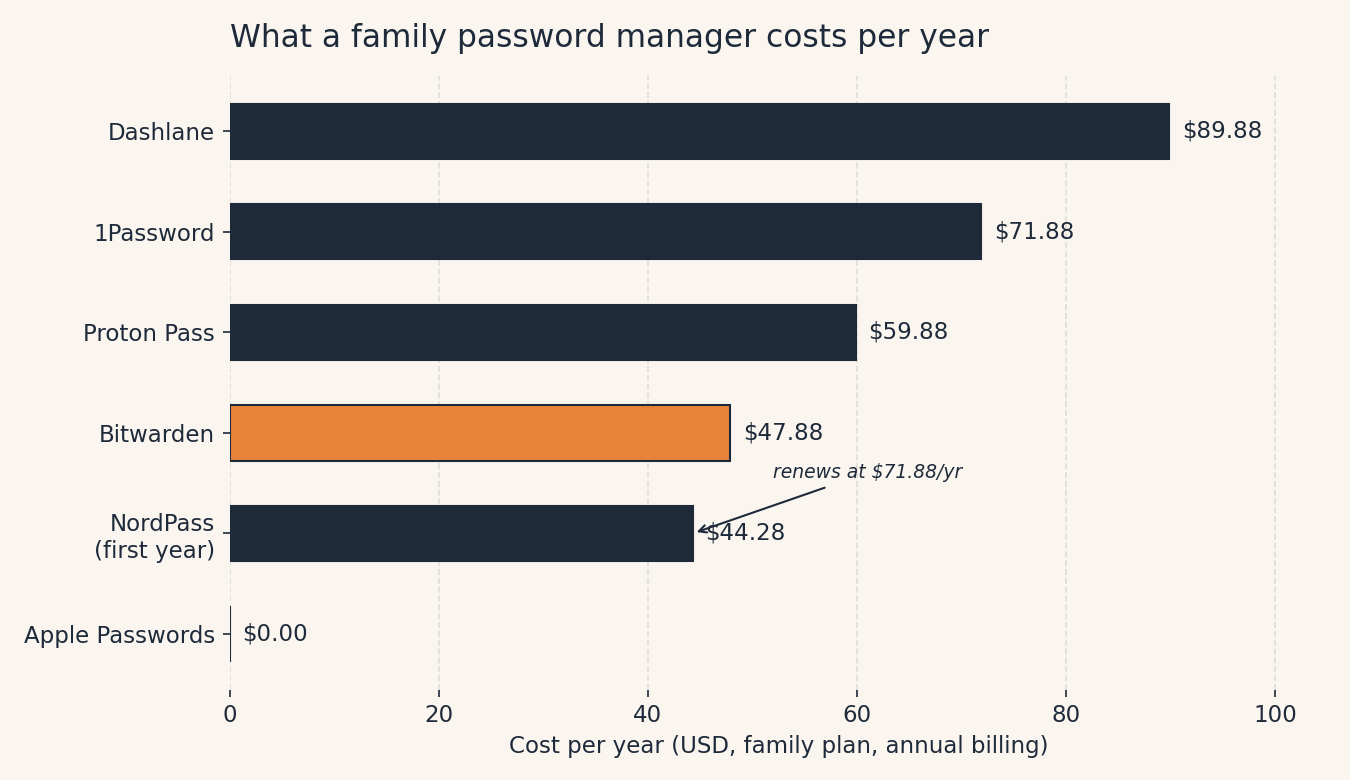
One number to watch: NordPass’s $44.28 is a first-year intro price, it renews at $71.88 a year. That’s the steepest renewal jump of the bunch, and it’s exactly the kind of thing fine print hopes you won’t notice.
1. 1Password, best for most families
If I had to pick one and hand it to every family I know, it’s 1Password.
What we like: It’s the only app here that passes all three family-test questions cleanly. The setup flow is the most forgiving we’ve seen, big buttons, plain language, no settings maze. Sharing is done through shared vaults: one for the streaming logins, one for the kids’ school stuff, and everyone keeps a private vault too. And the killer feature for families: a family organizer can recover a locked-out member’s account. Every other app on this list either lacks this or makes it a chore. When your teenager forgets their master password the night before a school deadline, this is the feature that matters.
What could be better: There’s no free tier, not even a limited one, just a 14-day trial. And 1Password raised its family price in March 2026 from $59.88 to $71.88 a year, so half the “best of” lists you’ll find are still quoting the old price. Ours isn’t.
Pricing: $5.99/month billed annually ($71.88/year) for five people. New customers get a first-year promo at $4.49/month, but it renews at full price, budget for the real number. Check the official pricing page before buying; prices moved twice across the industry this year.
Our take: The most expensive pick on this list for a family of five or fewer, and still the one we’d pay for. The recovery feature alone is worth the premium. If anyone in your family would struggle with tech, this is the one.
Who should skip this: If $72 a year makes you wince, keep reading, Bitwarden is right below.
2. Bitwarden, best value
Bitwarden is the pick for families who want nearly everything 1Password does for two-thirds the price.
What we like: $47.88 a year covers six people, that’s about $8 per person per year, less than a streaming service costs per month. Every family member gets the full premium feature set: unlimited shared collections, emergency access (you can name a trusted contact who gets time-delayed access to your vault, genuinely important for couples), and breach reports. And Bitwarden has the best free tier in the business: unlimited passwords on unlimited devices, with free basic sharing for two people. A couple could plausibly use the free tier forever and never pay a cent.
What could be better: The interface is less polished. It’s not bad, it’s just clearly built by people who’d rather improve security than smooth out animations. For a tech-comfortable family, it’s a non-issue. For the least technical person in your house, it’s a small but real hurdle: 1Password’s setup flow is noticeably kinder.
Pricing: $3.99/month billed annually ($47.88/year) for six people. Raised from $40 in January 2026, existing subscribers got a loyalty discount on their first renewal. Free tier: genuinely free, no credit card.
Our take: The rational pick. If your family can handle a slightly plainer app, you save $24 a year over 1Password and get the best emergency-access story of the bunch. For a family with a teenager who might need the free tier someday, this is the one.
Who should skip this: If the person doing the setup in your house is also the person everyone else calls for tech help, just get 1Password and spare yourself the support tickets.
3. Apple Passwords, best free pick (all-Apple households only)
This one comes with a giant asterisk, but for the right family it’s the correct answer, and it costs nothing.
What we like: It’s free, it’s already on every iPhone, iPad, and Mac, and it does the basics well: strong password generation, autofill in Safari, and Shared Groups for sharing logins with family. No account to create, no app to download, no subscription to forget about. For a family that’s entirely inside Apple’s world, the “setup afternoon” is about ten minutes long.
What could be better: The asterisk: no Android support at all. One Android phone in the family, a kid’s hand-me-down, a spouse who prefers Pixel, and this pick falls apart completely. It also has no emergency access: if a family member forgets their Apple Account credentials, there’s no organizer rescue like 1Password offers. And shared passwords move out of your personal store into the shared group, which confuses people the first time.
Pricing: $0. Up to six people through Family Sharing.
Our take: Take the free thing if you can. If your whole household is on Apple and will stay there, there is no reason to pay for anything else. If there’s even one Android device in the mix, skip to Bitwarden.
4. Proton Pass, best for the privacy-minded
Proton Pass is the youngest app here (launched 2023), from the Swiss company behind Proton Mail, and it’s the pick for families where privacy is the point.
What we like: The free tier is remarkably generous, unlimited passwords, passkeys, sync across all devices, a built-in authenticator, and even email aliases (handy for kids signing up for things without using a real address). The family plan adds an admin panel, shared vaults, and 50 GB of encrypted storage. Being Swiss-based with a strong privacy reputation, it’s the pick for families who care about where their data lives.
What could be better: It’s the least battle-tested app on this list, 1Password has been around since 2006 and Bitwarden since 2016. And at $59.88 a year, it’s priced awkwardly: more expensive than Bitwarden for broadly similar family value, while 1Password is only $12 more and meaningfully easier to use.
Pricing: $4.99/month billed annually ($59.88/year) for six people. Month-to-month billing is $6.99/month, a steep penalty, so annual is the only sane choice.
Our take: Pick this if the Proton privacy story matters to you. For everyone else, Bitwarden is cheaper and 1Password is easier.
The two we left out
Dashlane Friends & Family ($89.88/year, up to 10 people): The priciest plan here, and the math only works if you fill most of the ten seats. The gotcha that sank it: the bundled VPN is available to the plan admin only, the other nine members don’t get it. Annual billing only, no free tier (retired September 2025). Fine product, wrong value for a typical family.
NordPass Family ($44.28 first year, renews at $71.88): The intro price is the cheapest paid plan on the list, which is exactly why we’re suspicious of it. That 62% renewal jump lands quietly in year two. The free tier only works on one device at a time, so it can’t even serve as a trial for real life. If you go in, set a calendar reminder for month eleven.
The jargon decoder
“Zero-knowledge”, you’ll see this on every password manager’s site, and it just means: the company stores your encrypted vault but cannot read it. Your master password never leaves your device. It’s the reason a breach at the company doesn’t expose your passwords. One sentence, and now you know more than most of their marketing pages will tell you.
FAQ
Can my whole family really share logins safely? Yes, that’s what shared vaults (or Apple’s Shared Groups) are for. Everyone gets their own login to the password manager, and the shared passwords live in a common space. Nobody texts the Netflix password in the family group chat ever again.
What if one family member uses Android and the rest use iPhone? Rule out Apple Passwords immediately, it doesn’t exist on Android. 1Password, Bitwarden, and Proton Pass all work across iPhone, Android, Windows, and Mac. This is the single most common reason families pick wrong.
What happens if someone forgets their master password? This is the question nobody asks until it’s too late. 1Password lets a family organizer recover a locked-out member, the best answer on this list. Bitwarden’s emergency access covers it with a time delay. With Apple Passwords, you’re in Apple Account recovery, which is slow and stressful. Whatever you pick, write the master password down and put it somewhere safe. Yes, really. One piece of paper in a drawer beats a forgotten password every time.
Is the free option actually good enough? Bitwarden’s free tier is the real deal, unlimited passwords, unlimited devices, free for a couple. Apple Passwords is genuinely free for all-Apple families. The paid plans buy you easier family sharing, emergency access, and (in 1Password’s case) the kindest setup flow. Start free, upgrade if sharing gets annoying.
How we made this call
We compared official pricing as of October 3, 2026, family-plan seat limits, sharing mechanics, and recovery options across six password managers, leaning on 2026 reviews from security.org, allaboutcookies.org, and Macworld plus Bitwarden’s own pricing announcement and MakeUseOf’s coverage of the 1Password price increase. We didn’t run hands-on trials for this piece, the rankings come from documented features and pricing, not from a week of daily use. Prices change often (two of these apps raised prices in 2026 alone), so check the official pricing page before you buy.
We fix our mistakes in public: if you spot an error or a price that’s changed, tell us and we’ll correct the article the same day with a dated note. No affiliate links on this page, we earn nothing from your choice, which is exactly how a recommendation should work.
Start the whole family off with strong ones: our free Passphrase Generator makes memorable passwords in one click, no signup.




3 thoughts on “The Best Password Manager for Your Whole Family (2026)”