Editor’s Note: New post, October 2026. Prices checked October 16, 2026. Canva retired its old Teams plan, so any guide still quoting it is out of date.
Research review: pricing and plan contents verified October 16, 2026 against Canva and Adobe pricing as reported from their official pricing pages in October 2026 checks. No hands-on walkthrough was done for this piece.
In a sentence: For most non-designers, Canva is the easier and broader tool, while Adobe Express is the cheaper paid pick and the obvious choice if you already pay for Adobe apps, because Premium is included with them.
Plain-English Verdict
Start with Canva Free. It has the larger free template library, and most people never need to pay. If you do pay, Canva Pro at $144 a year buys the widest set of everyday design jobs in one place. Choose Adobe Express Premium at $9.99 a month if you want to spend less, you work with Adobe Stock photos and Adobe Fonts, or Premium is already included in a Creative Cloud plan you pay for.
How we checked this
Checked: Canva’s official pricing page as read in October 2026 checks (Pro, Business, and free-tier contents, plus the retired Teams note); Adobe’s Express pricing as read in October 2026 checks (Premium, free-tier contents, and Teams); both vendors’ published help and support pages.
Date: October 16, 2026.
Method: Research review. See How We Review. We earn nothing if you buy either tool. There are no affiliate links in this post.
Here’s what each tool does in one sentence: each one lets you pick a ready-made design, swap in your own words and pictures, and download a finished flyer, social post, or set of slides without learning professional design software. Think of both as a well-stocked craft table. The templates are the pre-cut shapes. You still choose the colors and the words, but nobody hands you a blank page and wishes you luck.
The 60-second decision tree
- Do you pay for Creative Cloud All Apps, Photoshop, or another paid Adobe plan that includes Express Premium? Use Adobe Express. You may already be paying for it.
- Do you make many kinds of things: flyers, presentations, short videos, simple websites, and printed cards? Canva. It covers more kinds of jobs in one account.
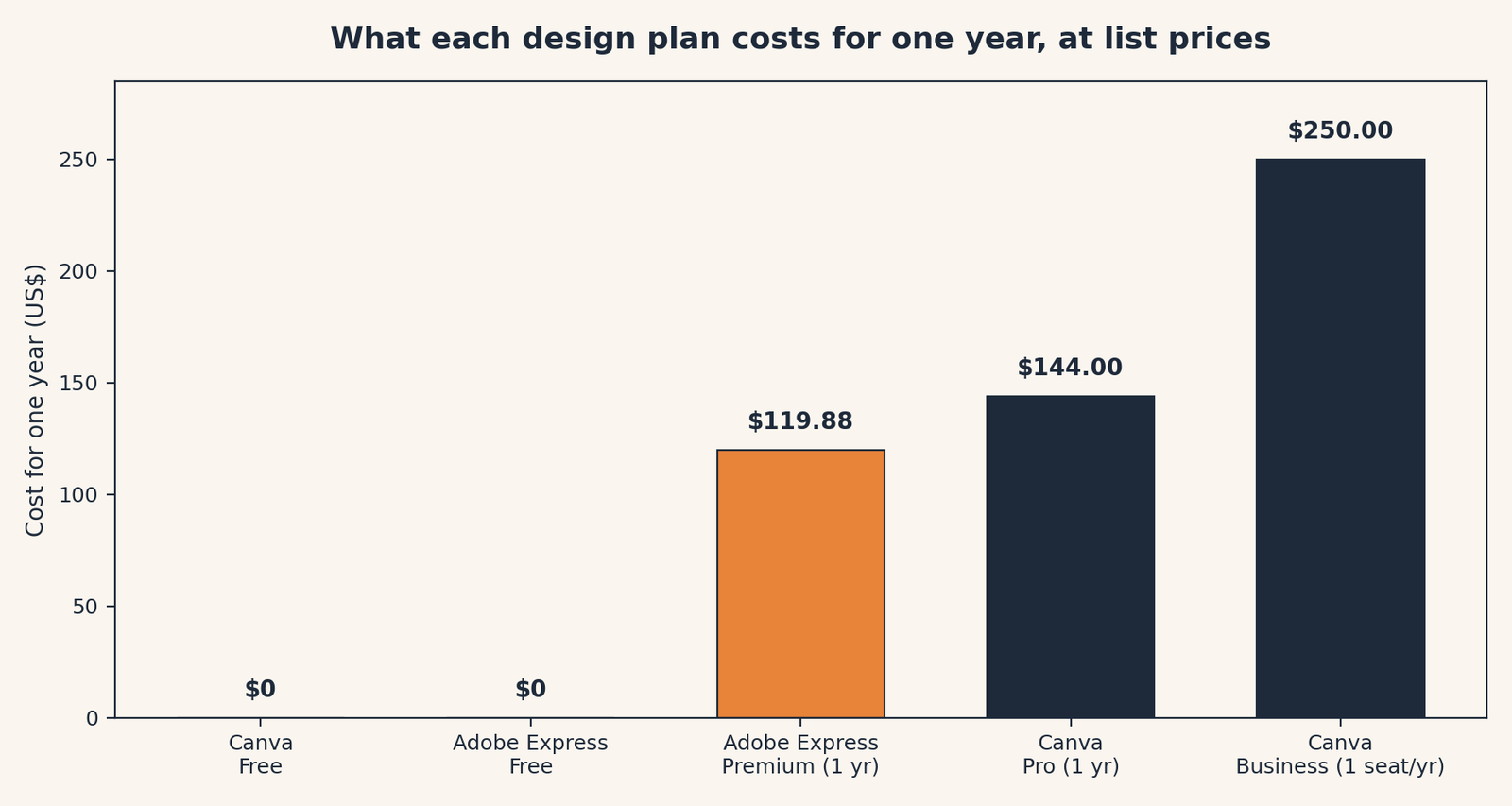
- Is price the main concern and you only need one paid seat? Adobe Express Premium at $9.99 a month, about $119.88 a year, beats Canva Pro at $144 a year.
- Do you need a team plan? Compare carefully. Canva Business is $250 per person per year. Express for Teams is priced per person per month, with a lower regular rate, so the team math favors Adobe.
- Do you only design now and then? Stay free on either one. Both free tiers are permanent plans, not trials.
- Still torn? Make the same simple flyer in both free versions and notice which one you finished without hunting for buttons. That feeling matters more than a feature list.
Our picks, labeled by job
- Our pick for most non-designers: Canva, starting free and moving to Pro at $144 a year only if you hit the free limits. The broadest everyday tool.
- Budget pick: Adobe Express Premium, $9.99 a month. Less per year than Canva Pro, with strong photos and fonts.
- If you already live in Adobe apps, get this one: Adobe Express Premium, included with many paid Creative Cloud plans at no extra cost.
Skip this if…
Skip Canva Pro if you only design a few times a year. The free plan has 1.6 million or more templates, and Pro features like the background remover will not earn back $144 at that pace.
Skip Adobe Express if you want one tool for presentations, documents, sheets, websites, and print as well as social posts. That wider set of jobs is Canva’s home ground.
Skip both paid plans if a free template plus your own photos already gets the job done. Pay when a limit blocks real work, not before.
The scorecard
| Canva | Adobe Express | |
|---|---|---|
| What it costs | 7 | 8 |
| Does the job | 9 | 8 |
| Works where you work | 9 | 8 |
| Help when stuck | 8 | 8 |
| Free version | 9 | 7 |
| Overall | 8.4 | 7.8 |
Canva wins on the breadth of jobs it covers, on how much its free plan includes, and on the size of its app connections. Express wins on price: Premium costs less per year, is sold month to month, and its team pricing is gentler than Canva Business at $250 per person per year. Help scores tie because both vendors publish deep help centers, tutorials, and community support, and we grade published channels only.
Scores grade published facts only: pricing pages, feature lists, help docs. We do not score how an app feels to use.
TPM Scorecard · Rubric v1.0 — October 2026 · Checked October 16, 2026.
How we score, in full: How We Review.
1. Canva
Canva is a browser-first design tool with mobile and desktop apps, built around templates for social posts, flyers, presentations, videos, documents, and print.
The price: Free is $0. Pro is $144 a year, or $18 a month billed monthly, for one person. Business is $250 per person per year. The old Canva Teams plan has been replaced by Business, and Canva’s own pricing page now explains that change in its questions section. Pro includes 100 GB of storage, 5 Brand Kits, and a much larger library than free. A Brand Kit, in plain English, is a saved set of your colors, fonts, and logos so every new design starts on-brand instead of from memory.
What we like: the sheer range. Pro lists 3.6 million or more templates and 141 million or more premium photos, videos, and graphics. It adds the background remover, resizing a design for another platform in a few clicks, scheduling social posts, and bulk creation for making many similar designs at once. Canva also lists more than 300 connected apps, so extras like QR codes and stock libraries sit inside the same editor. For teachers and eligible nonprofits, Canva offers free premium access through its education and nonprofit programs, which is worth checking before anyone at a school or charity pays.
What could be better: the team step is steep. One person pays $144 a year on Pro, but a team on Business pays $250 per person per year, so a five-person team pays $1,250 a year. AI use is also metered. Canva gives each plan a monthly AI allowance, and heavy users can be offered an AI Pass add-on on top of the plan. If AI images are your main job, read that allowance carefully before assuming Pro covers all of it.
Pricing: Free $0; Pro $144 a year or $18 a month; Business $250 per person per year. Our take: start free. Pay for Pro when the background remover, the premium library, or the extra storage solves a problem you actually have this month.
2. Adobe Express
Adobe Express is Adobe’s simpler design tool. It also runs in a browser with mobile apps, and it is built for social posts, flyers, short videos, and simple pages.
The price: Free is $0, with no card required. Premium is $9.99 a month. We are pricing Premium as a monthly figure only, because Adobe’s own pricing page, as read in October 2026 checks, describes Premium as billed monthly and we could not confirm an annual individual price on that page. Some other sites quote $99.99 a year, so check Adobe’s checkout before repeating that number. Premium includes 100 GB of storage, all premium templates, Brand Kits, and 250 Firefly generative credits a month. Firefly is Adobe’s AI tool for making and editing images from words. Express for Teams is priced per person per month with a two-seat minimum; the most repeated current figures are a lower first-year rate and a regular rate of $7.99 per person per month, so verify the team price on Adobe’s page before budgeting.
What we like: the raw materials are excellent. Premium opens 200 million or more Adobe Stock assets and more than 30,000 fonts, plus one-click resize and tools to remove a video background. If you already use Photoshop or Illustrator, Express can work with those files, so a logo fixed in Illustrator can show up in your Express flyer without a fresh export. And if your Creative Cloud plan already includes Express Premium, the best price in this whole comparison is the $0 extra you would pay.
What could be better: the free plan is leaner than Canva Free. It lists 100,000 or more templates and 1 million or more stock assets, which sounds like plenty until you set it beside Canva Free’s 1.6 million or more templates. Premium assets on the free plan can be used with a watermark, and free plans do not include Brand Kits. Express also covers a narrower set of everyday jobs than Canva: it is strong on social and marketing designs, and thinner on documents, sheets, and the other office-style work Canva now includes.
Pricing: Free $0; Premium $9.99 a month (about $119.88 over twelve months). Our take: Premium is the sensible paid buy if you design social posts and flyers, like Adobe’s photos and fonts, and want to spend less than Canva Pro costs.
The head-to-head that actually matters
Who it’s for: the free plans decide this for many readers. Both are permanent, both include 5 GB of storage on free, and both let you finish a simple flyer without paying. Canva Free gives you more templates and a starter Brand Kit with three colors. Express Free gives you scheduling for one account per social network, a feature Canva reserves for paid plans, but no Brand Kits. If you post to one social account and design rarely, Express Free is enough. If you browse templates until one fits, Canva Free gives you more to browse.
The catch: storage and the paid libraries are closer than the marketing suggests. Both paid individual plans include 100 GB of storage. Express Premium lists more stock assets (200 million or more) while Canva Pro lists more templates (3.6 million or more). In plain terms: Adobe brings a bigger photo and font drawer, Canva brings a bigger drawer of ready-made layouts. Neither number tells you whether the one template you need is in there, which is why the free test with your own real flyer is worth twenty minutes.
| Canva | Adobe Express | |
|---|---|---|
| Free plan | $0; 1.6M+ templates; 4.7M+ free assets; 5 GB; 1 Brand Kit | $0; 100,000+ templates; 1M+ stock assets; 5 GB; no Brand Kits |
| Paid individual plan | Pro, $144/year or $18/month, one person | Premium, $9.99/month |
| Paid storage | 100 GB on Pro | 100 GB on Premium |
| Team plan | Business, $250 per person/year | Teams, per person/month, two-seat minimum (verify current rate) |
| Standout paid extras | Background remover, social scheduling, 5 Brand Kits, bulk create | 200M+ Stock assets, 30,000+ fonts, 250 Firefly credits/month, remove video background |
| Works with | Browser, mobile, desktop; 300+ connected apps; presentations, docs, sheets, websites, print | Browser and mobile; Adobe Stock, Fonts, and Photoshop/Illustrator file links |
| Included elsewhere | Free premium programs for eligible teachers and nonprofits | Premium included with many paid Creative Cloud plans |
What about the flyer test?
The bank angle for this topic was making the same flyer in both free tiers. We did not run that walkthrough for this piece, so we will not pretend one editor felt faster than the other. Do the test yourself in twenty minutes: pick a real event, use the same photo and the same words in both tools, and export both results. Notice three things: how long it took to find a template you liked, whether your photo needed the paid background remover, and whether the finished file looked right when you opened it outside the editor. Those three observations will tell you more than any feature table, including ours. If both pass, choose on price and on the other jobs you do each week. For the money side of subscriptions in general, our guide to finding and canceling subscriptions you forgot pairs well with this decision, and if your flyer is for a small business, our invoicing roundup covers the next tool most freelancers end up shopping for. Our explainer on what open source means is useful background if you later compare these paid tools with free alternatives.
Frequently asked questions
Is Canva or Adobe Express cheaper in 2026?
Adobe Express Premium, at $9.99 a month or about $119.88 over a year, costs less than Canva Pro at $144 a year. On teams, the gap widens: Canva Business is $250 per person per year, while Express for Teams is priced per person per month at a lower regular rate, with a two-seat minimum.
What happened to Canva Teams?
It was replaced by Canva Business. Older guides quoting a cheap per-person Teams price are describing a plan new customers can no longer buy. Canva’s pricing page addresses the change directly in its questions section.
Is Adobe Express Premium included with Creative Cloud?
Yes, for many paid Creative Cloud plans, including All Apps, Express Premium is included at no extra cost. Check your Adobe account before buying Express on its own, because paying twice for the same plan is an easy mistake here.
Can I really design a flyer for free?
Yes, on both. Each free plan is a permanent tier with templates, stock assets, and 5 GB of storage. The limits you are most likely to feel are the premium templates and assets marked as paid, the missing background remover, and, on Express Free, the absence of Brand Kits.
Which one should a teacher or nonprofit pick?
Check Canva first. Its education and nonprofit programs offer free premium access to eligible applicants, which can make the paid comparison irrelevant. If you do not qualify, the ordinary free plans and the prices above apply.
Method: Research review (no hands-on testing). Prices and plan contents cross-checked against Canva and Adobe pricing as reported from their official pricing pages in October 2026 checks, including the pre-verified fact brief prepared for this topic on October 15, 2026. Checked October 16, 2026.
Corrections: Spotted an error? Tell us. We fix mistakes publicly and date them.
Prices: US list prices; verify before buying.
Source: Canva pricing guide reporting Canva’s official pricing page (via ProcurementVMS), checked October 16, 2026.
Like plain-English tool guides? Our newsletter rounds up the week’s posts every Saturday. Join here.
Related Posts
 HoneyBook vs. Indy: Which Invoicing Tool Should a Freelancer Use? (2026)
- Google Workspace vs Microsoft 365 for a Tiny Business (2026)
- FreshBooks vs. Wave: Which Invoicing App Is Worth Paying For? (2026)
- Zapier vs. Make: What Automation Actually Costs You (2026)
- Calendly vs Cal.com: Which Booking Tool Is Right for You? (2026)