

Editor’s Note (September 2026): This is a documented comparison based on official 2026 pricing and features — not a side-by-side lab test. Prices were checked against official pricing pages at publication; confirm before you buy. See how we review.
The Plain-English Verdict: Notion is a polished online workspace that’s wonderful for shared docs and team projects, but it charges per person once your team grows. Obsidian is a free app that keeps your notes as simple files on your own computer — it takes longer to learn, but nobody can ever take your notes away. Pick Notion if you share and collaborate; pick Obsidian if your notes belong to you alone and you want to keep it that way.
If you’ve gone looking for a better note app lately, you’ve met these two. Notion and Obsidian come up in every conversation, and the people recommending them talk past each other completely. One side raves about databases. The other side raves about “local-first Markdown.”
Here’s the plain version: Notion is a filing cabinet that lives on the internet. Obsidian is a box of index cards that lives on your desk. That one image explains about 80% of the difference. The rest is money, effort, and who owns your words.
What each one actually is
Notion is an all-in-one workspace that runs in your browser or its app. You write docs, build wikis, make to-do lists, and create databases (think: simple spreadsheets that can look like calendars, kanban boards, or tables). Everything lives on Notion’s servers, and you need an account to use it. The pitch is that your docs, projects, and team knowledge all live in one tidy place instead of scattered across five apps.
Obsidian is a note-taking app that stores every note as a plain text file in a folder on your own computer. No account required — you can download it and start writing. The magic is in how notes connect: you link one note to another, and Obsidian draws a visual map (the famous “graph view”) of how your ideas relate. It works fully offline, because your notes never leave your machine unless you decide otherwise.
So: Notion organizes your information for you, in the cloud. Obsidian gives you a pile of connected cards and says, “organize them however you like.”
The money: what each costs in 2026
This is where the two diverge sharply, so let’s look at real numbers from each company’s pricing page (checked September 2026 — prices change, so confirm before you pay).
Notion charges per person, per month:
| Plan | Price (billed yearly) | The gist |
| Free | $0 | Unlimited pages for one person; 5 MB file uploads; 7-day page history |
| Plus | $10/user/month | Unlimited uploads; 30-day history; unlimited guests |
| Business | $20/user/month | Everything in Plus, plus full Notion AI and admin controls |
| Enterprise | Custom | For big companies with compliance departments |
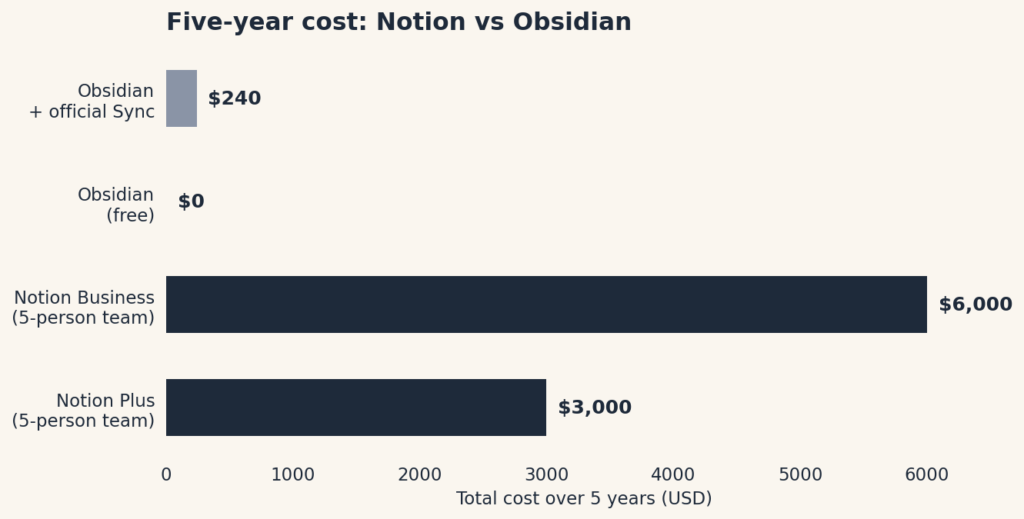
The free tier is genuinely generous for one person — unlimited pages and blocks, forever. The bill arrives when other people join: a five-person team on Plus costs $600 a year; on Business, $1,200. (Notion raised Plus and Business prices in March 2026, so if an old blog post quotes lower numbers, that’s why.)
One more 2026 change worth knowing: Notion used to sell its AI as a separate add-on you could bolt onto any plan. That’s gone. Full AI access now requires the Business plan at minimum — Plus users only get a limited trial. If AI features are the reason you’re shopping, budget for Business.
Obsidian is priced like the opposite of all that:
| Piece | Price | What it does |
| The app itself | Free | Every feature, unlimited notes, no account needed |
| Sync (optional) | $48/year ($4/month) | Official sync across your devices, encrypted end to end |
| Publish (optional) | $96/year ($8/month) | Turns part of your notes into a public website |
| Catalyst | $25 one-time | Early access builds; supports development; unlocks nothing |
The app is free in the fullest sense: every core feature, all 2,000+ community plugins, no sign-up. You only pay if you want Obsidian’s official device sync — and you can skip even that by keeping your notes folder inside iCloud, Dropbox, or Google Drive, which many people do.
The honest math: a solo Notion user can pay $0 forever. A five-person team pays $600–$1,200 a year. An Obsidian user can pay $0 forever too — or $48 a year for the convenience of official sync. Over five years, Obsidian’s worst case ($240) is less than one year of Notion Business for a small team.
Where your notes live (and why it matters)
This is the philosophical split, and it’s worth thirty seconds of your time.
With Notion, your notes live on Notion’s computers. That’s what makes sharing effortless — send someone a link and they’re reading your doc. It’s also what makes some people uneasy: if Notion has an outage, raises prices, or changes its rules, your notes are along for the ride. You can export your stuff, but day to day, you’re a tenant.
With Obsidian, your notes are files in a folder you control. Open them in any text editor. Copy the folder to a USB stick. If Obsidian the company vanished tomorrow, your notes would still be right there, perfectly readable. Nobody can change the terms on files sitting on your own hard drive.
Neither is paranoid or wrong. But if the sentence “my notes live on someone else’s server” bothers you, that’s your answer — and it’s Obsidian.
Sharing and teamwork
Here’s where Notion earns its keep. Sharing a Notion page is as easy as sharing a Google Doc: send a link, set permissions, done. Comments, mentions, real-time editing with teammates — it’s built for this. If your notes are really team knowledge (meeting notes, project docs, a company wiki), Notion is the natural home.
Obsidian is, by design, a solo tool. Your notes live on your machine, so “sharing” means either publishing them as a website (the paid Publish add-on), syncing through a shared folder, or using version-control tools that most normal humans shouldn’t have to learn. It can be done — researchers and writers do it — but it’s plumbing, not a feature.
Plain rule: if the word “we” appears in your note-taking, lean Notion. If it’s all “I,” Obsidian is on the table.
How much fiddling each one asks of you
Both apps have a learning curve, but they’re different shapes.
Notion is easy to start and easy to overdo. Writing a doc takes zero learning. But Notion’s real power — linked databases, filtered views, rollups — is a hobby disguised as a feature. We’ve all seen the Notion setups with seventeen linked databases tracking someone’s water intake. The app won’t stop you from building a second job for yourself. If you have the temperament of a tinkerer, budget your time accordingly.
Obsidian is harder at the start and calmer later. The first hour can feel sparse: here’s a blank page, good luck. The plugin marketplace (2,000+ community plugins) means you can add almost anything — task management, calendars, spaced repetition — but each addition is a decision you make. Reviewers consistently call the learning curve “real,” especially for anyone coming from a simple notes app. Once it’s set up the way you like, though, it tends to stay out of your way.
Jargon Decoder: You’ll see the word “Markdown” everywhere in Obsidian discussions. It just means plain text with a few formatting shortcuts — asterisks for italics, hashes for headings. That’s it. You already know how to do it.
On mobile, both have iOS and Android apps. Obsidian’s mobile apps have improved a lot, though reviewers note they still lag the desktop experience when you’ve loaded up on plugins. Notion’s mobile app is the full workspace in your pocket — convenient, and occasionally sluggish with big databases.
AI: who has it, who doesn’t
Notion has gone all-in. Business and Enterprise plans include the full AI suite: writing help, meeting notes, an agent that can work across your workspace. It’s genuinely useful if your notes are where work happens. Just remember the price of admission: $20 per person per month.
Obsidian has no built-in AI at all. What it has is a plugin ecosystem where community tools let you connect your own AI key and chat with your notes. That means more setup, more decisions — but also your choice of AI model and no per-seat AI tax. If you like control more than convenience, this is a feature, not a gap.
Who should pick which
Pick Notion if: you share notes with other humans regularly; you want docs, tasks, and simple databases in one place; you’d rather have structure handed to you than build it yourself; your team needs one shared source of truth.
Pick Obsidian if: your notes are personal — a journal, research, a novel, your life’s paperwork; the idea of your words living on your own machine matters to you; you want a tool that costs nothing and can’t surprise you with a price hike; you enjoy (or at least tolerate) setting things up once to have them exactly your way.
Pick neither if: you just need somewhere to jot things down. Apple Notes, Google Keep, or a paper notebook will make you happier than either of these. No shame in it.
The short answer
Notion is the filing cabinet in the cloud: organized, shareable, and billed per person. Obsidian is the box of index cards on your desk: private, permanent, and free. Most people who are happy with their choice picked based on one question — “Do I share my notes, or are they mine?” — and never looked back.
Sources: Pricing figures verified against each product’s official pricing page in September 2026. Notion plan details cross-checked with ClickUp’s 2026 Notion pricing breakdown; Obsidian pricing and mobile-app notes cross-checked with Nubia Magazine’s 2026 Obsidian review. This comparison is based on documented features and pricing, not hands-on testing — where we haven’t verified something ourselves, we say so.
Frequently Asked Questions
Is Notion really free?
Yes, for personal use — the free plan covers unlimited pages and blocks for individuals. You only pay for team collaboration features or AI add-ons.
Can I use Obsidian for free?
Yes. Obsidian’s core app is free for personal use on every platform, and your notes stay as plain files on your device. Paid add-ons like Sync and Publish are optional.
Which is better for teams?
Notion, by a mile. Real-time collaboration, permissions, and shared workspaces are its home turf. Obsidian is built for individuals first.
Can I move my notes from Notion to Obsidian?
Yes — Notion exports to Markdown, which Obsidian reads natively. Plain notes move over cleanly; complex databases need some cleanup.