
*Editor's Note: New post, November 2026. Prices and plan limits checked November 16, 2026, on official pricing pages.*
*Research review: plan prices, free-plan limits, and AI rules verified November 16, 2026 against Notion's official pricing page as reported in November 2026 checks, plus the Google Workspace, Asana, and Fathom prices this site verified in October 2026. No pick below depends on a claim that we ran a business inside these tools.*
In a sentence: a tiny team can run its documents, tasks, meeting notes, simple client pipeline, and content calendar in one Notion workspace for $120 a person a year, and the honest price of doing it with AI included is $240 a person a year.
Plain-English Verdict
Notion Plus, at $10 per member per month billed yearly, is the pick for most tiny teams: one home for the five jobs that usually scatter across five subscriptions. Notion Business, at $20, is the same workspace with full Notion AI included, and it earns the extra money only when the team uses that AI every week. Keep real accounting and heavy databases in their own tools, because Notion does those jobs poorly or not at all.
The worry: you cancel four subscriptions, move everything into one workspace, and then discover the workspace only makes sense to the person who built it, so the team drifts back to email and the old tools creep back one renewal at a time, and you end up paying for both stacks. Consolidation guides for small teams keep warning about exactly that pattern, which is why this guide prices the move and names the jobs Notion should never take.
How we checked this
Checked: Notion's official pricing page and help-center limits, as reported in November 3 to 6, 2026 checks; the Google Workspace, Asana, and Fathom prices this site verified on their official pricing pages in October 2026; Notion's published plan features for AI, meeting notes, and guests.
Date: November 16, 2026.
Method: Research review. See How We Review. The startup trial link in this post is our referral link, disclosed where it appears.
Here is what this guide does in one sentence. It walks the five jobs a tiny team usually buys five tools for, shows what each job looks like inside Notion, and then does the consolidation math in full.
Jargon Decoder: "Workspace" just means: your team's shared home inside the app, the one place its pages and lists live. "Seat" just means one paid person with a login.
Our picks, by role
Notion Plus: our pick for most tiny teams
At $10 per member per month billed yearly, Plus removes the limits that make the free plan a solo tool: unlimited blocks, file uploads up to 5 GB per file, 30 days of page history, and unlimited guests. Docs, tasks, meeting notes, a simple client pipeline, and a content calendar all live in one workspace.
Notion Business: our pick when the team uses AI weekly
At $20 per member per month billed yearly, Business adds the full Notion AI set: the Notion Agent, AI Meeting Notes, and Enterprise Search, plus 90 days of page history and private teamspaces. Since May 2025 there is no separate AI add-on to buy, so Business is the only route to ongoing AI.
Notion Free: our pick for one person, or one person plus clients as guests
Free is unlimited for a single member, with up to 10 guests on individual pages. That covers a solo founder showing clients their project pages. The moment a second member joins, the whole workspace is capped at 1,000 blocks in total, and today's short post covers that trap in full.
Keep these separate: accounting, heavy databases, and offline-first notes
Notion has no invoicing, bank feeds, or tax tools, so accounting stays in an accounting app. Its databases are fine for lists and pipelines, and the wrong home for large, tightly linked records. And if your work happens offline for long stretches, a local-first notes app serves you better than a workspace built around sync.
Would they renew? Notion publishes no renewal or retention figure for tiny teams, and this run's research found no published post-purchase signal specific to teams this size, so this test line reports that plainly: there is no owner signal to quote yet.
Skip this if…
Notion Plus — your team needs full Notion AI every week
Notion Business — nobody will use the AI after month one
Notion Free — a second member is joining the workspace
Notion, any plan — you need real accounting or invoicing
Quick poll: How many tools does your team open before lunch: one, three, or five or more? That count is the size of the prize here.
The five jobs, one by one
Job 1: Documents and the team wiki
What we like: Every other job on this list produces writing: briefs, decisions, how-we-do-things pages. In Notion those pages live beside the work itself, so the meeting record links to the task it created. A standalone documents tool charges for this job on its own; Google Workspace Business Starter, which this site priced at $7 per person per month in October 2026, is the usual separate bill, and most teams keep it for email anyway.
What could be better: The catch: a wiki nobody maintains becomes a junk drawer with a search box. Notion gives you the shelves. The habit of shelving things is yours.
Job 2: Meeting notes
What we like: Business includes AI Meeting Notes, which turns a meeting into a summary inside the same workspace as the project it discussed. Bought separately, meeting-notes tools are a real line item: this site verified Fathom Premium at $16 per person per month on annual billing in October 2026.
What could be better: On Free and Plus, AI meeting help is a limited trial only. A team that wants AI notes inside Notion is really choosing Business, at double the Plus price, for every member at once.
Job 3: Tasks and projects
What we like: Task lists in Notion are databases: the same list can show as a board, a calendar, or a plain table, with owners and due dates. For a tiny team's workload, that covers what most teams buy a project tool for. Bought separately, Asana Starter was priced at $10.99 per person per month in this site's October 2026 research.
What could be better: Who it's for: teams with complex dependencies, heavy automation, or dozens of projects will outgrow it. Notion's project tools are a good simple system, and a simple system is the ceiling as well as the appeal.
Job 4: A simple client pipeline
What we like: A pipeline is a list with stages: lead, talking, quoted, working, done. A Notion database does that job honestly for a tiny team, with one page per client holding the notes and files. Our guide to the best free CRM for a one-person business covers the point where a real CRM, free ones included, starts winning.
What could be better: No automatic follow-up reminders tied to your inbox, no email history captured for you. When follow-ups start slipping, the pipeline page is a record of the slipping, not a cure.
Job 5: The content calendar
What we like: A calendar view over the same database pattern: one row per post or email, with owner, date, and status. For a team publishing weekly, this replaces a separate planning tool or a spreadsheet that one person understands.
What could be better: The price: the calendar is only as current as the team's updating habit. That is true of every tool on this page, and it is the real cost of consolidation: one habit to keep, instead of five.
The consolidation math
Prices below use annual billing, the way these plans are normally bought, for a team of three.
| Route | What it covers | Three people, one year |
|---|---|---|
| Notion Plus | Docs, tasks, notes, pipeline, calendar. AI is trial only | $360 |
| Notion Business | Everything in Plus, with full Notion AI included | $720 |
| Separate stack | Google Workspace Starter ($252) plus Asana Starter ($396) plus Fathom Premium ($576), CRM free | $1,224 |
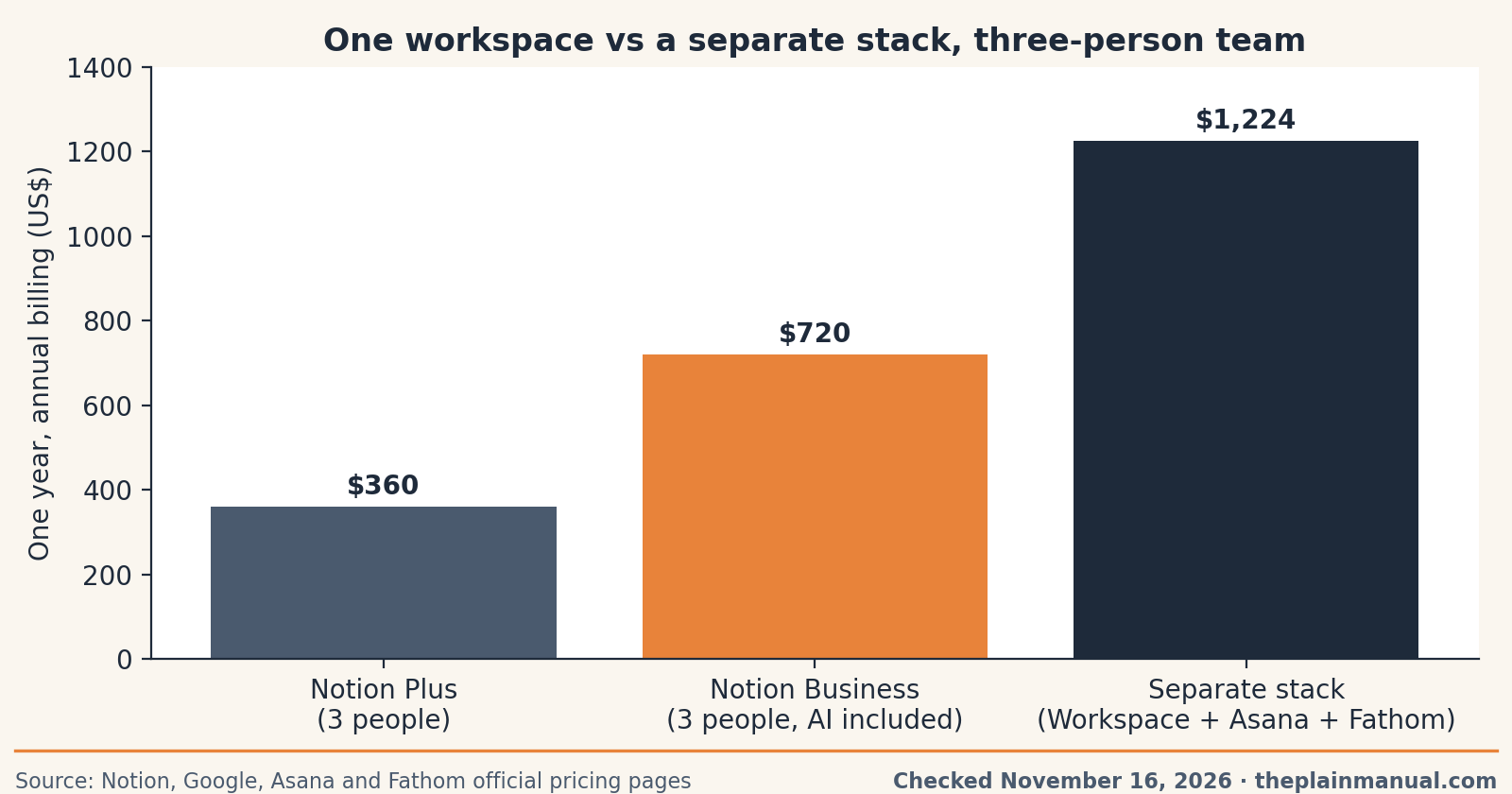
Read the table carefully, because the honest version has a wrinkle. Most teams keep Google Workspace or Microsoft 365 for email whatever they choose, so the true saving is the project tool and the meeting-notes tool, not the whole $1,224. Even with that wrinkle, one Business seat at $240 a year replaces a general AI subscription that commonly costs $20 a month on its own: for three people, the AI alone bought separately is $720 a year, the same as Notion Business for the whole team. Our personal AI stack audit covers the household version of this same overlap.
The price tag test: Notion Plus costs $10 per member per month billed yearly, $120 per person per year, and the one thing that blocks a simpler sentence is the per-member rule, because every teammate you add as a member adds that same $120.
Buy now or wait: no dated Notion sale window appeared in this run's research, and Notion is known in this site's coverage for stable list prices rather than seasonal discounts. The documented lever is billing yearly instead of monthly, which saves $24 per member per year on Plus and $48 on Business. Waiting gains nothing we could document.
Building a startup? You may not have to pay for Notion yet
Through the Notion Builders Program, founders and startups can apply for up to 3 months of Notion Business free, with Notion AI included. It is open to new or free Notion users who have never paid or trialed before, no credit card is needed, and Notion makes the call on approvals.
Full disclosure: that is our referral link. If you are approved, we may earn a reward, at no cost to you.
What Notion cannot do for you
Three limits deserve plain words before anyone cancels anything. First, accounting: no invoices, no bank connections, no tax reports, so the accounting app stays. Second, heavy databases: once records run into the thousands with tight links between them, a real database tool handles the load and Notion slows into frustration. Third, offline work: Notion is built to sync, so long stretches without a connection are its weakest setting, and a local-first app wins there. Our Notion vs Obsidian comparison covers that trade in full.
FAQ
Is Notion free for a tiny team?
Only in a narrow shape. One member gets unlimited pages and blocks, with up to 10 guests. Once a workspace has two or more members, the free plan caps the whole workspace at 1,000 blocks in total, with uploads up to 5 MB per file and 7 days of page history.
How much is Notion for three people?
Plus costs $360 a year for three members on annual billing. Business costs $720 a year for three. Monthly billing raises those to $432 and $864.
Does Notion Plus include AI?
No. Free and Plus include a limited trial of Notion AI. Full AI, including the Agent, AI Meeting Notes, and Enterprise Search, starts on Business at $20 per member per month billed yearly. The old separate AI add-on was retired in May 2025.
Can clients see our workspace without costing us seats?
Yes, as guests. Guests are free, see only the pages you share with them, and do not count as members. Plus and Business allow unlimited guests; Free allows 10.
What should a tiny team keep outside Notion?
Accounting and invoicing, any heavy database work, and your email. Most teams also keep their file storage where it already lives and link to files from Notion pages.
First 30 days with your pick
Week 1 setup: build the five pages in this order: the team home page, the task database, the meeting-notes page, the client pipeline, and the content calendar. Move this week's real work in before inviting anyone, and invite clients as guests, not members.
Weeks 2 to 4, watch out for: the junk-drawer drift. Pages created in a hurry with no home become unfindable by week three, so spend ten minutes each Friday filing or deleting. On Plus, watch whether anyone actually opens the AI trial; that answer decides the Business question better than any feature list.
Day-30 keep or cancel check: your first renewal is a year away on annual billing, so the day-30 check is about fit. Ask: did the team open this workspace daily without being reminded, and can everyone find last week's meeting notes in under a minute? Two yes answers mean keep it and cancel the replaced tools. A no means simplify the setup before adding anything else.
Was this post useful? Answered it / Out of date / Still confused
Method: Research review (no hands-on testing). Notion plan prices and limits checked November 16, 2026 on Notion's official pricing page as reported in November 2026 checks of that page; Google Workspace, Asana, and Fathom prices as verified by this site in October 2026.
Corrections: Spotted an error? Tell us, and we fix mistakes publicly.
Prices: US list prices; verify before buying.
Source: Notion's official pricing page
Run your own numbers: Our free Subscription Cost Calculator shows what a $120 or $240 per-person tool becomes over five years, for a whole team.