*Editor's Note: New post, November 2026. Prices and free-plan limits checked November 14, 2026, on official pricing pages.*
*Research review: free-plan limits, seat caps, and first paid prices verified November 14, 2026 against the official pricing pages for Trello, ClickUp, Asana, Notion, and monday.com. No pick below depends on a claim that we ran client work through these tools.*
In a sentence: most freelancers can run real client work on a free plan all year, and the right free plan is the one whose first limit is one your work never touches.
Plain-English Verdict
Trello Free is the pick for most freelancers: unlimited cards, up to 10 collaborators, and boards a client can understand at a glance. ClickUp Free Forever gives you the most machinery for $0, with unlimited tasks and people, if you can live with 60 MB of file storage. Asana Personal and Notion Free each win a narrower job, for a two-person partnership and for document-heavy solo work, and monday.com's free plan is a tryout, not a working tier.
The worry: you set up a tidy board, invite your clients in, and they quietly go back to email because the tool asks for one more login and one more interface to learn, so requests land in four places at once and the unlogged ones turn into unpaid work. Practitioner writing through 2026 keeps reporting that pattern, and it is why the simplest board a client will open beats the most powerful one they will not.
How we checked this
Checked: the official pricing pages for Trello, ClickUp, Asana, Notion, and monday.com, read November 14, 2026; ClickUp's pricing-page FAQ on guest permissions; AppBrain's Google Play data for Trello.
Date: November 14, 2026.
Method: Research review. See How We Review. We earn nothing if you sign up, and there are no affiliate links here.
Here is what this guide does in one sentence. It ranks the free plans by the first limit a working freelancer would actually hit, then prices the first paid step in full.
Jargon Decoder: "Seat" just means: one paid person with a login. When a plan bills per seat, every helper who needs their own login raises the bill, even if they open the tool twice a month.
Our picks, by role
Trello Free: our pick for most freelancers
Boards, lists, and cards, with unlimited cards and up to 10 collaborators. A client who has never seen it understands it in about a minute, and that minute is the whole argument.
ClickUp Free Forever: our pick for the most machinery at $0
Unlimited tasks and unlimited members, plus docs, a calendar view, sprint tools, and time tracking. The price of that machinery is a 60 MB ceiling on file attachments for the whole Workspace.
Asana Personal: our pick for a two-person partnership
Unlimited tasks and projects for exactly two users, with list, board, and calendar views and generous 100 MB per-file uploads. The third person ends the free plan.
Notion Free: our pick when the project is mostly documents
Project databases, subtasks, and dependencies inside the same pages as your briefs and notes, with unlimited blocks for one person and up to 10 guests. Files cap at 5 MB each.
monday.com Free: a tryout, not a working tier
Two seats, three boards, and 200 items total, with no guests and no automations. Fine for testing the look of the tool. Too small to run a practice on.
Would they renew? Our lead pick is Trello, and its published signal is scale with reservations: its Android app held a Google Play rating of 3.76 out of 5 from 114,033 ratings, with about 31 million installs, in AppBrain's November 2026 data. Millions keep it installed; the middling score says a vocal share grumble while they keep it.
Skip this if…
Trello Free — you run more than 10 client boards at once
ClickUp Free Forever — clients send you large files every week
ClickUp Free Forever — a client guest must not be able to edit everything
Asana Personal — a third person needs to work in the tool
Notion Free — your deliverables are files bigger than 5 MB
monday.com Free — you need a client to see a board as a guest
Quick poll: How are you running client work right now? Free plan, paid plan, or email and a spreadsheet? The honest answer decides which section below is yours.
The picks, one by one
Trello Free
What we like: The free plan is a working plan. Unlimited cards, assignees and due dates, unlimited Power-Ups (the add-ons that connect other apps), an unlimited activity log, and room for 10 collaborators, which covers a freelancer, an assistant, and several clients. Capture is the quiet strength: to-dos arrive from email, Slack, and Microsoft Teams into an inbox, then land on a board once sorted.
What could be better: The catch: structure is the cap. A free Workspace holds up to 10 boards, so one board per client stops working at client eleven, and files cap at 10 MB each, so video drafts live somewhere else. The calendar-style Planner is view-only free, and the extra views sit on Premium.
Pricing: Free, $0. Standard, the first paid step, is $5 per user per month billed annually, $60 a year for one person, and removes the board and collaborator caps.
Our take: Who it's for: freelancers whose clients need to see progress without learning software. One board per client, three lists (To do, Doing, Done), and a card per deliverable is the whole system. Our earlier Trello vs Asana comparison covers the head-to-head.
ClickUp Free Forever
What we like: On paper this is the most generous free plan here. Unlimited tasks and subtasks, unlimited members and guests at no charge, collaborative documents, Kanban boards, a calendar view, sprint management, time tracking, and 24/7 support, all at $0 with no credit card.
What could be better: The fine print: two limits do the real gating. The whole Workspace gets 60 MB of file storage, and only attachments count, so text-heavy work can run for months while one folder of screenshots ends the free run in a week. And on the free plan, guests have full create and edit permissions that cannot be modified, in ClickUp's own words, so a client invited in can change anything. Today's short post covers that second limit in full. Paid features also arrive as a fixed number of "uses" that never reset, so the Gantt chart is a demonstration, not a tool.
Pricing: Free, $0. The first paid step is the new Core plan at $9 per user per month billed yearly, $108 a year for one person, and an upgrade covers the entire Workspace, so every member becomes a paid user at once.
Our take: Choose ClickUp when the work is yours and your subcontractors', and the files live in Drive or Dropbox anyway. Keep clients out of the Workspace, or accept that they can edit what they see.
Asana Personal
What we like: Personal is the calmest free plan here for structured work: unlimited tasks and projects, list, board, and calendar views, status updates that replace the weekly progress email, and more than 100 free integrations. File uploads are the most generous on this page, unlimited in count with a 100 MB ceiling per file.
What could be better: The price: the cap is people, and it is low. Personal covers two users, with no guest route around it on the free plan, so the day a bookkeeper or a regular client needs real access, the free plan is over. Asana's AI features also start on the paid tiers.
Pricing: Free, $0 for two users. Starter is $10.99 per user per month billed annually, $131.88 a year for one person, and it adds timelines, dashboards, unlimited automations, forms, custom fields, and unlimited free guests.
Our take: The right free plan for a two-person studio, or a freelancer plus one steady collaborator. If clients need to watch progress, Trello fits better at $0.
Notion Free
What we like: Notion treats a project as a database inside your notes, so the brief, the meeting record, and the task list share one page. The free plan includes subtasks and dependencies, custom properties, basic forms, Notion Calendar, and a trial of Notion AI. For one person it is roomy: unlimited pages and blocks, and up to 10 guests invited to individual pages, a clean way to show one client one project.
What could be better: Who it's for: the limits arrive with company and with files. Add a second member and the free plan's block allowance becomes limited (Notion's help center puts the shared-workspace cap at 1,000 blocks), uploads cap at 5 MB per file, and page history reaches back only 7 days.
Pricing: Free, $0. Plus is $10 per member per month billed yearly, $120 a year for one person, and it lifts the block limit, raises uploads to 5 GB per file, and extends page history to 30 days.
Our take: Pick Notion when your project work is mostly writing and tracking, and your files live in cloud storage you link to rather than upload. Our Notion vs Obsidian comparison covers the notes-first side.
monday.com Free
What we like: The boards are bright, the templates are plentiful (200 or more), and for two people testing whether a board habit sticks at all, three boards of looking costs nothing.
What could be better: The catch: every number is small. Two seats, three boards across the whole account, 200 items total, 500 MB of storage, no guests at all, and no automations or integrations. A freelancer with four active clients runs out of boards quickly, and no client can see a board without a seat.
Pricing: Free, $0 for up to two seats. Paid plans start at a three-seat minimum: Basic at $9 per seat per month billed annually means $27 a month, $324 a year, for a solo freelancer paying for two empty seats. That minimum, not the headline $9, is the real first paid price.
Our take: Try it free if the look appeals to you. Do not build a practice on the free plan.
Pricing side by side
| Tool | Free plan's first real limit | First paid step (annual billing) | One person, one year |
|---|---|---|---|
| Trello | 10 boards and 10 collaborators per Workspace | Standard, $5/user/mo | $60 |
| ClickUp | 60 MB of attachments, Workspace-wide | Core, $9/user/mo | $108 |
| Notion | 5 MB per file; blocks limited with 2+ members | Plus, $10/member/mo | $120 |
| Asana | 2 users, no third person | Starter, $10.99/user/mo | $131.88 |
| monday.com | 3 boards, 200 items, no guests | Basic, $9/seat/mo, 3 seats minimum | $324 |
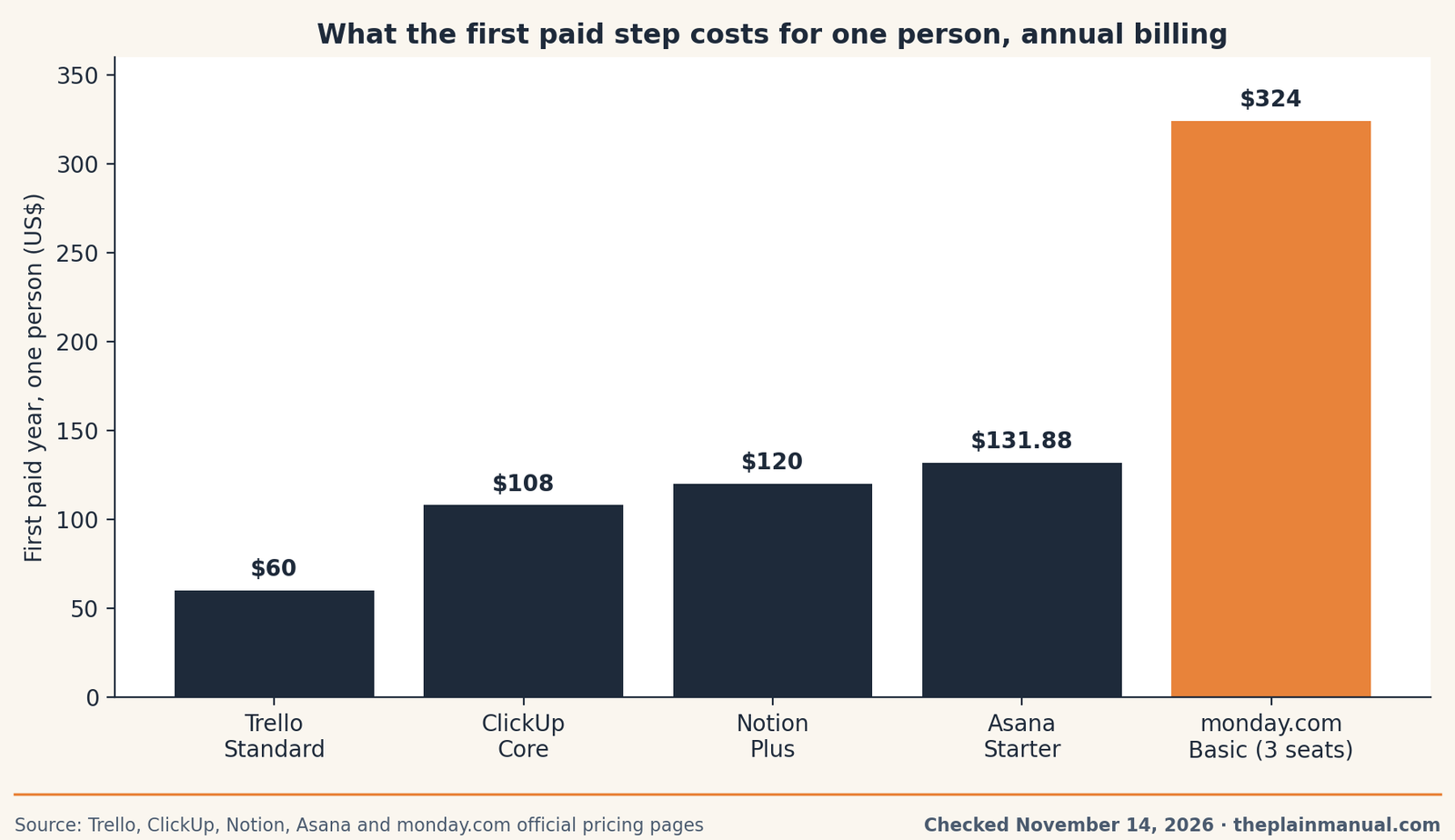
The price tag test: Trello Standard costs $5 a month billed annually, $60 for a solo freelancer's year, and that sentence is the whole price, with no seat minimum behind it.
Buy now or wait: every pick above is free, so the timing question is about the upgrade, and no dated sale window for these tools appeared in this run's research. The free plans are permanent rather than trials, so waiting costs nothing and gains nothing. Start free, and let a limit you actually hit be the reason you pay.
How to choose in ten minutes
Count three things: how many clients are active at once, how many people need to work inside the tool, and how your files arrive. More than 10 active clients points past Trello's board cap toward ClickUp. A steady partner and no client access points to Asana Personal. Work that is mostly documents points to Notion. One board per client with clients watching points back to Trello. Our guide to the best project tool for a two-person business covers the paid end.
One setup rule protects every choice: review the free plan's counters monthly, so the first limit arrives as a planned upgrade rather than a locked board on a deadline morning.
FAQ
Can a freelancer really run client work on a free plan?
Yes, while the work fits the plan's first limit. Trello Free covers up to 10 boards and 10 collaborators, a real practice for most solo freelancers. These free plans are permanent, not trials.
Which free plan allows the most people?
ClickUp Free Forever, with unlimited members and guests at no charge. Its binding limits sit elsewhere: 60 MB of attachments Workspace-wide, and guests who can edit everything they can reach.
Which free plan should a two-person team pick?
Asana Personal, built for exactly two users with unlimited tasks and projects. If clients also need access, Trello Free's 10 collaborators fit better at $0.
What is the cheapest first upgrade?
Trello Standard at $60 a year for one person on annual billing. The priciest first step here is monday.com Basic at $324 a year, because paid plans start at three seats.
When should I pay at all?
When you can name the limit you hit: the eleventh board, the third person, the file that will not upload.
First 30 days with your pick
Week 1 setup: create the Workspace, build one board per active client (or one Space, in ClickUp's terms), set the three-list flow of To do, Doing, and Done, and move this week's real work in before inviting anyone. Add due dates to everything already promised.
Weeks 2 to 4, watch out for: the counters. Boards creep toward 10 on Trello, so archive finished clients weekly. ClickUp's 60 MB fills silently through screenshots, so link files instead of attaching them. On Asana Personal, notice the first time you wish a third person could see a task: that wish is the upgrade signal.
Day-30 keep or cancel check: every pick here is free, so the check is about fit rather than a renewal charge. Ask one question: did a client open this tool without being reminded this month? If yes, keep it and stay free until a named limit bites. If no, simplify to the board your clients will open.
Was this post useful? Answered it / Out of date / Still confused
Method: Research review (no hands-on testing). Free-plan limits and prices checked November 14, 2026 on the official pricing pages for Trello, ClickUp, Asana, Notion, and monday.com, with ClickUp's guest wording from its pricing-page FAQ and monday.com's limits from its help center as reported in November 2026 coverage.
Corrections: Spotted an error? Tell us, and we fix mistakes publicly.
Prices: US list prices; verify before buying.
Source: Trello's official pricing page and ClickUp's official pricing page
Run your own numbers: Our free Subscription Cost Calculator shows what a $60 or $132 yearly tool becomes over five years.