*Editor's Note: New post, November 2026. Prices checked November 6, 2026, at regular list prices on annual billing unless a monthly price is stated.*
*Research review: pricing, seat minimums, and free-plan limits verified November 6, 2026 against the tools' official pricing pages and October and November 2026 pricing coverage of those pages. We did not run a live project inside any of these tools for this piece.*
In a sentence: for a business of exactly two people, Trello Free covers the job at $0 for most pairs, Asana Personal is the stronger free plan when deadlines run the work, and monday.com charges a pair for three seats.
Plain-English Verdict
Start free. Trello Free allows up to 10 collaborators in one Workspace, real headroom at $0. If your work is a chain of deadlines, Asana Personal is free for exactly two people and adds structure Trello saves for paid plans. Pay only when a named limit bites, and check the seat minimum before the sticker price.
The worry: you pay per seat for a tool built for a company of fifty, the second person quietly stops updating it, and the real project list drifts back to texts and email while the subscription keeps billing. Small-team pricing coverage in 2026 keeps finding the same trap under the sticker price: seat minimums, guest rules, and automation caps decide what a tiny team pays.
How we checked this
Checked: Trello's and ClickUp's official pricing pages, read November 6, 2026 (free limits, seat prices, ClickUp's new Core lineup and 60 MB storage cap); Asana, monday.com, and Notion pricing as read on their official pages in October and November 2026 coverage.
Date: November 6, 2026.
Method: Research review. See How We Review. We earn nothing if you buy any plan, and there are no affiliate links in this post.
Here is what a project tool does in one sentence. It keeps one shared list of who is doing what, by when, where both of you can see it. In a two-person business every per-seat charge lands twice, every seat minimum lands on seats that do not exist, and an afternoon of setup is an afternoon with no one left to do the work.
Jargon Decoder: "Per seat" just means per person with a login. Two people, two seats, and on some plans a minimum of three.
Our picks, by role
Trello: our pick for most two-person businesses
Trello is the pick when your work fits on boards: one board per client or project, with cards moving from to-do to done. Free covers up to 10 collaborators per Workspace, so a pair can add a contractor later without a bill appearing.
Asana Personal: our pick when deadlines run the business
Asana Personal is free for up to two users, which describes your business exactly, with unlimited tasks and projects. The catch arrives with person number three: from there, everyone moves to a paid seat.
ClickUp: our pick for doing more jobs in one place
ClickUp packs tasks, docs, time tracking, and chat into one account. Its free plan allows unlimited tasks and unlimited free members, with one small, hard limit on storage, covered below.
Notion Plus: our pick when the notes are the project
If your projects live inside documents and briefs, Notion keeps the plan and the paperwork in one place. The free plan gets tight for two, so most pairs should budget for Plus.
monday.com: the good-looking board with a seat trap
monday.com makes the prettiest status boards in this group, and clients understand them at a glance. The pricing works against a pair: paid plans start at three seats, so you pay for a colleague who does not exist.
A shared doc: the honest $0 pick
For some pairs the right project tool is a shared document you already have: one list, one owner column, one due-date column, reviewed weekly. It costs $0 extra and never charges for a third seat. A later section gives you the test for when the doc stops being enough.
Would they renew? Our top pick, Trello, is free for most pairs, so there is no renewal to judge. Its published signal is a Google Play rating of 3.76 stars from 114,019 ratings, data updated November 4, 2026 (via AppBrain): a huge user base with a middling score, which fits a simple tool many people use lightly.
Skip this if…
Trello — your work needs timelines and workload views daily
Asana Personal — a third person joins your projects this year
ClickUp — you attach a lot of files and photos
Notion Plus — you want a board first and documents second
monday.com — paying for a third, empty seat bothers you
A shared doc — work keeps slipping because nobody sees due dates
The picks, one by one
Trello
What we like: Two people fit easily inside the free limit of 10 collaborators per Workspace, and free boards carry unlimited cards, checklists, and due dates. When a paid feature calls, Standard is $5 per user per month billed annually, so $120 a year for two, and it lifts the board limit, adds custom fields and advanced checklists, and raises automation to 1,000 command runs a month. Premium, at $10 per user per month annually, adds the Calendar, Timeline, Table, and Dashboard views.
What could be better: The catch: Trello stays simple by leaving out the management layer. Timelines and cross-board views wait for Premium, and no workload view warns you when one partner has twelve jobs due Friday. On a paid Workspace, a guest on two or more boards becomes a billable member, so a client added casually to a second board can add a seat to your bill.
Pricing: Free for up to 10 collaborators and 10 boards per Workspace. Standard $5 per user per month billed annually ($6 monthly), $120 a year for two. Premium $10 annually ($12.50 monthly), $240 a year for two.
Our take: Who it's for: pairs whose work is a set of boards: client jobs, orders, listings, content. Start free, and let the 10-board limit tell you when to pay.
Asana
What we like: Personal is the only free plan here sized exactly to your business: up to two users, unlimited tasks and projects, and list, board, and calendar views at $0. Starter adds Timeline and Gantt views, task dependencies, forms that turn requests into tasks, custom fields, unlimited automations, and unlimited free guests, which suits client work.
What could be better: The price: the step from free to paid is steep. Starter is $10.99 per user per month billed annually, so a pair pays $263.76 a year, and Advanced jumps to $24.99 per user per month for portfolios, goals, and workload tools a two-person business rarely needs.
Pricing: Personal free for up to 2 users. Starter $10.99 per user per month billed annually ($13.49 monthly), $263.76 a year for two. Advanced $24.99 annually ($30.49 monthly).
Our take: Pick Asana when one missed handoff costs more than $264 a year. Recurring work with dependencies, like a launch checklist, is where it earns the step up.
ClickUp
What we like: Breadth at a fair seat price. The free plan allows unlimited tasks and members, with docs, boards, a calendar view, and time tracking. Core, the first paid plan on the page we read on November 6, 2026, is $9 per user per month billed yearly, so $216 a year for two, with unlimited storage and Gantt charts, custom fields, and 1,000 automations a month.
What could be better: The fine print: two items deserve a hard look. The free plan's storage cap is 60 MB for the whole workspace, and ClickUp's pricing-page FAQ says file attachments are the only thing that counts against it, so a pile of phone photos can fill it. And the Core price carries a struck-through regular price of $12 per user per month, so budget $288 a year for two at renewal if the $9 figure is a promotion at your signup. Upgrades apply to the whole Workspace: every member moves and bills together.
Pricing: Free Forever $0, with 60 MB of storage. Core $9 per user per month billed yearly ($12 regular price shown on the same page), $216 a year for two at the shown price. Business $17 billed yearly ($25 regular shown).
Our take: Pick ClickUp when you want tasks, docs, and time tracking under one login, and give it one focused hour of setup at the start. Its breadth is also its learning curve.
Notion
What we like: Notion is the strongest pick when the project and the paperwork are the same thing: brief, notes, checklist, and delivery list on connected pages. Plus is $10 per member per month billed annually, $240 a year for two, with unlimited blocks, file uploads, 30-day page history, and custom forms.
What could be better: The free plan is where pairs get squeezed. Notion describes free as unlimited for one person, with blocks limited once a workspace has two or more members, 5 MB uploads, and 7 days of page history. Full Notion AI waits for Business at $20 per member per month, $480 a year for two, so price the AI from Business if the AI is why you are buying.
Pricing: Free $0, limited for two or more members. Plus $10 per member per month billed annually ($12 monthly), $240 a year for two. Business $20 annually ($24 monthly).
Our take: Who it's for: pairs who write as they work: consultants and creators whose deliverable starts as a document. If your work is mostly cards on a board, Trello does that job with less setup.
monday.com
What we like: The boards are genuinely clear. A client can read a monday status board in seconds, and Standard adds Timeline, Gantt, and calendar views plus guest access. For client-facing status reporting, that clarity has real value.
What could be better: The catch: at your size, the seat rules are the story. The free plan covers up to 2 seats and 3 boards, which fits a trial and little else. Every paid plan carries a 3-seat minimum, and seats sell in buckets, so two people pay for three: Basic is $9 per seat per month billed annually, $324 a year for a pair, and Basic leaves out automations and integrations entirely. Standard, the first plan with automations, is $12 per seat, so $432 a year for two people in three paid seats.
Pricing: Free for up to 2 seats. Basic $9 per seat per month billed annually ($12 monthly), sold from 3 seats, $324 a year minimum. Standard $12 annually ($14 monthly), $432 a year minimum. Pro $19 annually.
Our take: Pick monday only when its boards will face clients often enough to justify the empty seat. Price it at $432 a year, the real Standard figure for a pair.
Pricing side by side, for exactly two people
| Tool and plan | What two people pay per year | The limit that matters at your size |
|---|---|---|
| Trello Free | $0 | 10 collaborators, 10 boards |
| Trello Standard | $120 | Guests on 2+ boards become billable |
| Asana Personal | $0 | Free stops at 2 users |
| Asana Starter | $263.76 | Paid plans start at 2 seats |
| ClickUp Free Forever | $0 | 60 MB storage total |
| ClickUp Core | $216 at the shown price | Regular price shown as $12 per user |
| Notion Plus | $240 | Free limited for 2+ members |
| monday.com Standard | $432 | 3-seat minimum for a pair |
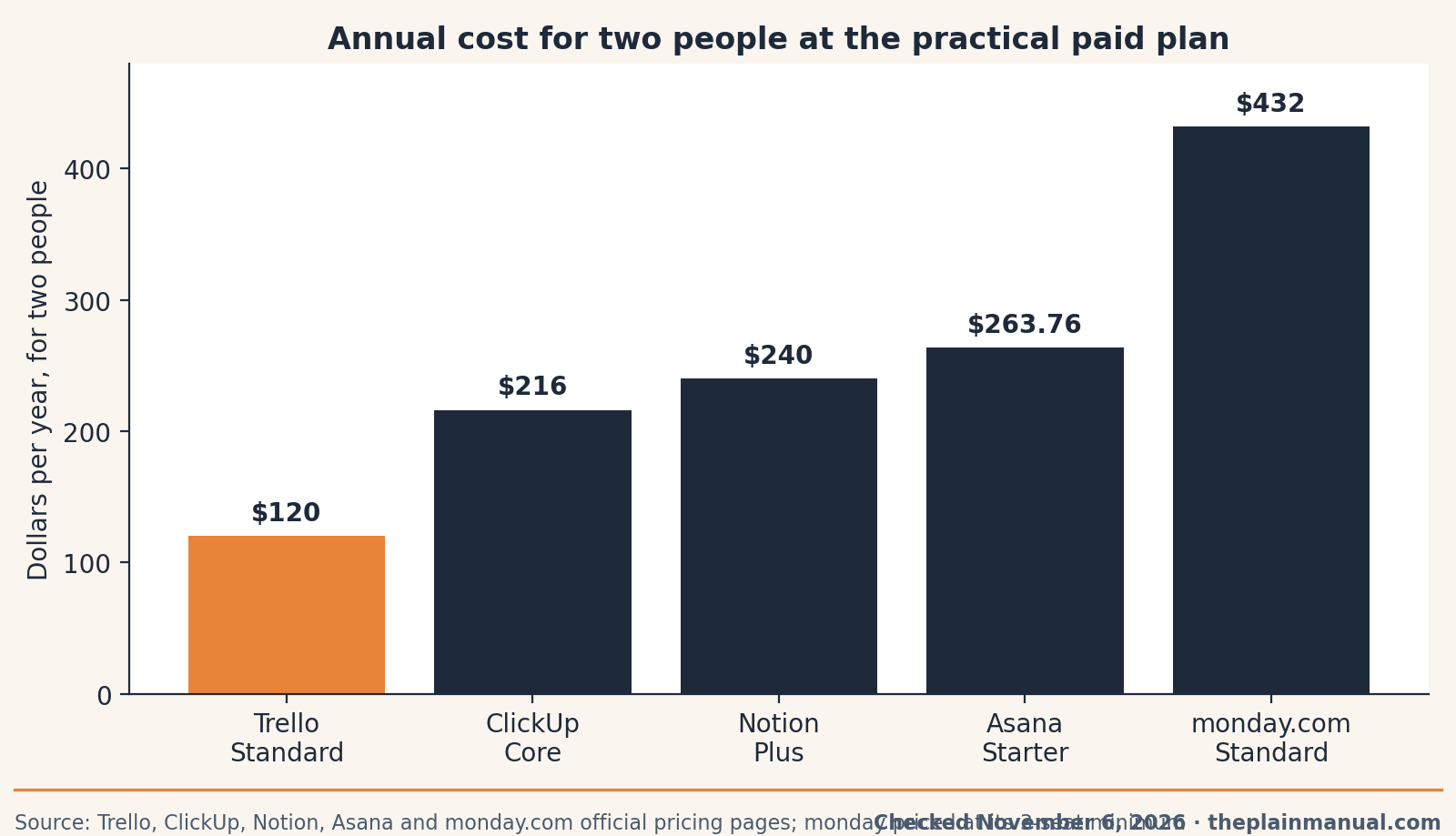
The price tag test: Trello Free costs $0 for up to 10 collaborators and 10 boards in one Workspace, and that is the whole price for most two-person businesses.
Buy now or wait: our research found no documented sale window for any pick, and every pick runs a free plan, so waiting gains nothing we can verify; the free plans do the waiting for you, and annual billing is the standing discount on paid rows.
The fine print: every annual figure uses annual billing at list prices checked November 6, 2026. Monthly billing raises each per-seat price, and monday.com's figures use its 3-seat minimum, because a pair cannot buy two seats.
When the shared doc stops being enough
A project tool earns its subscription the week three things happen together: jobs slip because the list lives in two places, one of you keeps asking "did you see my note?", and a client needs to see progress without joining your text thread. Until that week, the shared doc plus a 15-minute Monday review is a rational system, as our guide to the best simple to-do app argues for personal lists. When that week arrives, start with Trello Free or Asana Personal (see our Trello vs Asana and Asana vs monday.com comparisons).
FAQ
Is a free project tool enough for two people?
Usually, yes. Trello Free covers up to 10 collaborators, Asana Personal covers exactly 2 users with unlimited tasks, and ClickUp Free allows unlimited members. The limits that bite first are boards on Trello, storage on ClickUp, and the third person on Asana.
Why does monday.com charge us for three seats when there are two of us?
Its paid plans carry a 3-seat minimum, sold in fixed buckets. A pair pays the 3-seat figure on any paid plan: $324 a year on Basic, $432 on Standard.
What will these tools cost when we hire a third person?
On per-seat plans, the third person adds one seat: $60 a year on Trello Standard, $131.88 on Asana Starter, $120 on Notion Plus. Asana Personal cannot add a free third user, so the whole team moves to Starter. A monday pair is already paying for that seat.
Can clients look at our boards without a paid seat?
Sometimes. Asana Starter includes unlimited free guests. On Trello's paid plans, a guest on one board is fine, and a guest on two or more boards becomes billable. Check the rule before inviting a client to a second board.
Run your own numbers: every paid row above is a subscription, and subscriptions compound quietly. Our free Subscription Cost Calculator shows what $120, $264, or $432 a year becomes over five and ten years.
Method: Research review (no hands-on testing). Cross-checked against Trello's and ClickUp's official pricing pages read November 6, 2026, and Asana, monday.com, and Notion pricing as read on their official pages in October and November 2026 coverage. Checked November 6, 2026.
Corrections: Spotted an error? Tell us, and we fix mistakes publicly and date them.
Prices: US list prices; verify before buying.
Source: Trello's official pricing page and ClickUp's official pricing page