
Editor’s Note: New post, October 2026. Free-tier limits checked October 23, 2026. One warning before the picks: Skype retired on May 5, 2025. Any list that still recommends it is out of date. Its replacement, Microsoft Teams Free, is in the field below.
Research review: participant and time limits verified October 23, 2026 against Google Meet’s help pages, Microsoft’s Teams Free and Skype retirement pages, Cisco’s Webex pricing page, Zoom’s pricing page, and WhatsApp’s October 14, 2026 Guest Calling announcement. We did not run a club call on each service for this piece.
In a sentence: For most clubs and groups, the best free video call tool is Google Meet, because a free group call lasts a full 60 minutes, holds up to 100 people, and anyone can join from a browser link with no download and no account.
Plain-English Verdict
Start with Google Meet if your meetings fit inside an hour, which most book clubs, hobby groups, and committee calls do. If your group regularly talks past an hour, use WhatsApp’s new guest calling (up to 32 people, no time limit, guests join from a browser with no WhatsApp account) or Jitsi Meet (no account for anyone, host included). Pay only if you need cloud recording: that, not extra minutes, is the thing free plans actually lock away.
How we checked this
Checked: Google Meet’s official limit documentation, Microsoft’s Teams Free limits and its Skype retirement notice, Cisco’s Webex pricing page, Zoom’s official pricing page, WhatsApp’s October 14, 2026 announcement, plus Jitsi and Discord’s published limits, all read October 22 to 23, 2026.
Date: October 23, 2026.
Method: Research review. See How We Review. We earn nothing if you buy any of these plans, and there are no affiliate links in this post.
Here is what a video call tool does in one sentence. It puts your group’s faces in one window so you can talk without everyone driving to the same room.
Every tool below is free to start. They differ in three ways that matter to a club: how long a group call lasts before it cuts off, how many people fit, and how much fuss the least technical member faces when joining. We judged them on those three things. One rule explains most pricing confusion here: on Zoom, Meet, Webex, and Teams, only the host’s plan sets the time limit. Members who join do not each need a paid seat.
The picks, by kind of group
Google Meet: our pick for most clubs and groups
Our pick for most people. Meet is the video tool attached to a normal Google account. The host needs a free Google account. Everyone else just clicks a link in their browser.
What we like: the hour, and the manners. A free group call (three or more people) runs up to 60 minutes, with a warning at about 55 minutes, and up to 100 people can join. One-to-one calls can run up to 24 hours. Guests can join from a browser link without an account, and the host admits them. For a 45 to 60 minute book club, that is the whole job, done free.
What could be better: The catch: there is no recording on the free plan, and the 60-minute wall is firm. When it hits, the call ends and someone has to start a new one.
The price: free for the limits above. Longer group calls are a paid Google Workspace feature, and we are not printing a per-person Workspace price here because most clubs will never need it. If your treasurer is the only one who might pay, that is a hosting decision, not a per-member bill.
Our take: if your group already lives in Gmail and Google Calendar, there is nothing to install and nothing to explain. This is the default for a reason.
WhatsApp: our pick when the call runs long and the group is 32 or fewer
Best for groups that talk past an hour. WhatsApp group video holds up to 32 people with no time limit, and since October 14, 2026, guests can join from a computer browser through a call link with no WhatsApp account and no app. We covered that change on its own in today’s short note.
What we like: no clock. A two-hour family call or a long committee argument does not get cut in half, calls are end-to-end encrypted (in plain English: scrambled so only the people on the call can understand them), and the host approves each guest from a waiting room.
What could be better: the host still needs a WhatsApp account to create the link, guest joining is a computer-browser feature (do not promise it from a phone browser), and 32 is a hard ceiling. Guests also cannot send messages in the call or invite anyone else.
The price: free. There is no paid WhatsApp tier for ordinary users to buy their way out of the 32-person cap.
Our take: for most families and small clubs, this quietly became the easiest long call in the list, especially if half the group already has WhatsApp on their phone.
Jitsi Meet: our pick when nobody should need an account
Best for the group with one member who refuses every signup. Jitsi Meet’s public site (meet.jit.si) needs no account, no download, and has no stated time limit. The host needs no account either, which no other pick here can say.
What we like: zero friction. Send a link, everyone clicks, you are talking. It is the closest thing on this list to walking into a room.
What could be better: The fine print: it runs on shared public computers, with no promise of support. Jitsi’s own guidance puts a hard participant limit around 75, with quality straining well before 100 people, roughly past 35. For a 10-person club that is fine. For a 60-person lecture, pick something else.
The price: free on the public site.
Our take: the zero-friction pick, not the heavy-duty pick. Wonderful for a casual group, wrong for anything that must not wobble.
Microsoft Teams Free: our pick for Microsoft households and Skype refugees
Best for groups already in Microsoft accounts, and for anyone still looking for Skype. Skype retired on May 5, 2025, and Microsoft points its users here: Skype sign-ins, contacts, and chats carry over to Teams Free.
What we like: the same honest hour as Meet. Free group meetings hold up to 100 people for up to 60 minutes, joining from a browser without an account is supported, and each user gets 5 GB of cloud storage for shared files.
What could be better: the app is busier than a club needs, with channels and chats a book club will never open, and there is no recording on the free plan. The interface asks more of your least technical member than Meet does.
The price: free for the limits above.
Our take: a perfectly good 60-minute tool, and the natural home if your group was a Skype group. New groups starting from zero will usually find Meet simpler.
Zoom Workplace Basic: the familiar name, with the shortest free clock
Best for groups whose members already know Zoom and whose calls are short. Zoom’s free Basic plan holds up to 100 people, and almost everyone has joined a Zoom call by now, which is a real advantage with a nervous group.
What we like: familiarity, and local recording. Basic lets the host record onto their own computer, which free Meet and free Teams do not offer at all. Screen sharing and the waiting room work the way your members remember.
What could be better: The price: of the free clock, that is. Group meetings stop at 40 minutes, which cuts a normal book club in half. Zoom also leans harder on its app than the browser-first tools above.
The price: free at 40 minutes. If the host pays for Zoom Workplace Pro, meetings run up to 30 hours with 10 GB of cloud recording per license, at $14.16 per user per month billed annually (about $169.92 a year) or $16.99 a month billed monthly, per Zoom’s pricing page checked October 23, 2026. Remember the host rule: only the host needs that license for the longer limit.
Our take: fine for a 30-minute check-in. For an hour-long club, the 40-minute cutoff makes it the wrong free default in 2026, whatever your group’s habits say.
Webex Free and Discord: two honest also-rans
Webex Free, best for a group that wants a whiteboard in a short call. Cisco’s free plan allows unlimited meetings of up to 40 minutes each, up to 100 attendees, with screen sharing, whiteboards, and local recording included. What could be better: the same 40-minute ceiling as Zoom, with less familiarity to soften it. Its first paid tier, Starter, is $144 per user per year on Cisco’s pricing page and lifts meetings to 24 hours and 150 attendees. Our take: a solid, slightly corporate-feeling Zoom alternative. Nothing about it beats Meet’s free hour for a club.
Discord, best for gaming and hobby groups that already live there. Discord has no meeting time limit, and video in a server voice channel supports up to 25 people with their cameras on (group direct-message video is only 10). What could be better: every member needs a Discord account, and the server-and-channels layout is the least familiar interface here for a non-gaming member. Who it’s for: a group that already chats in Discord all week. For them it is effortless. For a book club starting cold, it is the hardest first step on this list.
One more one-liner: FaceTime group calls hold up to 32 and non-Apple guests can join by web link, but only someone with an Apple device and account can create that link, so it works only when your whole club is already on iPhone.
Skip this if…
Google Meet — meetings regularly run past an hour
WhatsApp — group bigger than 32, or no WhatsApp account to host
Jitsi Meet — the call can’t afford a wobble, or 30+ cameras on
Microsoft Teams Free — your least technical member finds busy apps stressful
Zoom Basic — your club talks for an hour; the 40-minute cutoff lands mid-sentence
Discord — members don’t already use it; the signup is the whole cost
The free limits, side by side
| Tool | Free group time limit | People | Join without an account? | Recording on free |
|---|---|---|---|---|
| Google Meet | 60 minutes | 100 | Yes, browser link (host needs a Google account) | No |
| Microsoft Teams Free | 60 minutes | 100 | Yes, browser | No |
| Zoom Basic | 40 minutes | 100 | Yes, link (app pushed) | Local only |
| Webex Free | 40 minutes | 100 | Yes, link (app pushed) | Local only |
| No time limit | 32 | Yes, computer browser (host needs an account) | No | |
| Jitsi Meet | No stated limit | Quality strains well before 100 | Yes, nobody needs an account | No |
| Discord | No time limit | 25 with video in a server channel | No, account required | No |
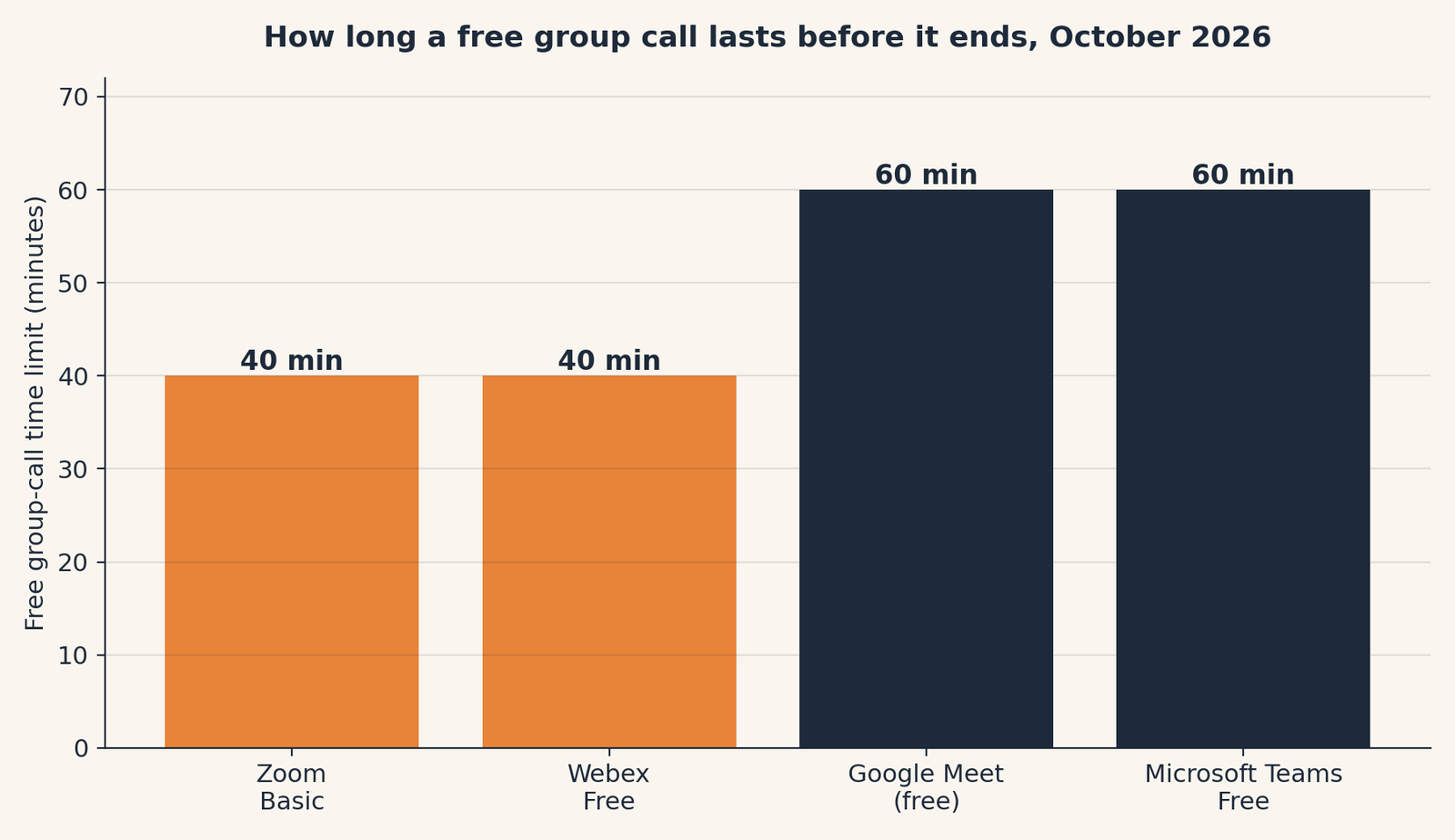
What changed: two things moved this year that older roundups miss. Skype is gone, retired in May 2025, so any guide still listing it is recycling. And WhatsApp’s October 2026 guest calling removed the oldest objection to WhatsApp, that everyone needed the app and an account. Guests now need neither, at least from a computer.
When paying actually makes sense
For a club, paying buys one of two things: a longer clock, or a recording in the cloud. The longer clock is usually free somewhere else on this page (WhatsApp and Jitsi have no clock at all), so the honest reason to pay is recording. Free Meet and free Teams cannot record. Free Zoom and free Webex record only onto the host’s computer. If your club records its meetings to share with absent members, a single paid host license is a real purchase, not a trap. Price it with our Meeting Cost Calculator habit in mind: one host license, not a seat for every member. And if your group is a working team rather than a club, our guide to AI meeting-notes tools for a small team covers the note-taking side of the same decision.
Jargon Decoder
“End-to-end encrypted” just means: the call is scrambled on your device and only unscrambled on the other people’s devices, so the company running the call cannot listen in the middle.
For a group spread across time zones, finding the hour is half the battle. Our free Time-Zone Meeting Planner takes up to four places, a date, and the hours each side is usually available, and answers in plain English: the window that works for everyone, or the least-bad one, naming who starts early or stays late.
Frequently asked questions
Is Google Meet really free for a group call?
Yes. With a free personal Google account, a group call of three or more people runs up to 60 minutes with up to 100 participants. One-to-one calls can run up to 24 hours. There is no recording on the free plan.
Does everyone in the group need a paid plan to get a longer call?
No. On Zoom, Meet, Webex, and Teams, only the host’s plan sets the time limit. If the host pays, the whole call gets the longer limit, and guests join free.
What replaced Skype for free group calls?
Microsoft Teams Free. Skype retired on May 5, 2025, and Microsoft moved its users to Teams Free, where Skype sign-ins, contacts, and chats carry over. Teams Free group meetings run up to 60 minutes for up to 100 people.
Can people join a WhatsApp call without a WhatsApp account?
Yes, since October 14, 2026. A host with a WhatsApp account creates a call link, and guests join from a computer browser by entering their name and waiting for the host to admit them. Group calls hold up to 32 people with no time limit.
Which free tool has no time limit at all?
WhatsApp (up to 32 people), Jitsi Meet (no account for anyone, quality strains at larger sizes), and Discord (up to 25 with video in a server channel, account required). Each trades the clock for a different catch, listed in the table above.
Run your own numbers: before your club pays anyone for longer calls or recordings, add up what the meetings themselves are worth with our free Meeting Cost Calculator. It takes a minute, nothing leaves your browser, and it usually settles the “should we just pay?” argument.
Method: Research review (no hands-on testing). Cross-checked against Google Meet’s official limit documentation, Microsoft’s Teams Free and Skype retirement pages, Cisco’s Webex pricing page, Zoom’s official pricing page, and WhatsApp’s October 14, 2026 announcement. Checked October 23, 2026.
Corrections: Spotted an error? Tell us, and we fix mistakes publicly and date them.
Prices: US list prices; verify before buying.
Source: Google Meet’s official help page on meeting limits for free accounts, read October 23, 2026.
Related Posts
 The Best Scheduling Tool for Coaches and Therapists (2026)
- The Best Email App for Inbox Overwhelm in 2026: Free Tools First
- Notion for a Tiny Team: One Workspace Instead of Five Tools (2026)
 The Best Free Project Management Tools for Freelancers in 2026
- The Best Project Tool for a Two-Person Business in 2026