Editor's Note: New post, November 2026. Prices and plan limits checked November 1, 2026, at regular list prices. Where a page shows a monthly figure for annual billing, we say so, because the renewal charge is the number that matters.
Research review: prices, storage limits, and plan features verified November 1, 2026 against Dropbox's official plans page, Google's official Google One plans page, and Google Workspace Help. We did not move a live library between the two services for this piece, and we say so wherever that matters.
In a sentence: Google Drive is the right home for most people's files in 2026, because it gives you 15 GB free and a cheap ladder of small plans, while Dropbox earns its higher floor only when fast sync and client file delivery are the actual job.
Plain-English Verdict
Start with Google Drive. Every Google account already includes 15 GB shared across Drive, Gmail, and Photos, and paid space starts at $1.99 a month for 100 GB, so most households can grow slowly instead of jumping straight to a big plan. Choose Dropbox when your work is moving large files to other people for a living: its sync uploads only the parts of a file that changed, its transfer tools are built for delivery, and its paid plans restore deleted files for far longer. Dropbox's free tier, 2 GB on three devices, is a sample, not a home.
The worry: you fill Google's shared 15 GB pool with photos, Gmail stops receiving mail until you free space or pay, and moving a large library to the other service later is a weekend job, not a settings change.
How we checked this
Checked: Dropbox's official plans page (Basic, Plus, Standard, and Advanced storage, prices, and recovery windows); Google's official Google One plans page (the free 15 GB shared pool and the paid storage ladder); Google Workspace Help on storage and upload limits (750 GB a day, 5 TB per file); Dropbox's published device limit for free accounts.
Date: November 1, 2026.
Method: Research review. See How We Review. We earn nothing if you buy either plan, and there are no affiliate links in this post.
Here's what each service does in one sentence. Google Drive is a filing room attached to Gmail and Docs. Dropbox is a delivery and sync service that stores files very well.
Jargon Decoder: "block-level sync" just means that when you edit a large file, Dropbox uploads only the small pieces that changed, instead of sending the whole file again. Think of mailing one corrected page instead of reprinting the whole book.
The 60-second decision tree
- You mostly write documents, spreadsheets, and slides with other people? Google Drive. Docs, Sheets, and Slides live inside it, and several people can edit the same file at once.
- You send large finished files to clients, and versions matter? Dropbox. Transfers, recovery windows, and fast sync are its home turf.
- You need a little more space than free, and not much more? Google Drive. The $1.99 and $2.99 steps exist there. Dropbox jumps from 2 GB free to 2 TB paid, with nothing small in between.
- Your team already pays for Google Workspace? Check first. Workspace includes Drive storage per person, so a Dropbox bill may duplicate space you own.
- Your budget is $0, full stop? Google Drive, at 15 GB free against Dropbox's 2 GB.
Our picks, by role
Google Drive: our pick for most people
Google Drive is the pick when your files are mostly documents and photos, your collaborators already have Google accounts, and you want the paid ladder to start small. The free 15 GB is real room for documents, the apps people edit in are built in, and sharing a file with anyone who has a Google account takes one link.
Dropbox: our pick for large-file work and client delivery
Dropbox is the pick when files are large, finished, and going somewhere: video exports, design folders, photo sets for a client. Its sync handles big files gracefully, its transfer feature delivers up to 100 GB on team plans, and paid recovery windows run to 180 days on Standard and a full year on Advanced, against 30 days on Plus.
Skip this if…
Google Drive — you need small paid steps beyond a shared pool that Gmail also drains
Google Drive — you regularly upload more than 750 GB in a day
Dropbox — 2 GB free and three devices is your whole budget
Dropbox — you want a cheap 100 GB middle step
TPM Scorecard: Dropbox vs Google Drive
| What we graded | Dropbox | Google Drive |
|---|---|---|
| What it costs (renewal prices) | 7 | 9 |
| Does the job (features) | 8 | 9 |
| Works where you work (platforms and extras) | 8 | 9 |
| Help when stuck (support and documentation) | 8 | 7 |
| Free version (what you get for $0) | 3 | 9 |
| Overall | 6.8 | 8.6 |
The gap is 1.8, and the free tier explains most of it. Google gives every account 15 GB with no device limit. Dropbox gives 2 GB and caps free accounts at three linked devices. Dropbox wins the support row honestly: its plans page lists priority email and live chat on paid plans, with phone support on higher tiers, while Google's human support mainly arrives with a paid Google One plan. The job row is close, because Dropbox's sync and delivery tools are excellent; Google takes it on the breadth of Docs, Sheets, Slides, and search sitting inside the storage itself.
Scores grade published facts only: prices, features, platforms, support channels, and free-tier limits as listed by each company. We do not score how an app feels to use.
TPM Scorecard · Rubric v1.0 · October 2026 · Checked November 1, 2026. See How We Review.
Use our numbers
Cite this post: "Dropbox vs Google Drive: Which Should Hold Your Files? (2026)" — The Plain Manual, November 1, 2026. https://theplainmanual.com/dropbox-vs-google-drive/
CSV download: the scorecard table above, as a spreadsheet-ready file: Download the scorecard CSV
Google Drive, in plain English
Drive's strongest argument is already in your pocket. If you use Gmail, you already have Drive, and the 15 GB pool covers both, plus Google Photos. That sharing is also the trap: phone photos can eat the pool, and when it is full, uploads stop and Gmail feels it until you clear space or upgrade.
What we like:
- The paid ladder starts tiny. Google One sells 100 GB for $1.99 a month and 200 GB for $2.99 a month, so a reader who is slightly over the free pool pays coffee money, not a storage bill.
- At 2 TB the price is $9.99 a month, or $99.99 a year, and the year price undercuts Dropbox Plus over the same period.
- Editing is native. A Doc shared with three people is one file with live cursors, not four copies named final and final-real.
- For work accounts, Workspace bundles the storage with email and meetings: Business Starter at $7 per person a month with 30 GB pooled per person, Standard at $14 with 2 TB, and Plus at $22 with 5 TB.
What could be better:
- The catch: the shared pool surprises people. There is no separate 15 GB for Drive alone, and a full pool touches Gmail first in most households, because mail you cannot receive is louder than a photo that did not back up.
- Google's own upload rules cap each user at 750 GB uploaded or copied in 24 hours, and a single file can be up to 5 TB. Most readers will never meet either limit. Video editors moving a full shoot can meet the daily one on day one.
- The top personal plan bundles AI features. Google AI Pro, at $19.99 a month with 5 TB, sells Gemini tools alongside the space.
Our take: Drive is the default for documents, photos, and family sharing, and its small plans are the friendliest on-ramp in cloud storage. Keep an eye on the shared pool, and it stays friendly.
Dropbox, in plain English
Dropbox does one job with unusual care: keeping files in step across devices and getting large finished files to other people. When you save an edit to a large file, its sync sends only the changed pieces, so a corrected export never means another full upload.
What we like:
- Sync and recovery are the product. Plus restores deleted files and earlier versions for 30 days. Standard stretches that window to 180 days, and Advanced to a full year, which is genuine insurance for client work.
- Delivery tools are built in. Transfers send up to 50 GB on Plus and up to 100 GB on Standard and Advanced, with password and expiry options on paid plans.
- Paid plans link unlimited devices, and Dropbox runs on Windows, Mac, Linux, phones, and the web, so a mixed household is not a problem once you pay.
- Support channels are published plainly on the plans page: priority email and live chat on paid plans, phone support on the higher tiers.
What could be better:
- The free tier is a brochure. Two gigabytes fills with a handful of phone videos, and free accounts link only three devices, so a desktop, a laptop, and a phone already use the whole allowance.
- There is no small paid step. Plus is 2 TB at $9.99 a month billed annually, $119.88 a year, or a higher monthly rate billed month to month. A reader who needs 80 GB pays for 2,000 GB or stays on Google.
- Team pricing starts higher than Workspace's entry point. Standard is $15 per person a month billed annually, starting at 3 TB for the team, and Advanced is $24 per person a month starting at 15 TB. Those are fair prices for delivery-heavy teams, and steep ones for a group that mainly shares documents.
Our take: Who it's for: people paid to move files. If your files earn money when they arrive intact and on time, Dropbox's price is a business cost. If your files are homework, household records, and photos, the same price buys room you will never use.
The price, in full
| Plan | Price | Storage and the plain catch |
|---|---|---|
| Google Drive free | $0 | 15 GB, shared with Gmail and Photos |
| Google One Basic | $1.99/mo | 100 GB, shareable with up to 5 others |
| Google One Standard | $2.99/mo | 200 GB, shareable with up to 5 others |
| Google One 2 TB | $9.99/mo or $99.99/yr | 2 TB, the point where most households stop |
| Google AI Pro | $19.99/mo | 5 TB, bundled with Gemini features |
| Dropbox Basic | $0 | 2 GB, three linked devices |
| Dropbox Plus | $9.99/mo billed annually ($119.88/yr) | 2 TB, unlimited devices, 30-day recovery |
| Dropbox Standard | $15 per person/mo billed annually | Starts at 3 TB for the team, 180-day recovery |
| Dropbox Advanced | $24 per person/mo billed annually | Starts at 15 TB for the team, 1-year recovery |
The price tag test: Google Drive, our pick for most people, can be said in one sentence at the step most readers take: $1.99 a month buys 100 GB, and that is the whole price, with no per-seat count.
Buy now or wait: Black Friday falls on Friday, November 27, 2026, a few weeks away. If you are not out of space today, waiting to check both official pricing pages that week costs nothing. If nothing is discounted, the list prices above are stable, and paying them then loses nothing.
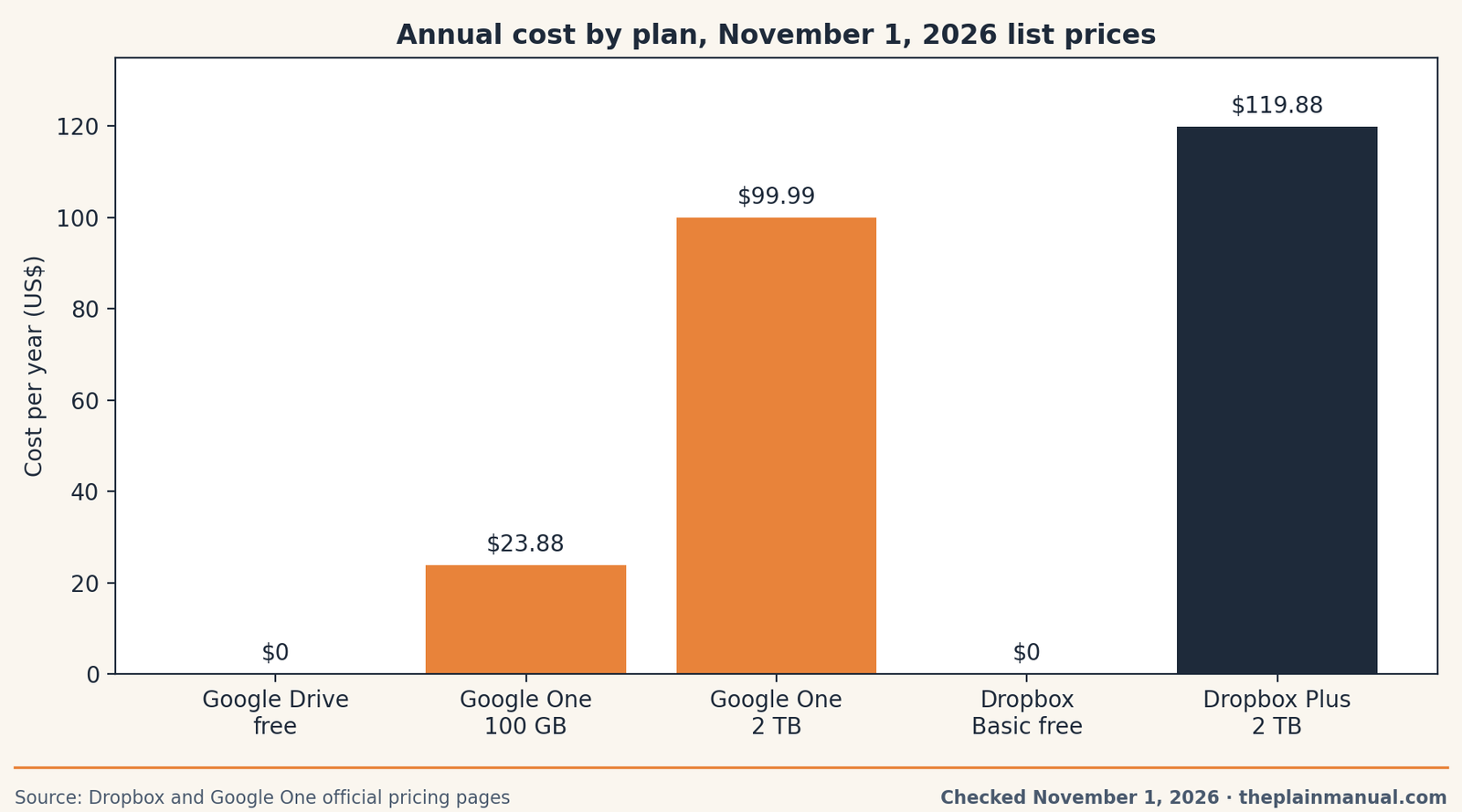
The price: read the chart by the shape of the ladder, not the top rung. Both services sell 2 TB for $9.99 a month on annual billing presentations, and Google's year price is lower. The difference lives below 2 TB, where Google sells small steps and Dropbox sells none, and in the free tier, where 15 GB against 2 GB decides the comparison for most readers before money enters it. Our guide to what cloud storage actually is explains the shared-pool idea in slower detail, and our family photo storage roundup runs the same math for photo-heavy households.
Moving later, and the one rule that prevents pain
You can move between these services, and the move is tedious both ways. Google Docs export to Office formats, with comments and formatting sometimes simplified. Google's 750 GB daily upload cap sets the speed limit on the way in. Shared links do not travel: every link you sent points at the old home.
One rule prevents most of the pain. Keep the master copy of anything irreplaceable in the service you pay attention to, and treat the other, if you use both, as a delivery tray rather than a second archive. Our explainer on sync versus backup makes the same point about iCloud: a service that mirrors deletions is a filing cabinet, not a safe.
FAQ
Is Google Drive really free?
Yes, up to the shared pool. Every account includes 15 GB across Drive, Gmail, and Photos. Paid Google One plans raise that one shared limit; there is no separate Drive-only allowance.
Why is Dropbox's free plan so small?
Dropbox's published free tier is 2 GB with a three-device limit, and its business is paid sync and delivery. Treat Basic as a way to try the apps and send a test transfer, not as storage you can live in.
Which is better for sharing files with clients?
Dropbox, for finished work. Transfers carry large files with expiry and password options on paid plans, and longer recovery windows protect you when a client asks for last month's version. Drive is better for files clients will edit with you.
Can I use both at once?
Yes, and many people do: Drive for documents and photos, Dropbox as the delivery tray for large finished files. Give each service one job, in writing if needed, so a file's home is never a guess.
What happens when my Google storage is full?
Uploads stop, Photos backups pause, and Gmail can stop sending and receiving until you free space or upgrade. Google warns you as you approach the limit, so the fix is usually a cleanup or the $1.99 step.
Method: Research review (no hands-on testing). Cross-checked against Dropbox's official plans page, Google's official Google One plans page, Google Workspace Help on storage and upload limits, and Dropbox's published free-account device limit. Checked November 1, 2026.
Corrections: Spotted an error? Tell us, we fix mistakes publicly and date them.
Prices: US list prices; verify before buying.
Source: Dropbox's official plans page
Related Posts
 Google Workspace vs Microsoft 365 for a Tiny Business (2026)
- Fireflies.ai vs. Fathom: Which Meeting Bot Is Less Annoying? (2026)
- Canva vs Adobe Express: Which Is Better for Non-Designers? (2026)
- WordPress vs Squarespace: Which One Owns Your Website? (2026)
 Notion vs Obsidian: Which Note App Is Right for You? (2026)