*Editor's Note: New post, November 2026. Prices and plan limits checked November 13, 2026, at regular list prices, with renewal prices printed wherever a maker publishes them.*
*Research review: prices, export rules, and support channels verified November 13, 2026 against the official Squarespace and WordPress.com pricing pages and Squarespace's export documentation. One disclosure in our favor: this site runs on self-hosted WordPress, which we operate every day.*
In a sentence: WordPress is the pick when your website has to be yours to move, extend, and keep for years, and Squarespace is the pick when you want a handsome site you never have to maintain, at four times the entry price.
Plain-English Verdict
WordPress wins for most readers who expect their site to grow. It starts at $48 for the first year, renews at $60, adds almost any feature through plugins, and hands you a site you can carry to another host. Squarespace starts at $228 a year, asks nothing of you after setup, and looks polished from the start. What it will not do is leave with you: the design and the store pages stay behind.
The worry: you pick the easy builder today, the business outgrows it in year two, and leaving means paying for the same website twice, because migration guides price a Squarespace exit as a rebuild that takes weeks. Squarespace's July 2026 price increase, landed on existing owners at renewal, is the smaller version of the same fear.
How we checked this
Checked: Squarespace's official pricing page, read November 13, 2026 (all four plans and fees); WordPress.com's official pricing page (prices, storage, the 50,000+ plugin line, support tiers); three October 2026 reviews that read that page directly for renewal figures; Squarespace's Help Center export article (updated October 9, 2026).
Date: November 13, 2026.
Method: Research review. See How We Review. We earn nothing if you buy any plan, and there are no affiliate links in this post.
Here is what each one does in one sentence. WordPress is free software for running a website, and you choose who hosts it and how much of it you manage. Squarespace is a subscription that rents you the software, the hosting, the design, and the support desk in one bill. That single difference explains almost every row below. Our explainer on what "open source" means covers the software side.
Jargon Decoder: "CMS" just means: content management system, the desk where you write pages and publish posts. Both of these are a CMS. The fight is over who owns the desk.
The 60-second decision tree
- You want the site finished this weekend and untouched for a year: Squarespace.
- You expect the site to gain features over time: WordPress.
- Your platform budget is under $100 a year: WordPress.com Personal; nothing on Squarespace fits.
- Leaving later must be a file transfer, not a rebuild: WordPress, ideally self-hosted.
- You sell digital products and every fee point matters: read the fee rows below first.
Our picks, by role
WordPress: our pick for most people whose site will grow
WordPress is the pick when the website is a business asset rather than a brochure. The entry price is low, the feature ceiling is the highest here, and the exit door is real: your content, files, and database can move to another host.
Squarespace: our pick for a finished site you never want to maintain
Squarespace is the pick when the job is a good-looking site for a practice, a portfolio, or a small shop, built once and left alone. One company designs it, hosts it, secures it, and answers your questions at 3 AM. You pay more for that quiet, and the site itself can never move.
Skip this if…
WordPress — you want the site finished this weekend, untouched after
WordPress — updates, backups and plugin choices sound like chores
Squarespace — you may need a feature no builder ships built in
Squarespace — leaving later must be a file transfer, not a rebuild
TPM Scorecard
Scores grade published facts only: pricing pages, feature lists, and help docs. We do not score how a builder feels to use.
| Criterion | WordPress | Squarespace |
|---|---|---|
| What it costs | 9 | 6 |
| Does the job | 9 | 7 |
| Works where you work | 9 | 6 |
| Help when stuck | 7 | 8 |
| Free version | 8 | 4 |
| Overall | 8.4 | 6.2 |
The gap is 2.2, from price and portability: WordPress starts at a quarter of Squarespace's entry price and can leave its host, while Squarespace wins only the support row.
TPM Scorecard · Rubric v1.0 — October 2026 · Checked November 13, 2026. See How We Review.
Use our numbers: Cite this post: "WordPress vs Squarespace: Which One Owns Your Website? (2026)" — The Plain Manual, November 13, 2026. https://theplainmanual.com/wordpress-vs-squarespace/ Download the scorecard as a CSV: https://theplainmanual.com/wp-content/uploads/2026/11/wordpress-vs-squarespace-scorecard.csv
The picks, one by one
WordPress
First, a naming trap. WordPress comes in two forms that share one name. WordPress.com is a hosted service run by Automattic: you pick a plan and they run everything, much like Squarespace. WordPress.org is the same software as a free download: you rent hosting from any company and run it yourself, or pay someone to run it. The pricing table uses WordPress.com, the like-for-like rival to Squarespace.
What we like: The ladder starts low and the ceiling is high. Personal, at $48 for the first year and $60 at renewal, includes a custom domain for a year and, since April 2, 2026, the right to install plugins, a feature WordPress.com used to lock behind its $300 Business plan. The official pricing page puts the plugin library at 50,000+, which means almost any feature a small site could want exists as an add-on: stores through WooCommerce, booking, memberships, course tools.
What could be better: The catch: freedom arrives as homework. On WordPress.com the homework is light, since Automattic handles updates and security, but you still choose plugins, and a bad or abandoned plugin is yours to notice. Self-hosted, the homework is the whole list: updates, backups, security, and a hosting bill with its own renewal jump. Readers who know they will never do it should weigh that against Squarespace's silence.
Pricing: Free plan at $0 with 1 GB of storage, a WordPress.com subdomain, and ads. Personal $48 for the first year, renewing at $60. Premium $96, renewing at $108. Business $300, renewing at $336, adding staging, backups, and developer access. Commerce $540, renewing at $600, with managed store tooling and no WordPress.com transaction fee. Monthly billing costs far more: $9 to $70 a month. Self-hosted WordPress has no platform price; you pay a host and a registrar instead.
Our take: Who it's for: bloggers, businesses that publish to grow, anyone who might sell in new ways later, and anyone burned before by a platform closing or repricing. WordPress is the conservative long-run choice precisely because it is the less convenient one this month.
Squarespace
What we like: Squarespace is the most finished product here. The templates are genuinely handsome, the editor keeps beginners from breaking the layout, and everything a small site needs is already inside: hosting, security, a store, and support on every plan. Its pricing page lists 24/7 support on all four plans. For a site that needs to look trustworthy by Friday, that package is hard to beat.
What could be better: The price: the entry ticket is $228 a year, and the plan most small businesses need is Core at $348, because Basic caps you at 2 contributors and takes 2% on store sales plus 7% on digital products and memberships. The second catch is the ceiling: Squarespace offers a curated set of Extensions rather than an open plugin library, so a feature it has not built or approved is a no. The third catch is the exit, below.
Pricing: Basic $228 a year on annual billing, or $25 a month monthly. Core $348 a year, or $39 monthly, with no store transaction fee and 5% on digital products. Plus $588 a year, with the digital fee down to 1% and a card rate of 2.7% plus $0.30. Advanced $1,188 a year, with no digital fee and card rates from 2.5% plus $0.30. There is no free plan; a 14-day free trial is the front door.
Our take: Who it's for: owners who value a quiet, polished site over a flexible one, and who can say the site they need in three years looks like the site they need today. Our guide to alternatives to Squarespace exists for owners who learn otherwise at renewal.
Pricing side by side
| Plan | First year (annual billing) | Later years | Monthly billing | The detail that matters |
|---|---|---|---|---|
| WordPress.com Personal | $48 | $60 a year | $9 a month | 6 GB; plugins included since April 2026 |
| WordPress.com Premium | $96 | $108 a year | $18 a month | 13 GB; payment buttons and WordAds |
| WordPress.com Business | $300 | $336 a year | $40 a month | 50 GB; staging, backups, developer access |
| Squarespace Basic | $228 | $228 a year at current list | $25 a month | 2 contributors; 2% store fee, 7% digital |
| Squarespace Core | $348 | $348 a year at current list | $39 a month | No store fee; 5% digital fee |
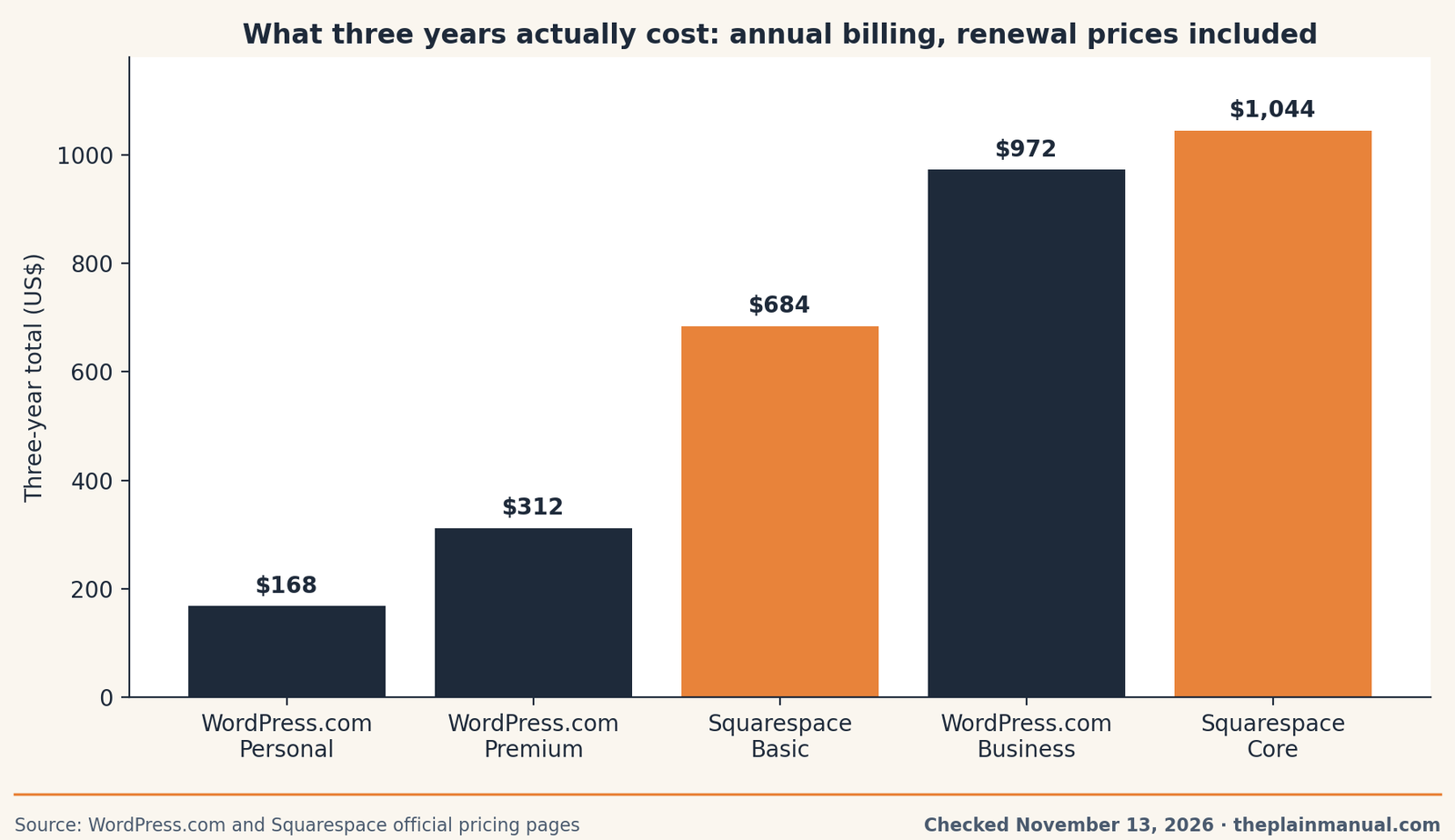
The price tag test: WordPress.com Personal renews at $60 a year for a site on your own domain with plugins included, and that is the whole platform price.
Buy now or wait: our November 2026 check found no dated sale window for either platform's regular plans. The documented timing lever is the billing term: Squarespace's own pricing page says annual billing saves up to 36% against monthly, while WordPress.com's first-year prices step up at renewal. Waiting gains nothing we can verify.
The fine print: WordPress.com's later-year figures are the renewal rates on its pricing page, confirmed by three October 2026 reviews that read it directly. Squarespace publishes one list price, so its later years assume the list holds; its July 2026 increase, which raised Basic from $16 to $19 a month at renewal, shows that assumption can break. Self-hosted WordPress is not charted, because hosting prices vary by provider; the software costs $0.
Who owns the site, really
This section decides this pairing in five years. Owning a website has a plain test: can you take the whole working site somewhere else without rebuilding it?
WordPress passes that test. A self-hosted site is a folder of files plus a database, and both can be downloaded and moved to any compatible host; changing hosts is a routine job thousands of companies compete to do for you. WordPress.com sits one step back: export your content in its standard format and move to self-hosted WordPress whenever you like.
Squarespace fails the test on purpose, because the platform is the product. Per its own Help Center, the only export is a single file in WordPress format, carrying layout pages, one blog with its posts, and text and image blocks. It does not carry store pages, product blocks, video or audio blocks, a second blog, style settings, or custom CSS. Products can leave separately as a spreadsheet, without images or reviews. Migration guides agree: the words transfer, the website gets rebuilt, and a small site takes two to four weeks while a large store can take six to twelve. Our TIL on what Squarespace's export leaves behind lists the gaps. The rent-versus-own decision is a real one, best made before the site holds three years of work.
Selling things on each
The catch: the sticker price is only half a store's platform cost; the fee on each sale is the other half. Squarespace Basic takes 2% of store sales and 7% of digital products and memberships, Core removes the store fee and cuts digital to 5%, and only the $1,188 Advanced plan takes nothing on digital sales. WordPress.com's Commerce plan charges no WordPress.com transaction fee, and a self-hosted WooCommerce store pays no platform percentage at all. A shop selling mostly digital products can pay Squarespace hundreds a year in fees a WordPress store does not have, enough to flip the headline price gap.
So which one should you pick?
Pick Squarespace if the site is a finished object: a portfolio, a practice page, a small shop with a stable catalog, kept by someone with no interest in maintaining it. You will pay $228 to $348 a year for that polish and support, a fair trade while the site stays simple.
Pick WordPress if the site is a growing asset: a publication, a store that will add product types, or any site you cannot afford to rebuild someday. Start on WordPress.com Personal, $60 a year at renewal, and move to self-hosted WordPress when you want the whole deed, files, database, and all. That is the road we chose for The Plain Manual, and its upkeep is the honest price printed above.
FAQ
Is WordPress free?
The software is free, and WordPress.com has a free plan with 1 GB of storage and a WordPress.com address. A site on your own domain starts at $48 for the first year on Personal, renewing at $60. Self-hosted WordPress costs whatever hosting and a domain cost, with no platform fee.
Can I move from Squarespace to WordPress later?
Partly. Squarespace exports one blog and basic pages into a WordPress-format file, and products can leave as a spreadsheet. The design, store pages, and several page types do not export, so the move is a rebuild measured in weeks.
Which is cheaper over three years?
At renewal prices, WordPress.com Personal totals $168 over three years, against $684 for Squarespace Basic at current list. The business tiers nearly meet: WordPress.com Business totals $972, against $1,044 for Squarespace Core.
Which is better for selling?
Squarespace is simpler to run and Core removes the store transaction fee, but digital products still pay 5% there, and 7% on Basic. WordPress.com Commerce and self-hosted WooCommerce charge no platform percentage, so higher digital sales favor WordPress.
Who should never run self-hosted WordPress?
Anyone who will not keep updates, backups, and security handled, personally or by paying someone to do it. That reader should choose Squarespace, or WordPress.com, where the platform team carries that list.
Method: Research review (no hands-on testing). Cross-checked against the official Squarespace and WordPress.com pricing pages, Squarespace's export article, and October and November 2026 coverage. Checked November 13, 2026.
Corrections: Spotted an error? Tell us, and we fix mistakes publicly and date them.
Prices: US list prices; verify before buying.
Source: Squarespace's official pricing page and WordPress.com's official pricing page
Related Posts
 Squarespace vs Wix: Which Is Better for a Small Business? (2026)
- Alternatives to Squarespace: After the July 2026 Price Increase
- Shopify vs Etsy for Selling Digital Products: Which Should You Use? (2026)
- Mailchimp vs Kit: Which Should Send Your First Newsletter? (2026)
 Notion vs Obsidian: Which Note App Is Right for You? (2026)