

Editor’s Note: First published October 2026. Evidence: Research review — we compared both companies’ official pricing pages and documentation on October 2, 2026. We did not run a hands-on invoicing walkthrough for this piece, so treat it as a pricing-and-features guide, not a lab test. Prices below are list prices; both companies run promos, so check the official pricing page before buying.
Plain-English Verdict: Wave’s invoicing is free forever, and for a solo freelancer who just needs to send professional invoices, it’s genuinely enough. FreshBooks earns its $23–$70/month when you bill by the hour, want invoices that chase themselves with automatic reminders, or need time tracking and reports that don’t come from a spreadsheet. Start with Wave; move to FreshBooks when the free tier’s rough edges start costing you time.
Need to send a one-off invoice without signing up anywhere? Our free Invoice Generator does it in your browser.
What we actually did: We read FreshBooks’ and Wave’s current pricing pages line by line, cross-checked plan limits and payment-processing fees against current third-party reviews, and did the per-invoice fee math ourselves. This site earns nothing if you buy — we have no affiliate links, so our only incentive is being right.
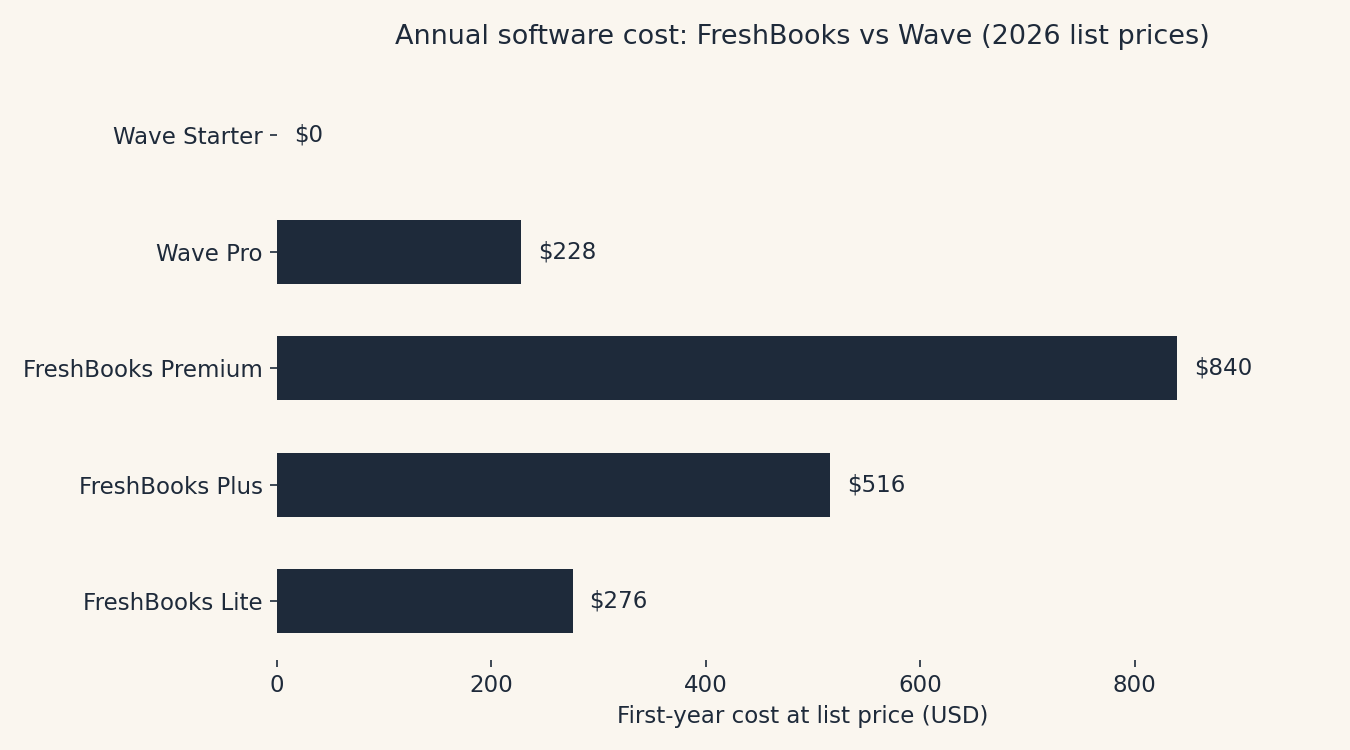
If you’re a freelancer choosing invoicing software, the real question isn’t “which app is better?” It’s “am I getting $276 a year of value out of the paid one, or will the free one do?” Let’s answer it in plain dollars.
1. FreshBooks — the polished pro
What it does in one sentence: FreshBooks is invoicing plus light accounting, built for service freelancers who bill clients and want the whole money-in workflow, estimates, time tracking, invoices, reminders, reports, in one friendly place.
What we like
- The invoices look expensive (in a good way). FreshBooks has some of the most professional-looking invoice templates in the business. When a client opens one, it reads as “serious professional,” not “side hustle.”
- Billable hours flow straight into invoices. If you track time, you can turn tracked hours into an invoice line item without retyping anything. This is the feature Wave simply doesn’t have, and for hourly billers it’s the whole ballgame.
- Automatic payment reminders. FreshBooks will politely chase late payments for you on the Plus plan and up. You set the schedule once; the awkward follow-up emails send themselves.
- Real accounting grows with you. The Plus plan ($43/mo) adds double-entry reports, bank reconciliation, and accountant access. The Premium plan ($70/mo) adds project profitability. You can start solo and not outgrow it.
What could be better
- The 5-client cap on Lite is a tripwire. The cheapest plan, Lite at $23/month, covers only 5 billable clients. Bill a sixth client in a month and you have to jump to Plus at $43/month, even if you need nothing else from it. Most active freelancers outgrow Lite within a quarter.
- Intro promos hide the renewal price. FreshBooks runs aggressive discounts (as of this writing, the official pricing page shows heavy first-year promos). Lovely, until month thirteen, when the bill snaps back to list price. Always price the renewal, not the promo.
- No free plan. There’s a 30-day free trial that doesn’t require a credit card, but after that, it’s pay or leave.
Pricing (list prices, October 2026):
| Plan | Monthly | Yearly | Billable clients | Headline limits |
|---|---|---|---|---|
| Lite | $23/mo | $276/yr | 5 | No recurring invoices, no auto payment reminders, no bank reconciliation |
| Plus | $43/mo | $516/yr | 50 | Adds recurring invoices, auto reminders, accounting reports, accountant access |
| Premium | $70/mo | $840/yr | Unlimited | Adds project profitability, custom email templates |
| Select | Custom | Custom | Unlimited | Lower processing rates, dedicated support |
Payment processing runs through FreshBooks Payments: 2.9% + $0.30 per card transaction, and 1% for bank transfers (reportedly capped at $15). Each extra team member is $11/month. Advanced Payments (subscriptions, virtual terminal) is another $20/month. (All from FreshBooks’ official pricing page, checked October 2, 2026.)
Our take: FreshBooks is the buy-it-once-and-forget-it pick for freelancers who bill by the hour or juggle enough clients to need automation. It’s not cheap, but it replaces a small pile of admin work. Just know that Lite is a starter plan in the truest sense, budget for Plus if you have more than five clients.
2. Wave, the genuinely free one
What it does in one sentence: Wave gives you professional invoicing and basic double-entry accounting for $0, forever, and makes its money when clients pay you by card.
What we like
- Free means free. Unlimited invoices, expense tracking, and real double-entry bookkeeping at $0. Not a trial, not a crippled tier, the whole accounting core, free.
- The invoices look just fine. Not as polished as FreshBooks, but clean, professional, and customizable enough that no client will think “budget software.”
- Recurring invoices and automatic reminders exist. This is the surprise: features FreshBooks gates behind its $43/month plan, Wave includes for free (Pro adds unlimited auto-reminders; the free tier covers the basics).
- Simple pricing story. There’s no client cap, no invoice cap, no “which plan am I on?” math. You pay only when money moves.
What could be better
- No time tracking, full stop. If you bill by the hour, Wave can’t turn your hours into invoices. Hourly billers: this is probably the dealbreaker.
- The previously-free perks moved. Wave has shifted automatic bank imports, receipt scanning, and unlimited payment reminders behind the $19/month Pro plan. Longtime free users grumbled about it on Reddit, fairly. Check which features sit on which side of that line before you commit your workflow to it.
- Support is thin on the free tier. Priority support (phone, chat) is a Pro perk. Free-tier users are mostly on their own with help docs.
- The card fee is a touch higher. 2.9% + $0.60 per card transaction vs. FreshBooks’ 2.9% + $0.30. On big invoices the difference is pennies; on small ones it adds up.
Pricing (October 2026):
| Plan | Monthly | Yearly | What’s included |
|---|---|---|---|
| Starter | $0 | $0 | Unlimited invoices, bookkeeping (manual entry), basic reports |
| Pro | $19/mo | $190/yr (annual) | Adds automatic bank imports, receipt scanning, multi-user access, priority support |
Payment processing: 2.9% + $0.60 per card transaction (Pro waives the $0.60 on your first 10 card transactions each month), 1% per bank payment ($1 minimum). Payroll is a paid add-on.
Our take: Wave is the honest answer for freelancers who send invoices and get paid. It’s not trying to be your accountant, project manager, and time tracker, it’s trying to make invoicing free, and it succeeds. The catch is the payment-processing fee, which is how Wave gets paid. If most of your clients pay by card, do the fee math below; “free” software with per-transaction fees isn’t free at high volume.
The real cost: what a $1,000 invoice costs you
Software price is only half the story. Here’s what actually leaves your pocket when a client pays a $1,000 invoice by card vs. bank transfer:
| FreshBooks (Lite) | Wave (Starter) | |
|---|---|---|
| Monthly software cost | $23 | $0 |
| Card fee on $1,000 invoice | $29.30 (2.9% + $0.30) | $29.60 (2.9% + $0.60) |
| Bank-transfer fee on $1,000 | $10 (1%) | $10 (1%) |
| Yearly software cost | $276 | $0 |
Two observations. First, the card fees are nearly identical, the processing cost is a wash. Second, the decision is almost entirely the $276/year question: is FreshBooks’ time tracking, automation, and polish worth $23 a month to you?
Jargon Decoder: “ACH” just means: a bank-to-bank transfer. Slower than a card payment (a day or two), but the fee is 1% instead of ~3%. If a client owes you $5,000, asking them to pay by bank transfer instead of card saves you about $100 in fees. Worth one sentence in your invoice notes.
Which one should you pick?
Pick Wave if: you’re a solo freelancer sending straightforward invoices, your clients pay reliably, and you’d rather keep $276 a year. Wave is also the right starting point if you’re not sure what you need yet, it’s free to find out.
Pick FreshBooks if: you bill by the hour (time tracking → invoices is the killer feature), you have more than five regular clients (you’ll need Plus anyway), or late payments are eating your afternoons and you want automatic reminders doing the chasing.
Who should skip both? If you sell physical products, need inventory, or have employees, you’re past both of these, look at QuickBooks or Xero. And if your invoicing life is one client and a spreadsheet, keep the spreadsheet. Software should earn its keep.
Want the wider field? Our roundup of the best invoicing software for freelancers in 2026 ranks the full shortlist by time-to-paid. And if the late-payment chase is your real problem, automating the boring parts of your workflow can pick up the rest.
Frequently asked questions
Is Wave really free?
Yes, invoicing and accounting are free forever on the Starter plan. Wave makes money from payment-processing fees (2.9% + $0.60 per card transaction) and paid add-ons like payroll. If your clients pay by bank transfer or you handle payments separately, Wave costs you nothing.
Can I switch from Wave to FreshBooks later?
Yes, and it’s the natural upgrade path. Export your client list and invoice history from Wave, import into FreshBooks during the 30-day free trial, and run both in parallel for a month before committing.
Does FreshBooks work if I only have a few clients?
It works, but it’s pricey for what you get: $23/month for up to 5 billable clients, without recurring invoices or automatic reminders. With a small client list, Wave does the same job for $0.
Which is better for getting paid faster?
Both send professional invoices and accept cards. FreshBooks Plus has the edge on automatic payment reminders and late-fee scheduling. On Wave’s free tier, reminders exist but the unlimited automated version sits behind Pro. The honest answer: the fastest way to get paid is sending the invoice today, on either tool.
Do I need accounting software at all as a freelancer?
If you have more than a handful of clients, yes, tax time without one is a special kind of misery. But “accounting software” can be Wave’s free tier. Don’t pay $23/month for features you won’t open.
Method: Research review (no hands-on testing). Cross-checked against FreshBooks’ and Wave’s official pricing pages and current independent reviews. Checked October 2, 2026.
Corrections: Spotted an error? Tell us — we fix mistakes publicly and date them.
Prices: US list prices; verify before buying.
Related Posts
 HoneyBook vs. Indy: Which Invoicing Tool Should a Freelancer Use? (2026)
- Calendly vs Cal.com: Which Booking Tool Is Right for You? (2026)
- Todoist vs TickTick: Which To-Do App Will You Actually Keep Using? (2026)
- Google Workspace vs Microsoft 365 for a Tiny Business (2026)
- Trello vs. Asana: Which Project Tool Is Right for a Small Team? (2026)


2 thoughts on “FreshBooks vs. Wave: Which Invoicing App Is Worth Paying For? (2026)”