

*Editor's Note: New post, November 2026. Prices and plan limits checked November 19, 2026, at regular list prices, with annual and monthly billing both printed where the makers publish both.*
*Research review: prices, plan limits, and platform support verified November 19, 2026 against October and November 2026 coverage that read the official Toggl Track and RescueTime pricing pages directly. No hands-on walkthroughs, and no tracking-accuracy claims measured by us.*
In a sentence: Toggl Track is the pick if you bill clients or run a team, because its timers, billable rates, and team reports turn hours into invoices, while RescueTime is the pick if you forget timers, because it records your apps and websites on its own and shows you where the day went.
Plain-English Verdict
Toggl Track wins for billable work. You start a timer, name the project, and the entry is ready for a report or an invoice, with a free plan for up to three people. RescueTime wins for honest self-knowledge. It runs in the background, sorts your computer time into productive and distracting, and needs no discipline at all. Pick by the job: a timesheet you can send, or a mirror you can trust.
The worry: you pay for a tracker, use it for two weeks, then quietly stop, and the gap costs you twice: the subscription renews while the hours you meant to bill were never recorded. Review coverage of this pairing returns to the same failure from both sides: manual timers get forgotten and leave holes in a client bill, while automatic tracking that nobody reviews, or that cannot become a timesheet without a higher tier, turns into a report you pay for and ignore.
How we checked this
Checked: Toggl Track's pricing as read on its official pricing page in October and November 2026 checks (Free for up to 3 users, Starter $9 per user per month billed annually or $12 monthly, Premium $16 annually or $24 monthly, 30-day trial); RescueTime's pricing as read on its official pricing page in October and November 2026 checks (Lite free with two weeks of history, Solo $7 a month billed annually or $9 monthly, Solo+ $12 annually or $15 monthly, Team and Team+ per-user plans, 14-day trial); the October 4, 2026 head-to-head comparison built only from both makers' own documentation.
Date: November 19, 2026.
Method: Research review. See How We Review. We earn nothing if you buy any plan, and there are no affiliate links in this post.
Here is what each one does in one sentence. Toggl Track is a timer you start and stop, attached to projects and clients, that turns your entries into reports and billable hours. RescueTime is a background recorder that watches which apps and websites you use and turns that record into a picture of your focus.
Jargon Decoder: "Automatic tracking" just means: the app records what your computer is doing without you pressing anything. "Billable rate" just means: the hourly price attached to an entry, so a report can show money as well as minutes.
The 60-second decision tree
- You bill clients by the hour: Toggl Track, because entries carry projects and rates from the start.
- You forget to start timers, every time: RescueTime, because there is no timer to forget.
- You want to see which sites eat your afternoons: RescueTime, with its distraction reports.
- A small team needs shared reports and approvals: Toggl Track Premium, or RescueTime Team+ if the team also wants automatic capture.
- You want to pay nothing: Toggl Free for up to three people, or RescueTime Lite for a two-week look at your habits.
Our picks, by role
Toggl Track: our pick for billable hours and teams
Toggl is built around a deliberate entry. You say what you are working on, and that label follows the time into every report. For freelancers and small teams, that label is the product: it is what makes an invoice defensible and a project budget readable.
RescueTime: our pick for focus and honest habits
RescueTime is built around a passive record. It sorts apps and sites into productive, neutral, and distracting, sets goals and alerts, and on paid plans runs Focus Sessions that block distracting sites while you work. Nobody has to remember anything, which is exactly why its picture of a week is harder to argue with.
Skip this if…
Toggl Track — you forget timers and need capture that runs itself
Toggl Track — you want distracting sites blocked while you work
RescueTime — you need client-ready timesheets on a cheap plan
RescueTime — two weeks of history is all your review needs, paid
TPM Scorecard
Scores grade published facts only: pricing pages, feature lists, and help docs. We do not score how an app feels to use.
| Criterion | Toggl Track | RescueTime |
|---|---|---|
| What it costs | 7 | 8 |
| Does the job | 8 | 7 |
| Works where you work | 9 | 8 |
| Help when stuck | 8 | 7 |
| Free version | 8 | 6 |
| Overall | 8.0 | 7.2 |
The gap is 0.8, and the shape matters more than the number: Toggl scores on team billing and breadth of platforms, RescueTime scores on a cheaper solo entry, and its free plan loses points because it keeps only two weeks of history.
TPM Scorecard · Rubric v1.0 — October 2026 · Checked November 19, 2026. See How We Review.
Use our numbers: Cite this post: "Toggl Track vs RescueTime: Which Time Tracker Should You Use? (2026)" — The Plain Manual, November 19, 2026. https://theplainmanual.com/toggl-track-vs-rescuetime/ Download the scorecard as a CSV: https://theplainmanual.com/wp-content/uploads/2026/11/toggl-rescuetime-scorecard.csv
Quick poll: Timers you start yourself, or tracking that runs on its own? Your answer is the whole decision in this post, in miniature.
The picks, one by one
Toggl Track
What we like: The free plan is a real tool: unlimited time tracking and projects for up to three users, with timers, tasks, boards, and personal reports. Starter adds the billing layer most freelancers actually need, billable rates, team reports, tags, and time rounding. Premium adds the management layer: timesheet approvals, required fields, scheduled reports, profitability and forecasting, and priority support. It runs on the web, Mac, Windows, iPhone, Android, and browser extensions, and its desktop app can suggest entries from your activity, which softens the forgotten-timer problem without removing your say over the final entry.
What could be better: The catch: the core product still depends on you. A timer you never start records nothing, and a timer you forget to stop invents hours. Premium also jumps sharply: $16 per user per month billed annually against Starter at $9, and $24 against $12 on monthly billing, so a five-person team pays $960 a year on Premium annual billing. Approvals and profitability sit behind that jump.
Pricing: Free is $0 for up to 3 users. Starter costs $9 per user per month billed annually ($108 per user per year) or $12 billed monthly. Premium costs $16 per user per month billed annually ($192 per user per year) or $24 billed monthly. Paid plans carry a 30-day trial of Premium.
Our take: Who it's for: freelancers who bill by the hour, and teams of two to twenty who need one shared record of project time. Our guide to the best free project management tools for freelancers covers the tools that sit around the tracker.
RescueTime
What we like: The record builds itself. RescueTime logs apps and websites in the background, sorts them by how productive they are, and sends weekly summaries that show the pattern without any data entry. Paid Solo adds the tools people actually cite: Focus Sessions that block distracting sites, unlimited goals and alerts, offline activity, and unlimited history. It runs on Mac, Windows, Linux, iPhone, and Android.
What could be better: The price: the free Lite plan keeps only two weeks of report history and one goal, so the honest long-term picture starts at Solo. The billing tools sit one tier higher still: Timesheets, clients, projects, and billable rates need Solo+ at $12 a month billed annually for one person, or Team+ at $16 per user for teams. A freelancer who wants automatic capture and a client timesheet pays for the top solo tier, and still gets a thinner invoicing story than Toggl gives on Starter.
Pricing: Lite is free. Solo costs $7 a month billed annually ($84 a year) or $9 billed monthly. Solo+ costs $12 a month billed annually ($144 a year) or $15 billed monthly. Team costs $10 per user per month billed annually or $12 monthly, and Team+ costs $16 annually or $18 monthly. Paid plans carry a 14-day free trial.
Our take: RescueTime suits one person who wants the truth about a working week and help defending focus time. It is a mirror first and a timesheet second, and the pricing says so.
One person, one year: the cost table
Prices below are US list prices checked November 19, 2026, at annual billing, for one person.
| Plan | Per year | What the year buys |
|---|---|---|
| Toggl Track Free | $0 | Timers, projects, personal reports, up to 3 users |
| RescueTime Solo | $84 | Automatic tracking, Focus Sessions, unlimited history |
| Toggl Track Starter | $108 | Billable rates, team reports, tags, rounding |
| RescueTime Solo+ | $144 | Solo plus timesheets, clients, projects, billable rates |
| Toggl Track Premium | $192 | Approvals, profitability, forecasting, priority support |
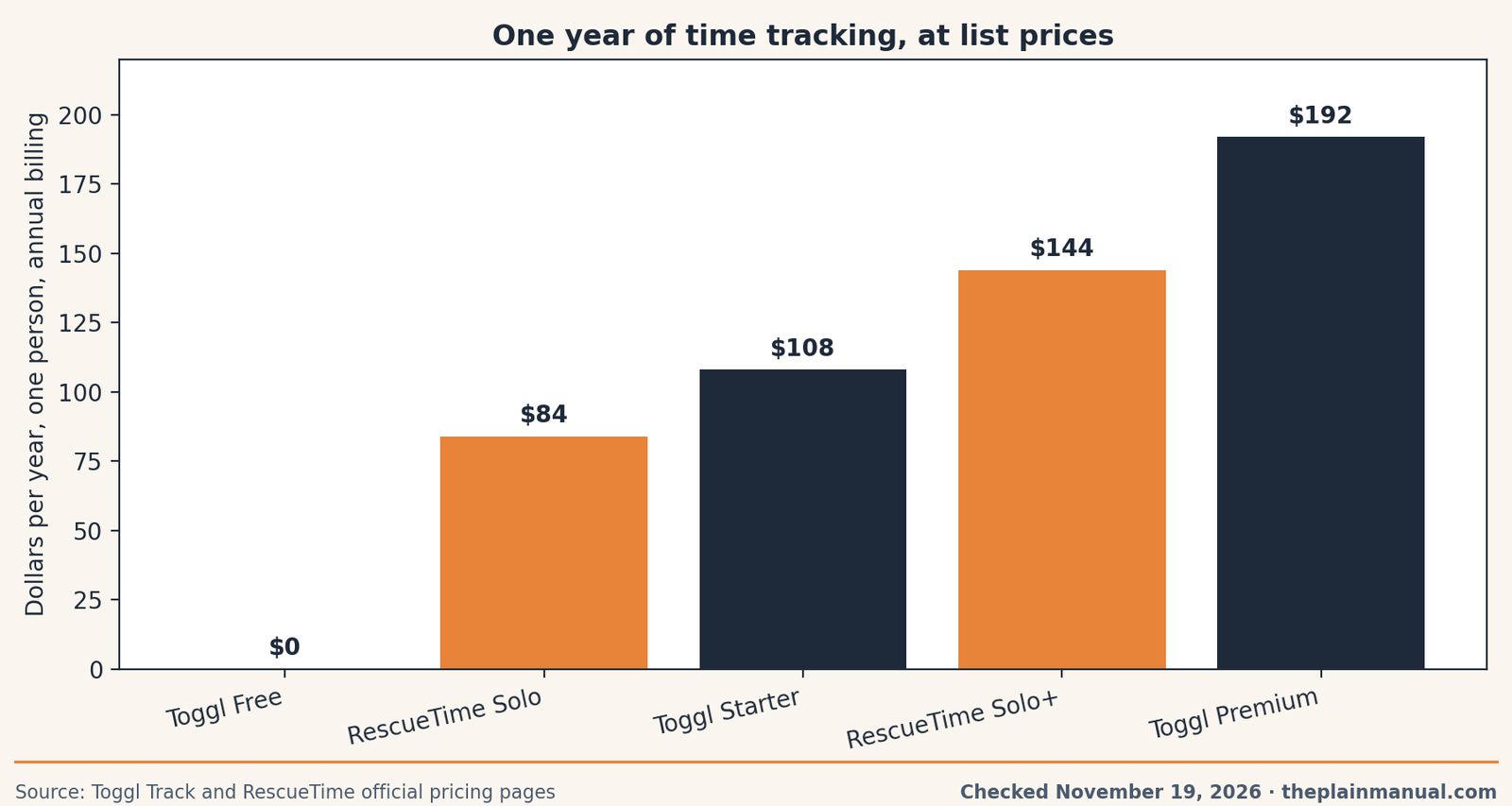
Read the table by job, not by price order. The cheapest route to a client-ready record is Toggl Free, then Starter at $108. The cheapest route to an automatic record is RescueTime Lite, then Solo at $84. The overlap row is Solo+ at $144: it is where RescueTime starts doing Toggl's job, and it costs more than the Toggl tier built for that job.
The price tag test: Toggl Track Starter costs $9 per user per month billed annually, $108 per user per year, and that single sentence is the whole price for billable team tracking, with no seat minimum published on the pricing page.
Buy now or wait: no dated sale window for either tool appeared in this run's research, and both makers held these list prices across the October and November 2026 checks this run consulted. The documented saving is annual billing: Toggl Premium drops from $24 to $16 per user per month, and RescueTime Solo from $9 to $7. Waiting gains nothing we could document.
The honest limits of both routes
Three limits deserve plain words. First, neither tool knows what you did away from the screen: Toggl needs a manual entry for a phone call, and RescueTime needs its offline activity feature on a paid plan. Second, automatic tracking raises a fair privacy question for teams: RescueTime records app and website use, so a team should agree in the open about what is tracked before anyone installs it. Third, both tools report the past well and change the future only if someone reads the report, which is why the worry line at the top of this post is the real test.
FAQ
Is Toggl Track really free?
Yes, for up to three users. The free plan covers unlimited time tracking and projects, timers, tasks, boards, and personal reports. Billable rates and team reports start on Starter, at $9 per user per month billed annually.
Does RescueTime track you automatically?
Yes. RescueTime runs in the background and records the apps and websites you use, then sorts that time into productive, neutral, and distracting. The free Lite plan keeps two weeks of report history; paid plans keep unlimited history.
Which is better for billing clients?
Toggl Track. Its entries carry a project and a billable rate from the moment you start the timer, and team reports start on Starter. RescueTime only adds timesheets, clients, and billable rates on Solo+ and Team+, its higher tiers.
Can Toggl Track work automatically too?
Partly. Its desktop app can watch your activity and suggest time entries for you to approve. The suggestion still depends on the desktop app, and the approved entry is the record, so the habit it asks for is a short daily review rather than a timer for every task.
Which should a team choose?
A team that bills clients should choose Toggl Track, with Premium when approvals and profitability reports matter. A team that wants automatic capture plus shared timesheets should price RescueTime Team+ at $16 per user per month billed annually and compare it honestly against Toggl Premium at the same annual per-user price.
First 30 days with your pick
Week 1 setup: pick one tool and one rule. On Toggl, create your projects and clients before the first timer, and set your billable rate if you are on Starter. On RescueTime, spend ten minutes fixing the categories it got wrong, because every report after that inherits those labels.
Weeks 2 to 4, watch out for: on Toggl, the forgotten timer, fixed by a two-minute end-of-day review of suggested and missing entries. On RescueTime, the report you never open, fixed by reading the weekly summary once and changing one thing it shows you.
Day-30 keep or cancel check: your renewal date is the monthly or annual charge you chose at signup, so check use against it now. Ask: did the record change a bill, a budget, or a habit this month? A yes on any one of those means keep it. Three no answers mean cancel before the renewal and keep the free plan, which on both tools still covers the basics.
Was this post useful? Answered it / Out of date / Still confused
Method: Research review (no hands-on testing). Prices, plan limits, and platform support checked November 19, 2026 on the makers' official pricing pages, as reported in the October and November 2026 checks cited in the How we checked this box.
Corrections: Spotted an error? Tell us, and we fix mistakes publicly.
Prices: US list prices; verify before buying.
Source: Toggl Track's pricing page and RescueTime's pricing page, as read in the 2026 coverage cited in today's research notes.
Related Posts
 Alternatives to Harvest: After Usage Billing Made the Renewal Unpredictable
 Todoist vs TickTick: Which To-Do App Will You Actually Keep Using? (2026)
- Trello vs. Asana: Which Project Tool Is Right for a Small Team? (2026)
 Notion vs Obsidian: Which Note App Is Right for You? (2026)
- Zapier vs. Make: What Automation Actually Costs You (2026)