

*Editor's Note: New post, November 2026. Prices and plan limits checked November 23, 2026, at regular list prices, and renewal prices are the ones used in the text.*
*Research review: prices, sharing rules, and privacy settings verified November 23, 2026 against Microsoft's official Microsoft 365 plans page, Google's official Google One AI plans page, and both makers' privacy pages. No hands-on walkthroughs, and no accounts were upgraded by us.*
In a sentence: most people already have one of these two assistants bundled into a subscription they pay for, and the right pick is the one that lives where your files already live, Google apps for Gemini and Microsoft 365 apps for Copilot.
Plain-English Verdict
Gemini and Copilot both have a free tier, a cheap way in, and a top consumer plan at $19.99 a month. Gemini wins on household value: Google AI Pro at $19.99 can be shared with up to five other people, who get the AI benefits at no extra cost. Copilot wins inside Word, Excel, PowerPoint, and Outlook, and its top plan, Microsoft 365 Premium at $19.99, bundles the Office apps themselves. Start by checking what you already pay for, because a second $20 plan is the most common waste here.
The worry: you buy a household plan expecting household AI, then find the AI belongs to one person. Microsoft's own plans page says AI features on its Family, Premium, and Pro plans are available only to the subscription owner and cannot be shared, while Google's page says AI Pro members share the AI benefits with up to five others. Paying $19.99 a month for a benefit your family cannot use is the expensive mistake this post exists to prevent.
How we checked this
Checked: Microsoft's official Microsoft 365 plans page (Personal $9.99 a month, Family $12.99, Premium $19.99, AI features owner-only, a limited-time first-period offer running today); Google's official Google One AI plans page (AI Plus $4.99, AI Pro $19.99 or $199.99 a year, 5 TB, family members get AI benefits at no extra cost); Google's Gemini Apps Privacy Hub and Microsoft's Copilot privacy pages for the privacy labels below.
Date: November 23, 2026.
Method: Research review. See How We Review. We earn nothing if you buy any plan, and there are no affiliate links in this post.
Here is what each one does in one sentence. Gemini is Google's assistant, built into Gmail, Docs, Drive, Search, Chrome, and Android phones. Copilot is Microsoft's assistant, built into Word, Excel, PowerPoint, Outlook, Teams, Windows, and the Edge browser.
Jargon Decoder: "Context window" just means: how much text the assistant can hold in mind at once, like the size of the desk it can spread your documents across.
The 60-second decision tree
- Your mail, documents, and photos live in Google apps: Gemini, starting free.
- Your documents live in Word, Excel, and Outlook: Copilot, through a Microsoft 365 plan.
- A household wants to share one paid AI plan: Google AI Pro, the shareable one.
- You want the cheapest paid step up: Google AI Plus at $4.99 a month.
- Your employer runs Microsoft 365: ask about the work licence first.
Skip this if…
Gemini — your real work happens inside desktop Word and Excel
Copilot — your household expects to share the paid AI
Gemini — you need AI grounded in your company's Microsoft 365 files
Copilot — you want a paid AI tier under $10 a month
Google AI Pro — nobody at home will use the 5 TB storage
TPM Scorecard
Scores grade published facts only: pricing pages, feature lists, and help docs. We do not score how an app feels to use.
| Criterion | Gemini | Copilot |
|---|---|---|
| What it costs | 9 | 7 |
| Does the job | 9 | 9 |
| Works where you work | 8 | 9 |
| Help when stuck | 8 | 8 |
| Free version | 7 | 6 |
| Overall | 8.2 | 7.8 |
The gap is 0.4, so on the facts alone this one is too close to call. Gemini scores on price and sharing, with a $4.99 step up and a shareable top plan. Copilot scores on reach inside the Office apps, and loses ground because its work version is an add-on per person on top of a base licence.
TPM Scorecard · Rubric v1.0 — October 2026 · Checked November 23, 2026. See How We Review.
Use our numbers: Cite this post: "Gemini vs Copilot: Which AI Is Already in Your Subscriptions? (2026)" — The Plain Manual, November 23, 2026. https://theplainmanual.com/gemini-vs-copilot/ Download the scorecard as a CSV: https://theplainmanual.com/wp-content/uploads/2026/11/gemini-vs-copilot-scorecard.csv
Quick poll: Which best describes your AI bill today: free only, one paid plan, or paying for both ecosystems?
The picks, one by one
Gemini: our pick for Google households
What it does in one sentence: Gemini is the assistant inside the Google account most people already use for mail, photos, and documents.
What we like: the ladder is easy to read. Free costs $0 with a Google account, with standard usage limits and a 32,000-token context window. Google AI Plus costs $4.99 a month, doubles the free usage allowance, raises the context window to 128,000 tokens, and includes 400 GB of storage and Gemini in Gmail. Google AI Pro costs $19.99 a month or $199.99 a year, gives four times the free usage, a 1 million-token context window, and 5 TB of storage. The price: the sharing rule is the headline. Google's plans page says family members on an AI Pro plan can enjoy AI benefits at no extra cost, and that you can share the AI features and the 5 TB of storage with up to five other people. One Pro plan can cover six people.
What could be better: The catch: the free tier got smaller in October 2026. Since October 9, free accounts run on an Auto setting that sends most prompts to Flash-Lite, Google's smallest model, and AI Plus lost the Pro model in the same change. Gemini also does its best work inside Google's own apps, so a Word and Excel household gets a chat window and little in-app help.
Privacy label (not scored): Collects: your chats and what you share, including uploads, plus location-type information listed in Google's Gemini Apps Privacy Hub. Trains on your data: with the Keep Activity setting on, yes, Google uses activity to improve its services, including training its generative AI models, with help from human reviewers; turn Keep Activity off and future chats are not used for training. Delete path: review and delete activity in Gemini Apps Activity, with auto-delete set to 18 months by default; Google notes data already reviewed is disconnected from your account and kept for up to 3 years.
Our take: Who it's for: anyone whose mail, school, or family life already runs on Google accounts, and any household that wants one AI bill instead of several.
Copilot: our pick for Microsoft 365 households
What it does in one sentence: Copilot is the assistant inside Microsoft 365, the subscription that carries Word, Excel, PowerPoint, and Outlook.
What we like: the free Copilot chat answers questions, searches the web, creates images, and works in Windows and Edge with a free Microsoft account. Paid value arrives through Microsoft 365 itself. Personal, at $9.99 a month or $99.99 a year, includes the desktop apps with Copilot, higher usage than free, and 1 TB of storage. Premium, at $19.99 a month or $199.99 a year, adds extensive Copilot usage and exclusive features, including the Researcher and Analyst agents.
The fine print: the old Copilot Pro plan is gone. Microsoft folded it into Microsoft 365 Premium, and current reporting puts the end of support for existing Copilot Pro subscriptions at August 1, 2026. Any guide still selling a $20 Copilot Pro add-on is out of date. For many people the honest tier is Personal at $9.99, which already raises Copilot usage above free.
What could be better: The catch: sharing. Microsoft's FAQ says AI features on Family, Premium, and Pro plans are available only to the subscription owner and cannot be shared. Family shares the apps and storage with up to six people, and the AI stays with the person who pays. Our companion short covers that rule on its own. Work is a second catch: business Copilot is an add-on at $21 per user a month, currently $18 on promotion through December 31, 2026, and $30 at enterprise level, each on top of a qualifying licence.
Privacy label (not scored): Collects: your conversations, which Microsoft says are saved by default so you can return to them, plus memories when personalisation is on. Trains on your data: only if you leave the setting on; Microsoft's privacy controls let you opt out of the use of your conversation activity for training its generative AI models at any time. Delete path: delete a single conversation or your whole conversation history in Copilot or through the Microsoft privacy dashboard, at any time.
Our take: Copilot suits a person, rather than a household, whose working day sits in Word, Excel, and Outlook, and who wants the assistant inside those files. Price it as a Microsoft 365 decision first and an AI decision second.
One person, one year: the cost table
Prices below are US list prices checked November 23, 2026. Annual figures use the makers' published annual prices where they exist, and twelve monthly payments where they do not.
| Plan | Per year | What the year buys |
|---|---|---|
| Gemini Free | $0 | Gemini chat, standard limits, 15 GB storage |
| Copilot Free | $0 | Copilot chat, web search, image creation |
| Google AI Plus | $60 | 2x Gemini usage, 400 GB, Gemini in Gmail |
| Microsoft 365 Personal | $100 | Office apps with Copilot, higher usage, 1 TB |
| Microsoft 365 Family | $130 | Office apps for up to 6 people, AI for the owner only |
| Google AI Pro (annual) | $200 | 4x usage, 5 TB, AI shareable with up to 5 others |
| Microsoft 365 Premium (annual) | $200 | Office apps, extensive Copilot usage, exclusive agents |
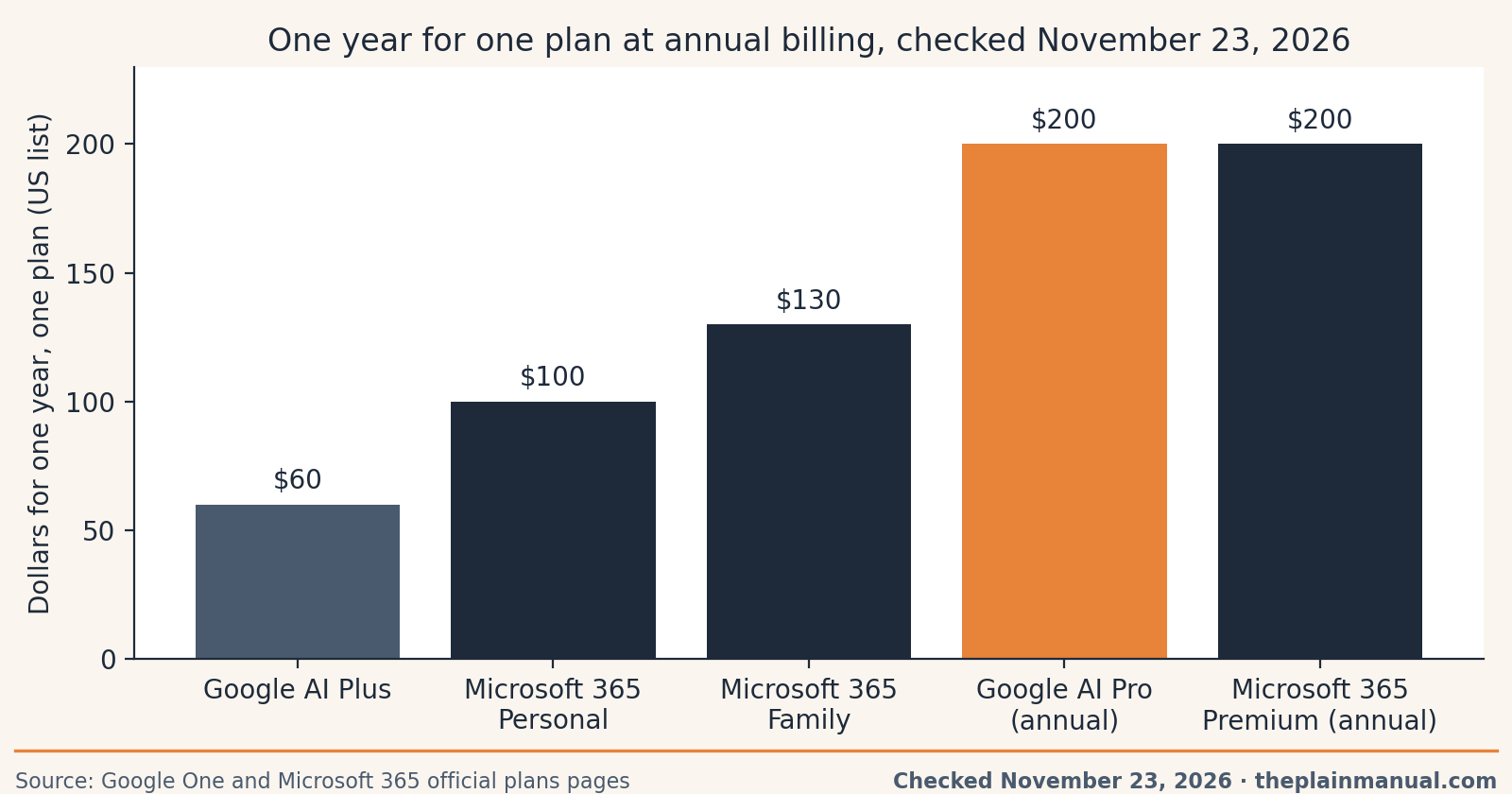
Read the table by household, not by headline. The two $200 rows buy different bundles: storage and shareable AI from Google, Office apps and in-app Copilot from Microsoft. For six people, the Google row still costs $200 in total, while Microsoft's AI benefits follow the subscription owner alone.
The price tag test: Google AI Pro costs $19.99 a month or $199.99 a year for one plan whose AI benefits up to six people can use, and that is the whole price.
Buy now or wait: Microsoft's plans page is running a limited-time offer today, $13.99 for the first month of Premium and $139.99 for the first year, with Personal at $6.99 and $69.99 for its first period, after which the regular prices in this post apply. If the Microsoft route already fits you, that documented first-period saving is real. No dated sale for Google's AI plans appeared in this run's research, so waiting on the Google side gains nothing we could document.
The honest limits of both routes
Three limits deserve plain words. First, both free tiers are moving targets: Google trimmed free model access in October 2026, and Microsoft publishes usage in relative terms, higher and highest, rather than prompt counts. Second, in-app help never crosses over: Gemini will not sit inside desktop Word, and Copilot will not sit inside a Google Doc. Third, a work account can change the answer: if your employer pays for a work Copilot or Gemini add-on, a personal plan may duplicate it, so check there before paying at home.
FAQ
Is Copilot Pro still available?
No. Microsoft folded Copilot Pro into Microsoft 365 Premium at $19.99 a month, and existing Copilot Pro subscriptions lost support on August 1, 2026, per current reporting. The consumer Copilot decision today is a Microsoft 365 tier decision: Personal, Family, or Premium.
Can my family share Microsoft 365 Copilot?
The apps and storage, yes, on Family and Premium. The AI features, no. Microsoft's own FAQ says AI features on its Family, Premium, and Pro plans are available only to the subscription owner and cannot be shared with others.
Can my family share Google AI Pro?
Yes. Google's plans page says family plan members on a Google AI Pro plan can enjoy AI benefits and features at no extra cost, and the plan's AI features and 5 TB of storage can be shared with up to five other people.
Which free AI is better, Gemini or Copilot?
On documented facts, they tie closely. Gemini free includes Deep Research and image tools with standard limits and a 32,000-token context window. Copilot free includes web-grounded chat and image creation, with no published prompt count. Use the free one attached to the apps you already open.
What does Copilot cost a small business?
Microsoft 365 Copilot Business costs $21 per user a month, currently $18 on a promotion through December 31, 2026, for organisations up to 300 seats. The enterprise version costs $30 per user a month. Both sit on top of a qualifying Microsoft 365 licence, so the add-on price is never the whole price.
First 30 days with your pick
Week 1 setup: pick one ecosystem and cancel nothing yet. Check whether your current Microsoft 365 or Google One tier already includes the AI level you need, and set the privacy controls in this post, Keep Activity on Gemini or the training opt-out on Copilot, before the chats pile up.
Weeks 2 to 4, watch out for: on Gemini, the weekly usage cap, which a few long document sessions can reach faster than daily chatting. On Copilot, the owner-only rule, which a household usually discovers in week two, when a second person opens Word and finds no AI benefit waiting.
Day-30 keep or cancel check: your renewal date is the charge you chose at signup, so judge against it now. Did the assistant do real work inside your everyday apps, or did you mostly open a chat window you could have used free? In-app work means keep it. Chat only means drop to free, or to Plus at $4.99 on the Google side.
Was this post useful? Answered it / Out of date / Still confused
Method: Research review (no hands-on testing). Prices, sharing rules, usage tiers, and privacy settings checked November 23, 2026 on the makers' official plans and privacy pages.
Corrections: Spotted an error? Tell us, and we fix mistakes publicly and date them.
Prices: US list prices; verify before buying.
Source: Microsoft's Microsoft 365 plans page and Google's Google One AI plans page, as read November 23, 2026.
Related Posts
 Google Workspace vs Microsoft 365 for a Tiny Business (2026)
- Dropbox vs Google Drive: Which Should Hold Your Files? (2026)
- Perplexity vs ChatGPT Search vs Google AI Mode: Which AI Search Should You Use? (2026)
- TickTick vs Microsoft To Do: Which Free To-Do App Should You Use? (2026)
- Superhuman vs Spark: Is a $30-a-Month Email App Sane? (2026)