
*Editor's Note: New post, November 2026. Prices and plan limits checked November 17, 2026, on Cal.com's official pricing page.*
*Research review: prices, free-plan limits, and the 2026 source and hosting changes verified November 17, 2026 against Cal.com's official pricing page and dated 2026 reporting on the company's own announcements. No pick below depends on a claim that we booked meetings through a paid account.*
In a sentence: Cal.com still gives one person an unusually deep free booking page, with unlimited links and calendars at $0, and the honest change in 2026 is about trust, not features: the hosted product is closed source now, and the open version left behind is a smaller tool meant for personal projects.
Plain-English Verdict
Cal.com is worth using if you are one person who needs a booking page and wants more than one kind of meeting at $0. Its free plan covers unlimited links and calendars, payments, and notifications, where the best-known rival's free plan stops at one event type. Pay for Teams, at $12 per user per month billed yearly, only when a second person, round-robin scheduling, or removing the Cal.com branding becomes a real need.
How we checked this
Checked: Cal.com's official pricing page, read November 17, 2026; dated April and July 2026 reporting on Cal.com's closed-source announcement and its Cal.eu shutdown notice; Calendly's free-plan limit as reported from its own pricing and help pages in October 2026.
Date: November 17, 2026.
Method: Research review. See How We Review. We earn nothing if you sign up, and there are no affiliate links here.
Here is what this review does in one sentence. It explains what changed at Cal.com in 2026, grades the free plan against the one job most readers hire it for, and then prices the moment the bill starts.
Jargon Decoder: "Open source" just means: the code that runs the tool is published, so anyone can read it, copy it, and run their own copy. "Round-robin" just means: bookings take turns landing on different people's calendars.
What Cal.com is, in plain words
Cal.com sells booking pages. You set the hours you are willing to meet, connect your calendars, and send people a link. They pick a time that is free on both sides, and the meeting lands on everyone's calendar with the video link and reminders attached.
That job sounds small, and it is the kind of small job that eats an afternoon when it goes wrong. A booking page that double-books you once costs more goodwill than a year of subscription fees. So the questions that matter here are simple ones. What does the free plan actually allow? When does the bill start? And what did the company change this year that a reader choosing it in 2024 would not expect?
The price: the free plan is genuinely free, with no time limit printed on the pricing page. Cal.com describes it as scheduling "with no usage limits" for an individual. The paid plans begin where teamwork begins.
Changed
Two announcements reshaped this tool in 2026, and both matter more than any feature added this year.
First, the code closed. In April 2026 Cal.com moved its production code into a private repository. For five years the company's whole pitch rested on being the open booking tool: you could read the code, and you could run your own copy of the same product. That is no longer true of the hosted product you sign up for at cal.com. The company gave a security reason, saying that AI tools now make it easier to hunt for weaknesses in published code.
Second, the European home closed. On July 30, 2026, Cal.com announced that Cal.eu, its European-hosted region, would shut down on November 1, 2026. That date has now passed. Reporting on Cal.com's own pages since then says paid Organizations keep a European hosting route, with Teams customers on Cal.eu offered a move up to Organizations, while individuals are asked to migrate to the main Cal.com service. If where your booking data sits is a legal question for you, treat that as the headline of this review, and read the company's current hosting pages before you commit.
What replaced the open product is a separate project called Cal.diy. It keeps the core booking engine under the MIT licence, which is a permissive open licence. It also leaves out the parts a business would miss: no teams, no routing forms, no automated workflows, no single sign-on, and no analytics. Cal.com itself frames Cal.diy for personal, non-production use. So the sentence "Cal.com is open source" now needs a footnote every time it appears, including in older guides on this site and everywhere else.
Broken
The catch: nothing about your booking page broke on the day the code closed. Your links kept working, and your meetings kept booking. What broke is a promise, and promises are part of what a reader buys.
People chose this tool, in part, as insurance. If the company raised prices, changed its mind, or shut down, the open code meant a technical reader could keep running the same tool on their own server. Cal.diy weakens that insurance in two ways. It is a smaller tool than the one you would be leaving, so the escape route no longer leads to the same place. And the company does not guarantee its security, which is a serious caveat for software that holds your calendar and your clients' contact details.
The second breakage is quieter. Reviews, comparison pages, and help articles written before April 2026 describe Cal.com as open source, and most of them have not been updated. A reader researching this tool today will meet that claim again and again, stated as a current fact. It was true. It is not true now. If a guide cannot get the headline fact right, discount its pricing claims too, and check the vendor's own page before you act on any of it.
There is also a pricing-page gap worth naming, because it affects what you can verify before you buy. Cal.com's pricing page prints one price per paid plan: $12 per user per month for Teams and $28 for Organizations, each marked "Save 25%" on yearly billing. It does not print the monthly-billing price anywhere on the page. The arithmetic says about $16 and about $37, and today's short post walks through that math. A price you have to work out with a calculator is a price the seller chose not to show you.
Still the same
Strip away the year's headlines and the product underneath is the same generous one, which is why this review still lands where it lands.
The free plan, read on Cal.com's own pricing page on November 17, 2026, covers one user with unlimited links and unlimited calendars. It includes email and SMS notifications, a mobile app and a browser extension, and connections to more than 100 other apps. It accepts payments through Stripe and PayPal, which matters more than it sounds: a coach or consultant can charge for a session on the free plan instead of upgrading for the privilege. It syncs both ways with Salesforce and HubSpot, and it can import your Calendly event types in one click, which lowers the cost of trying it.
Set that beside the free plan most readers are comparing it with. Calendly's free plan, as its own pages describe it, allows one active event type and one calendar connection. One kind of meeting is a real limit. The day you want a free introductory call and a paid hour side by side, you are shopping for a paid plan there, and still on $0 here. That single contrast is the reason Cal.com keeps winning solo readers, and it survived 2026 intact.
The paid ladder is also unchanged in shape. Teams, at $12 per user per month billed yearly, adds one team with shared availability, round-robin and collective scheduling, routing forms, booking analytics, and the right to remove Cal.com's branding from your page. Organizations, at $28, adds unlimited sub-teams, a company subdomain, SAML single sign-on and SCIM provisioning, and published SOC 2, HIPAA, and ISO 27001 compliance. Enterprise is a custom quote. Paid plans carry a 14-day trial, per the 2026 reporting on the pricing page.
The true cost, in a table
Annual billing is the price Cal.com prints, so the table below uses it, and shows the monthly figure as our arithmetic from the stated 25% yearly saving, clearly labelled as such.
| Who you are | Plan | Per year | Monthly billing |
|---|---|---|---|
| One person | Free | $0 | $0 |
| Two people, shared bookings | Teams | $288 | About $384 |
| Five people, shared bookings | Teams | $720 | About $960 |
| Five people, company controls | Organizations | $1,680 | About $2,220 |
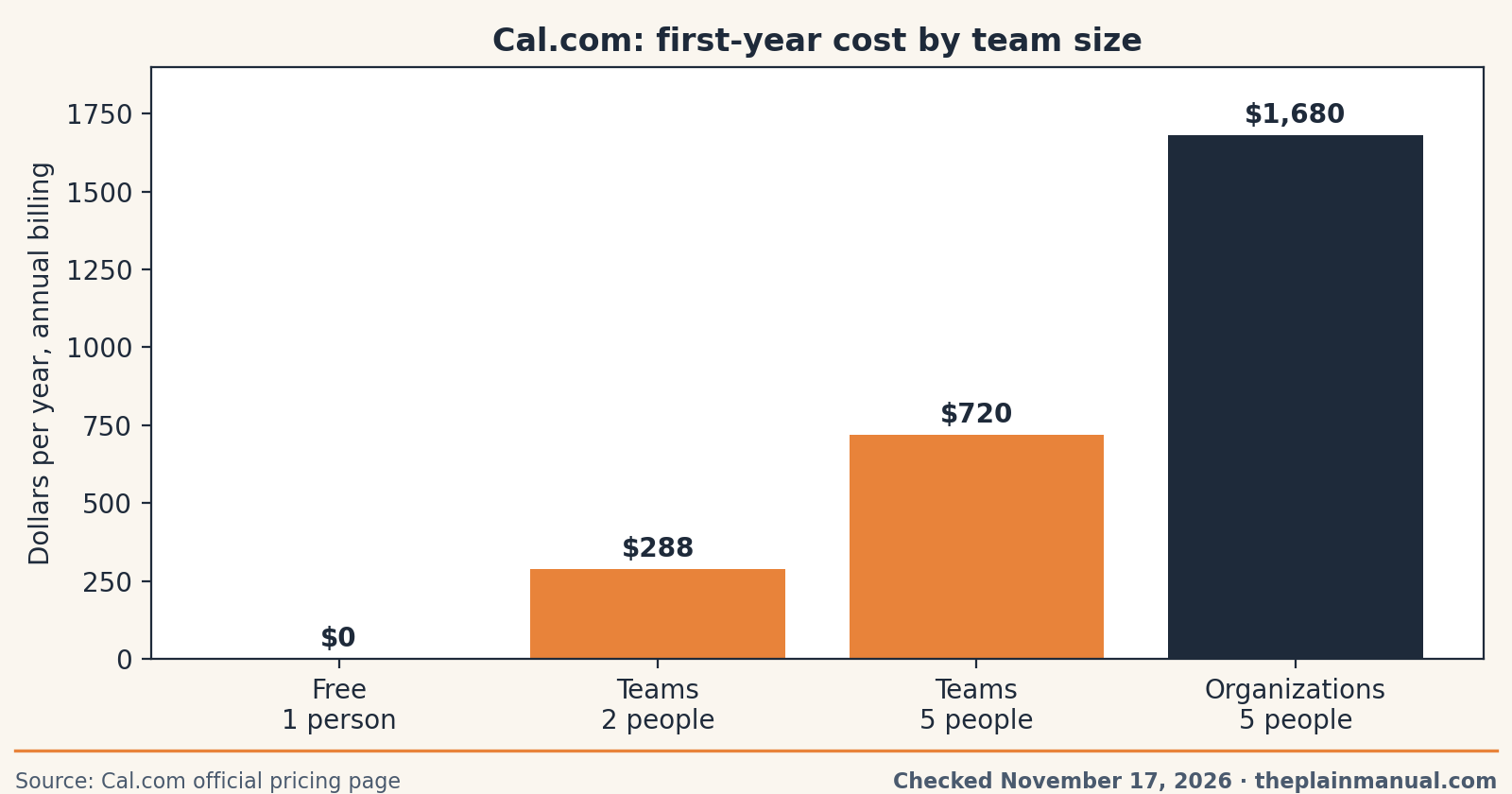
Read the table with one rule in mind. The bill starts with the second person, not with the second meeting. A solo reader can book a thousand meetings a year and pay nothing. A two-person practice that shares one booking page pays $288 a year on annual billing, and that is the honest comparison to make against a rival's per-seat price.
Who it's for: if you run meetings as part of work you are paid for, price the meetings themselves too. Our free Meeting Cost Calculator turns a recurring meeting into a yearly dollar figure, which is usually a much larger number than any row in the table above.
Should you stay, switch, or start here?
If you are choosing fresh today, start on the free plan. It covers the whole job for one person, it takes payments, and the import from Calendly is built in, so the trial costs you an afternoon rather than a migration project. Upgrade only for a named reason: a second host, bookings that should rotate across a team, a routing form that sends people to different pages, or branding you need gone.
If you are already on Cal.com and chose it for the open code, your decision is different. The hosted tool still works, and switching costs are real. What changed is your insurance policy, not your booking page. The practical move is to note the change, check where your data is hosted after the Cal.eu shutdown, and decide at your next renewal whether the free plan's depth still outweighs the weaker escape route. Readers in Europe with hosting obligations should make that check now, not at renewal.
If you need your scheduling tool itself to be open and self-hosted for production work, Cal.diy is not presented by its own maker as that tool. Look for a scheduling product whose production code is the published code, and expect to pay in setup time instead of subscription dollars.
What could be better
Three honest drawbacks, beyond the year's changes. The setup asks more of you than the simplest rivals do, because the free plan exposes more settings, and more settings means more decisions on day one. The pricing page withholds the monthly price, which is a small thing that tells you something about how the company wants you comparing. And the compliance and hosting story now splits by tier, so a small team that needs European hosting or a signed compliance route may find itself priced into Organizations at $28 per user, more than double the Teams price, for reasons that have nothing to do with scheduling.
Frequently asked questions
Is Cal.com still open source?
No. The hosted product moved to closed source in April 2026. A separate community project, Cal.diy, keeps the core booking engine under the MIT licence, without teams, routing forms, workflows, single sign-on, or analytics, and its maker frames it for personal, non-production use.
Is Cal.com really free?
For one person, yes. The free plan covers unlimited links and calendars, notifications, payments through Stripe and PayPal, and more than 100 app connections, with no time limit printed on the pricing page. The bill starts when a second person joins.
How much does Cal.com cost for a small team?
Teams costs $12 per user per month billed yearly, so two people pay $288 a year and five pay $720. Organizations costs $28 per user per month billed yearly. The pricing page does not print monthly-billing prices; the stated 25% yearly saving implies about $16 and about $37.
What happened to Cal.eu?
Cal.com announced on July 30, 2026 that its European-hosted region would close on November 1, 2026. Reporting on the company's pages since then describes a European hosting route for paid Organizations, an upgrade path for Teams customers who were on Cal.eu, and migration to the main service for individuals.
How does Cal.com compare with Calendly for a solo user?
On free plans, Cal.com allows unlimited event types and calendars for one user, while Calendly's free plan allows one active event type and one calendar connection. Readers who already use our earlier comparison can read the full head-to-head in Calendly vs Cal.com, and the setup walkthrough in How to Set Up a Free Booking Page with Cal.com.
Was this helpful? Answered it / Out of date / Still confused. Tell us which, and the posts readers flag get checked first.
Source: Cal.com official pricing page, read November 17, 2026; Cal.com's April 2026 closed-source announcement and July 30, 2026 Cal.eu shutdown notice, as reported in dated 2026 coverage; Calendly pricing and help pages as reported in October 2026.
Method: Research review, November 17, 2026. Prices and limits were read on the vendor's own pricing page. No hands-on testing was done for this post, and no affiliate links appear in it. Corrections: if a price or limit here is wrong, we fix the post and note the fix.
Related Posts
 WordPress vs Squarespace: Which One Owns Your Website? (2026)
- Asana vs Monday.com for a Small Team: Which One Is Worth Paying For? (2026)
- Alternatives to Squarespace: After the July 2026 Price Increase
- HoneyBook vs. Indy: Which Invoicing Tool Should a Freelancer Use? (2026)
- Trello vs. Asana: Which Project Tool Is Right for a Small Team? (2026)