Editor’s Note: New post, October 2026. Prices checked October 21, 2026. One warning before the picks: Microsoft changed Microsoft 365 Family storage this month, and most comparison pages still describe the old deal. We used the new one.
Research review: prices, limits, and sharing rules verified October 21, 2026 against Google’s own Google One plan page, Microsoft Support’s sharing and storage pages, Apple’s published iCloud+ price table, and current Dropbox and Amazon Photos listings. We did not move a family library between services for this piece.
In a sentence: For most families, the best cloud storage for photos is the 2 TB plan attached to the phones you already carry: Google One if your house mixes iPhones and Androids, iCloud+ if everyone is on an iPhone, and Amazon Photos if you already pay for Prime and mostly shoot stills.
Plain-English Verdict
Start with Google One 2 TB at $99.99 a year if your family mixes phone brands, because it is the cheapest 2 TB pool and every member’s photos stay private. Start with iCloud+ 2 TB at $9.99 a month if everyone carries an iPhone, because it is the only service here that also holds a full iPhone backup. Already paying for Amazon Prime? Your photos are probably covered at no extra cost, as long as you understand the video catch below.
How we checked this
Checked: Google’s official Google One plan page (read October 21, 2026, including the 2026 rename that now sells the 2 TB level under Google AI Plus), Microsoft Support’s sharing and storage-change pages, Apple’s iCloud+ price table, and current Dropbox and Amazon Photos listings.
Date: October 21, 2026.
Method: Research review. See How We Review. We earn nothing if you buy any of these plans, and there are no affiliate links in this post.
Here’s what cloud storage does in one sentence. It keeps a copy of your photos on the company’s computers, so a dropped phone is a bad day, not a lost decade.
Every service below does that job. They differ in three ways that matter to a family: what a terabyte costs per year, whether storage is one shared pool or a private shelf per person, and what happens to new photos the day you stop paying. We judged them on those three things, in that order.
The picks, by household
Google One: our pick for most families, and for mixed iPhone and Android houses
Our pick for most people. Google Photos is the album, and Google One is the storage plan that feeds it. One 2 TB pool covers the plan holder plus up to five others, and sharing the storage does not mean sharing the photos: each person’s library stays private unless they share an album.
What we like: the price, and the manners. At $99.99 a year for 2 TB, it is the cheapest family-sized pool here, about $50 per terabyte per year. Search is the other quiet win: finding “the dog at the lake house in 2022” is the kind of request Google Photos was built for, on any phone.
What could be better: The catch: the pool is shared with Gmail and Google Drive, not reserved for photos, so a hoarder’s inbox eats into the photo space. Google also renamed its tiers in 2026: the 2 TB level now sits under a plan called Google AI Plus on Google’s own page, next to pricier AI plans that do the same family job. Buy the storage. Ignore the upsell shelf.
The price: 100 GB is $1.99 a month, 200 GB is $2.99 a month, and 2 TB is $9.99 a month or $99.99 a year. The free tier is 15 GB, shared across Photos, Drive, and Gmail, which a new phone can fill in a single holiday weekend.
Our take: if your family cannot agree on a phone brand, this is the neutral ground, and the cheapest too.
iCloud+: our pick for all-iPhone households
Our pick if everyone in the house carries an iPhone. iCloud+ is the storage plan built into every Apple device. One plan can be shared with up to five other family members through Family Sharing, and each person’s photos and files stay private to them.
What we like: it does a second job nobody else here can do. iCloud is the only service in this roundup that holds a full iPhone device backup, the thing you restore from when a phone is lost or replaced. A Google-only household still needs iCloud, or a computer, for that job, as we explained in our guide to why your iPhone says storage full while you pay for iCloud.
What could be better: Apple bills monthly only, with no annual discount, so 2 TB costs $119.88 a year, a clean $20 more than Google for the same space. The 5 GB free tier is also the stingiest start here.
The price: 50 GB is $0.99 a month, 200 GB is $2.99 a month, 2 TB is $9.99 a month, then 6 TB at $29.99 and 12 TB at $59.99 a month.
Our take: the $20 premium over Google buys the device backup and zero setup. Fair for an all-iPhone family. A mixed family would pay it and still need a second home for the Android photos.
Amazon Photos: the cheapest pick, if you already pay for Prime
Our pick for Prime households that mostly shoot still photos. A Prime membership includes unlimited full-resolution photo storage, RAW camera files included, at no extra charge. If your family already pays for Prime for the deliveries, the photo storage is, in effect, already bought.
What we like: unlimited means unlimited. No per-terabyte math on stills, no “90 percent full” warning over a vacation, and Prime photos do not count against any paid pool you add later.
What could be better: The fine print: video gets only 5 GB, and for families that is a big catch, because family libraries are increasingly video: first steps, school concerts, the dog doing anything at all. Past 5 GB, video uploads stop until you buy a storage plan (100 GB is $1.99 a month, 1 TB is $6.99 a month, 2 TB is $11.99 a month) or clear space. Anyone who calls Amazon “unlimited family storage” without the video line in the same sentence is selling you something.
The price: included with Prime for photos, plus 5 GB of video. Without Prime, 5 GB total.
Our take: a stills-heavy Prime household can stop shopping here. A video-heavy one should treat Amazon as a free photo vault and keep clips somewhere with a real allowance.
Microsoft 365 Family (OneDrive): worth it for the Office apps, no longer for the storage
Our pick only if your family also wants Word, Excel, and PowerPoint. Microsoft 365 Family covers up to six people with the Office apps, and its OneDrive storage used to be the headline: 1 TB per person, 6 TB in total. That headline is now out of date, including in most roundups you will find this week.
What we like: the bundle is still real value if your household uses the Office apps anyway, files stay private per person even though storage is now shared, and OneDrive sits comfortably alongside Windows computers.
What could be better: What changed: starting October 8, 2026, new Family subscriptions get one 2 TB pool shared by all members, per Microsoft’s own support pages. The price did not move: $12.99 a month or $129.99 a year. Existing subscribers keep their per-person 1 TB until their first renewal on or after May 2, 2027. So the same $129.99 that bought up to 6 TB now buys 2 TB for a new family, about $65 per terabyte per year, and storage alone no longer justifies this plan.
The price: Basic is 100 GB for one person at $19.99 a year, Personal is 1 TB for one person at $99.99 a year, and Family is $129.99 a year for up to six people sharing 2 TB (new subscriptions). Add-ons can raise a subscription to 10 TB total.
Our take: buy it for the apps if you need them, and treat storage as a bonus that just got smaller. Do not renew blindly in 2027 on a 6 TB promise that has already ended.
Dropbox: the file cabinet, not the photo album
Our pick for families who mostly share documents and big files. Dropbox began as a syncing folder, and it still shows: the strongest file tool here, and the weakest photo deal.
What we like: sharing documents, scans, and school paperwork is painless, and the Family plan adds a shared Family Room folder alongside private individual accounts.
What could be better: the math. Plus gives one person 2 TB for $119.88 a year, the same annual price as iCloud, with no family sharing. Family shares 2 TB across up to six accounts for $203.88 a year, about $102 per terabyte per year, double Google’s rate for the same pool. Nothing about photos justifies that premium.
The price: Plus $119.88 a year (one user), Family $203.88 a year (2 TB shared, up to six accounts). Free tier: 2 GB.
Our take: keep Dropbox if your family already runs its paperwork through it. Do not start here for photos.
Skip this if…
Google One — everyone is on iPhone and nobody wants a second app
iCloud+ — half the family is on Android; their photos live elsewhere
Amazon Photos — your family shoots lots of video; 5 GB fills fast
Microsoft 365 Family — bought for storage only, without using the Office apps
Dropbox Family — photos are the point; priciest 2 TB here at $203.88/yr
The price per terabyte, honestly
The price: stickers hide the shape of these plans, so here is the one comparison that cuts through it: what one terabyte costs you for one year, at the 2 TB family tier, using annual billing where a service offers it.
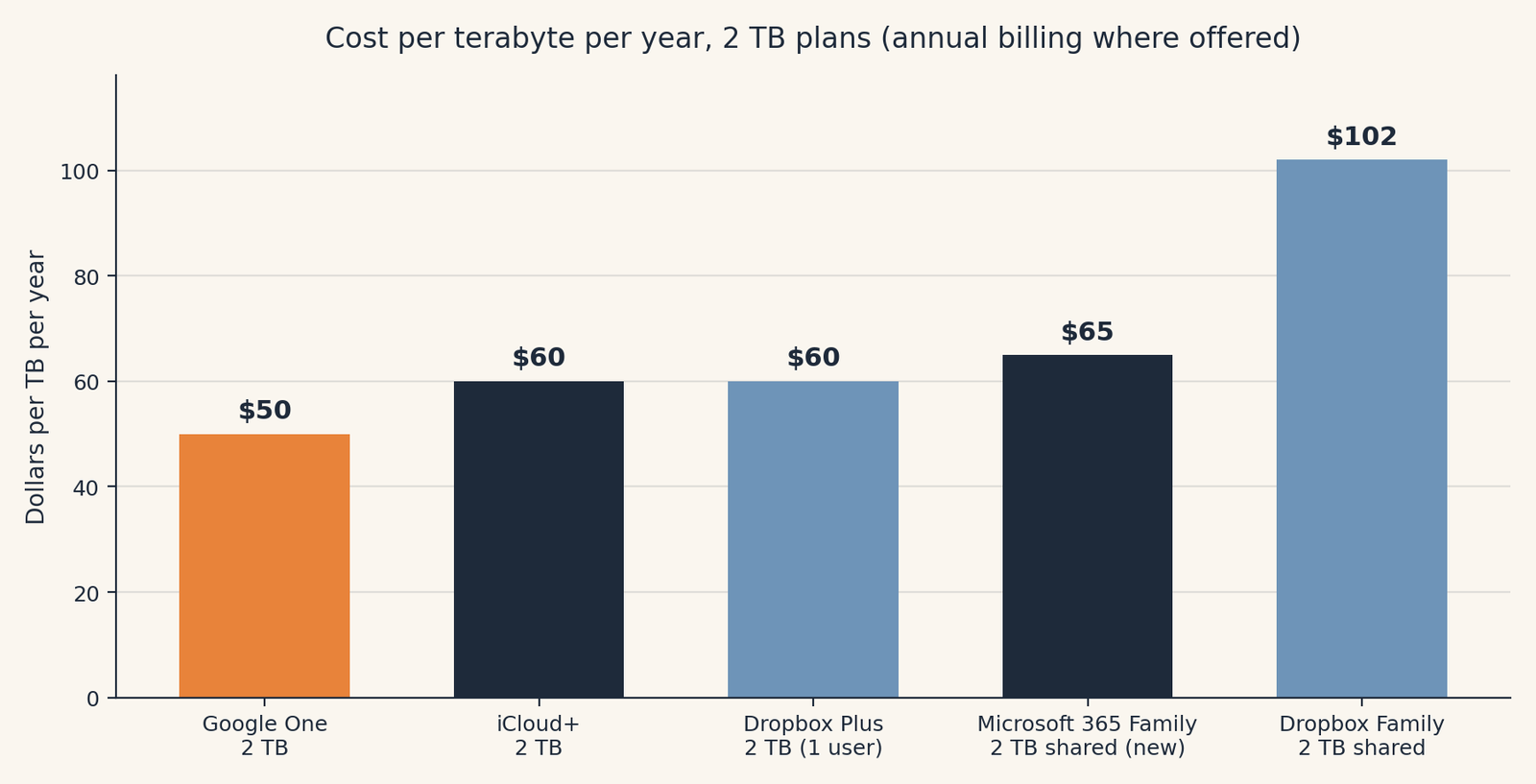
| Service and plan | Storage | Price per year | About per TB per year | Who shares it |
|---|---|---|---|---|
| Google One 2 TB | 2 TB, one pool | $99.99 | $50 | Holder plus up to 5 others, files private |
| iCloud+ 2 TB | 2 TB, one pool | $119.88 (monthly only) | $60 | Family Sharing, up to 5 others, files private |
| Dropbox Plus | 2 TB | $119.88 | $60 | One user only |
| Microsoft 365 Family | 2 TB, one shared pool (new subscriptions) | $129.99 | $65 | Up to 6 people, files private |
| Dropbox Family | 2 TB, shared | $203.88 | $102 | Up to 6 accounts |
| Amazon Photos with Prime | Unlimited photos, 5 GB video | Included with Prime | Not applicable | Household Prime benefits |
Two honest notes on that table. Microsoft’s row would have won this chart a month ago, at roughly $22 per terabyte, and any guide still showing that figure is using the retired 6 TB deal. And iCloud’s row is the only one with no annual option: $9.99 leaves the account twelve times a year, and the total is $119.88 either way.
What happens when you stop paying
Who it’s for: anyone who has let a card expire and wondered if the photos went with it. The short answer is reassuring, with one sharp edge.
Nobody here deletes a family library the day a payment fails. Microsoft states the pattern plainly: if the subscription ends, your files remain intact, and your storage shrinks back to the free size. The others work the same way: what you stored stays stored, and downloads remain available.
The sharp edge is the new photos. When your stored library is bigger than the free tier you fall back to, and for a family library it always is, every service here stops accepting new uploads and backups. Your phone keeps taking pictures. They just stop going anywhere. So pick the service you will actually keep paying for, set a reminder a month before any renewal you might cancel, and export the irreplaceable albums to a drive at home once a year. That habit matters because storage that mirrors your phone is not the same as a backup, the subject of our plain-English explainer on what cloud storage actually is and our guide to backing up your phone photos automatically.
Jargon Decoder
“Shared pool” just means: one bucket of storage that several people pour into. Your photos stay yours and nobody else can see them, but every person’s uploads make the bucket fuller. The opposite of a per-person allowance, where each member gets a bucket of their own.
Frequently asked questions
How much cloud storage does a family actually need?
Most families fit comfortably in 2 TB: a heavy phone photographer might fill 100 to 200 GB in a few years, so 2 TB covers four to six people with room for video. Families shooting lots of 4K video should count their video hours first, because video fills pools far faster than photos.
Can family members see each other’s photos on a shared plan?
No. On Google One, iCloud+, and Microsoft 365 Family, the space is shared but the files are not. Each library stays private unless its owner shares an album or folder.
Is Amazon Photos really unlimited?
For photos, yes, with a Prime membership: full-resolution stills, including RAW files, with no cap. For video, no: Prime includes only 5 GB of video storage, and more requires a paid storage plan.
We already pay for Microsoft 365 Family. Is our 6 TB gone?
Not yet, if you subscribed before the change. Existing subscribers keep 1 TB per person until their first renewal on or after May 2, 2027. New subscriptions, and expired ones bought again, get the shared 2 TB pool now.
What happens to our photos if we cancel?
Your stored photos stay stored and downloadable. What stops is new uploads and backups once you are over the free tier, so move anything irreplaceable before you cancel, and never leave new photos with no home.
Run your own numbers: our free Cloud Storage Calculator (“How Much Cloud Storage Do I Need?”) turns your photo count and video hours into a storage estimate and shows which plan tier actually fits, so you can check whether 200 GB is enough before paying for 2 TB.
Method: Research review (no hands-on testing). Cross-checked against Google’s official Google One plan page, Microsoft Support’s sharing and storage-change pages, Apple’s published iCloud+ prices, and current Dropbox and Amazon Photos plan listings. Checked October 21, 2026.
Corrections: Spotted an error? Tell us, we fix mistakes publicly and date them.
Prices: US list prices; verify before buying.
Source: Google One plans and Microsoft Support, Microsoft 365 subscription sharing FAQs, checked October 21, 2026.