

Here’s what it does in one sentence
Fathom and Otter.ai are apps that listen to your video meetings, write down what everyone said, and hand you a summary afterward — so you can stop frantically typing notes during a call.
Plain-English Verdict: If your meetings are free to try both, start with Fathom: its free tier records and transcribes unlimited meetings, while Otter.ai’s free tier stops at 300 minutes a month and cuts every call off at 30 minutes. But if you want live captions as people talk — or you need to upload old recordings — Otter.ai is the better fit. The paid tiers cost about the same, so pick on features, not price.
Why this comparison is tricky (honestly)
Both apps promise the same thing: never take meeting notes again. They get there in different ways, and the difference that matters most is how strict each free plan is.
One more honest note before we start. We researched both tools against their official pricing pages and documentation in September 2026, but we did not run a test meeting through either app for this article. That means we won’t make claims about whose transcription is more accurate — we haven’t measured it, and any blog that pretends otherwise is guessing. This piece is a guide to features, limits, and pricing. The Sources note at the bottom explains exactly what we did and didn’t do, and our methodology page explains how we review tools in general.
Fathom: the generous free tier with one real limit
Fathom sends a bot to your Zoom, Google Meet, or Teams call. The bot records, transcribes, and — within about half a minute of the call ending, hands you a structured summary with action items pulled out automatically.
What we like
- The free tier doesn’t meter your meetings. Unlimited recordings, unlimited transcription, unlimited storage. That is genuinely rare in 2026, and it’s the reason Fathom is our first suggestion for anyone drowning in meetings.
- Summaries arrive fast. Typically within 30 seconds of a meeting ending, and the transcript is linked to video timestamps — click a sentence, jump to that moment in the recording.
- Setup takes about ten minutes. Sign up, connect your calendar, and the bot starts showing up to scheduled calls on its own. There is no software to install for the basic flow.
What could be better
- The polished AI summaries are capped at 5 meetings a month on the free tier. After that, you still get every recording and transcript — but the smart recap with extracted action items stops until the next month. This is the catch. It is small, but it is the whole catch.
- The bot is always visible, and you can’t hide it. Paid users can rename the bot, but there is no option to record without a bot joining the call at any tier. If your clients find a bot guest odd, this will come up.
- 28 languages, no mobile app. Plenty for most English-speaking teams, narrower than some rivals, and if you want to record in-person conversations on your phone, Fathom won’t help.
Pricing
| Plan | Monthly price | What you get |
|---|---|---|
| Free | $0 | Unlimited recording, transcription, and storage; advanced AI summaries limited to 5 calls/month |
| Premium | $20/month ($16/month billed annually) | Unlimited AI summaries and action items, “ask Fathom” search across past meetings, CRM integrations |
| Team | $19/user/month ($15/user/month annual, 2-user minimum) | Team dashboards, shared libraries, coaching metrics |
| Business | $34/user/month ($25/user/month annual, 2-user minimum) | Full CRM field-level sync (Salesforce, HubSpot), compliance controls |
Check the official pricing page before buying, Fathom changed its tier names and prices during 2026.
Our take
Fathom is the best free starting point for anyone who lives on video calls. The 5-AI-summaries cap is real, but recordings and transcripts never stop, and 5 polished recaps a month covers the calls that actually matter. Upgrade to Premium when you’re regularly hitting the cap, not before.
Otter.ai: the caption king with a stopwatch
Otter.ai is the older of the two (founded 2016), and it shows in the feature set: real-time transcription that appears on screen as people talk, an auto-joining meeting bot called OtterPilot, and a search engine across all your past meetings.
What we like
- Live captions. Otter writes the transcript in real time, on screen, while the meeting is happening. For anyone hard of hearing, in a noisy café, or in a meeting where English isn’t everyone’s first language, this is genuinely useful, not a gimmick.
- OtterPilot joins on its own. Connect your calendar and the bot shows up to scheduled calls automatically, no “wait, did someone press record?” moment.
- You can upload old recordings on the free tier. Three lifetime file imports on the Basic plan, enough to test whether it handles your audio well before paying. (Fathom’s free tier doesn’t do file imports at all.)
- “AI Chat” is included free. 20 queries a month: ask questions like “what were the three objections about the pricing model?” and get answers pulled from your transcripts.
What could be better
- The 30-minute per-meeting cap on the free plan is the killer. Not the 300 minutes a month, the 30-minute per-conversation limit. A normal hour-long meeting gets cut off mid-recording, and you have to manually start a new one. That is the single most annoying limit in either app’s free tier.
- Minutes don’t roll over. Unused transcription minutes vanish at month’s end, and even the paid Pro plan caps individual conversations at 90 minutes.
- 3 lifetime file imports. Not per month, ever. Once you’ve used them, uploading recordings requires a paid plan.
Pricing
| Plan | Monthly price | Monthly minutes | Max per meeting |
|---|---|---|---|
| Basic (free) | $0 | 300 | 30 minutes |
| Pro | $16.99 ($8.33 billed annually) | 1,200 | 90 minutes |
| Business | $30/user ($19.99/user billed annually) | 6,000 | 4 hours |
| Enterprise | Custom | Custom | Custom |
Check the official pricing page before buying, Otter runs periodic promotions.
Our take
Otter.ai’s free plan is really a trial wearing a free plan’s clothes: 300 minutes sounds fine until the 30-minute cutoff ruins your first hour-long meeting. But for short meetings, live captions, and uploaded recordings, it’s a legitimate tool, and Pro at about $100 a year is one of the cheaper paid upgrades in the category.
The head-to-head, side by side
| Fathom (free) | Otter.ai (free) | |
|---|---|---|
| Meetings recorded per month | Unlimited | 300 minutes total |
| Longest single meeting | No cap | 30 minutes |
| AI summaries per month | 5 advanced (basic unlimited) | Included on recorded meetings |
| Live captions during the call | No | Yes |
| Upload old recordings | No | Yes (3 lifetime) |
| Storage | Unlimited | 25 most recent conversations |
| Platforms | Zoom, Meet, Teams | Zoom, Meet, Teams, Webex |
| Mobile app | No | Yes |
| Paid plan starts at | $16/mo (annual) | $8.33/mo (annual) |
Why choose it over the other?
Choose Fathom over Otter.ai if you have a lot of meetings and a small budget. The unlimited recording on the free tier is the decisive feature, nobody wants to ration which calls get notes. Fathom also wins if you mostly want the recording and transcript for reference, rather than real-time help during the call.
Choose Otter.ai over Fathom if you need live captions (accessibility, noisy environments, non-native speakers), if you want to upload recordings of calls that already happened, or if your meetings are short and the 30-minute cap won’t bite you. It’s also the better pick if you ever record conversations on your phone.
What a year of the paid tier actually costs
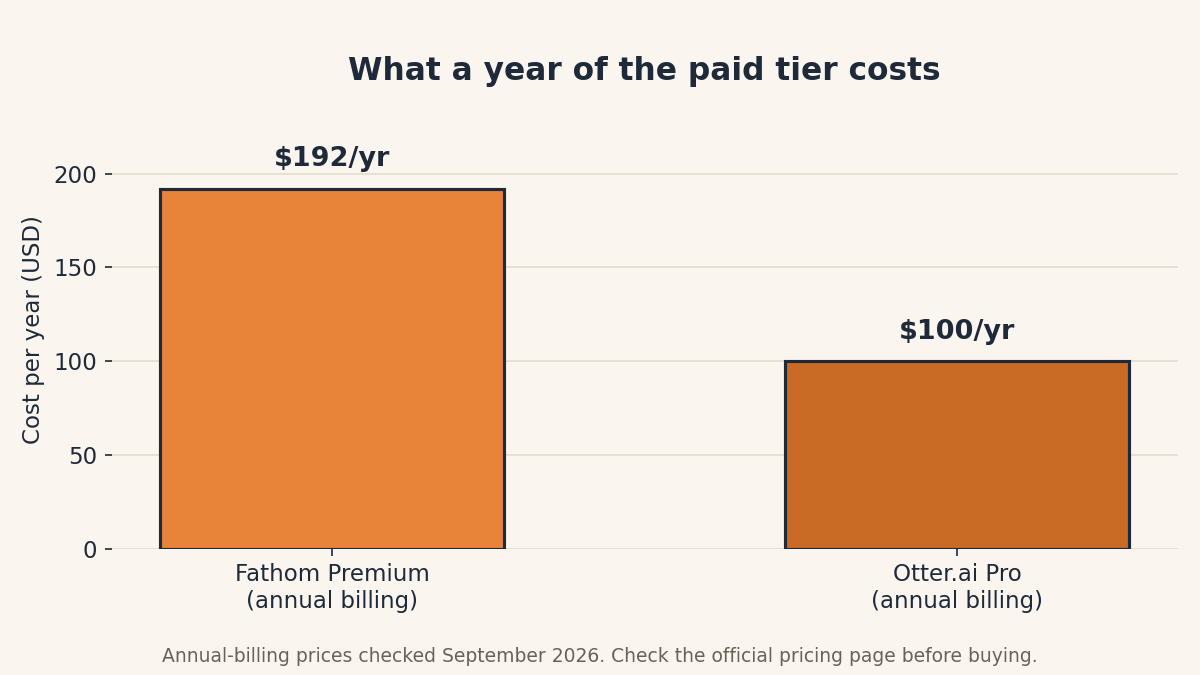
The chart uses annual-billing prices because both apps discount heavily if you pay yearly. Month to month, it’s $20 vs. $16.99 — close enough that you should pick on features, not on the few dollars’ difference.
The privacy question nobody asks (but should)
Jargon Decoder: A “bot” is just a robot guest that joins your call to listen. It shows up in the participant list like a person named “Fathom” or “OtterPilot.” “Transcription” is the written record of everything said — the app turns the audio into text.
Both apps put a bot on your calls. Everyone in the meeting can see it, and in many places you’re expected (and in some places legally required) to tell people a meeting is being recorded. The apps announce themselves, which helps — but the habit is yours to build: a quick “I’m recording this with a notes app, everyone okay with that?” at the start covers you in most situations.
Also worth knowing: transcripts live on these companies’ servers, not on your computer. Both companies say they don’t train AI on customer data, and Fathom lists SOC 2 and GDPR compliance. Still, think twice before recording a meeting where anyone discusses medical, legal, or financial
details, a written transcript is a document that can be searched, shared, and subpoenaed.
Try it yourself: our free Meeting Cost Calculator tallies what your meetings really cost, no signup, runs entirely in your browser.
Our bottom line
For most people, the answer is Fathom: its free tier is the most generous in the category by a wide margin, and the 5-summaries-a-month cap is a minor annoyance next to Otter.ai’s 30-minute guillotine. But “most people” isn’t you specifically. If live captions or uploaded recordings are on your must-have list, Otter.ai is the right call, and its Pro plan is the cheaper upgrade if you ever decide to pay.
Our suggestion: try Fathom’s free tier for two weeks. If you never miss live captions, you’re done, that was free. If you do miss them, you just learned something worth $100 a year.
FAQ
Is Fathom really free?
Yes, with one limit: you get unlimited recording, transcription, and storage forever, but the polished AI summaries and auto-extracted action items are capped at 5 meetings a month. Everything else keeps working after that.
What happens when an Otter.ai meeting hits 30 minutes?
The recording stops. You can manually start a new recording for the rest of the meeting, but the transcript gets split across two conversations. On the paid Pro plan the cap rises to 90 minutes per meeting.
Do I have to tell people the bot is recording?
The bot appears in the participant list, so attendees can see it, but a verbal heads-up at the start of the call is the polite (and in some jurisdictions, required) move. Consent rules vary by state and country.
Which one is better for a small team?
Fathom’s Team plan ($15/user/month annual) is aimed at coaching and shared libraries; Otter.ai’s Business plan ($19.99/user/month annual) gives unlimited-ish minutes (6,000/month) and CRM integrations. But honestly, most small teams should start on the free tiers, both companies’ free plans tell you within a fortnight whether the tool fits.
Can either tool transcribe a meeting I’m not on a video call for?
Otter.ai can, its mobile app records in-person conversations, and the free plan includes 3 lifetime file uploads. Fathom needs a Zoom, Google Meet, or Teams call to record.
Sources and corrections
What we did: We compared the official pricing pages and documentation for Fathom and Otter.ai in September 2026, plus third-party roundups published in 2026. We did not run test meetings through either app, so we make no claims about transcription accuracy, those numbers come from vendors and reviewers, not from us. Read our methodology for how we review tools.
Corrections: Pricing changes. If you spot something out of date, tell us and we’ll fix it, that’s the deal.
Editor’s Note: First published September 2026. Pricing checked September 29, 2026.
Want one plain-English software take in your inbox every week? Subscribe to The Plain Manual newsletter, no spam, unsubscribe anytime.
Related Posts
 Notion vs Obsidian: Which Note App Is Right for You? (2026)
- Google Workspace vs Microsoft 365 for a Tiny Business (2026)
- Todoist vs TickTick: Which To-Do App Will You Actually Keep Using? (2026)
- Calendly vs Cal.com: Which Booking Tool Is Right for You? (2026)
- FreshBooks vs. Wave: Which Invoicing App Is Worth Paying For? (2026)



3 thoughts on “Fathom vs. Otter.ai: Which AI Meeting Notes App Should You Use? (2026)”