
Editor’s Note: New post, October 2026. Prices checked October 17, 2026. Squarespace renamed its plans, so any guide still quoting Personal and Commerce prices is out of date.
How this guide was made: pricing and plan contents verified October 17, 2026 against Squarespace’s official pricing page, Wix’s official plans page, and WordPress.com pricing as reported in October 2026 checks. One honest advantage: The Plain Manual itself runs on WordPress, so the WordPress parts of this guide come from daily hands-on use, not a pricing page.
In a sentence: For most side hustles that sell something, Squarespace Core at $348 for the first year is the good enough pick, Wix Core costs the same and gives you more room to tinker, and WordPress.com is the cheaper start if you mainly write and only take occasional payments.
Plain-English Verdict
Start where your hustle actually is, not where a pricing page hopes it will be. If you sell products, services, or bookings and want the site to look polished with the least fuss, pick Squarespace Core. If you like moving things around until they feel right, pick Wix Core at the same first-year price. If your hustle is mostly writing, advice, or a portfolio, start on WordPress.com Premium at $96 for the first year and upgrade only when a limit blocks real work.
How we checked this
Checked: Squarespace’s official pricing page on October 17, 2026 (new Basic, Core, Plus, and Advanced plans, transaction fees, and card rates); Wix’s official plans page (plan contents, storage, and collaborator limits) with US annual prices cross-checked in October 2026 reporting; WordPress.com plan prices as reported in October 2026 checks of its pricing page.
Date: October 17, 2026.
Method: Research review, with WordPress judged from daily hands-on use (this site runs on it). See How We Review. We earn nothing if you buy any of these tools. There are no affiliate links in this post.
Here’s what a website builder does in one sentence: it rents you a ready-made shop front, counter, and till in one monthly bill, so you never have to hire the builder, the electrician, and the locksmith separately. Hosting, security, templates, and the editing tools all live in the same account. The trade is simple. You pay a little more each month, and in return you give up some freedom to move everything exactly as it was to a different landlord later.
Our picks, labeled by job
- Our pick for most side hustles: Squarespace Core, $29 a month on annual billing, $348 for year one. Clean templates, no extra fee on ordinary online store sales, and invoices included.
- Budget pick: WordPress.com Premium, $8 a month on annual billing, $96 for year one. The cheapest credible start for a writing-led hustle, with payment buttons for occasional sales.
- If you want to tinker, get this one: Wix Core, $29 a month on annual billing, $348 for year one. A free-form editor, basic selling, bookings, and 50 GB of storage.
- If you sell courses or memberships, read the fine print first: Squarespace charges a separate fee on digital content and memberships, 7% on Basic and 5% on Core, on top of card fees. That fee, not the headline price, decides whether Squarespace is cheap for you.
Skip this if…
Skip Squarespace Core if you mainly sell digital downloads, courses, or memberships and every percentage point matters. The 5% digital content fee on Core adds up fast, and Plus at $588 a year only brings it down to 1%.
Skip Wix Core if you hate choices. The editor lets you move almost anything, which is freedom for some people and a whole Saturday of nudging boxes for others.
Skip WordPress.com Premium if you need a full shop with proper product pages, shipping, and tax tools from day one. That job belongs to its Commerce plan at $540 a year, or to Squarespace or Wix.
Skip all three paid plans if you have no audience yet and nothing to sell. Build on a free tier, prove one person will pay, then upgrade.
The true cost for one year
The price: Annual billing is the honest comparison, because every one of these companies shows its lowest number that way and charges more month to month. On annual plans, all three include a free custom domain for the first year. That sounds generous, and it is, for exactly one year. From year two, the domain renews at the standard rate, so budget roughly another $15 to $25 a year for a typical .com name, and check the exact renewal price before you buy.
| Plan | Per month, annual billing | First year | Can it sell? |
|---|---|---|---|
| WordPress.com Personal | $4 | $48 | No payment buttons |
| WordPress.com Premium | $8 | $96 | Payment buttons, no full shop |
| Wix Light | $17 | $204 | No |
| Squarespace Basic | $19 | $228 | Yes, with a 2% store fee |
| WordPress.com Business | $25 | $300 | Payment buttons, plus plugins |
| Wix Core | $29 | $348 | Yes, basic selling |
| Squarespace Core | $29 | $348 | Yes, 0% store fee |
| WordPress.com Commerce | $45 | $540 | Yes, full WooCommerce shop |
| Squarespace Plus | $49 | $588 | Yes, lower card rate |
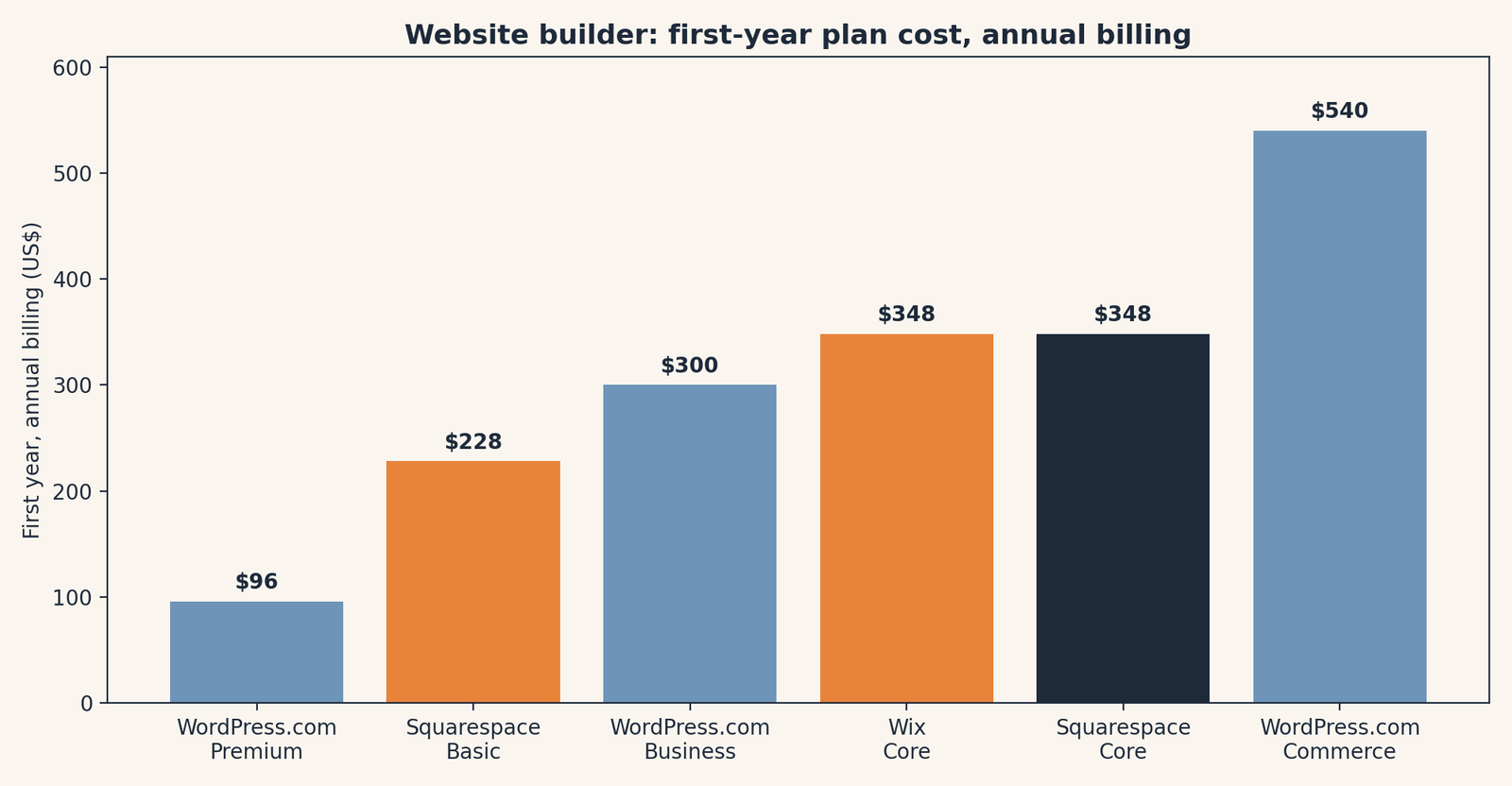
Two quiet costs sit under that table. The first is card processing, which nobody escapes: Squarespace Payments starts at 2.9% plus 30 cents per sale on Basic and Core, and Wix Payments is commonly reported at the same 2.9% plus 30 cents in the US. The second is your time. A builder that saves you three evenings of wrestling with settings has already paid for a month or two of its own bill, even if no receipt ever says so.
1. Squarespace Core: our pick for most side hustles
Squarespace is the polished option. Its templates start closer to finished than most rivals, which matters when design is not your job and your evenings are short.
What we like: Core removes the 2% online store fee that Basic charges, includes advanced analytics, lets unlimited contributors help, and includes free invoicing on every plan. For a coach, a maker, or a small service business, that is a complete counter and till in one bill.
What could be better: The digital content fee is the catch. Courses, memberships, and similar content carry a 5% fee on Core and 7% on Basic, on top of card fees. You also cannot take your exact site design with you if you leave. Your words and product data can be exported in limited forms, but the look stays behind.
Who it’s for: Sellers of physical products, services, and bookings who want the site to look trustworthy quickly, and who would rather pick a strong template than arrange every pixel.
Pricing: Basic is $19 a month billed annually ($228 a year), Core is $29 ($348), Plus is $49 ($588), and Advanced is $99 ($1,188). Monthly billing is $25, $39, $65, and $139. Card rates start at 2.9% plus 30 cents on Basic and Core, then drop on higher plans.
Our take: If I had to pick one for a neighbour starting a real side hustle this weekend, this is it, unless the hustle is mainly digital content. Start on Core if you will sell, Basic only if you will not.
2. Wix Core: the tinkering pick
Wix is the flexible option. Its editor is a blank-ish canvas with thousands of templates, an AI site builder to get a first draft, and room to move elements freely.
What we like: You can start completely free, with no credit card, and only pay when you are ready to connect a domain and remove Wix branding. Core adds 50 GB of storage, five collaborators, basic selling, and scheduling for services. Business, at $39 a month billed annually ($468 a year), adds 100 GB and standard selling features for a growing store.
What could be better: Freedom has a price in time. It is easy to make a Wix site that looks slightly off and hard to say why. Paid apps from its marketplace can also creep: a feature that feels basic sometimes lives in an add-on, so check the full bill before you commit. Changing templates later is also less clean than beginners expect.
The catch: The cheapest Wix plan, Light at $17 a month billed annually, cannot sell at all. Readers compare Light’s price with selling plans from rivals and think Wix is cheaper. It is not, for a shop. The fair comparison is Core against Core, and there the first year is identical at $348.
Pricing: Free is $0. Light is $17 a month billed annually ($204 a year), Core is $29 ($348), Business is $39 ($468), and Business Elite is $159 ($1,908). Monthly billing is higher, commonly reported at $24, $36, $46, and $172.
Our take: Pick Wix if the free start matters, if you sell bookings as well as products, or if you genuinely enjoy arranging a page until it feels like yours.
3. WordPress.com: the budget start, and the best exit plan
WordPress.com is the hosted home of the WordPress software, and it is the cheapest serious start in this guide. It is also the pick with the clearest way out, because a site built on WordPress can, with work, move to self-hosted WordPress later. We explain that difference in our guide to what open source means.
What we like: Premium at $96 for year one covers a custom domain, no ads, premium themes, and simple payment buttons, which is enough for a writer who sells one ebook, one consultation, or a small paid newsletter upgrade. Personal at $48 a year is even cheaper if you take no payments at all.
What could be better: The step up is steep and confusing. A full shop needs Commerce at $540 a year, and the famous plugin library only becomes fully useful on Business at $300 a year and above. Between Premium and Commerce there is a wide middle where readers pay more without getting the shop they pictured.
Pricing: Free is $0 with a WordPress.com subdomain and ads. Personal is $4 a month billed annually ($48 a year), Premium is $8 ($96), Business is $25 ($300), and Commerce is $45 ($540). Monthly billing is higher, reported at $9, $18, $40, and $70.
Our take: We like WordPress more than a price table can show, and that is not a slogan: this site runs on WordPress, we publish on it every day, and it has never once stopped us building something we pictured. Pick WordPress.com if words are the product and payments are occasional. Skip it as a cheap shop, because at shop level it is not cheap anymore. Our explainer on cloud storage makes the same point we make here: always ask what happens when you stop paying, and how hard it is to leave.
Which one lets you leave with your content?
This is the question nobody asks on day one and everybody asks on the worst day. With Squarespace and Wix, you can export some content, such as blog posts or product lists in limited formats, but you cannot move the design, and a rebuild is part of any exit. With WordPress.com, your posts, pages, and media travel in a standard export, and the same software runs on ordinary hosting, so the move is real work but not a restart from zero. If your hustle is a five-year project, that exit plan is worth money. If it is a one-season experiment, it is worth almost nothing, and you should buy the easiest tool instead.
Domain tip, whichever you pick: the free first-year domain is convenient, but note its renewal price in your calendar on the day you register it. A domain that renews quietly at a high rate is the smallest, saddest subscription surprise, and our guide to finding subscriptions you forgot exists because of exactly this pattern.
Frequently asked questions
What is the cheapest website builder that can take payments?
WordPress.com Premium at $96 for the first year can take simple payments with payment buttons. For a proper shop checkout, the cheapest full options here are Wix Core and Squarespace Core, both $348 for year one on annual billing.
Do I need the most expensive plan to sell digital products?
No, but read the fee, not just the plan price. On Squarespace, digital content and memberships carry a 7% fee on Basic and 5% on Core, on top of card fees. At high digital sales, a higher plan or a different platform can be cheaper overall.
Is a free website builder enough for a side hustle?
For testing, yes. For selling, usually no. Free tiers carry the builder’s branding, a subdomain instead of your own domain, and no proper checkout. Prove the idea free, then pay.
How much should I budget for year two?
The same plan price, plus your domain renewal, roughly $15 to $25 for a typical .com, plus any paid apps or email you added. Put the renewal dates in your calendar when you sign up.
Can I move my site later if I choose wrong?
Words and basic product data, usually yes, with effort. The exact design, no, on Squarespace and Wix. WordPress.com has the cleanest exit, because the same WordPress software can run on other hosting.
Run your own numbers: A website builder is a subscription, and subscriptions are only cheap until renewal day. Add up your first year and your second year with our free Subscription Cost Calculator in the Free Tools section, including the domain renewal, before you pick a plan.
Method: Research review for Squarespace and Wix. WordPress is the software this site runs on; we build and publish on it daily, and the WordPress judgements here come from that daily hands-on use. Prices and fees cross-checked against Squarespace’s official pricing page, Wix’s official plans page, and WordPress.com pricing as reported in October 2026 checks. Checked October 17, 2026.
Corrections: Spotted an error? Tell us. We fix mistakes publicly and date them.
US list prices; verify before buying.
Source: Squarespace pricing (via Squarespace), checked October 17, 2026.
Like plain-English tool guides? Our newsletter rounds up the week’s posts every Saturday. Join here.