Editor’s Note: This comparison is current as of October 2026. Pricing checked October 10, 2026.
In a sentence: Trello is the simpler, cheaper project board that most small teams should start with; Asana is the more organized, more expensive option worth the money only if your work needs deadlines, dependencies, and real reporting.
Plain-English Verdict
For a small team that just wants to see what everyone is working on, start with Trello’s free tier (up to 10 people, no credit card, done in minutes). If your work keeps slipping because nobody knows what is due when, Asana’s Starter plan at $10.99 per user per month is the more grown-up option and worth the extra money. Most teams reading this do not need either paid plan yet. (And no, this site earns nothing either way. There are no affiliate links here.)
What we actually did: We read both official pricing pages directly on October 10, 2026 (trello.com/pricing and asana.com/pricing), and cross-checked every plan name and price against six independent 2026 reviews and pricing guides that each quoted the live pages themselves. We did not run a hands-on walkthrough or create test accounts for this piece, so this is a researched comparison guide, not a lab test. We make no money from your choice either way: no affiliate links, no sponsored placements.
The 60-second decision tree
- If you want something running in five minutes: pick Trello Free. A board, some columns, cards you drag across. You already understand it.
- If your team keeps missing deadlines: pick Asana Starter. Its timeline view and task dependencies make due dates visible in a way Trello’s free boards do not.
- If you hate project software on principle: start with Trello Free anyway. It feels more like sticky notes than software, which is the point.
- If you have more than two people: know that Asana’s free plan caps at two users, so it is not really an option for a team of three or more. Trello’s free plan covers up to ten.
- If you just need a shared to-do list: skip both. A plain checklist app is faster, cheaper, and easier to stick with. (See our guide to the best simple to-do app.)
- If money is tight and you are under ten people: Trello Free is the obvious first stop. It costs nothing and stays useful far longer than most free tiers.
1. Trello
Here’s what it does in one sentence. Trello gives you boards with columns (like “To do,” “Doing,” “Done”), and you drag task cards across them so everyone can see where the work stands at a glance.
Trello is the older, simpler tool, and it shows in a good way. It was built around one idea, the board, and it resisted becoming anything else for years. Atlassian (the company behind Jira) bought it, gave it some AI features, and it is still the least intimidating project tool you can hand to a non-technical team. People who claim to hate project software tend to tolerate Trello, which is rare praise in this category.
What we like
The learning curve is genuinely tiny. A new person opens a board and understands it in about ninety seconds, because it looks like the system every office already uses with sticky notes on a wall. The free tier is real: up to 10 collaborators per workspace, unlimited cards, and no credit card demanded. Paid tiers are straightforward too, with Standard at $5 per user per month and no surprise upsells lurking behind the first payment screen. Trello’s Premium tier now includes AI features like card summarization and AI-generated boards, per Trello’s own pricing page, so the company is at least keeping pace.
What could be better
Trello has no real dependency management, which is the grown-up way of saying it cannot easily show that task B cannot start until task A finishes. If your work is a sequence of steps that must happen in order, you end up tracking that order in your head, which defeats the purpose of a project tool. Reporting is thin, large boards get unwieldy, and the free tier’s 10-board cap arrives sooner than you expect. Also worth knowing: guests on two or more boards in a paid workspace count as billable seats, so a “cheap” Standard plan can quietly inflate as collaborators pile up.
Pricing
- Free: $0. Up to 10 collaborators per workspace, unlimited cards, 10 boards per workspace.
- Standard: $5 per user per month billed annually ($6 month to month). Unlimited boards, advanced checklists, custom fields, 1,000 Butler automation runs a month.
- Premium: $10 per user per month billed annually ($12.50 month to month). Adds Timeline, Table, Calendar, Dashboard, and Map views, plus AI features and workspace controls.
- Enterprise: $17.50 per user per month, billed annually ($210 per user per year). Security and admin controls for big organizations. Overkill for a small team; skip it.
Prices are from trello.com/pricing, read October 10, 2026. They change, so give the official pricing page a glance before you commit to anything.
Our take
Trello is the project tool we would hand to a small team that has never used one. It is cheap, it is friendly, and its simplicity means people actually use it, which is the real failure mode of project software. Buy Standard at $5 a seat when you outgrow ten boards; consider Premium only when you catch yourself wanting a timeline view.
Who should skip this: teams that live by deadlines and dependencies, like agencies juggling client work with linked deliverables. Trello will feel like writing the plan on a napkin when you need a spreadsheet. Read the Asana section instead.
2. Asana
Here’s what it does in one sentence. Asana is a task manager that organizes your team’s work into projects with clear owners, due dates, and timelines, so nothing gets forgotten and everyone knows what is theirs.
Asana is the more serious of the two, and it wants you to know it. Where Trello feels like a wall of sticky notes, Asana feels like a well-run meeting. One assignee per task, so ownership is never ambiguous. Timelines, dependencies, dashboards, approvals. It also got a big rebrand of its plan names: what used to be called Basic is now Personal, Premium is now Starter, and Business is now Advanced. If you read an old review and the plan names look unfamiliar, that is why.
What we like
Asana is built around the question every small team actually asks: what is due, who owns it, and when. The Timeline and Gantt views on the Starter plan turn a pile of tasks into a visible schedule, and dependencies make handoffs explicit instead of hopeful. One task, one assignee, zero arguments about whose job it was. The 2026 plans also include AI Studio credits and AI Teammates on paid tiers, per Asana’s pricing page, so automation is no longer the preserve of the top tier. Paid plans include unlimited free guests, which is generous and makes client collaboration genuinely cheap.
What could be better
The free plan is the tightest in this comparison by a wide margin: two users. That is not a small-team plan, it is a personal plan, and a team of three has no free option at all. The entry paid price is also more than double Trello’s: $10.99 per user per month on annual billing. And Asana has a way of being more tool than you need. If your work fits on one board, Asana’s timelines, portfolios, and goals feel like being handed a filing cabinet when you asked for a folder.
Pricing
- Personal: $0, free forever, but capped at 2 users. Unlimited tasks and projects, list, board, and calendar views, 100 MB per file.
- Starter: $10.99 per user per month billed annually ($13.49 month to month). Timeline and Gantt views, reporting dashboards, unlimited automations, custom fields, forms, AI Studio credits, unlimited free guests.
- Advanced: $24.99 per user per month billed annually ($30.49 month to month). Portfolios, goals, workload management, approvals and proofing, native time tracking.
- Enterprise: custom pricing. SSO, security controls, capacity planning. For big companies; a small team will never need it.
Prices are from asana.com/pricing, read October 10, 2026. Always check the official page before buying, because list prices do move.
Our take
Asana is the better tool for a team whose work has real deadlines and real dependencies. It is more structured, more explicit, and harder to ignore, which is exactly what a team that keeps dropping things needs. But you pay for that structure: the free plan will not hold a team, and $10.99 a seat is a real line item for a five-person shop. Start here if Trello feels too loose. Do not start here if Trello already feels like enough.
Who should skip this: two-person partnerships and tiny crews whose entire plan fits on a whiteboard. Paying $659 a year to organize three people’s to-dos is a rough trade. Try Trello Free first, or honestly, a good checklist app.
Why choose Trello over Asana?
Price and simplicity, in that order. Trello’s free plan covers ten people for nothing, and its first paid tier is $5 a seat, less than half of Asana’s. It is also the tool people adopt without being taught, which matters more than any feature list. If your work is a flow of stages (sales pipeline, content calendar, hiring queue), a board is the natural shape for it, and Trello’s boards are the least fuss you will find.
Why choose Asana over Trello?
Structure and accountability. Asana makes ownership, deadlines, and dependencies visible by design: one assignee per task, timelines that show the order of work, dashboards that show whether you are on track. If your projects have phases that must happen in sequence, or a boss who asks “who owns this,” Asana earns its higher price. Trello can fake this with labels and due dates. Asana does not have to fake it.
The numbers, side by side
| Trello | Asana | |
|---|---|---|
| Free tier | $0, up to 10 collaborators, 10 boards per workspace | $0, but capped at 2 users |
| Entry paid plan | Standard: $5/user/mo (annual), $6 monthly | Starter: $10.99/user/mo (annual), $13.49 monthly |
| Top standard tier | Premium: $10/user/mo (annual), $12.50 monthly | Advanced: $24.99/user/mo (annual), $30.49 monthly |
| 5-person team, annual cost | $300 (Standard) / $600 (Premium) | $659 (Starter) / $1,499 (Advanced) |
| Best views | Board-first; Timeline/Table/Calendar/Map on Premium | List/Board/Calendar free; Timeline/Gantt on Starter |
| Guests | Guests on 2+ boards in a paid workspace are billable | Unlimited free guests on paid plans |
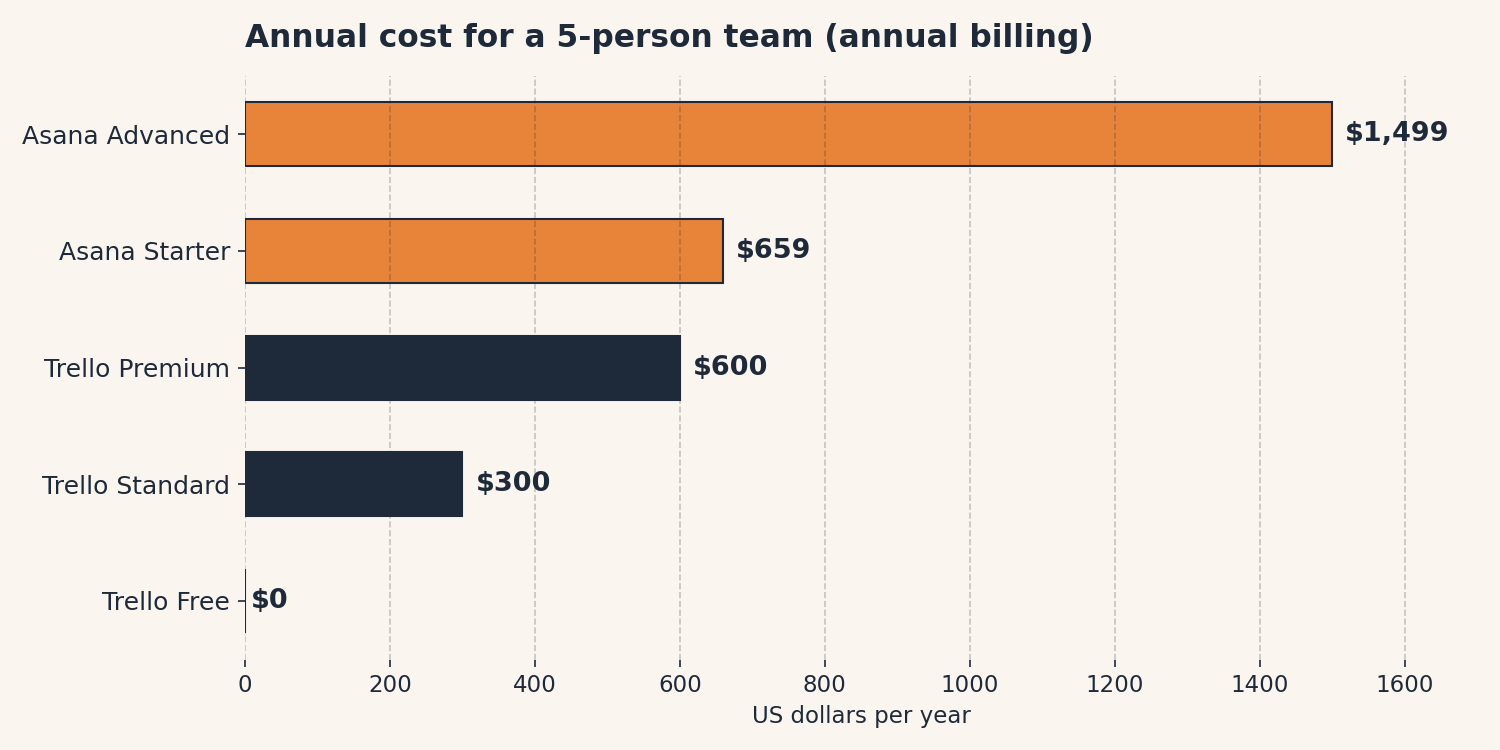
The chart above shows the annual cost for a 5-person team on each plan, using annual billing: Trello Free $0, Trello Standard $300, Trello Premium $600, Asana Starter $659, Asana Advanced $1,499. Asana’s free Personal plan is also $0 but caps at 2 users, so it cannot hold a 5-person team. We built this chart for this post; the numbers match the pricing in the table above.
The Jargon Decoder
“Kanban” just means: a board of columns you drag cards across. It comes from a Toyota factory scheduling system, which sounds intimidating until you realize it is the same idea as sorting laundry into piles. Trello is basically digital kanban. Asana can do kanban too, but it is only one of its many personalities.
Frequently asked questions
Can a small team really use Trello for free?
Yes, as long as “small” means ten people or fewer and ten boards is enough. Trello’s free plan covers that with no credit card, and it stays useful longer than most free tiers. The first thing that usually forces an upgrade is the board limit, not a missing feature.
Is Asana’s free plan enough for a small team?
Almost certainly not. Asana Personal caps at two users, so a team of three or more has no free option. If you want to try Asana without paying, go in knowing Starter at $10.99 per user per month is the real entry price for a team.
Which is better for a team that hates project software?
Trello. It looks and feels like sticky notes on a wall, the learning curve is minutes, and nobody needs a training session. Asana is the better project tool on paper, but it asks more of people, and reluctant users do not give more.
Do I need the paid plan of either?
Probably not at first. Start free, and upgrade when a specific limitation gets in your way: more than ten boards, a need for timeline views, or dependencies that Trello cannot show. Paying $600 a year to organize work you could see on one board is the classic overkill mistake.
What if I just need a shared to-do list?
Use a checklist app, not project software. A project tool adds boards, timelines, and automation you will never touch, and that overhead is why teams abandon them. Our best simple to-do app guide covers the lighter option.
Keep reading
- Zapier vs. Make: Which Automation Tool Is Worth Your Money?: If your project board needs to talk to your other tools, this is the comparison to read next.
- The Best Simple To-Do App: The honest “just use a checklist” option we keep recommending to teams that do not need a project board at all.
- Notion vs. Obsidian: Which Is Better for Personal Notes?: Another head-to-head, this time for the tool where your project notes might live.
Method: Research review (no hands-on testing). Cross-checked against trello.com/pricing, asana.com/pricing, Flozic’s 2026 reviews of both tools, ProcurementVMS, Rock.so, and Gend.co. Checked October 10, 2026.
Corrections: Spotted an error? Tell us. We fix mistakes publicly and date them.
Prices: US list prices; verify before buying.
Source: Trello’s official pricing page and Asana’s official pricing page, read October 10, 2026; secondary checks via Flozic’s 2026 Trello review (via Flozic’s review desk) and Flozic’s 2026 Asana review (via Flozic’s review desk).
Like plain-English tool guides? Our newsletter rounds up the week’s posts every Saturday. Join here.
Related Posts
 Notion vs Obsidian: Which Note App Is Right for You? (2026)
- Todoist vs TickTick: Which To-Do App Will You Actually Keep Using? (2026)
- Zapier vs. Make: What Automation Actually Costs You (2026)
- Google Workspace vs Microsoft 365 for a Tiny Business (2026)
- Calendly vs Cal.com: Which Booking Tool Is Right for You? (2026)