
Editor’s Note: New post, October 2026. Prices checked October 13, 2026.
Research review: pricing and features verified October 13, 2026 against official store and developer pages plus dated 2026 comparisons. No hands-on walkthrough was done for this piece.
In a sentence: Most Mac owners do not need a cleaner subscription at all, because a free stack (macOS’s own storage tools, AppCleaner, and OnyX) does the jobs people actually pay CleanMyMac for, and the one paid tool worth owning costs $9.99 once.
Plain-English Verdict
CleanMyMac is a tidy all-in-one Mac cleaner, and it costs $39.95 a year for one Mac, every year, for as long as you keep it. Almost everything it does has a free or one-time equivalent that a normal person can use safely. Start with the free stack in this guide, add DaisyDisk for $9.99 once if you want to see where your space went, and keep the roughly $200 you would have spent over five years.
How we checked this
Checked: MacPaw’s official CleanMyMac store page; Dr.Buho’s own BuhoCleaner pricing page; Macworld’s 2026 Mac cleaner roundup and DaisyDisk review; FreeMacSoft’s AppCleaner listing; Titanium Software’s OnyX via Macworld; Apple’s Storage settings support page.
Date: October 13, 2026.
Method: Research review. See How We Review. We earn nothing if you buy any of these tools. There are no affiliate links in this post.
Here’s what CleanMyMac does in one sentence: it scans your Mac for junk files, old caches, app leftovers, and duplicates, then deletes them from one friendly screen. That is genuinely convenient. The question this guide answers is a narrower one: which parts of that job are worth paying for, and what should they cost?
One thing to notice before we start: most “best CleanMyMac alternatives” lists on the internet are written by companies selling one of the alternatives. MacPaw publishes one. So do the makers of BuhoCleaner and iBoysoft’s cleaner. We sell nothing here, so our top pick can afford to be the boring one: free.
Our picks, labeled by job
1. Our pick for most people: the free stack (macOS Storage tools + AppCleaner + OnyX)
This is three free tools that split CleanMyMac’s job between them. Your Mac already includes the first one.
Start with what Apple built in. Open Apple menu, then System Settings, then General, then Storage. You get a bar showing what is eating your drive, plus Apple’s own recommendations, such as storing files in iCloud, removing watched TV shows and movies automatically, and emptying the Trash after 30 days. For a lot of people whose only problem is a full disk, this screen plus ten minutes of deleting old downloads finishes the job. No download, no account, no subscription.
Add AppCleaner for uninstalling properly. Dragging an app to the Trash leaves its settings and support files behind, which is the clutter cleaner apps love to show you. AppCleaner, a small free app from FreeMacSoft, fixes exactly that: drop an app onto it and it lists the leftover files so they all leave together. It does one job and does it well.
Add OnyX only if you want the deeper maintenance tools. OnyX, free from Titanium Software (donations welcome), runs the cache cleaning and system maintenance routines that sit closer to CleanMyMac’s territory. It is the least friendly face in this stack, with panels of checkboxes, so treat it as optional. The first two tools cover most people.
What we like: the total price is $0, forever, and each tool shows you what it is about to remove instead of asking for blind trust. What could be better: you are using three tools instead of one app, and none of them holds your hand the way CleanMyMac does. Pricing: $0. OnyX is donationware. Our take: if your Mac is healthy and just cluttered, this stack is the whole answer.
One more free name worth knowing: Pearcleaner is a free, source-available cleaner inspired by AppCleaner, with extra leftover-file hunting for people who like to see under the hood. It is a fine swap for AppCleaner if you are comfortable reading a file list before you delete it.
2. Best if your drive is full and you cannot see why: DaisyDisk, $9.99 once
Sometimes the problem is not junk. It is one forgotten video export, a virtual machine, or four years of downloads, and no cleaner can tell your important files from your clutter. DaisyDisk draws your drive as a colorful map where big folders are visibly big, so the space hog introduces itself in about a minute. Then you delete it yourself, knowing exactly what it was.
What we like: one honest price, $9.99 once, and it answers the “where did my space go?” question better than any cleaner on this page, including CleanMyMac. What could be better: it only shows you the map. It does not clean caches, uninstall apps, or scan for malware, and it is not trying to. Pricing: $9.99 one-time purchase. Our take: this is the paid pick we would buy with our own money, because a full drive is the most common reason people go shopping for a cleaner in the first place.
3. Best if you want one app that does it all, without a subscription: BuhoCleaner (one-time license)
Some people genuinely want the CleanMyMac shape: one window, cleanup plus uninstalling plus large-file hunting, no assembly required. The honest version of that deal is a one-time license, and BuhoCleaner sells one. Dr.Buho’s own pricing page lists a lifetime license for one Mac alongside a yearly plan, and the free version lets you scan and delete a limited amount before you pay anything, so you can see your own numbers first.
What we like: it is the all-in-one experience without the yearly bill, and the free tier means you never pay to find out whether you needed it. What could be better: BuhoCleaner’s prices move around a lot with seasonal promotions, and third-party sites quote wildly different numbers, so treat any price you read, including ours, as a starting point and check Dr.Buho’s page on the day you buy. It also lacks CleanMyMac’s malware scanner, so it is a cleaner, not a security tool. Pricing: lifetime and yearly options on Dr.Buho’s site, checked October 13, 2026. Our take: pick this only if the free stack’s three windows honestly annoy you. Convenience is a fair thing to buy. It is just not worth $39.95 a year.
Skip this if…
Skip the free stack if three separate tools sound like a chore and you would rather pay once for one window. That is BuhoCleaner’s whole case.
Skip DaisyDisk if your drive is not actually full. A map of space you are not short on is a $9.99 screensaver.
Skip BuhoCleaner if you want malware scanning built into your cleaner, or if promo pricing games put you off. The free stack plus Apple’s built-in protections will serve you fine.
The five-year math (our original comparison)
Cleaner apps are small purchases that behave like subscriptions, so here is the comparison the store pages do not line up for you. Prices checked October 13, 2026.
| Option | How you pay | Cost over 5 years |
|---|---|---|
| CleanMyMac (1 Mac) | $39.95 per year | $199.75 |
| CleanMyMac one-time purchase (1 Mac) | $119.95 once | $119.95 |
| BuhoCleaner lifetime (1 Mac) | One-time license, price varies with promos | One payment, then $0 |
| DaisyDisk | $9.99 once | $9.99 |
| Free stack (Storage tools + AppCleaner + OnyX) | Free | $0 |
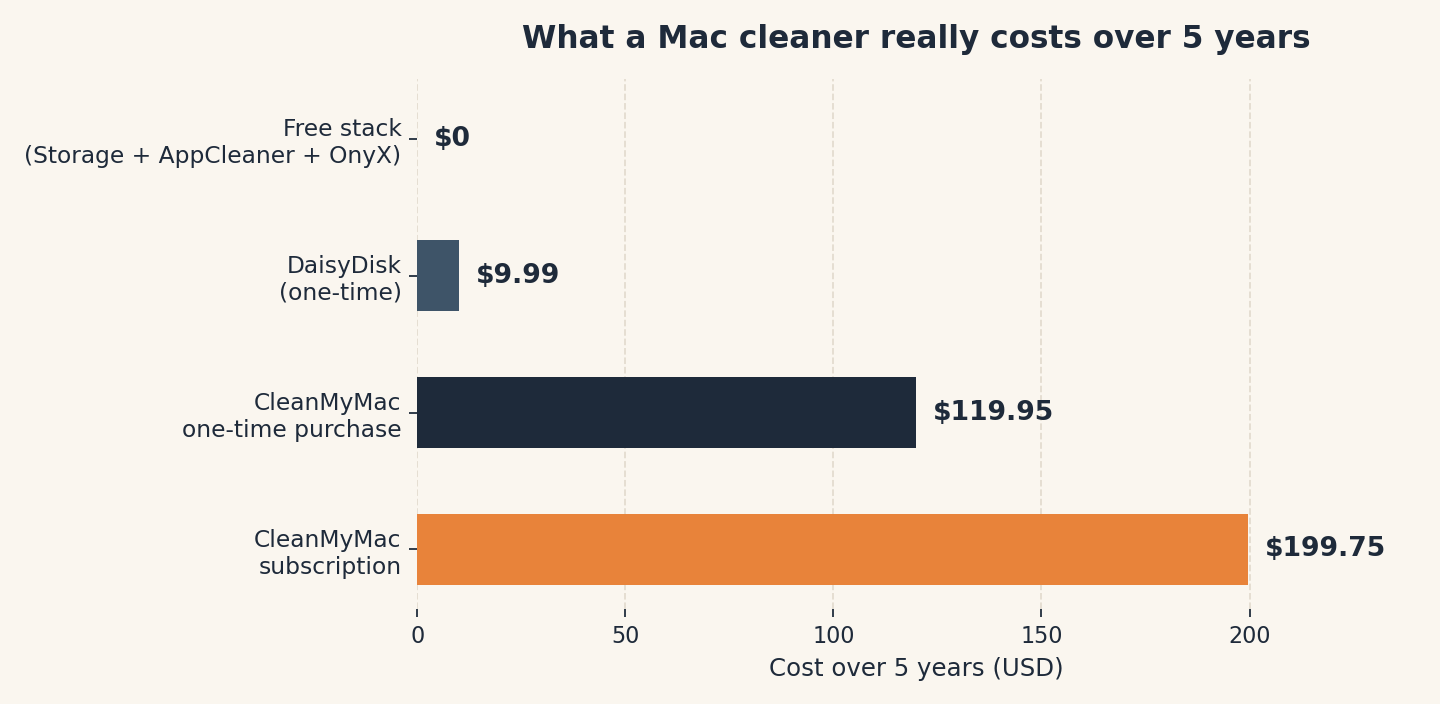
Read that first row slowly. Five years of the standard CleanMyMac subscription costs about the same as twenty DaisyDisks, for software whose main job is deleting files your Mac mostly manages on its own. Even MacPaw’s own one-time purchase, $119.95, is the quietly better deal if you have decided CleanMyMac itself is the tool you want.
Jargon Decoder
Cache means a stash of temporary files an app keeps so it can load faster next time. Deleting a cache rarely frees much space for long, because the app simply rebuilds it. That is why “we found 8 GB of junk” claims deserve a raised eyebrow: much of it was coming back anyway.
What no cleaner can do (the honesty section)
A cleaner cannot speed up a healthy Mac. If your Mac is slow because it is old, short on memory, or running one misbehaving app, deleting caches will not fix it. A nearly full drive can slow things down, and fixing that is real, but that is the DaisyDisk job, not a subscription job.
A cleaner is not a backup. Nothing here protects a single photo. If your files matter, a backup matters more than any app on this page, and it is where the first $10 should go.
Deleting more is not cleaning better. Tools that brag about the biggest junk number are often counting files macOS would have removed on its own, or caches that rebuild by Friday. Remove what you understand, keep a backup before a big cleanup, and leave system files you do not recognize exactly where they are.
When CleanMyMac itself is actually worth it
Fair is fair. If you manage Macs for less technical family members, want the malware scanner and the updater and the cleaner in one place they cannot get wrong, and would rather pay yearly than explain three free tools over the phone, CleanMyMac is a defensible purchase. Buy the one-time license if you can, and know that you are paying for convenience and support, not for cleaning power the free stack lacks.
FAQ
Is CleanMyMac worth $39.95 a year?
For most people, no. Its main jobs (finding big files, uninstalling apps completely, clearing caches) are covered by the free stack in this guide. It is worth it mainly if you want one supported app to hand to a less technical person.
Do Macs need cleaner apps at all?
Usually not on a schedule. macOS handles routine maintenance itself. What Macs need occasionally is a clear-out of large forgotten files and properly uninstalled apps, which is a ten-minute job with the tools above, not a subscription.
Is OnyX safe to use?
OnyX is a long-running free utility from Titanium Software and a standard recommendation in 2026 cleaner roundups (via Macworld). Use the version made for your version of macOS, stick to its standard maintenance options, and keep a backup before any big cleanup, as you would with any tool that deletes files.
What is the cheapest good alternative to CleanMyMac?
Free is cheapest: Apple’s built-in Storage tools plus AppCleaner cost nothing. If you want one paid tool, DaisyDisk at $9.99 once is the best value on this page.
Will deleting caches make my Mac faster?
Almost never in a lasting way. Caches rebuild because apps use them to load faster. Freeing space on a nearly full drive can help. Routine cache deletion, on its own, is mostly theatre.
Keep reading
- How to Find (and Cancel) the Subscriptions You’re Still Paying For: the statement audit that catches cleaner subscriptions and everything like them.
- What Is Cloud Storage, Actually?: where files go when your drive fills up and offloading starts to make sense.
Run your own numbers: Add up what your own cleaner, storage, and app subscriptions cost per year with our free Subscription Cost Calculator. It runs in your browser, and nothing you type leaves your device.
Method: Research review (no hands-on testing). Cross-checked against MacPaw’s official store page, Dr.Buho’s pricing page, Apple’s Storage support page, and Macworld’s 2026 cleaner roundup. Checked October 13, 2026.
Corrections: Spotted an error? Tell us. We fix mistakes publicly and date them.
Prices: US list prices; verify before buying.
Source: MacPaw’s official CleanMyMac store page (via MacPaw) for CleanMyMac pricing, checked October 13, 2026.
Like plain-English tool guides? Our newsletter rounds up the week’s posts every Saturday. Join here.