Editor’s Note: New post, October 2026. Pricing checked October 11, 2026.
In a sentence: Cozi Gold at $39 a year is the best family calendar app for busy parents who want one app for schedules, lists, and meals, while a free shared Google or Apple calendar quietly wins if the schedule is all you actually need.
Plain-English Verdict
If I had to pick one app for a busy family, I would pick Cozi Gold ($39 a year, covers the whole family): a color-coded shared calendar, shopping lists, and a meal planner in one place, on both iPhone and Android. If you refuse to pay anything, TimeTree is the best free calendar, with no member limits and no 30-day lookahead wall. And honestly? If your family only needs the schedule, skip all of them and share a plain Google or Apple calendar for free. (And no, this site earns nothing either way. There are no affiliate links here.)
What we actually did: We compared the 2026 pricing pages, app-store subscription listings, and free-tier limits of the four most-recommended family calendar options, cross-checked against 2026 reporting (somiya.app’s family-organizer comparison, nagmelater.com’s Maple-shutdown rundown, reclaim.ai’s shared-calendar guide, and getsense.ai’s Sense vs. FamilyWall comparison). We did not install or test any of these apps for this piece, so this is a researched roundup, not a hands-on review. We make no money from your choice: no affiliate links, no sponsored placements.
The family calendar is the most important app nobody shops for carefully. Everyone in the house has a different schedule, school sends updates through three channels, soccer practice moved again, and somehow one parent becomes the family’s entire memory. A good family calendar takes that job away from a human being.
There is also fresh urgency if you use Maple, the family-reminders app: it is shutting down on December 31, 2026, according to nagmelater.com’s rundown of where families should move their reminders and lists (via nagmelater.com). If your reminders live in Maple, you have about eleven weeks to move them.
The short list
- Best overall: Cozi Gold ($39 a year), for families who want the calendar, the lists, and the meal planner in one app. Everyone in the account is covered by one subscription.
- Best free calendar: TimeTree ($0), for families that just need a proper shared schedule with no lookahead wall and no member limits, and are fine with ads.
- Best all-in-one: FamilyWall Premium ($44.99 a year), for families who also want chat, live location, and a shared budget where the calendar lives.
- The free built-in answer: a shared Google or Apple calendar ($0), for families whose only problem is the schedule. No app to learn, no ads, no bill.
1. Cozi Gold, the best family calendar app for most busy parents
Here’s what it does in one sentence. Cozi is a shared family calendar with a color-coded event for every person, plus shared shopping lists, to-do lists, and a meal planner with a recipe box, on iPhone, Android, and the web.
Cozi is the default answer, and it earned that the long way: it has been around for over fifteen years and is used by tens of millions of families. When someone says “family calendar app,” the mental picture they have is basically Cozi. Everyone gets their own color, everyone can add events, and the grocery list lives next to the schedule instead of in a separate app nobody opens.
What we like
One subscription covers the whole family, which matters more than it sounds. Cozi Gold is $39 a year for everyone in the account, while some competitors charge per person or per account. Up to 12 people fit on one account, so grandparents and babysitters are covered. The read-only sync with Google, Outlook, and Apple calendars means Cozi events appear in the calendar you already check.
What could be better
The free tier is weaker than it looks. It carries ads, and since May 2024 it reportedly shows only about 30 days of calendar ahead, a real problem when you are booking a school year. Reviewers in 2026 describe that window as the push toward Gold. There is also no export button for your lists; only the calendar can leave via a per-member calendar link on the website.
Pricing
- Free: $0. Shared calendar, lists, and recipes, with ads and roughly a 30-day calendar window.
- Cozi Gold: $39 a year. Covers everyone in the account. Removes ads, opens the full calendar window, adds up to three reminders per event.
- Cozi Max: reported at $79.99 a year. AI features. Skip it unless you want to pay double for novelty.
Prices are from Cozi’s own FAQ and 2026 reporting, read October 11, 2026. They change, so give the official pricing page a glance before you commit to anything.
Our take
Cozi Gold is the pick we would make for a mixed iPhone-and-Android family that wants the whole organizer, not just dates. At $39 a year, it is the cheapest paid option here, and the one-family pricing is genuinely fair.
Who should skip this: families who will never pay for software and will not tolerate a 30-day window. You will be annoyed by month three. Read the TimeTree section instead.
2. TimeTree, the best free family calendar
Here’s what it does in one sentence. TimeTree is a shared calendar that does one thing properly: everyone’s schedule in one place, with a comment thread on every event so “can you take her instead?” happens where the event lives.
TimeTree is the anti-Cozi in the best way. It does not try to plan your meals or store your recipes. It is a calendar, a good one, and it is free in a way that stays free. There are ads, but there is no member limit, no limit on how many calendars you can share, and no 30-day lookahead wall on the free tier.
What we like
The free tier is the product. Unlimited shared calendars and members means a whole extended family can pile in without anyone paying. The per-event chat thread is the small feature that turns out to matter: scheduling arguments usually happen in a separate group chat, and then the answer never makes it back to the calendar. Here they are the same place. It runs on iPhone, Android, and the web, and it has been around since 2015, so this is not a startup that will vanish with your plans.
What could be better
It is a calendar, not an organizer. If you need shared lists, a meal planner, or document storage, you will end up back in other apps for those, which defeats the one-app promise. Premium is priced per account, not per family: $4.49 a month or $44.99 a year per person who upgrades, so two parents on Premium pay $89.98 a year, not $44.99. And its help center describes exporting your data as not generally available, so have an exit plan before you invest a school year in it.
Pricing
- Free: $0. Unlimited shared calendars and members, with ads.
- Premium: $4.49 a month or $44.99 a year, per account. Removes ads and adds attachments.
Prices are from TimeTree’s own listings and 2026 reporting, read October 11, 2026. They change, so give the official pricing page a glance before you commit to anything.
Our take
If the calendar is genuinely the whole problem and nobody is paying for anything, TimeTree is the free answer. It does the schedule better than the free tiers of apps that also do five other things, because the schedule is all it does.
Who should skip this: anyone who wants lists, meal planning, or documents in the same app. TimeTree will not become that app.
3. FamilyWall Premium, the best all-in-one for families who want everything in one place
Here’s what it does in one sentence. FamilyWall bundles a shared calendar, family messenger, live location with arrival alerts, photo albums, a budget tracker, and a meal planner into a single app.
FamilyWall is for the family that is tired of having five apps and wants one. Calendar, chat, “where is everyone” location alerts, shared photos, a budget, and meal planning all live under one login. It has been around since 2011, and its 2024 acquisition by OurFamilyWizard gives it corporate backing, which matters when your family’s logistics live inside one company’s servers.
What we like
The family pricing is the best value on this page for what you get: Premium is $4.99 a month or $44.99 a year and covers everyone in the circle, with no member limit. Nothing else here does live location with zone alerts inside the same app as the calendar, and Google and Outlook calendar sync comes with Premium. The 25 GB of storage for family documents and photos is a genuinely useful bonus.
What could be better
More modules is exactly what made some families bounce off family apps before; if a simpler app already felt like too much, this one will too. The App Store listing declares that data is collected for advertising, and its privacy policy says personal information may be stored and processed “in the EEA, USA and any other country,” naming Google Analytics and Firebase. If where your family’s data lives matters to you, read the policy yourself rather than taking anyone’s summary, including ours.
Pricing
- Free: $0. Core calendar, lists, and chat, with ads.
- Premium: $4.99 a month or $44.99 a year (the App Store lists the monthly plan at $7.99; buying direct on familywall.com is cheaper). Covers the whole circle. Adds budget, meal planner, Google and Outlook sync, location alerts, and 25 GB of storage.
Prices are from FamilyWall’s app-store subscription text and familywall.com, read October 11, 2026. They change, so give the official pricing page a glance before you commit to anything.
Our take
FamilyWall is the right answer when the family genuinely wants one app instead of five, or when chat and location are requirements. At $44.99 a year for the whole circle, nothing else on this list replaces as much software.
Who should skip this: families that have already bounced off an all-in-one app, and anyone uncomfortable with ad-data collection in a family product. Simplicity people should pick Cozi or TimeTree and stop there.
4. A shared Google or Apple calendar, the honest free answer
Here’s what it does in one sentence. A shared calendar from the phone you already own, visible to everyone you share it with, doing the schedule and only the schedule, for nothing.
This is the pick for families whose problem is really just “whose turn is soccer pickup.” A shared Google Calendar costs nothing, syncs everywhere, and works on every phone and browser in the house. A shared Apple Calendar does the same for iPhone families. There are no ads, no subscriptions, no 30-day windows, and no learning curve because everyone already has the app.
What we like
It is free forever and already installed. Color-coding works by calendar, sharing is one link, and it syncs to every device without a third app in the middle. For the family that mostly needs to avoid double-booking the car, this is the entire solution.
What could be better
It is a schedule and nothing else. No shared lists, no meal planning, no chat on events, no location alerts, no budget. Mixed iPhone-and-Android households need to pick one platform’s calendar as the source of truth, and the family ends up running lists in a separate app, which is fine as long as everyone actually opens it.
Pricing
- Free: $0. Forever. It is built into the phone.
Our take
We would not be honest reviewers if we skipped this. If your family only needs the schedule, do not download anything. Share a calendar from the app already on your phone and spend the $39 on something your kids will notice.
What it actually costs per year
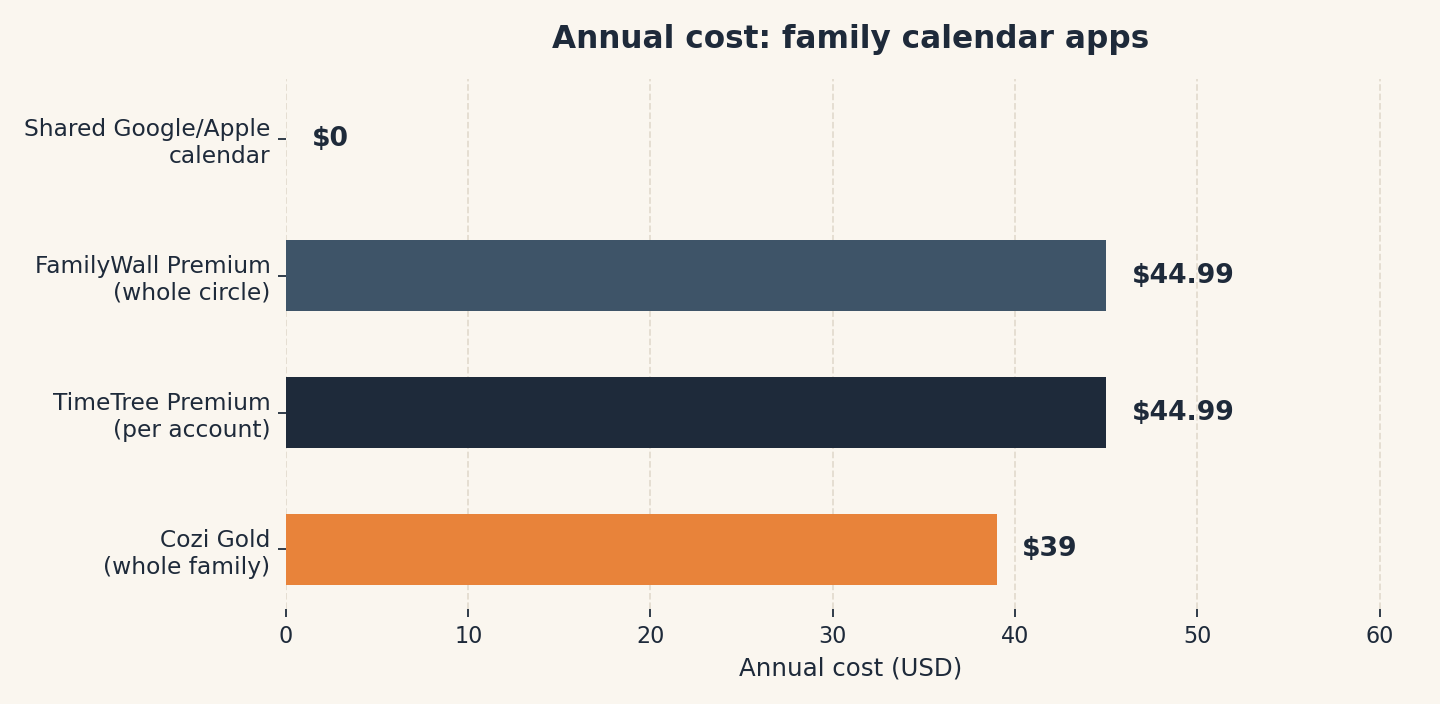
The chart above shows annual cost using annual billing: Cozi Gold $39 for the whole family, TimeTree Premium $44.99 per account (two parents would pay $89.98), FamilyWall Premium $44.99 for the whole circle, and a shared Google or Apple calendar $0. We built this chart for this post; the numbers match the pricing above it.
One budgeting note: family apps are exactly the kind of $39-a-year subscription that quietly stacks with six others into real money. If you are tallying them up, our free Subscription Cost Calculator does the math in about a minute, and our guide to finding forgotten subscriptions shows where they hide.
Which one should you pick?
| If this is you | Pick this | Why |
|---|---|---|
| You want the calendar, the lists, and the meals in one app, and $39 a year is fine | Cozi Gold | Cheapest paid option; one subscription covers up to 12 people |
| Nobody is paying for anything, ever | TimeTree | Truly free calendar with no member limits and no 30-day wall |
| You want chat, location, and a budget where the calendar lives | FamilyWall Premium | $44.99 a year for the whole circle, and nothing else bundles this much |
| You just need everyone to see the schedule | A shared Google or Apple calendar | Free, already installed, no ads, no learning curve |
| You are moving off Maple before December 31 | Cozi Gold | Closest overall shape: shared calendar, lists, and reminders in one app |
The two questions nobody asks (but should)
What happens when you stop paying? Ask this before you invest a school year in any of these. Cozi’s paid window collapses back toward the limited free view. TimeTree’s help center says export is not generally available, and Cozi has no export button for lists. The free shared-calendar answer has no lock-in at all, which is worth more than it sounds.
Who actually adds the events? Every family app on this list fails the same way in real life: one parent becomes the data-entry clerk for the whole family. Pick the app the least technical person in your house will open. The best family calendar is the one with the most recent updates, not the best feature list.
Keep reading
- The Best Password Manager for Your Whole Family (2026): the sibling roundup for family software, judged on whether the least technical family member finishes setup.
- How to Find (and Cancel) the Subscriptions You Are Still Paying For: because $39 and $44.99 a year subscriptions stack up quietly.
Method: Research review (no hands-on testing). Cross-checked against Cozi’s FAQ, TimeTree’s and FamilyWall’s app-store listings, somiya.app’s 2026 family-organizer comparison, nagmelater.com’s Maple-shutdown rundown, reclaim.ai’s shared-calendar guide, and getsense.ai’s Sense vs. FamilyWall comparison. Checked October 11, 2026.
Corrections: Spotted an error? Tell us. We fix mistakes publicly and date them.
Prices: US list prices; verify before buying.
Source: somiya.app’s 2026 family-organizer comparison (via Somiya’s editorial team) and nagmelater.com’s Maple-shutdown rundown (via nagmelater.com), read October 11, 2026; app-store pricing via FamilyWall’s subscription text and TimeTree’s Premium listings.
Like plain-English tool guides? Our newsletter rounds up the week’s posts every Saturday. Join here.
Related Posts
 The Best Password Manager for Your Whole Family (2026)
- The Best Simple To-Do App for People Who Hate To-Do Apps (2026)
- The Best CleanMyMac Alternatives in 2026: Free and One-Time Options, in Plain English
- The Best Website Builder for a Side Hustle (2026)
- The Best Budgeting App Now That Mint Is Gone (2026)