
Editor’s Note: This roundup is current as of October 2026. Pricing checked October 9, 2026.
In a sentence: Notion is the best note-taking app for most students in 2026 because the Education plan gives you a $120-a-year product for free, with OneNote the best $0-all-rounder and GoodNotes 6 the clear pick for iPad handwriting.
Plain-English Verdict
If I had to pick one app for a student’s entire degree, I would pick Notion: its Education plan is genuinely free for verified students, and its databases turn class notes, assignment lists, and reading logs into one organized home. Handwriting on an iPad? GoodNotes 6, free for three notebooks, $11.99 a year for unlimited. Want everything free on every device with zero setup? OneNote. Want your notes to live as files you own forever? Obsidian. (And no, this site earns nothing either way. There are no affiliate links here.)
What we actually did: We read Notion’s official pricing page and Education plan details on October 9, 2026, cross-checked against GoodNotes’ own pricing page (via the 2026 pricing guide citing it directly) and independent September 2026 comparisons that list free-tier limits for nine student note apps. We did not sign up for any of these tools, so this is a research review, not a hands-on test. We make no money if you choose any of them.
How we ranked these
A student note app has one job: make sure the right note is findable the night before the exam. We ranked on five things that matter in a dorm, not a demo room: what the free tier actually includes, whether handwriting works, whether it survives four years of classes, what it costs over a full degree, and how much setup pain stands between you and your first note.
1. Notion: best overall for students
Notion is a blank workspace that becomes whatever you build: typed notes, class wikis, assignment trackers, reading databases, and a dashboard that ties a whole semester together.
Here’s what it does in one sentence: one app that holds your notes, your to-do lists, and your class schedules in linked pages and simple databases, all searchable in one place.
What we like
- The Education plan is the best student deal in software. Verified students and educators get the Plus plan, a $10-a-month product ($120 a year), free: unlimited file uploads, a 30-day page history, and unlimited blocks, re-verified against your school email once a year. Almost nobody needs to pay for Notion during a degree.
- Databases are a study superpower. A class page can hold lecture notes, a linked database can hold every assignment with its due date, and a reading log can track the papers you’ve actually read. No other free student app organizes work like this.
- It runs everywhere and syncs itself. Web, Windows, Mac, iOS, Android, one account, everything synced. Your notes survive a stolen laptop.
What could be better
- Handwriting is basically not here. Notion is a typing app. If your classes mean diagrams, formulas, and fast sketches, you will feel this every lecture.
- The blank page is a trap for beginners. Total flexibility means total setup. The first weekend has a learning curve; the second month feels effortless. Budget for that first weekend.
- The AI is a trial, not a feature, on the student plan. Free and Education users get a limited number of complimentary AI responses, not ongoing access. If AI help is the main reason you’re considering Notion, know the limit up front.
Pricing
- Free: $0 forever. Unlimited pages and blocks for one person; 5 MB file uploads, 7-day page history, 10 guests.
- Education plan: $0 for verified students and educators (accredited colleges and universities; school email required, re-verified yearly). Plus-level features, one member per workspace.
- Plus: $10 per user/month billed annually ($12 monthly). This is what the Education plan gives students for free.
- Business: $20 per user/month billed annually. Overkill for coursework.
Pricing verified against Notion’s pricing page on October 9, 2026. Check it before you pay; these pages move.
Our take
Notion wins because it solves the actual student problem (a growing pile of notes, deadlines, and readings that must stay organized for years) at the actual student price ($0). No other free student tier removes every limit you would ever hit in class.
Who should skip this: handwriting-first students. If you take notes with a pencil because you think in diagrams, you will fight Notion daily, and pick three is your app.
2. Microsoft OneNote: best free all-rounder
OneNote is the digital three-ring binder: sections, pages, and freeform typing or handwriting anywhere on the page. It is completely free, on every platform, with no premium tier to miss.
What we like
- It is actually free, not “free tier” free. No paid plan exists for OneNote itself. Notebooks, pages, sections, handwriting, syncing, all $0.
- Handwriting is excellent. With a stylus, OneNote’s ink is among the best in the category, and it runs on Windows, Mac, iOS, Android, and the web.
- Many students already own the whole suite. Universities commonly include Microsoft 365 for students at no cost, which brings 1TB of OneDrive storage instead of the 5GB free tier.
What could be better
- Notebooks can turn into a junk drawer. Freeform pages are wonderful for capturing and terrible for finding. Without discipline (or without a system you maintain), your third semester’s notes become a maze.
- Sync lives and dies on OneDrive. The 5GB free OneDrive tier fills up faster than you’d think once lecture PDFs start arriving. The fix is usually free through your school, but it is one more account to sort out.
- It is not beautiful. Notion looks designed; OneNote looks like a utility. That sounds shallow until you’re staring at the app for six hours a day.
Pricing
- OneNote: $0, every platform, no paid tier.
- Microsoft 365 Personal: $69.99/year. You do not need this for OneNote, but it adds 1TB of OneDrive and the full Office suite.
- Microsoft 365 for students: often $0 through your university. Check your school’s IT page before paying for anything.
Our take
OneNote is the pick for the student who wants notes to be a solved problem, not a hobby. Typed or handwritten, everywhere, for nothing. The honest trade is elegance for reliability.
Who should skip this: students who want their notes to be a system (databases, linked pages, dashboards). OneNote is a binder, not a brain.
3. GoodNotes 6: best for iPad handwriting
GoodNotes 6 is the closest thing to paper that runs on a screen: a handwriting-first notebook app for iPad with lifelike ink, the deepest PDF annotation toolkit in its class, and search across your own handwriting. If your degree runs on a pencil, start here.
What we like
- The ink is the product. GoodNotes’ handwriting rendering is the industry reference point: it feels like a pen, and your handwritten pages become searchable text.
- The free tier is a real trial, forever. Up to three notebooks with the core note-taking and PDF markup tools, free with no time limit. You can test the actual experience for a full semester before paying.
- PDF annotation is the deepest here. Marking up a 400-page textbook, circling formulas, writing in margins: this is what GoodNotes was built for.
What could be better
- The full version costs money. Essential is $11.99 a year (unlimited notebooks, unlimited audio recording, 5GB storage, no watermark), Pro is $35.99 a year (adds cross-device sync and deeper AI), and the full AI add-on is another $9.99 a month. Reasonable prices, but they are prices, and three of the four picks here are $0.
- Apple first, everyone else second. The full experience is iPad, iPhone, and Mac. Windows and Android exist but are limited. If your devices are a Chromebook and a Pixel, this is not your app.
- It is a notebook, not an organizer. For dashboards, linked databases, and project tracking, you will pair it with something else.
Pricing
- Free: $0 forever. Up to 3 notebooks, 3 whiteboards, 3 text documents; core note-taking and PDF markup.
- Essential: $11.99/year. Unlimited notebooks, unlimited audio recording, full sharing, 5GB storage, export without watermark, basic AI.
- Pro: $35.99/year. Everything in Essential plus real-time collaboration, cross-device sync, and deeper AI.
- AI add-on: $9.99/month on either paid plan. Optional; skip it until you know you need it.
Pricing from GoodNotes’ official pricing page, checked October 9, 2026. Verify before buying; pricing pages move.
Our take
GoodNotes 6 is the specialist pick, and specialists are worth paying for. If lectures mean diagrams and annotated PDFs, the free tier will tell you within a month whether the $11.99 a year is worth it. For handwriting students, it usually is.
Who should skip this: typed-note students and anyone not on Apple devices. Twelve dollars a year is cheap, but $0 is cheaper.
4. Obsidian: best for owning your notes
Obsidian is a note app built on a radical idea: your notes live as plain Markdown files on your own device, readable by anything, forever. No account required, no cloud lock-in, full offline use. It is beloved by researchers and the privacy-minded for exactly this reason.
What we like
- Free for personal use, with no asterisks. The core app costs nothing for students. The only paid pieces are optional: Sync ($4/month, end-to-end encrypted cloud sync) and Publish.
- Your notes outlive the app. Every note is a plain text file you can open in any editor in fifty years. No export anxiety, no format hostage situation.
- Linked thinking for research-heavy degrees. Bidirectional links and the graph view connect ideas across papers and courses. For thesis work and literature reviews, this is genuinely powerful.
What could be better
- The setup curve is real. Obsidian assumes you enjoy configuring things. A student who wants to open an app and take notes will bounce off it in an afternoon.
- Collaboration is do-it-yourself. Sharing notes with a study group means shared folders and workarounds, not a click.
Pricing
- Personal: $0. Full core app, unlimited notes, all platforms.
- Sync add-on: $4/month ($48/year). End-to-end encrypted cloud sync across devices. Optional; many students sync free via iCloud or just use one device.
- Publish add-on: not relevant for coursework.
Our take
Obsidian is the pick for the student who thinks about notes like an archivist: carefully, permanently, and with total control. It asks more of you up front and repays it over a whole degree.
Who should skip this: anyone whose reaction to “configure a plugin” is a sigh.
The money, side by side
| App | Student cost (4 years) | List price (4 years) |
|---|---|---|
| Notion | $0 (Education plan) | $480 (Plus, $10/mo) |
| OneNote | $0 | $0 |
| GoodNotes 6 Essential | $47.96 ($11.99/yr) | $47.96 |
| Obsidian | $0 (free tier) | $192 (with Sync, $4/mo) |
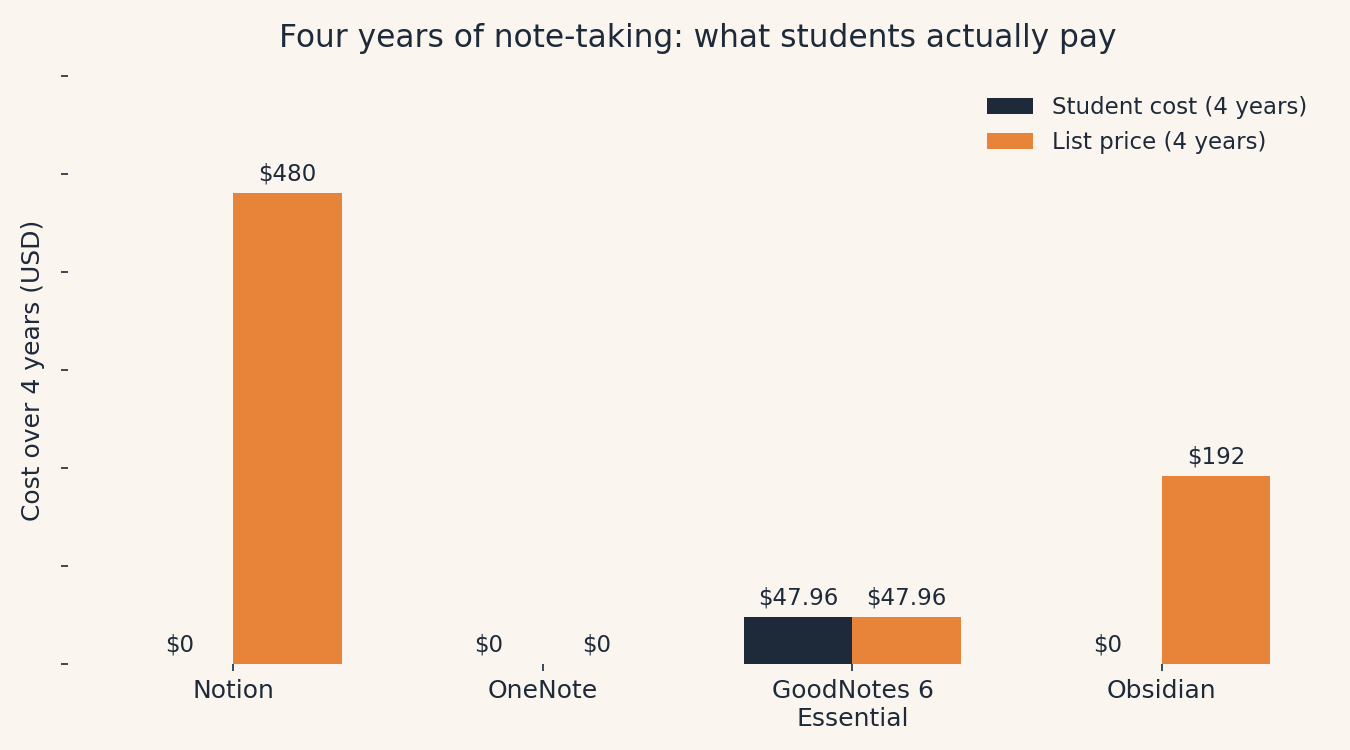
The chart above shows what a student actually pays over four years (navy) against each app’s list price (orange). Three of the four picks are $0 for students; the only paid pick costs less than $50 over a degree. Notion’s $480 list is Plus at $10 a month; Obsidian’s $192 is the optional Sync at $4 a month. We built this chart for this post; the numbers match the pricing in the table above.
Why choose Notion over OneNote?
Pick Notion if your notes need to be a system: classes as databases, assignments with due dates, readings you can find again. The Education plan removes the only reason to hesitate. Choose Notion when organization is the bottleneck.
Why choose OneNote over Notion?
Pick OneNote if you want notes to be a solved problem: open, write, done, synced, free, everywhere, with excellent handwriting. Your school likely covers the storage. Choose OneNote when capture is the bottleneck and you have better things to do than configure a workspace.
Honorable mentions (and one we left out)
Apple Notes is the fine default on Apple devices: free, fast, good handwriting on iPad, and synced everywhere Apple. It is not a study system, but for quick capture it beats everything here. Google Keep is the same idea for Google people, and too basic to carry a semester: sticky notes are not a degree.
Evernote did not make the ranked list. The free tier now caps at 50 notes, which a student burns through in a week, and paid plans start around $99 a year. We name the reason openly because “best” lists that silently drop tools are doing you no favors.
Frequently asked questions
Is Notion really free for students?
Yes. Notion’s Education plan gives verified students Plus-level features ($10 a month value) for free, tied to a school email and re-verified yearly. It covers one workspace member and does not include ongoing AI access.
What is the best note-taking app for iPad students?
GoodNotes 6 is the handwriting standard: searchable ink, deep PDF annotation, and a free tier with three notebooks. If you mostly type on your iPad, Notion or OneNote will do, and they are free.
Is Microsoft OneNote actually free?
Yes. There is no paid OneNote tier. It syncs through OneDrive, which includes 5GB free, and many universities provide Microsoft 365 (with 1TB of OneDrive) to students at no cost.
Do I need to pay for any note-taking app as a student?
No. Every pick here has a $0 path that survives a full degree: Notion via the Education plan, OneNote and Obsidian free outright, and GoodNotes’ free tier (or $11.99 a year for unlimited).
Keep reading
- Notion vs Obsidian: Which Note App Is Right for You? (2026): the head-to-head on the two most different picks here, filing cabinet versus index cards.
- What Is Notion, Actually?: the plain-English explainer, including who Notion is overkill for.
- The Best Free CRM for a One-Person Business (2026): databases are Notion’s superpower; here is what a real one looks like in business software.
Corrections: we fix errors when readers report them. This roundup was last updated October 2026.
Source: AskSia’s September 2026 student note-app comparison (free-tier limits and pricing table, via AskSia’s review desk), Notion’s pricing page via the 2026 Notion pricing breakdowns, and GoodNotes’ official pricing page. Pricing changes; check the official pages before you pay.
Like plain-English tool guides? Our newsletter rounds up the week’s posts every Saturday. Join here.