
Editor’s Note: First published October 2026. Evidence: Research review — we compared the current pricing pages, free-tier limits, and feature lists for every app below on October 5, 2026, cross-checked against three independent 2026 comparisons. No hands-on trials were run for this piece, so treat it as a research-backed ranking, not a lab test — and always check the official pricing page before buying, since these apps reprice like weather.
In a sentence: For people who hate to-do apps, TickTick is the one to beat, it’s the cheapest paid option ($36 a year at the current discount; list price $49.99), its free tier is genuinely usable, and it folds your calendar and habits into the same list so there’s one fewer app to abandon.
Plain-English Verdict: If I had to pick one to-do app for someone who hates to-do apps, I’d pick TickTick: the $36-a-year Premium plan (currently discounted from a $49.99 list price) undercuts Todoist’s $60 Pro by $24 a year and bundles a calendar, habit tracker, and focus timer, so one app covers everything. Todoist ($60/year) is the cleanest and smartest, its natural-language input is still unmatched, but its free tier is cramped and it got a 25% price hike in late 2025. And the honest truth: Microsoft To Do is free forever and already on your devices, if you’ve quit every other list app, start there for $0.
What we actually did: We pulled the current official pricing and free-tier limits for TickTick, Todoist, Microsoft To Do, Google Tasks, Apple Reminders, and Things 3 on October 5, 2026, and cross-checked them against three independent 2026 app comparisons (via 2sync, Asian Efficiency, and Nathanojaokomo). We didn’t sign up for trials or run hands-on tests for this piece, the ranking is based on documented plans, prices, and features. This site has no affiliate links, so we earn nothing if you pick any of these. Our only incentive is being right.
Let’s be honest about why you hate to-do apps: every one you’ve tried made you do work, learn its system, sort tasks into projects, fiddle with labels — before you ever got to do the actual task. The app became a chore, so you quit. That’s not a discipline problem. That’s the app failing at its one job: getting out of your way. So here’s our honest ranking of the best simple to-do app options for people who hate to-do apps.
So here’s how I judged every app below, one metric, because it’s the only one that matters for you: capture speed. How fast can you get a thought out of your head and into the app? If it takes more than a few seconds, you’ll stop opening it, and the world’s best feature list won’t save it.
The short version for the impatient
| App | Best for | Cost per year |
|---|---|---|
| TickTick | The best overall value, tasks, calendar, habits in one | $0 free tier / $36 Premium |
| Todoist | The cleanest, smartest input on the market | $0 free tier / $60 Pro |
| Microsoft To Do | The free one you already have | $0, forever |
| Things 3 | Apple-only folks who refuse subscriptions | ~$50+ one-time purchase |
1. TickTick, the winner for almost everyone
What it does in one sentence: TickTick is a to-do list that also swallowed your calendar, your habit tracker, and your focus timer, one app where the others would be three.
What we like
- The free tier doesn’t insult you. You get unlimited tasks, 9 lists, a calendar view, habit tracking, and the Pomodoro focus timer without paying a cent (via 2sync’s 2026 comparison). That’s enough for most people, forever.
- Capture is genuinely fast. Type “pick up dry cleaning tomorrow at 4” and it parses the date. Not quite as clever as Todoist’s input, but fast enough that you won’t abandon it.
- The calendar view ends the two-app problem. Your tasks sit alongside your actual calendar in one view, so “what do I have today?” gets one answer, not two. This is the feature that keeps people in TickTick long-term.
- The price is almost rude. Premium is $35.99 a year, roughly $3 a month, at the current discount (list price is $49.99), and it buys unlimited lists, more calendar features, and custom reminders (via Asian Efficiency’s 2026 pricing breakdown). At this price, TickTick replaces a habit app and a timer app you’d otherwise pay for separately.
What could be better
- It can feel busy. All those built-in features mean a denser interface than Todoist’s calm minimalism. If extra buttons stress you out, the simplicity crown goes elsewhere.
Pricing (October 2026): Free (9 lists, habits, calendar view, Pomodoro) · Premium lists at $49.99/year but is currently shown at $35.99/year on TickTick’s pricing page · about $5/month via app stores. No team plan to speak of.
Our take: This is the pick for people who hate to-do apps because it’s the least app-y: one place for tasks, habits, and your day. Start on the free tier; if you want the extras, $36 a year is the best value in to-do apps right now.
2. Todoist, the cleanest, smartest one (runner-up)
What it does in one sentence: Todoist is the minimalist to-do list with the smartest text input in the business, type like you talk, and it sorts it out.
What we like
- The input is genuinely magic. Type “follow up with Dave every Monday at 9am in the Client project” and Todoist assigns the project, sets the recurrence, and gets the time right (via Asian Efficiency’s 2026 test). TickTick handles simple dates; Todoist handles paragraphs.
- It’s calm. Generous whitespace, clear lists, nothing blinking at you. If cluttered apps are why you quit, Todoist’s design is therapy.
- 2026 brought real AI features. Todoist Assist breaks vague tasks (“prepare for the workshop”) into steps, and the Ramble voice feature turns a dictated sentence into a dated, filed task (via 2sync’s 2026 comparison). Not hype, genuinely useful for the “I need to deal with that” items.
What could be better
- The free tier is cramped. Five projects, limited filters, short history. Enough to try, not enough to live in.
- The price hike stings. Todoist raised Pro from $48 to $60 a year in December 2025, a 25% jump (via 2sync). It’s now $24 a year more than TickTick for an app that does less out of the box. Worth it only if the smart input is the feature you’ll use daily.
Pricing (list prices, October 2026): Free (5 projects, basic features) · Pro $60/year ($5/month annual, $7/month monthly) · Business $96/user/year.
Our take: If you add lots of tasks daily and value speed-of-capture above all, Todoist’s input is the best in class and worth the premium. For everyone else, TickTick does more for less.
3. Microsoft To Do, the boring free pick (for serial quitters)
What it does in one sentence: Microsoft To Do is a simple, free task list that’s already on your devices, it syncs with Outlook and asks almost nothing of you.
What we like
- It’s free. Entirely. No tiers, no upsell, no “premium” badge on basic features.
- It syncs everywhere Outlook does, Windows, iPhone, Android, web, and it talks to Outlook tasks natively, which is gold if your work email is Microsoft-based (via Nathanojaokomo’s 2026 roundup).
- It’s boring in the best way. Lists, due dates, reminders. Nothing to learn, nothing to configure, nothing to quit.
What could be better
- It’s the plainest app here. No habit tracker, no natural-language smarts, no calendar view worth mentioning. It won’t grow with you if you later want more.
Pricing: $0, forever.
Our take: Here’s the permission you came for: if you’ve quit three to-do apps, don’t buy a fourth one. Use Microsoft To Do. It’s free, it syncs, and its total lack of features is exactly why you might actually keep using it. Apple users: Apple Reminders is the same story on iPhone and Mac. Gmail people: Google Tasks lives inside your inbox and calendar. The boring free one you already have beats the perfect app you’ll open twice.
Who should skip this: anyone who wants habits and a calendar in the same list, that’s TickTick’s job.
4. Things 3, for Apple-only folks who refuse subscriptions
What it does in one sentence: Things 3 is the most beautiful to-do app ever made, sold once instead of rented forever, but only if you live entirely inside Apple-land.
What we like
- No subscription. You buy the Mac app once ($49.99; iPhone and iPad apps are sold separately) and it’s yours, no annual renewal, no feature paywall appearing in year two (via Nathanojaokomo’s 2026 roundup).
- It’s designed like jewelry. Animations, spacing, typography, using it feels good, which matters more than productivity gurus admit. The app you enjoy opening is the app you keep.
What could be better
- Apple only. No Windows, no Android, no web. If you ever touch a PC, your list is stuck on your phone.
- No collaboration to speak of. It’s a personal app; sharing is an afterthought.
Pricing: One-time purchase, Mac app $49.99, iPhone and iPad apps sold separately. No subscription.
Our take: The anti-subscription pick. If every device you own has an Apple logo and you’d rather pay once than forever, Things 3 is the most pleasant to-do experience money can buy. Everyone else: move along.
Jargon Decoder: “Sync” just means: your list is the same on your phone and your laptop without you doing anything. Every app above syncs, that’s the baseline, not a feature.
What five years actually costs
Subscriptions are where to-do apps quietly get expensive. Here’s the honest five-year math:
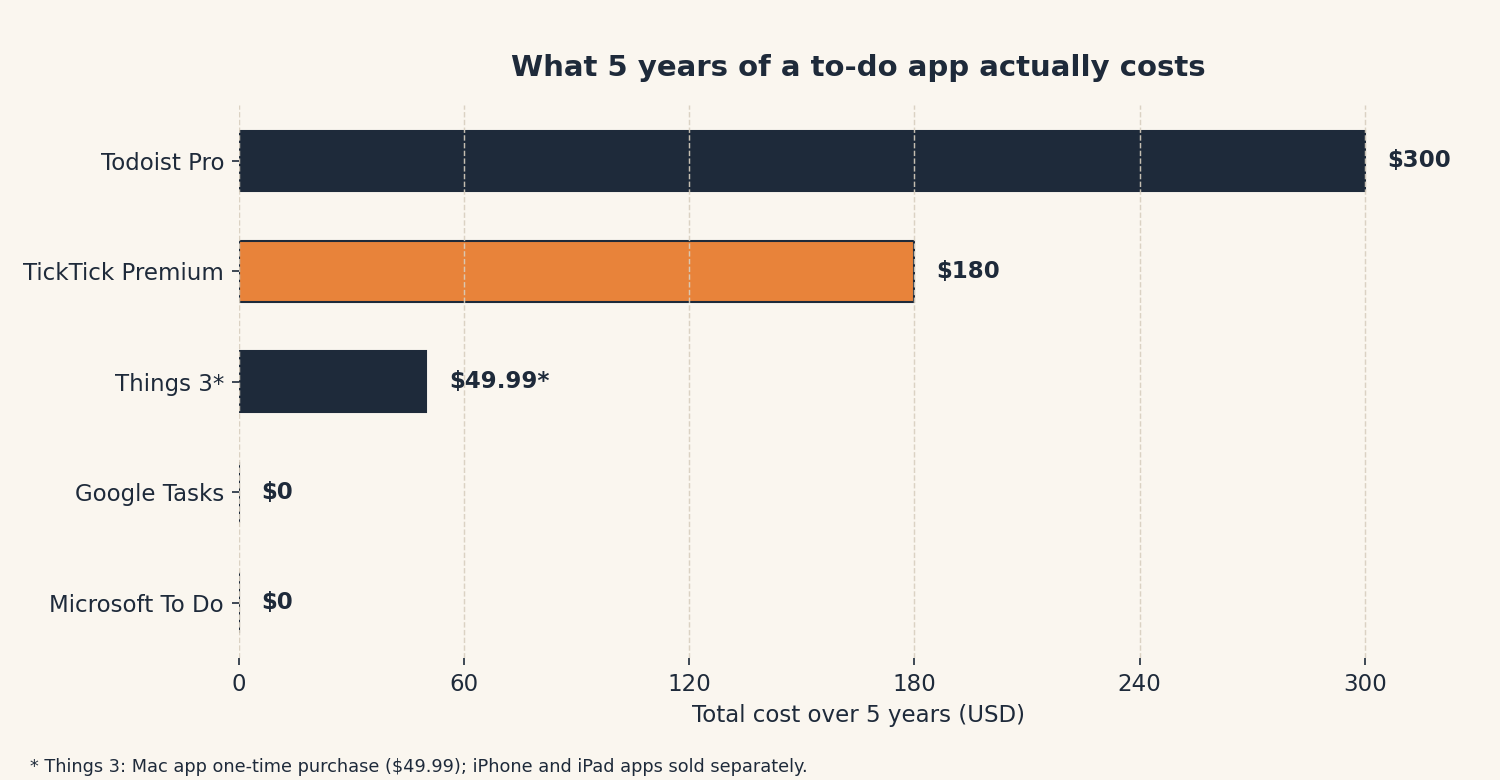
| App | Per year | 5-year total |
|---|---|---|
| Microsoft To Do | $0 | $0 |
| Google Tasks | $0 | $0 |
| TickTick Premium | $35.99 (current discount; list $49.99) | ~$180 |
| Todoist Pro | $60 | ~$300 |
| Things 3 | $0 after purchase | ~$50+ (Mac app; iPhone/iPad sold separately) |
TickTick’s five-year total uses the current $35.99/year discounted rate, its list price is $49.99/year, which would put five years at ~$250. Check the official pricing page before buying; app-store prices can also differ.
TickTick costs you a nice dinner over five years. Todoist costs you a weekend trip. Both are defensible, but only if you actually open the app, which brings us to the part that matters most.
Want to run this math on your own app subscriptions? Our Subscription Cost Calculator does it in seconds.
The 90-day rule (the part that actually matters)
Here’s the thing nobody selling productivity apps will tell you: the app was never the problem. Quitting was the problem. Every app above is good enough. So whichever you pick, make this deal with yourself: 90 days, one app, no switching. Put everything in it, the milk, the dentist, the vague “deal with the car thing.” Review it once a day, same time, coffee in hand.
If after 90 days you still hate it, the app was wrong. But nine times out of ten, the third app you try isn’t better than the first, it’s just newer. Pick one. Stick.
Our final rankings
- Best overall: TickTick, most value, one app for tasks/habits/calendar, $36/year.
- Best for power users: Todoist, smartest input, calmest design, $60/year.
- Best free pick: Microsoft To Do, $0, everywhere, gloriously boring.
- Best for Apple-only subscription-haters: Things 3, one-time purchase, gorgeous.
- If you only take one sentence from this post: the boring free one you already have beats the perfect app you’ll open twice.
We compared TickTick and Todoist head-to-head in more depth here. If you’re brand-new to productivity apps, start at our Explainers hub.
Frequently asked questions
Is a free to-do app enough?
For most people, yes, honestly, yes. Microsoft To Do, Google Tasks, and Apple Reminders handle lists, due dates, and reminders at $0, and TickTick’s free tier adds a calendar and habit tracker. Pay only when a paid feature solves a specific problem you actually have.
Todoist or TickTick, which is simpler for a beginner?
Todoist has the calmer interface and smarter text input, so it feels simpler day one. But TickTick’s free tier gives you more room to grow without paying. If “simpler” means “fewer buttons,” pick Todoist’s free tier; if it means “won’t charge me,” pick TickTick.
Why do I keep quitting every to-do app?
Because most apps make you organize before you can capture, the exact opposite of what a busy brain needs. Pick the app with the fastest capture (type-and-done), put everything in it for 90 days, and review it daily. The system that survives is the one you’ll use.
Didn’t Todoist get more expensive?
Yes, Pro went from $48 to $60 a year in December 2025, a 25% increase (via 2sync). That’s now $24 a year more than TickTick Premium, which is worth knowing before you commit.
Is Things 3 worth the one-time price?
If you use only Apple devices and hate subscriptions, yes, it’s a beautiful app you buy once. The Mac app is $49.99 with iPhone and iPad versions sold separately, so budget accordingly. If you ever use Windows or Android, skip it.
Method: Research review (no hands-on testing). Cross-checked against the official product pages (pricing, free-tier limits, features), 2sync’s 2026 TickTick vs. Todoist comparison, Asian Efficiency’s 2026 pricing breakdown, and Nathanojaokomo’s 2026 best to-do apps roundup. Checked October 5, 2026.
Corrections: Spotted an error? Tell us, we fix mistakes publicly and date them.
Prices: US list prices; verify before buying.
Source: 2sync’s TickTick vs. Todoist comparison (2026), checked October 2026.




2 thoughts on “The Best Simple To-Do App for People Who Hate To-Do Apps (2026)”