
Plain-English Verdict: Todoist is still a fine to-do app, and plenty of people should simply stay. But if the December 2025 price rise, the five-project cap on the free plan, or the calendar features sitting behind Pro pushed you to look around, the honest shortlist is short: TickTick if you want the closest like-for-like swap, Microsoft To Do if free and simple beats powerful, Things 3 if you are all-Apple and would rather pay once, and Habitica if habits are the part you actually struggle with.
In a sentence: Todoist Pro now costs $60 a year, and each pick below answers one specific reason for leaving it, starting with TickTick Premium at $49.99 a year and Microsoft To Do at $0.
Evidence label: Research review
The worry: you export years of tasks into a new app, rebuild your projects over a weekend, and then discover the new app lacks the one habit that made Todoist work for you, usually its fast natural-language dates. Readers who switch apps describe exactly that sunk weekend, and a task list you stop trusting is worse than a price rise.
How we checked this
Checked: Todoist's official pricing and billing FAQ (Beginner free with 5 personal projects; Pro $7 a month or $60 a year; the December 10, 2025 pricing update note); TickTick's upgrade page (Free with 9 lists and 99 tasks per list; Premium $49.99 a year); Microsoft To Do's product pages (the whole app is free, with no paid tier); the US App Store listings for Things 3 (iPhone $9.99, iPad $19.99, Mac $49.99, one-time) and Habitica (free, optional subscription $4.99 a month or $47.99 a year).
Date: November 28, 2026.
Method: Research review. See How We Review. We earn nothing if you buy any plan, and there are no affiliate links in this post.
Jargon Decoder: "Natural-language dates" just means: you type "call Ana every Friday at 3pm" and the app understands the date, the time, and the repeat, with no calendar picking.
The 60-second decision tree
- You want Todoist, but cheaper and with habits built in: TickTick Premium.
- You want free, simple, and already on your computer: Microsoft To Do.
- You are all-Apple and tired of subscriptions: Things 3.
- You do your tasks but skip your habits: Habitica.
- Your whole list fits in five projects: stay on Todoist Beginner, free.
Skip this if…
TickTick — you rely on Todoist's 120-plus integrations
Microsoft To Do — you need calendar layouts or task durations
Things 3 — anyone in your life uses Windows or Android
Habitica — a game layer on your chores would annoy you
Todoist itself — five free projects already pinch
Why people leave: the diagnosis
The price: Todoist raised Pro on December 10, 2025. Monthly billing went from $5 to $7, and yearly billing went from $48 to $60, applying at the first renewal on or after that date, per Todoist's own pricing update note. Sixty dollars a year is not outrageous for an app you open daily. It is enough to make people ask what the extra $12 bought them, and the honest answer is: the same app, priced like its rivals.
The free-plan ceiling: the free Beginner plan caps you at 5 active personal projects, 3 filter views, and 1 week of activity history. Projects past the cap turn view-only: you can read them, but you cannot add to them. That cap, more than any feature, is what pushes free users to shop around.
The paid gates: the features many switchers want sit behind Pro: the calendar layout, task durations, deadlines (a date separate from the due date), custom reminders, and 300 projects. If your reason for paying is one of those, check whether a rival includes it for less, or free.
Quick poll: What is pushing you away from Todoist: the $60 price, the five-project cap, or a feature locked behind Pro?
Closest like-for-like: TickTick
What it does in one sentence: TickTick is a to-do app that matches Todoist feature for feature, then adds a calendar view, a habit tracker, and an Eisenhower Matrix view (a four-box grid that sorts tasks by urgent and important).
What we like: this is the swap that changes the least about your day. The free plan allows 9 lists and 99 tasks per list, more headroom than Todoist Beginner's 5 projects. Premium costs $49.99 a year at list price, $10.01 less than Todoist Pro, and raises the limits to 299 lists and 999 tasks per list while adding calendar views and habit tracking.
The price: free at $0 within the free limits, then $49.99 a year for Premium. One honest caution from our own November 2026 coverage: older guides still quote $35.99 or even $27.99 for TickTick Premium. The maker's own upgrade page lists $49.99, so budget for that figure.
What could be better: The catch: the ecosystem is thinner. Todoist connects to more than 120 other apps; TickTick's integration list is shorter, and if your tasks arrive automatically from other tools, check yours is on it before you move. The interface is also busier, because the extra features have to live somewhere.
Our take: Who it's for: Todoist users whose complaint is the bill or the missing habits, and who want the move to feel like a lateral step, not a reinvention.
Free and simple: Microsoft To Do
What it does in one sentence: Microsoft To Do is a plain, free task list from Microsoft, built around a daily "My Day" page where you pick today's tasks each morning.
What we like: the price is the whole pitch: $0, with no paid tier at all. Nothing to renew, nothing to upgrade, no project cap waiting at five. It runs on Windows, Mac, iPhone, Android, and the web, and turns flagged Outlook emails into tasks. In our November 2026 comparison it beat TickTick for most people on exactly this simplicity.
The price: $0 a year, every year. If your employer's Microsoft 365 account is how you sign in, the app is already included in what they pay.
What could be better: The fine print: simple means simple. No calendar layout, no task durations, no habit tracker. Sharing shines inside Microsoft accounts and gets plain outside them. If you left Todoist wanting more power, this pick gives you less, on purpose.
Our take: Microsoft To Do suits the reader whose real complaint is paying $60 a year for a list. If a morning pick-list and reminders cover your life, the correct price for that is free.
Pay once, Apple only: Things 3
What it does in one sentence: Things 3 is a polished personal task manager for Apple devices that you buy once per platform instead of renting by the month.
What we like: the maths end the subscription conversation. The iPhone app costs $9.99 once (Apple Watch included), the iPad app $19.99 once, and the Mac app $49.99 once. All three together cost $79.97, less than sixteen months of Todoist Pro, and sync through Things Cloud is free.
The price: $9.99 to $79.97, paid a single time, with no renewal date to dread. There is no free plan, and the free trial is for the Mac version only, so phone-first readers buy on trust and the App Store refund window.
What could be better: the platform wall is total. There is no Windows version, no Android version, and no web version, and Cultured Code's own support pages say so plainly. There is no real sharing for a partner or a team, either. The day your household or your job adds a non-Apple device, Things cannot follow you.
Our take: Things 3 suits an all-Apple reader who plans their own work and life, and who would rather own the app than rent it.
Habits built in: Habitica
What it does in one sentence: Habitica turns your habits, daily routines, and to-dos into a small role-playing game, where finishing tasks earns your character gold and missing a daily costs it health.
What we like: Todoist tracks habits only as recurring tasks; Habitica makes habits the main event, with streaks, rewards you set yourself, and parties and quests with friends for accountability. The full tracker is free. The optional subscription, $4.99 a month or $47.99 a year, buys in-game perks rather than core features.
The price: $0 for the tracker itself. Even the subscription undercuts Todoist Pro by $12.01 a year, and cancelling it costs you perks, not your task list.
What could be better: The catch: the game is the point, and it is not for everyone. There is a vocabulary to learn (Habits, Dailies, To Do's), the shared-task Group Plan costs extra ($9 a month plus $3 per added member), and there is no natural-language date typing. If game rewards feel like noise, this pick will irritate you within a week.
Our take: Habitica fits the reader who does the one-off tasks fine but lets the daily habits slide, and who suspects a little friendly pressure would fix that.
The prices, side by side
| App | Free plan | Paid price | The catch in one line |
|---|---|---|---|
| Todoist (staying) | 5 projects, 3 filters | Pro $60/yr or $7/mo | Calendar, durations, deadlines behind Pro |
| TickTick | 9 lists, 99 tasks per list | Premium $49.99/yr | Fewer integrations than Todoist |
| Microsoft To Do | The whole app | None, no paid tier | No calendar layout or durations |
| Things 3 | None (Mac trial only) | $9.99 to $79.97 once | Apple devices only, no sharing |
| Habitica | The whole tracker | $47.99/yr, optional | Subscription buys perks, not features |
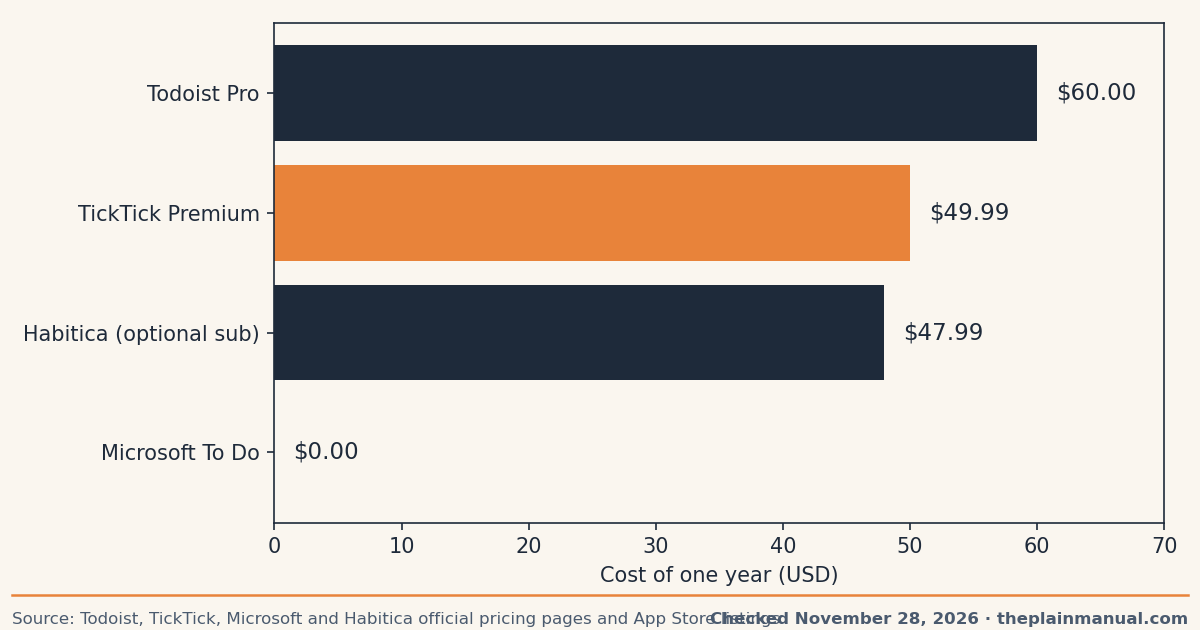
Price history, from our Monday checks: Todoist Pro was $5 a month billed yearly ($60 a year) at our November 16, 2026 check, and the Beginner free plan was the priced row beside it. Low across the tracked period: $60 a year. High across the tracked period: $60 a year. The other picks have no snapshot rows yet, so no strip is shown for them.
The price tag test: TickTick Premium at $49.99 a year is the closest like-for-like swap, and that figure is the whole price for one person, with no per-seat catch.
Buy now or wait: the honest default applies here. None of these makers runs a documented seasonal sale on these plans as of November 28, 2026, and Things 3 and Microsoft To Do have no renewal price to time at all, so waiting gains nothing. Our sale calendar tracks the windows that do exist: When Software Actually Goes on Sale.
What staying costs, honestly
Staying is a legitimate pick, and for many readers it is the right one. Pro at $60 a year buys the calendar layout, durations, deadlines, and 300 projects, plus the natural-language typing your fingers already know. If nothing on this page solves a problem you actually have, keep Todoist, pay yearly rather than monthly (monthly billing totals $84 a year), and spend the switching weekend on something better.
The migration checklist
- Export first. In Todoist, open each project and export it as a CSV file from the project menu, and save the files before you change anything. Your export is your way back.
- Count what you are moving. Note your project count, your recurring tasks, and your filters. Recurring tasks and filters rarely import cleanly anywhere, so expect to rebuild those by hand.
- Import one project, then test it for a day. Live with the new app for a full day before moving the rest.
- Rebuild recurring tasks and filters by hand. Check each rebuilt repeat against the Todoist original, especially monthly and weekday-only patterns, which are the ones that drift.
- Check the calendar integration at the destination. If your Todoist tasks appeared on your calendar, set that connection up in the new app and confirm one task shows on the right day.
- Run both apps for one week, new app first. Add every new task to the new app only. Todoist stays as the read-only backup until the week ends clean.
- Cancel Todoist Pro last. Only cancel once the new app holds everything, and time it just before your renewal date so you keep the paid time you already bought.
FAQ
Is there a free alternative to Todoist with more than five projects?
Yes. Microsoft To Do is entirely free with no paid tier, TickTick's free plan allows 9 lists with 99 tasks per list, and Habitica's full tracker is free. Each trades away something Todoist does well, usually its natural-language dates or its long integration list.
How much does Todoist cost in 2026?
Beginner is free with 5 personal projects. Pro costs $7 a month on monthly billing, or $60 a year on yearly billing. Business costs $10 per user a month, or $96 per user a year. Pro rose from $48 a year on December 10, 2025.
Which alternative is closest to Todoist?
TickTick. It matches the project-and-list structure, adds calendar views and a habit tracker, and its Premium plan costs $49.99 a year at list price. The main loss is Todoist's longer list of integrations.
Can I pay once instead of subscribing?
Yes, on Apple devices. Things 3 costs $9.99 for iPhone, $19.99 for iPad, and $49.99 for Mac, each a one-time purchase with free sync. There is no Windows, Android, or web version.
First 30 days with your pick
Week 1 setup: export your Todoist projects to CSV, import or rebuild your two busiest projects in the new app, rebuild your recurring tasks by hand, and connect the calendar if you used Todoist's.
Weeks 2 to 4, watch out for: the double-list habit. Adding tasks to both apps "just in case" guarantees you trust neither. New tasks go in the new app only, and Todoist stays untouched as your backup copy.
Day-30 keep or cancel check: compare this date with your Todoist Pro renewal date. If the new app is current and nothing is missing, cancel Pro before it renews at $60. If you drifted back to Todoist within the month, that is your answer too: cancel the new app's paid tier instead and stay.
Was this post useful? Answered it / Out of date / Still confused
Method: Research review (no hands-on testing). Prices, plan limits, and trial terms checked November 28, 2026 on the makers' official pricing pages, help pages, and US App Store listings.
Corrections: Spotted an error? Tell us, and we fix mistakes publicly and date them.
Prices: US list prices; verify before buying.
Source: Todoist's plans and billing FAQ, TickTick's upgrade page, Microsoft To Do's product pages, and the US App Store listings for Things 3 and Habitica, as read November 28, 2026.
Related Posts
 Todoist vs TickTick: Which To-Do App Will You Actually Keep Using? (2026)
 Alternatives to Harvest: After Usage Billing Made the Renewal Unpredictable
- Alternatives to HoneyBook: After the Loyalty Discount Expired
- TickTick vs Microsoft To Do: Which Free To-Do App Should You Use? (2026)
- Asana vs Monday.com for a Small Team: Which One Is Worth Paying For? (2026)