
Evidence label: Research review: free-tier limits and pricing verified October 7, 2026 against the official HubSpot, Zoho, and Attio pricing pages and independent 2026 comparisons. No hands-on walkthroughs were run for this piece; nothing here is a testing claim.
In a sentence: HubSpot is the free CRM a one-person business will actually use, Attio is the one you won’t outgrow, and Zoho is the one with the most features for zero dollars.
Plain-English Verdict: A CRM is a list of everyone you’ve talked to about work, plus a note about what happens next. HubSpot’s free tier is the best fit for a one-person business: genuinely free, 1,000 contacts, email tracking, a meeting scheduler, and a deal pipeline, all in the easiest free tool to learn. Attio is the runner-up with far more room before you ever pay (3 seats, 50,000 records, automatic contact enrichment), and Zoho is the most feature-rich free option. But if you have fewer than about 30 active clients, a spreadsheet still wins, and we’ll tell you exactly when it stops.
What we actually did: We read the official pricing and edition pages for HubSpot, Zoho, Attio, Streak, and Freshsales on October 7, 2026, compared their free-tier limits in a table and chart we built ourselves, and translated every limit into what it means for a freelancer. We did not sign up for trials or run any of these tools for this piece, and everything below comes from documented pricing and limits, and it’s labeled that way. The Plain Manual has no affiliate links and earns nothing if you pick any of these.
If you searched for the best free CRM for freelancers, here’s the honest shape of the market: every option on this list costs you nothing to start, and the differences that matter are the free-tier ceilings (contacts, users, pipelines) and what happens when you outgrow them. We ranked with conviction, did the first-paid-step math in plain dollars, and included the one scenario where the right answer isn’t a CRM at all.
Jargon Decoder: “CRM” just means: a customer list that remembers. It keeps every client, prospect, and conversation in one place so you never have to ask yourself “wait, did I follow up with them?” A “pipeline” is the same list laid out as columns (new lead, quoted, won, paid) so you can see where every deal stands at a glance.
1. HubSpot: the one I’d actually pick
HubSpot is the biggest name on this list and, unusually, the free tier is where that name works in your favor. It’s genuinely free with no time limit, it’s polished in a way free tools rarely are, and for a one-person business it covers the whole workflow: track people, see your deals in a pipeline, know when someone opened your email, and let clients book time on your calendar.
What we like
- 1,000 contacts free, no time limit. For a freelancer, 1,000 contacts is years of headroom. That’s the number that matters most (via saascrmreview’s July 2026 check of HubSpot’s official catalog).
- Email tracking, meeting scheduler, and live chat included. These are the features that make the free tier feel like a real tool rather than a demo.
- The easiest to learn. If you’ve ever bounced off a CRM because setup took a weekend, HubSpot is the fix. The interface is plain enough that you can be working in an afternoon.
- 2 free users. It’s capped, but for a one-person business (plus maybe a VA someday), two is all you need.
What could be better
- HubSpot branding sits on your outgoing emails, forms, and chat. Clients will see it. It’s the single most visible cost of “free.”
- One deal pipeline only, and no email sequences or workflows. Follow-up automation is the first thing you pay for.
- The upgrade path has a cliff. Sales Hub Starter (around $15–20 per user per month) is reasonable, but the moment you need real automation or custom reporting, you’re looking at Professional pricing, which starts in the hundreds per month.
Pricing
Free forever: $0 a year. First paid step: Sales Hub Starter at roughly $15–20 per user per month billed annually, or about $180–240 a year for one person (via EngageBay’s 2026 HubSpot breakdown). Always check HubSpot’s official pricing page before buying.
Our take
If I had to pick one for a freelancer starting today: HubSpot, no hesitation. It has the most complete free tool and the least friction. Who should skip it: if the thought of HubSpot’s logo on your client emails bothers you, keep reading.
2. Attio: the one you won’t outgrow
Attio is the newer, sleeker option: think of it as a CRM crossed with Notion. Its free tier is the most generous we found anywhere: up to 3 seats, 50,000 records, and automatic contact enrichment (it fills in job titles and company details on its own). For a one-person business, 50,000 records means you will effectively never hit a limit.
What we like
- 50,000 records and 3 seats free. That’s fifty times HubSpot’s contact allowance. The free tier is a working tier, not a trial in disguise (via AI Rank Lab’s September 2026 vendor-page check).
- Automatic enrichment. Attio pulls in contact and company details on its own, which saves the manual data entry that kills most people’s CRM habit.
- Real-time contact sync. Email people and Attio builds the contact records passively, from your actual correspondence.
What could be better
- The paid jump is steep. Plus starts at $29 per user per month billed annually ($348 a year), and that’s where workflows and the features a growing business wants live. Attio is free until it isn’t, and “isn’t” costs more than HubSpot’s or Zoho’s first paid step.
- More builder-y than HubSpot. The flexible data model is powerful and takes more setup thought. Budget an afternoon of deliberate configuring, not ten minutes of clicking around.
- Smaller ecosystem. Fewer integrations than HubSpot’s 2,000-plus app library.
Pricing
Free: $0 a year. First paid step: Plus at $29 per user per month billed annually, or $348 a year for one person (via Stacksync’s 2026 Attio review). Always check Attio’s official pricing page before buying.
Our take
If I had to pick one for a freelancer who hates switching tools: Attio. The free tier is so roomy you’ll probably never pay, and if you do, it’s because you grew into a team. Who should skip it: if you want the simplest possible setup with zero configuration, HubSpot is friendlier.
3. Zoho: the most features for zero dollars
Zoho CRM’s free edition has been around for years and it’s the workhorse pick: 3 users, 5,000 records, and (uniquely among the free tiers we found) basic workflow rules, so you can set up simple automations like auto-assigning new leads without paying (via AI Rank Lab’s September 2026 check of Zoho’s edition comparison). The interface is less polished than HubSpot’s or Attio’s, but the free feature set is the deepest.
What we like
- 3 users and 5,000 records free, forever. Limits verified on Zoho’s official pricing page in 2026 (via SaaSRat’s May 2026 pricing check).
- Basic workflow automation on the free tier. Nobody else on this list gives you automations for $0.
- The cheapest first paid step. Standard is $14 per user per month billed annually (about $168 a year), which is the lowest “I need more” price on this list.
- The whole Zoho ecosystem is there if you want it: invoicing, books, and email tools that all talk to the CRM.
What could be better
- The interface is the clunkiest of the three. It works, it’s just dated. If design quality affects whether you’ll actually open the tool, that’s a real factor.
- The ecosystem is confusing. Zoho sells dozens of apps with overlapping names and its own upsell logic. Expect to be courted.
- Support on free is email-only, and Zoho’s support reputation is the weakest of the three on independent review sites.
Pricing
Free: $0 a year. First paid step: Standard at $14 per user per month billed annually, or about $168 a year for one person (via saascrmreview’s 2026 Zoho pricing breakdown). Always check Zoho’s official pricing page before buying.
Our take
If I had to pick one for a freelancer who wants automation without paying: Zoho. It’s the only free tier with workflow rules. Who should skip it: if a dated interface will make you stop using it, pick HubSpot: the best CRM is the one you open.
The free-tier limits, side by side
We charted the headline number each free tier gives you: how many people and records you can store at $0 in our own bar chart (brand colors, log scale because Attio’s 50,000 would flatten the rest). Every number here matches the chart exactly.
| CRM | Free users | Free contacts / records | Deal pipelines | The catch |
|---|---|---|---|---|
| HubSpot (our pick) | 2 | 1,000 contacts | 1 | HubSpot branding on emails; no automation; 1 pipeline |
| Attio (runner-up) | 3 | 50,000 records | Included | Paid jump is $348/yr; more setup required |
| Zoho | 3 | 5,000 records | Included | Dated interface; email-only support |
| Capsule (honorable mention) | 2 | 250 contacts | 1 | 250 contacts is small; best for tiny lists |
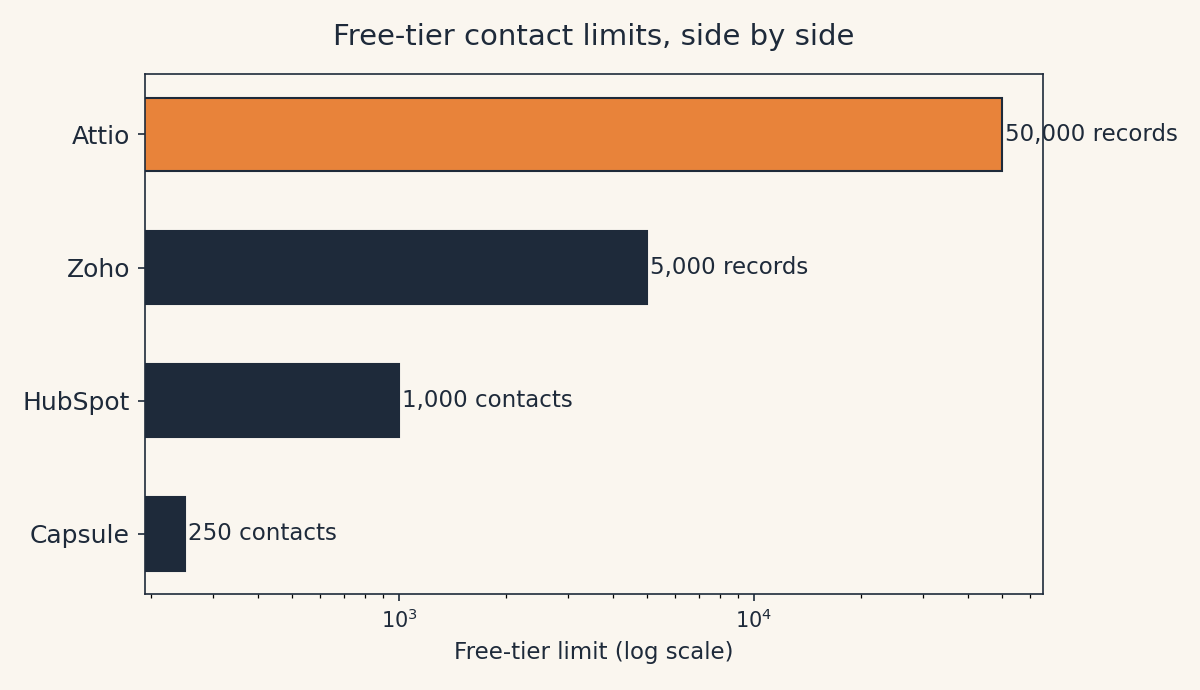
One translation note: HubSpot counts contacts (people), while Zoho and Attio count records (every contact, company, deal, and task). A 5,000-record limit fills up faster than it sounds, because each deal you track consumes records too.
When a spreadsheet still wins
Here’s the bank’s-angle honesty check we promised: a CRM is overkill until you have more clients than you can keep in your head. If you can count your active clients on two hands, a simple spreadsheet is faster than any tool on this list. No setup, no branding on your emails, no login. Add columns for last contact date, next step, and invoice status, and you’re done.
The spreadsheet stops winning the day one of these becomes true: you start forgetting follow-ups (missed follow-up = lost money), you can’t remember what you last discussed with a client, or you want a pipeline view of upcoming work instead of a flat list. That’s the moment to pick HubSpot from this list and import the spreadsheet in an afternoon.
Two that didn’t make the cut, honestly explained
Streak is the trap to know about. Its free plan is genuinely useful: email tracking, templates, mail merge, but it includes no CRM records or pipelines at all; actual CRM features start at $49 per user per month on the Pro plan (via NetHunt’s October 2026 Streak analysis). If your whole life is Gmail, that might still be worth it, but it is not a free CRM.
Freshsales has a question mark hanging over it. Several 2026 roundups still list a free plan for up to 3 users, but Freshworks’ own pricing page showed no $0 plan as of mid-September 2026: just three paid tiers and a 21-day trial (via AI Rank Lab’s September 2026 vendor-page check, and G2 lists it as trial-only). We left it off the list rather than recommend a free plan we can’t verify. If it returns, we’ll revisit.
One more connection worth making: a CRM tracks your clients, but it doesn’t get you paid. When a deal moves to “won” in your pipeline, you’ll need invoicing software for freelancers: our roundup of that is here. And if you’re still deciding whether you need a CRM at all, our plain-English explainer What Is a CRM? starts from zero. (HubSpot’s free meeting scheduler, by the way, pairs nicely with a free Cal.com booking page if you’d rather keep scheduling separate.)
FAQ
Is HubSpot CRM really free?
Yes, the free tier has no time limit. The limits are 2 users, 1,000 contacts, one deal pipeline, HubSpot branding on your outgoing emails and forms, and no automation. That’s plenty for a one-person business; the limits only bite when you add people or need sequences and workflows.
What’s the difference between a contact and a record?
A contact is one person. A record is any single item the CRM stores: a contact, a company, a deal, a task. HubSpot’s free tier counts contacts (1,000 people); Zoho and Attio count all records, so their limits fill faster than the headline number suggests.
Do I need a CRM if I only have a handful of clients?
No. Under roughly 30 active clients, a spreadsheet with last-contact and next-step columns is faster and free. Graduate to a CRM when you start forgetting follow-ups or want a pipeline view of upcoming work.
Can I switch CRMs later without losing my data?
Yes. HubSpot, Attio, and Zoho all export to CSV, and importing into a new CRM is a standard afternoon task. Don’t let fear of lock-in keep you on a spreadsheet long after you’ve outgrown it.
Can a CRM replace invoicing software?
No, they do different jobs. The CRM tracks relationships and deals; invoicing software creates bills, sends reminders, and gets you paid. You’ll eventually want both. Start with our freelancer invoicing roundup when the pipeline fills up.
For the occasional invoice before you’re ready for full software, our free Invoice Generator covers the basics with no account.
Method: Research review (no hands-on testing). Cross-checked against official HubSpot, Zoho, and Attio pricing pages, EngageBay’s 2026 HubSpot breakdown, saascrmreview’s July 2026 HubSpot catalog check, SaaSRat’s May 2026 Zoho pricing verification, Stacksync’s 2026 Attio review, NetHunt’s October 2026 Streak free-plan analysis, Findstack’s July 2026 Freshsales review, and AI Rank Lab’s September 2026 small-business CRM vendor-page check. Checked October 7, 2026.
Corrections: Spotted an error? Tell us — we fix mistakes publicly and date them.
Prices: US list prices; verify before buying.
Source: AI Rank Lab’s September 2026 small-business CRM pricing check (via airanklab.com)