*Editor's Note: New post, November 2026. Prices and free-plan limits checked November 9, 2026, at regular list prices.*
*Research review: prices, plan limits, and features verified November 9, 2026 against TickTick's official upgrade page and Microsoft's official To Do product and support pages. We did not move a live task list into either app for this piece.*
In a sentence: Microsoft To Do gives you its whole app for $0 with no caps to hit, and TickTick is the one to pay for only when you will actually use its calendar, habits, and planning extras.
Plain-English Verdict
Microsoft To Do is the pick for most people. Every feature it has is free, with no paid tier waiting behind it, and it pulls your flagged Outlook email into your list on its own. TickTick is the pick for planners: it adds calendar views, a habit tracker, and deeper task tools, and the full set costs $49.99 a year. Start free in either app, because both free plans cover an ordinary personal list.
The worry: you pay $49.99 a year for planner extras you never open, or you build years of lists inside a free app that only shares inside Microsoft's walls and cannot follow you when your accounts or devices change. Coverage of these two apps through 2026 keeps landing on those two mistakes.
How we checked this
Checked: TickTick's official upgrade page, read November 9, 2026 (Free and Premium prices, the full limits table, the refund and data-retention answers); Microsoft's official To Do product page and Microsoft Support's "Plan and connect with Microsoft To Do" page, read the same day (My Day, Outlook and flagged-email sync, Planner assignments); October and November 2026 coverage of both apps' official pages for platform lists and the 25 MB attachment figure.
Date: November 9, 2026.
Method: Research review. See How We Review. We earn nothing if you buy any plan, and there are no affiliate links in this post.
Here is what each one does in one sentence. Microsoft To Do is a clean daily list that lives inside your Microsoft account and your Outlook mail. TickTick is a list that wants to be your whole planning desk: tasks, calendar, habits, and countdowns behind one icon.
Jargon Decoder: TickTick's pricing page lists "NLP" as a free feature without explaining it. It means natural language processing: typing "Call Sam tomorrow at 3" and watching the app file the date and time by itself. Microsoft To Do has no documented equivalent, so dates there are picked by hand.
The 60-second decision tree
- Your email lives in Outlook and you flag messages to deal with later: Microsoft To Do, and it is not close.
- You want one app for tasks, a calendar view, and habit tracking: TickTick, with Premium priced in.
- You never want to think about a plan, a cap, or a renewal: Microsoft To Do, because there is nothing to buy.
- You are on Linux, or you mix phones and computers freely: TickTick, which publishes apps for all of them.
- Your lists stay under nine and your needs are simple: TickTick Free covers you at $0 too.
- You share lists with family on mixed accounts: read the sharing limits below before choosing either.
Our picks, by role
Microsoft To Do: our pick for most people
To Do is the pick when the job is a dependable daily list at no cost. There is one plan, it is free, and it includes the feature people actually pick this app for: flag an email in Outlook and it appears in To Do as a task, with the message one click away. My Day, its morning shortlist, is the other reason it sticks.
TickTick: our pick for planners who want it all in one app
TickTick is the pick when a bare list feels too bare. It documents calendar views, a habit tracker, an Eisenhower Matrix for sorting urgent from important, task durations, and filters, and its free plan already includes quick typed entry, reminders, and board view. The honest catch is that the best of those extras sit on Premium.
Skip this if…
Microsoft To Do — you need a calendar view inside the app
Microsoft To Do — your lists must leave the Microsoft account world
TickTick — a $49.99 yearly renewal for a to-do list feels steep
TickTick — nine lists will not hold your projects
TPM Scorecard
Scores grade published facts only: pricing pages, feature lists, and help docs. We do not score how an app feels to use.
| Criterion | TickTick | Microsoft To Do |
|---|---|---|
| What it costs | 7 | 10 |
| Does the job | 9 | 5 |
| Works where you work | 8 | 7 |
| Help when stuck | 7 | 8 |
| Free version | 6 | 10 |
| Overall | 7.4 | 8.0 |
The gap is 0.6, and it comes from one fact: Microsoft To Do charges nothing for everything it does, while TickTick reserves its best tools for a paid plan. TickTick wins the feature row by a wide margin, and the sections below show exactly which extras that $49.99 buys.
TPM Scorecard · Rubric v1.0 — October 2026 · Checked November 9, 2026. See How We Review.
Use our numbers: Cite this post: "TickTick vs Microsoft To Do: Which Free To-Do App Should You Use? (2026)" — The Plain Manual, November 9, 2026. https://theplainmanual.com/ticktick-vs-microsoft-to-do/ Download the scorecard as a CSV: https://theplainmanual.com/wp-content/uploads/2026/11/ticktick-vs-microsoft-to-do-scorecard.csv
The picks, one by one
TickTick
What we like: The free plan is a real plan. Nine lists with 99 tasks each, list and board views, typed entries that understand dates, task reminders, and sync across your devices, all at $0. Premium then adds the planning layer in one place: multiple calendar views, task durations, an Eisenhower Matrix, a habit tracker that grows from 5 habits to 299, and AI features. TickTick's own page also answers the exit question honestly: if Premium ends, your data is fully retained and you carry on as a free user.
What could be better: The catch: the free ceilings are placed exactly where an organized person will bump into them. Nine lists sounds like plenty until work, home, family, and two projects each want one. Free tasks get 2 reminders each, shared lists stop at 2 members, attachments stop at 1 a day, and the calendar is basic until you pay. Premium lifts every one of those numbers, which is the point: the free plan is a fair trial of the paid one.
Pricing: Free at $0. Premium $49.99 a year at list price on TickTick's own upgrade page, which shows no monthly price; the App Store lists a $4.99 monthly option. One plan, one price, no team tier. Older guides quote lower yearly figures for Premium, and today's companion note covers why those numbers are stale.
Our take: Who it's for: people who plan in their to-do app, not just store tasks in it. If you will open the calendar view weekly and keep habits beside your tasks, $49.99 a year replaces two or three separate apps. If you will not, this is an expensive list.
Microsoft To Do
What we like: The price is the whole pitch, and the pitch is true. Microsoft documents no paid tier for To Do: lists, steps inside tasks, due dates, reminders, repeating tasks, shared lists, and My Day are all included with a free Microsoft account. The Outlook connection is the standout. Microsoft Support documents that tasks are stored with your mail, so they appear in To Do and Outlook together, and flagged emails arrive as tasks you can rename, date, and add to My Day. Planner tasks assigned to you at work appear in the same app.
What could be better: The price: you pay in limits instead of dollars. To Do stops at the basics on purpose: no calendar view inside the app, no habit tracker, no focus timer, no boards, and no typed dates. Sharing has a wall around it, because lists travel only between personal Microsoft accounts, or between accounts inside one workplace or school. There is no Linux app. A household split across account types, or a reader who wants one system everywhere, will feel those edges.
Pricing: $0. There is no Premium, no Pro, and no checkout.
Our take: Who it's for: Outlook households, Microsoft 365 workers, and anyone whose to-do needs are a list, a reminder, and a clear view of today. It is also the safest first app in this comparison, because trying it costs nothing and leaving it costs nothing.
Pricing side by side
| TickTick Free | TickTick Premium | Microsoft To Do | |
|---|---|---|---|
| Price | $0 | $49.99 a year | $0 |
| Lists | 9 | 299 | No published cap |
| Tasks per list | 99 | 999 | No published cap |
| Reminders per task | 2 | 5 | Included, no paid tier |
| Shared list members | 2 | 29 | Sharing included |
| Habits | 5 | 299 | None |
| Calendar view | Basic | Multiple views | None in the app |
| Attachments | 1 a day | 199 a day | Up to 25 MB a task |
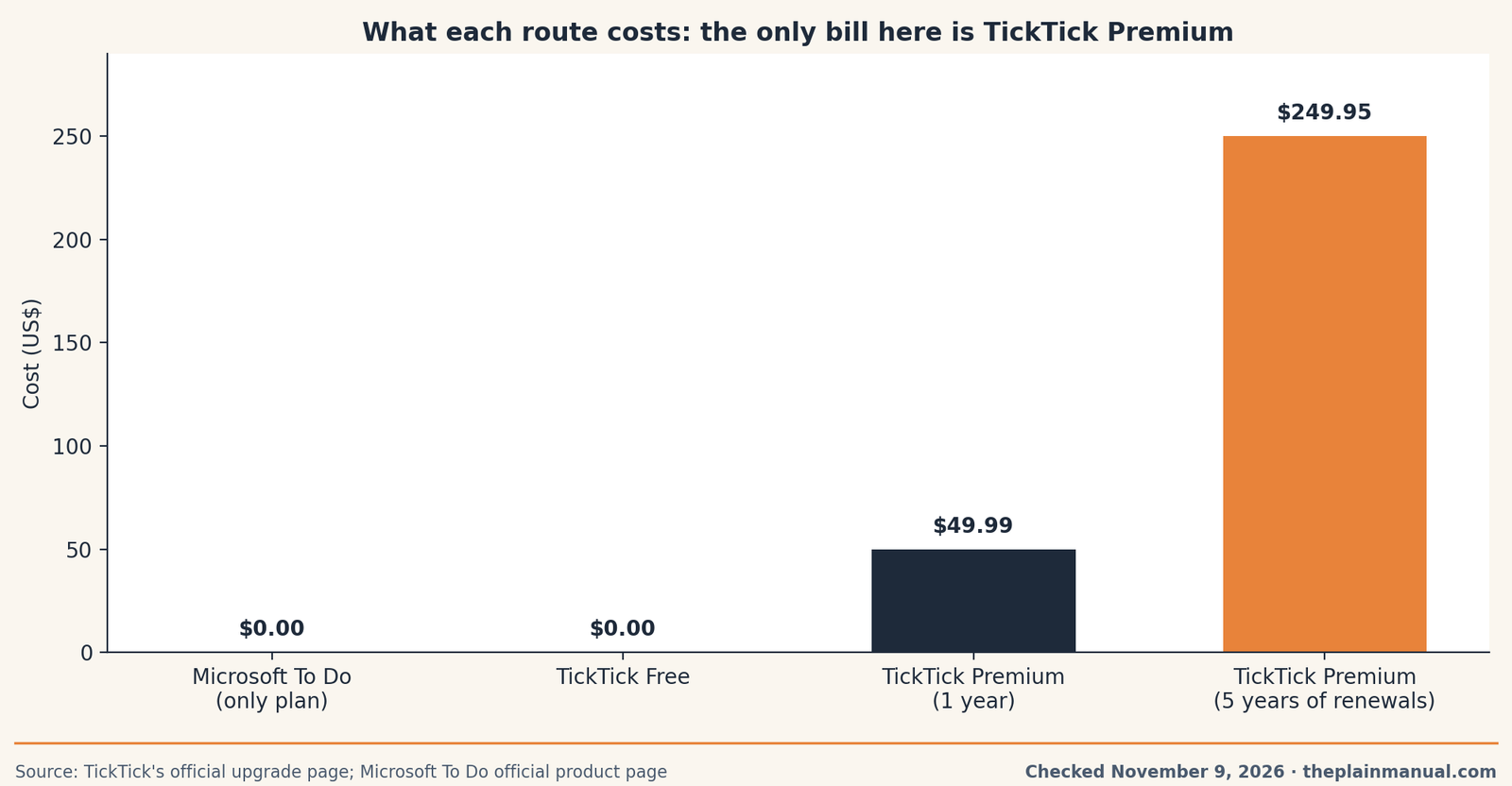
The price tag test: Microsoft To Do costs $0 for everything it does, with no paid tier at all, and that is the whole price.
Buy now or wait: Microsoft To Do has no price to wait on. TickTick Premium lists at $49.99 a year on TickTick's own page, and our research found no documented sale window for it, so waiting gains nothing we can verify. Our free Subscription Cost Calculator shows what a $49.99 renewal becomes across five years, which is the honest frame for the TickTick side of this choice.
The fine print: the TickTick figures are the limits printed in the Essentials table on TickTick's upgrade page, checked November 9, 2026. Microsoft publishes no numeric list or task cap for To Do, so the table says so plainly instead of printing a number we cannot source. The 25 MB attachment figure comes from To Do's app-store listing, as read in October 2026 coverage.
What Premium actually buys, in plain terms
Strip away the plan names and TickTick Premium buys three things. First, headroom: 299 lists and 999 tasks a list, 199 attachments a day, 29 people on a shared list. Second, views: the full calendar layouts, the Eisenhower Matrix without limits, widgets and statistics. Third, depth per task: durations, email reminders, five reminders instead of two, and the AI features TickTick lists on its upgrade page. None of that makes a task get done. It makes a large, busy system easier to see. Our earlier Todoist vs TickTick comparison reached the same answer from the other side: the extras reward the people who use them.
The free-plan test is simple. Run TickTick Free for a month. If you never hit the nine-list wall and never miss the full calendar, you have your answer, and it costs $0. If you hit the same wall twice in a week, Premium is priced fairly for what it removes. Either way, decide from a wall you actually met, not from a feature list. Readers who want the simplest possible tool, paid or not, may prefer the picks in our guide to the best simple to-do app, where capture speed is the whole test.
The Microsoft question
The catch: To Do's best features only exist inside Microsoft's own garden. Flagged email works when your mail is hosted by Microsoft and you sign in with the same account. Planner assignments need a work or school account. Your tasks live with your mail account, which is convenient until the day your work account closes or your family spans two account worlds. None of this is a reason to avoid To Do. It is a reason to pick it with your eyes open: for a Microsoft household it is the most connected free list we cover, and for everyone else it is a good simple list with a firm border around it.
TickTick's border is different. It runs on Windows, Mac, Linux, iPhone, Android, the web, and watches, and it syncs outside calendars like Google Calendar and Outlook. It answers to no ecosystem. What it asks in return is the renewal. That is the whole trade in this comparison, stated plainly: Microsoft gives you the app and keeps the walls; TickTick removes the walls and charges rent for the view.
FAQ
Is Microsoft To Do really free?
Yes. Microsoft publishes no paid tier for To Do. Every feature, from My Day to shared lists to the Outlook sync, comes with a free Microsoft account. Work extras like Planner assignments need a work or school account, and that is an account type, not a To Do upgrade.
Is TickTick's free plan enough for most people?
For one person's everyday lists, yes. Nine lists with 99 tasks each, reminders, board view, and sync is a generous free plan. Pay when you meet a named wall: a tenth list you genuinely need, a shared list with more than two people, or the full calendar views.
Does Microsoft To Do have a calendar view?
No calendar view inside To Do itself. Its planning view is My Day, a daily shortlist with suggestions. Your tasks live in Outlook alongside your mail, and TickTick is the app in this pair that builds calendar views into the list.
Can I share lists in both apps?
Yes, with different fences. TickTick shares a list with 2 people free and 29 on Premium. Microsoft To Do includes shared lists free, but a list travels only between personal Microsoft accounts, or between accounts in the same workplace or school.
What happens to my TickTick tasks if Premium ends?
They stay. TickTick's upgrade page states that after a Premium subscription expires, all your data is fully retained and you continue as a free user, with the Premium features switched off. That is the exit answer every paid app should print this clearly.
Method: Research review (no hands-on testing). Cross-checked against TickTick's official upgrade page and Microsoft's official To Do product and support pages, all read November 9, 2026, plus October and November 2026 coverage of both apps' official pages. Checked November 9, 2026.
Corrections: Spotted an error? Tell us, and we fix mistakes publicly and date them.
Prices: US list prices; verify before buying.
Source: TickTick's official upgrade page and Microsoft Support: Plan and connect with Microsoft To Do
Related Posts
 Google Workspace vs Microsoft 365 for a Tiny Business (2026)
- Trello vs. Asana: Which Project Tool Is Right for a Small Team? (2026)
- Superhuman vs Spark: Is a $30-a-Month Email App Sane? (2026)
- Asana vs Monday.com for a Small Team: Which One Is Worth Paying For? (2026)
- Calendly vs Cal.com: Which Booking Tool Is Right for You? (2026)