
Editor’s Note (September 2026): This is a documented comparison based on official 2026 pricing and features — not a side-by-side lab test. Prices were checked against official pricing pages at publication; confirm before you buy. See how we review.
The Plain-English Verdict: Todoist is the calmer, cleaner app with the best quick-add typing we’ve seen and genuinely useful AI — at $60 a year after a 2025 price hike. TickTick packs in more built-in tools (Pomodoro timer, habit tracker, full calendar) for about $50 a year, in a busier interface. The honest decider: if you’ll pay extra for calm and speed, pick Todoist; if you want the most features per dollar, pick TickTick.
Here’s the dirty secret of to-do apps: they’re all fine. Every one of them lets you write “buy milk” and check it off. So a Todoist vs TickTick comparison isn’t really about features — it’s about which one you’ll still be opening six months from now. That’s a question of feel, price, and how fast you can get a thought out of your head and into the list.
We’ve read the pricing pages, the docs, and the 2026 reviews so you don’t have to. Here’s the plain version.
What each one is, in one sentence
Todoist is a clean, focused to-do list that lives on every device you own and stays out of your way. TickTick is a to-do list that also swallowed a calendar, a Pomodoro timer, a habit tracker, and a white-noise machine.
Neither description is an insult. They’re just built for different humans.
The price tag in 2026
Let’s talk money first, because it’s the sharpest difference — and because something changed recently that most comparison articles haven’t caught up with.
Todoist has three tiers:
| Plan | Price (billed yearly) | The gist |
| Beginner (Free) | $0 | 5 active projects; 300 tasks per project; 3 filter views; 1-week history |
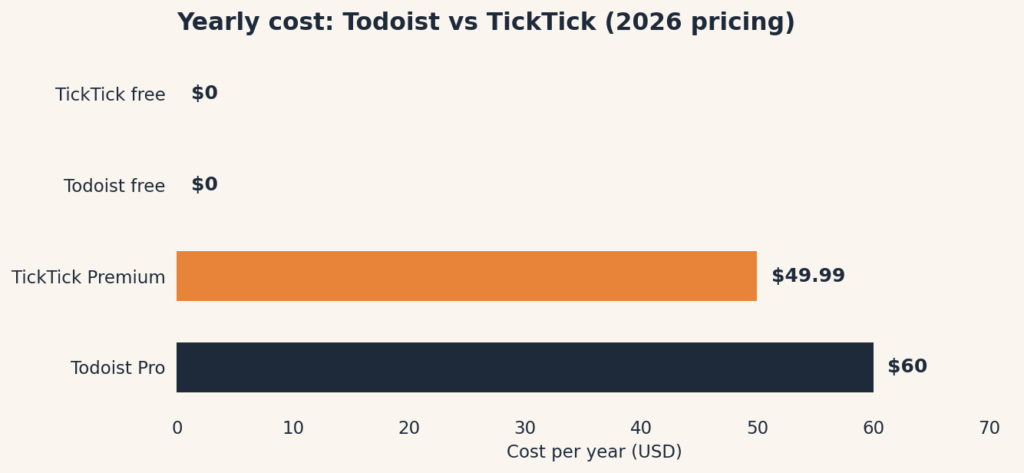
| Pro | $60/year ($5/month) | 300 projects; reminders; calendar layout; task durations; full AI Assist |
| Business | $96/user/year ($8/month) | Shared team workspace; 500 team projects; admin controls |
Two things to know. First, the free tier has no reminders at all — for a to-do app, that’s the feature most likely to push you toward Pro. Second, Todoist raised Pro from $48 to $60 a year in December 2025, a 25% jump. If an older review calls Todoist “the cheap option,” it’s quoting the old price.
TickTick keeps it simpler — free, or one paid tier:
| Plan | Price | The gist |
| Free | $0 | 9 lists; 99 tasks per list; basic reminders; calendar and kanban views |
| Premium | $49.99/year | 299 lists; full calendar; Pomodoro; habit tracker; custom filters; 5 reminders per task |
Now, the catch we promised: quite a few 2026 roundups still list TickTick Premium at $35.99 a year. That was the old price. We opened TickTick’s official upgrade page on September 28, 2026, and it says US$49.99/year. Prices move; always check the pricing page before you pay.
The honest math: TickTick Premium (~$50/year) still undercuts Todoist Pro ($60/year) by about 17% — not the 40% gap older articles quote, but real money over time. Over five years: roughly $250 vs $300. And TickTick’s free tier is more generous (9 lists vs 5 projects, and it includes reminders, which Todoist’s free tier doesn’t).
Getting tasks in: the typing test
This is where Todoist earns its reputation, and it’s the feature that decides the whole contest for fast-moving people.
Todoist’s quick-add understands natural language beautifully. You type “Follow up with the dentist every 6 months starting next Tuesday #health” and it parses the recurrence, the date, and the project in one go. For someone adding 10–20 tasks a day, that lack of friction is the whole product. Multiple 2026 comparisons call it the best in class, and the docs back it up.
TickTick handles the basics fine — “tomorrow at 3pm” works. But anything fancier (recurrence plus project plus label in one line) tends to need manual clicks afterward. It’s not broken; it’s just one more little tax on every task you enter.
Plain rule: if your to-do list is a firehose, Todoist’s typing will save you minutes every day. If you add a handful of tasks a day, you’ll never notice the difference.
Beyond the list: what each one throws in
Here’s the philosophical split. Todoist does one thing and trusts you’ll bring other apps for the rest. TickTick wants to be the other apps.
TickTick’s built-in extras (most need Premium):
- Pomodoro timer — the 25-minute focus timer, built right into the task view
- Habit tracker — check off daily habits alongside your tasks (5 habits free, 299 on Premium)
- Eisenhower Matrix — a four-box view for sorting by urgent vs. important
- Full calendar — see all your tasks across every list in one calendar; Todoist’s paid calendar shows one project at a time
- White noise — yes, really, ambient sounds for focusing
- “Annoying” alerts — persistent nagging reminders that don’t stop until you deal with the task
Todoist’s answer is focus plus smarts:
- AI Assist (Pro) — type a fuzzy task like “prepare for the client workshop” and it breaks it into steps: draft slides, review attendee list, test the projector. Not magic, genuinely handy.
- Ramble (Pro) — talk into your phone after a call (“add to the venue project: email Sarah the contract, due Friday”) and it creates the task with the right project and date. This is the standout.
- 150+ integrations — Todoist plugs into everything: Gmail, Slack, Google Calendar, and hundreds more. TickTick’s integration list is thinner.
- Filter queries — powerful text-based filters (like “overdue & #work”) for slicing your list any way you like.
So TickTick gives you more apps in one; Todoist gives you one app with a better brain and better friends.
Reminders that actually remind you
Worth its own section, because a to-do app that can’t nag you is a notebook.
TickTick wins this round. Its “annoying alerts” are persistent, customizable reminders that keep buzzing until you acknowledge the task — plus custom sounds. It’s the closest thing to having someone stand over your shoulder, and people who need it really need it.
Todoist’s reminders are standard: they go off, you see them, they go away. Pro lets you set multiple reminders per task and location-based ones, which covers most humans. But if you’re the person who snoozes an alarm into oblivion, TickTick’s nag mode is the feature you didn’t know you were shopping for.
The interface: calm vs. busy
Todoist is minimalist to a fault — generous whitespace, one clean list, almost nothing to learn. New users are productive in minutes. It stays fast and light even with huge lists, and the mobile app feels nearly identical to desktop.
TickTick is denser by necessity: with a Pomodoro timer, habit tracker, calendar, and Eisenhower Matrix all living in one app, there’s more on screen. It’s still well-designed, and it offers more themes and customization — but side by side, Todoist feels like a quiet room and TickTick feels like a busy desk. As one long-time user put it in a 2026 review: TickTick had “too many features that were just distracting side quests.”
Neither is wrong. But be honest with yourself about which room you work better in.
Jargon Decoder: The Eisenhower Matrix sounds like a sci-fi weapon. It’s just four boxes for sorting tasks: urgent-and-important, important-but-not-urgent, urgent-but-not-important, and neither. That’s the whole trick.
Who should pick which
Pick Todoist if: you add tasks constantly and want the fastest quick-add in the business; you like a calm, minimal interface; voice-to-task or AI task breakdowns sound useful (that’s the Pro plan); you live in Gmail/Slack/Google Calendar and want your tasks wired into all of them; you’re coordinating with a team (Business plan).
Pick TickTick if: you want one app instead of four — tasks, calendar, habits, and focus timer together; persistent nagging reminders would genuinely change your life; you’d rather pay ~$50/year than $60; the free tier needs to include reminders (it does, unlike Todoist’s); you like customizing themes and views.
Stick with free either way if: your needs are simple. TickTick’s free tier (9 lists, reminders included) covers more ground than Todoist’s free tier (5 projects, no reminders) — the rare case where we’d nudge a beginner toward TickTick first and upgrade only when a limit actually bites.
The short answer
Todoist is the calm, fast specialist: best-in-class quick entry, useful AI, and deep integrations, at $60 a year. TickTick is the generous generalist: more built-in tools and a kinder free tier for about $50 a year, in a busier package. The app you’ll “actually keep using” is the one that matches your temperament — quiet room or busy desk — so pick the room, not the feature list.
Sources: TickTick Premium pricing verified directly on TickTick’s official upgrade page on September 28, 2026 (US$49.99/year — several 2026 roundups still list the old $35.99). Todoist pricing cross-checked with Ellie Planner’s 2026 Todoist pricing breakdown. Feature comparisons cross-checked with 2sync’s TickTick vs Todoist 2026 comparison and Asian Efficiency’s 2026 comparison. This comparison is based on documented features and pricing, not hands-on testing — where we haven’t verified something ourselves, we say so.
Frequently Asked Questions
Is TickTick really cheaper than Todoist?
Roughly — their paid plans land within a few dollars of each other per year, and both have capable free tiers. The pricing table above has the exact current numbers.
Which has the better free plan?
TickTick’s free plan is more generous — more lists and features before you hit a paywall. Todoist’s free tier covers the basics well but nudges you toward Pro sooner.
Can I switch from Todoist to TickTick easily?
Yes. TickTick has a built-in Todoist importer that moves your tasks, projects, and labels in a few clicks.
Which is better for teams?
Todoist — its team workspaces, roles, and activity logs are more mature. TickTick works for small shared lists but isn’t built for team management.