Editor's Note: New post, October 2026. Prices and free-tier limits checked October 31, 2026, at regular list prices. Where a maker does not publish a price, we say so instead of quoting a roundup.
Research review: prices, plan limits, and features verified October 31, 2026 against the makers' own sites and pricing pages (Forest, Pomofocus reporting, Session) and current US App Store listings for Focus To-Do. We did not run a week of timed sessions in each app for this piece, and we say so wherever that matters.
In a sentence: for most people the best focus timer in 2026 is a free one, Pomofocus in a browser tab or the timer already on your phone, and the paid apps below earn their money only when they block your phone, carry your task list, or keep records you actually read.
Plain-English Verdict
Start free. Pomofocus gives you the whole core routine, a timer, a task list, and basic reports, with no account and no install. Pick Forest when your phone is the thing pulling you away, because its free tier blocks apps while a tree grows. Pay only for a specific extra: Focus To-Do if your timer and your task list should live together, or Session if you are all-Apple and want blocking plus tidy records. Every pick below lets you change the session length, so the old 25-minute rule never has to run your day.
The worry: you pay for a year of a timer, miss a day in week two, watch a streak or a forest reset, and stop opening the app at all, so the subscription keeps billing for a habit that already ended.
How we checked this
Checked: Forest's official site and its Free vs Plus plan comparison (core timer and Deep Focus app blocking are free; the old one-time Pro purchase is retired; Plus pricing varies by region and is not published on the site); Pomofocus pricing as reported from pomofocus.io in October 2026 (Premium $3 a month, $18 a year, or $54 lifetime; free tier capped at 3 saved templates); Session's official pricing page (Free $0; Pro $4.99 a month or $39.99 a year); Focus To-Do's US App Store in-app purchases (Premium $1.99, $3.99 for 3 months, or $11.99 lifetime); reader accounts of why timers get abandoned within a week or two.
Date: October 31, 2026.
Method: Research review. See How We Review. We earn nothing if you buy any plan, and there are no affiliate links in this post.
Here is what a focus timer does in one sentence. It counts down a work session you chose, rings, counts down a break, and repeats, so your attention has a fence around it instead of a vague promise.
The method behind most of these apps is the Pomodoro Technique: 25 minutes of work, a 5-minute break, and a longer break after four rounds. Treat those numbers as a starting guess. Every app below lets you set your own lengths, and a 40-minute session you finish beats a 25-minute session you abandon.
Jargon Decoder: "Pomodoro" just means the tomato-shaped kitchen timer the method's inventor used in the late 1980s. The word names the timer, nothing fancier.
Our picks, by role
Pomofocus: our pick for most people
Open a browser tab, type one task, press start. Pomofocus is the fastest honest start in this field, and its free tier covers the routine most readers actually need.
Forest: our pick when your phone is the distraction
Forest grows a virtual tree while you focus and lets it die if you give up and leave. The gentle guilt works, and its free tier includes the app blocking that rival apps usually charge for.
Focus To-Do: our pick when the timer should carry your tasks
Focus To-Do bolts a full task manager onto the timer, so each session belongs to a named job on your list. One lifetime price covers the upgrade, which suits people who plan their day in the same app.
Session: our pick for Apple households that want records
Session runs on iPhone, iPad, and Mac, syncs between them, blocks distracting apps and websites during a session on Pro, and keeps the calmest records in this group. Apple only, and Pro is a subscription.
Your phone's built-in timer: our pick when you want no app at all
The Clock app already on your phone, plus your phone's Focus mode and a face-down phone, covers the whole method for $0. This pick suits anyone who has downloaded three focus apps and used none of them past week two. Our guide to the best simple to-do app makes the same case for boring tools you already own.
Skip this if…
Pomofocus — you need your phone blocked during sessions
Forest — a dying tree would feel like a scolding
Focus To-Do — you want a timer and nothing else
Session — anyone in your house uses Android or Windows
Built-in timer — you want records of your focus time
The picks, one by one
Pomofocus
What we like: The free tier is the product. You get custom work and break lengths, a task list with session estimates per task, saved templates, and reports covering a day, a week, or a month. Basic use needs no account, so a first session starts in under a minute. Desktop apps for Mac, Windows, and Linux exist for readers who dislike browser tabs.
What could be better: Free shows ads, and the free tier now caps saved templates at 3, a limit that used to be unlimited. Projects, yearly reports, CSV export, and the Todoist connection all sit in Premium. There is no phone blocking, so willpower still guards the phone in your pocket.
Pricing: Free with ads. Premium is $3 a month, $18 a year, or $54 lifetime, and it removes ads and unlocks the projects, reports, and export features above.
Our take: Try the free tier for two weeks before paying anyone, including Pomofocus. Most readers will find the free tier is the whole answer.
Forest
What we like: The catch: Forest sells a consequence you can see. A finished session adds a tree to a growing forest, and a forest reads at a glance in a way a statistics page never does. Deep Focus, the mode that blocks apps you did not allow during a session, is free, and so is Plant Together, where a group shares one tree and loses it if anyone gives up. Forest says its users have funded over 2 million real trees through its partner Trees for the Future since 2014.
What could be better: The Plus price is a genuine annoyance to pin down. Forest's own site says Plus pricing varies by region and platform and sends you to your app store to see it, so we print no single Plus price here. Real-tree planting with your earned coins now sits in Plus (up to 5 trees per account), and the free tier limits Time Guard scheduling to one app or site. Older guides still describe a $3.99 one-time purchase; that offer is gone, and we explain the change in today's companion note, "TIL: Forest Is No Longer a One-Time Buy."
Pricing: Free for the core timer, Deep Focus blocking, Plant Together, and one soundscape, with occasional ads outside sessions. Plus is an optional subscription priced in your app store. The retired Pro unlock stays valid forever for people who bought it earlier.
Our take: Choose Forest when the phone itself breaks your sessions. Choose it free, and treat Plus as a later decision.
Focus To-Do
What we like: Each session attaches to a task, so your focus record answers a useful question: where did the morning go, job by job. The app runs nearly everywhere: iPhone, iPad, Apple Watch, Mac, Windows, Android, and a Chrome extension. Premium is sold as a lifetime purchase, a rare and welcome shape in this category.
What could be better: A task manager inside your timer adds setup a bare timer skips, and readers who keep tasks elsewhere gain little. Full sync, deeper statistics, and cloud backup sit in Premium, so the free tier works best on one device.
Pricing: Free to start. Premium costs $1.99, or $3.99 for 3 months, or $11.99 lifetime in the US App Store listings checked today. The lifetime price is the one worth considering; the short options exist mostly to test the upgrade cheaply.
Our take: Who it's for: people whose day is a list. If your tasks live in another app you love, Pomofocus plus that app does the same job for free.
Session
What we like: Session asks what you intend to do before the timer starts, then records how the session went, which turns a timer into a light review habit. It syncs across iPhone, iPad, and Mac, and Pro blocks the apps and websites you name during a session across Safari, Chrome, Brave, and Edge. Pro can also set your Slack status while you focus.
What could be better: Apple only, full stop. Pro is a subscription with no lifetime option, and the free tier's analytics history is short, so the records that make Session special mostly live behind the paywall.
Pricing: Free. Pro is $4.99 a month or $39.99 a year on Session's own pricing page, with a 7-day free trial and a 30% student discount for one year.
Our take: Session is the polished Apple pick and the easiest one here to overbuy. Its $39.99 a year buys blocking and records; readers who never open their records should stay free.
Your phone's built-in timer
What we like: It is already installed, already paid for, and starts in two taps. Pair it with your phone's Focus mode to silence notifications, set the phone face down, and keep a paper note beside you for stray thoughts. That note matters: most broken sessions start with "I will just check one thing," and writing the thing down parks it safely.
What could be better: No records, no streaks, no tree, and no blocking beyond what Focus mode already offers. Readers who stay honest because an app is watching will miss the watching.
Pricing: $0, forever, with no account.
Our take: Start here if you are unsure the method suits you at all. A week of kitchen-timer sessions tells you more about your attention than any app store page, a point our subscription audit guide makes about trying the free version of any habit before paying for it.
Pricing, side by side
| App | Free tier | Paid price (US) | Platforms |
|---|---|---|---|
| Pomofocus | Timer, task list, 3 templates, basic reports, with ads | Premium $3/mo, $18/yr, or $54 lifetime | Web; Mac, Windows, Linux apps |
| Forest | Timer, Deep Focus blocking, Plant Together, 1 soundscape | Plus subscription, price varies by region (check your app store) | iPhone, iPad, Android, browser extension |
| Focus To-Do | Timer plus task manager | Premium $11.99 lifetime (shorter options from $1.99) | iPhone, iPad, Watch, Mac, Windows, Android, Chrome |
| Session | Timer with short analytics history | Pro $4.99/mo or $39.99/yr | iPhone, iPad, Mac |
| Built-in timer | Full timer, no records | None | The phone you already own |
The price tag test: Pomofocus, our pick for most people, costs $0 for the timer, task list, and basic reports, and that $0 is the whole price unless you choose Premium for projects and exports.
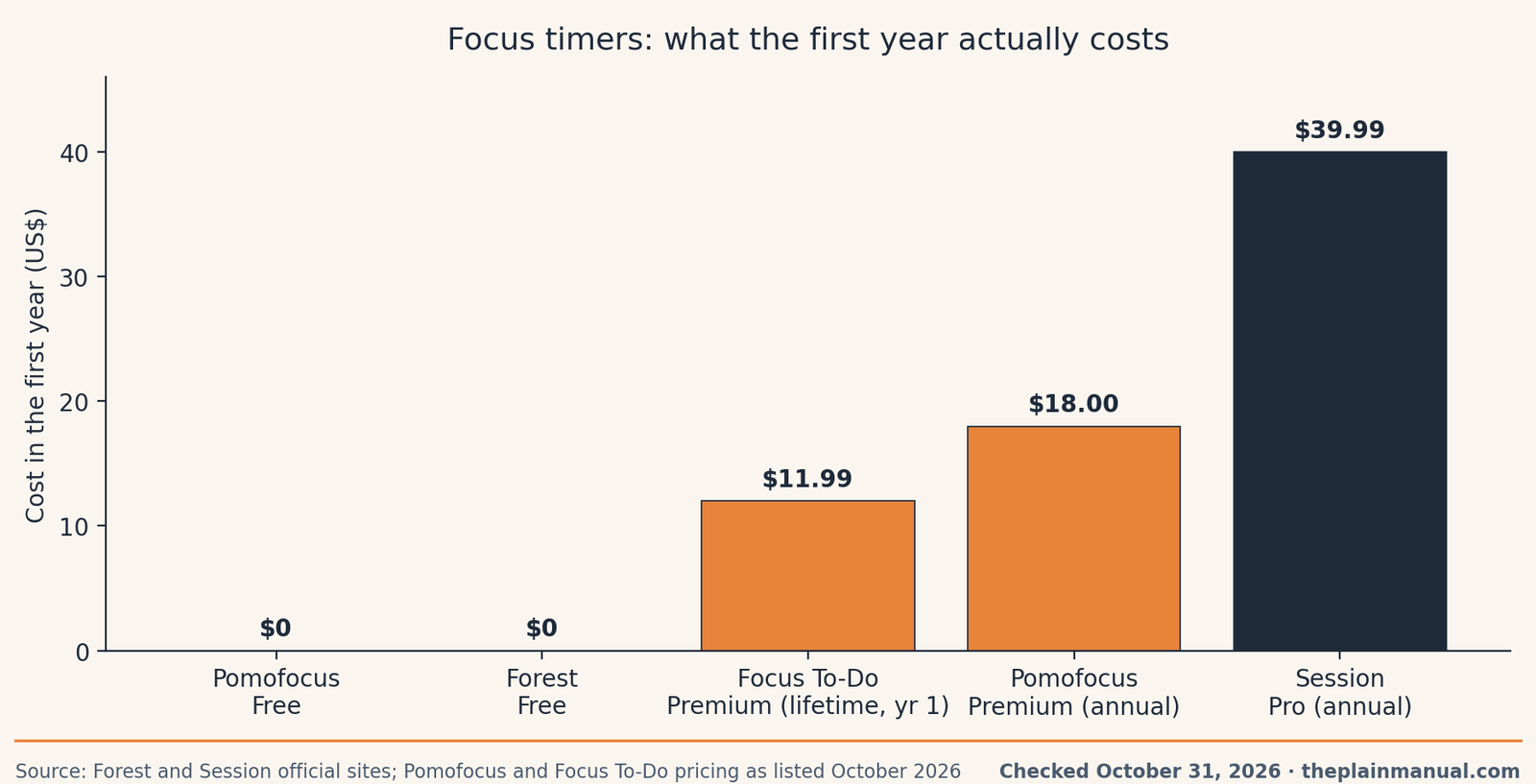
The price: read the chart as a warning about shape, not size. The amounts are small. The shape decides the value: a lifetime price ends, a subscription renews while you are busy forgetting it, and a free tier with one honest limit (3 templates, one soundscape, one guarded app) usually covers a normal reader's whole routine.
How to make any of these stick past week two
Reader accounts of abandoned timers repeat the same three endings, and each has a plain fix.
The bell keeps cutting your best work. A session that rings mid-sentence trains you to dread the bell. Fix: lengthen the session. Every pick above allows custom lengths, and 40 or 50 minutes suits writing, coding, and reading better than 25.
One missed day ends the habit. Streaks and forests motivate until they reset, and then the reset becomes the reason to quit. Fix: judge the week, not the day. Four focused sessions in a week is a working system even with a lost Tuesday in the middle.
Starting is the hard part. A timer assumes you begin when it begins. Fix: name the first tiny action before you press start ("open the document and fix the heading"), and let the session carry you from there.
FAQ
What is the best free focus timer?
Pomofocus, for most people. Its free tier covers custom session lengths, a task list, templates, and basic reports with no account. Your phone's built-in timer is the close second and the simplest option of all.
Is 25 minutes the right session length?
It is a starting point from the original method, not a rule about your brain. Every app here allows custom lengths. Pick a length you can finish on a tired day, and grow it once finishing feels normal.
Is Forest still a one-time purchase?
No. Forest's official site says the old Pro one-time purchase is no longer available to new users, and earlier buyers keep Pro permanently. New users choose between the free tier and the Plus subscription, priced in their app store.
Which focus timer blocks my phone?
Forest blocks apps during a session on its free tier, which is unusual. Session's Pro tier blocks apps and websites on Apple devices. Pomofocus and a built-in timer block nothing, so pair them with your phone's Focus mode.
Should I pay for a focus timer at all?
Only for a named extra you already miss: blocking, a task list inside the timer, or records you will review. Run a free tier for two weeks first. A paid tier bought to create motivation usually rents motivation for about a week.
Run your own numbers: a focus timer is a subscription like any other, and small renewals add up quietly. Our free Subscription Cost Calculator on the Tools page shows what $18 or $39.99 a year becomes over five years, next to everything else you renew.
Method: Research review (no hands-on testing). Cross-checked against Forest's official site and plan comparison, Session's official pricing page, Pomofocus pricing as reported from pomofocus.io in October 2026, Focus To-Do's US App Store listings, and reader accounts of timer abandonment. Checked October 31, 2026.
Corrections: Spotted an error? Tell us, we fix mistakes publicly and date them.
Prices: US list prices; verify before buying.
Source: Forest's official site and plan comparison